// SOMETHING IS EATING THE PC
Antimalware Service Executable slowing your PC?
Task Manager shows Antimalware Service Executable near the top, the fan is roaring and everything is slow. It’s not a virus: it’s Microsoft Defender, Windows’ own antivirus, doing a scan. Usually it settles by itself. When it doesn’t, there’s a reason, and switching your antivirus off isn’t the fix. Rated 4.9 on Google.
- ● Not a virus
- ● Why it gets busy
- ● Fixes that keep you safe
/01 — WHAT IT IS
What Antimalware Service Executable is, and why it gets busy
It’s the engine of Microsoft Defender Antivirus; its file is called MsMpEng.exe. It checks each file as it’s opened, downloaded or copied, and scans the whole PC from time to time. Both use the processor and the drive.
It gets busy for good reasons: a scan (Windows runs them when it thinks you’re not using the PC, which on a PC that’s only switched on when you need it, means while you are), after a Windows update or a new set of virus definitions, and when you copy or unzip lots of files.
Is it really Defender? In Task Manager, right-click it and choose Open file location. The real one is in a folder under C:\ProgramData\Microsoft\Windows Defender\Platform (or C:\Program Files\Windows Defender on older PCs). Anywhere else: ring us.
// FIX IT WITH ME · STEP BY STEP
Calm it down, step by step
The steps from this guide, one at a time, in the order that fixes the most cases fastest. Tell it what happened and it shows the next step. Nothing here leaves your device.Last reviewed 28 October 2026
-
01Let the scan finish
Open Windows Security, Virus & threat protection, and leave the PC on and plugged in until any scan finishes.
Has it settled down? -
02Keep one antivirus
If another antivirus is installed alongside Defender, uninstall one of them in Settings, Apps, and restart.
Has it settled down? -
03Install updates
Install every Windows and Defender update, then restart.
Has it settled down? -
04Lower the scan share
In Terminal (Admin), type Set-MpPreference -ScanAvgCPULoadFactor 30.
Has it settled down? -
05Check the drive
If the disk shows 100 per cent in Task Manager, an old hard drive is the bottleneck: an SSD fixes it.
Has it settled down?
Rather have it done for you? Remote help from £20, or in person across Bournemouth, Christchurch, Poole, Ringwood and the New Forest, with no call-out fee.
Sorted{mins}. Nice work.
Leave the PC on and plugged in for an hour once a week, so scans run while you are away.
Still busy all day? That is a remote job.
With your permission we connect to your screen and sort it in one session. Usually the same day, remote help from £20, and no fix, no fee.
Antimalware Service Executable slowing your PC? - the fix order (365techies.co.uk/antimalware-service-executable-high-cpu/) 1. Let the scan finish: Open Windows Security, Virus & threat protection, and leave the PC on and plugged in until any scan finishes. 2. Keep one antivirus: If another antivirus is installed alongside Defender, uninstall one of them in Settings, Apps, and restart. 3. Install updates: Install every Windows and Defender update, then restart. 4. Lower the scan share: In Terminal (Admin), type Set-MpPreference -ScanAvgCPULoadFactor 30. 5. Check the drive: If the disk shows 100 per cent in Task Manager, an old hard drive is the bottleneck: an SSD fixes it. Still stuck? 365 Techies fix it remotely: 01202 775566 - https://365techies.co.uk/remote-support/At a glance
| What it is | MsMpEng.exe: Microsoft Defender, the antivirus built into Windows. |
|---|---|
| Busy for 10 to 30 minutes | A scan, often after an update or first thing in the morning. Let it finish. |
| Busy all day, every day | Two security programs, a huge folder it keeps rescanning, or a slow hard drive. |
| Lower its share | PowerShell (Admin): Set-MpPreference -ScanAvgCPULoadFactor 30. |
| Don’t switch it off | Registry tricks are blocked by tamper protection and leave the PC unprotected. |
| Old hard drive? | Disk at 100 per cent is usually the drive, not Defender. An SSD fixes it for good. |
// NEED THIS FIXED RIGHT NOW?
Skip the DIY — call 01202 775566 and we can be looking at your screen within minutes. You watch everything we do, and most problems on this page are fixed in one short remote session. (Mon–Fri, 9am–5pm.)
/02 — FIRST
First: let it finish
- Open Windows Security (Start, type Windows Security), then Virus & threat protection. If a scan is running, it shows here with its progress.
- Leave the PC on and plugged in for 30 minutes. A quick scan takes minutes; a full scan on a big drive can take an hour or more.
- Restart afterwards and check Task Manager again. If it’s quiet now, that was all it was.
Leaving the PC switched on for an hour once a week, plugged in and idle, gives Defender its chance to scan when you don’t need the PC.
/03 — BUSY ALL THE TIME
Busy all the time? The usual causes
- Two security programs. Norton, McAfee or another antivirus alongside Defender, or an old one that was never removed properly. Normally Windows puts Defender to rest when another is in charge; when that goes wrong, they fight. Keep one: uninstall the other in Settings, Apps, then restart.
- Something it keeps rescanning: a big folder that changes all the time, such as a game library, a backup drive or a folder of virtual machines. See the next section.
- A slow hard drive. If Task Manager shows the disk at 100 per cent, not the processor, the drive is the bottleneck: an old spinning hard drive struggles with any scan. Replacing it with an SSD fixes it for good: hard drive upgrade.
- Something was found. Check Protection history in Windows Security: a threat it keeps finding and removing can keep it busy.
- Windows itself is behind. Install every update, including Defender’s own, then restart.
/04 — FIXES THAT KEEP YOU SAFE
Make it lighter, without switching it off
- Lower how much of the processor a scan may use. Right-click Start, choose Terminal (Admin), say Yes, and type Set-MpPreference -ScanAvgCPULoadFactor 30. Scans then aim for about 30 per cent instead of 50, so they take longer but you notice them less. It doesn’t change the checking of each file as it’s opened.
- Leave a folder out, only if you trust everything in it. Windows Security, Virus & threat protection, Manage settings, Exclusions. A game library from Steam or a folder of your own work files, perhaps; never Downloads, the Desktop or a whole drive. Anything in an excluded folder isn’t checked at all.
What not to do: switch Defender off with a registry change or a “tweak” program. Tamper protection blocks most of them, the rest leave your PC with no antivirus at all, and the guides that suggest them are often older than Windows 11.
/05 — THE QUICK WAY
Let our free app check what’s protecting the PC
FREE · WINDOWS 10 & 11 · NO SIGN-UP
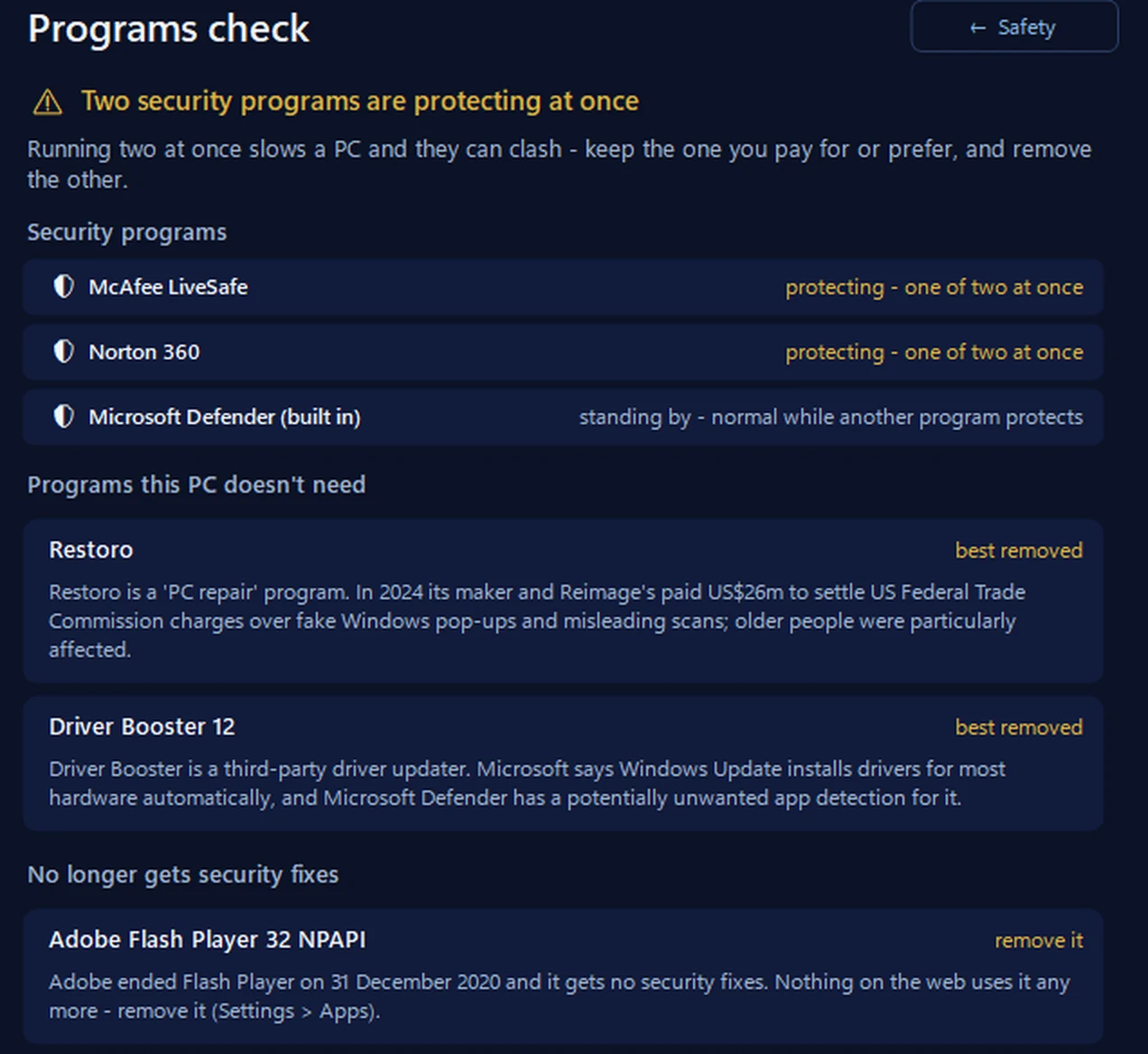
Programs check: is more than one antivirus running?
It reads Windows’ own register of security programs and says which one is protecting the PC, and warns when two are protecting at once — the usual reason Defender never settles — or when one is switched on but out of date, often a subscription that has ended. It also lists programs the PC doesn’t need, such as tune-up tools and driver updaters, each with the reason. It only reads: you remove things in Settings.
In the app: Safety, then Programs check.
Download 365 PC Manager free ↓What else it checks
Made by us, a family IT firm in Bournemouth since 1995, and digitally signed by 365 Techies Ltd.
/06 — WHEN TO CALL US
When to call us
Still not right? Ring 01202 775566 or text 07520 615332, Monday to Friday, 9 to 5. With your permission we connect to your Windows PC and sort it while you watch: usually the same day, remote help from £20, and no fix, no fee. We find what’s keeping Defender busy and sort it with one antivirus left on duty. For a slow PC in general, see speeding up a slow computer.
FAMILY-RUN SINCE 1995 · ★ 4.9 ON GOOGLE · 200+ COMPUTERS UNDER OUR CARE · NO FIX, NO FEE · SAME-DAY REMOTE SUPPORT
// GOOD QUESTIONS
Frequently asked
What is Antimalware Service Executable?
It’s Microsoft Defender Antivirus, the antivirus built into Windows. Its file is MsMpEng.exe. It checks files as they’re opened and scans the PC from time to time.
Is Antimalware Service Executable a virus?
No, not the real one. Right-click it in Task Manager and choose Open file location: it should be in a Windows Defender folder under ProgramData or Program Files.
Why is it using so much CPU?
Usually a scan, often after an update. If it’s busy all day, the usual causes are a second security program fighting it, a large folder it keeps rescanning, or a slow hard drive.
Can I disable Antimalware Service Executable?
Not safely. It’s your antivirus. If you install another antivirus, Windows rests Defender by itself. Lower its scan share instead, as on this page.
Why is my disk at 100 per cent?
On a PC with an old spinning hard drive, almost any scan or update fills the disk. Replacing it with an SSD is the fix that lasts.
Does Norton or McAfee replace Defender?
Yes, while it’s installed and up to date, Windows puts Defender in the background. If its subscription runs out, switch Defender back on or renew: don’t keep both running in full.
Can you fix it remotely?
Usually, yes: with your permission we connect to your Windows PC and find what’s keeping it busy while you watch.
// Still stuck?
Still slow after all that?
With your permission we connect to your Windows PC, find what’s keeping Defender busy and sort it, without leaving you unprotected. Call 01202 775566 or text 07520 615332.
We’ll fix it with you
- Checking the problem is free
- Fixes from £20, agreed before we start
- We phone first, and you watch every step
Stop it happening again
- A full service every six weeks, written up
- Every program kept up to date
- Unlimited remote help when you need it
Plans from £18.25 a month per computer · cancel any time
Mon–Fri 9–5 · family-run since 1995 · rated 4.9 on GoogleWhy it gets busy →