// BLUE SCREEN, OR BLACK?
Blue screen stop codes: what yours means
The PC stopped with “Your device ran into a problem and needs to restart” and a code in capitals. That code is the most useful clue you’ll get. Here’s what the common ones usually mean, how to find the code again after the restart, and what to try, in order. Rated 4.9 on Google.
- ● The common codes
- ● Find it after the restart
- ● Fixes in order
/01 — THE CODES
What the common stop codes usually mean
Each code says what Windows was doing when it had to stop, not always why. These are the ones we see most, with the number Windows records alongside (you’ll need it in step 2):
- CRITICAL_PROCESS_DIED (0xEF): a part of Windows it can’t run without stopped. Usually damaged Windows files, a failing drive, or a driver. Repair Windows’ files and check the drive.
- IRQL_NOT_LESS_OR_EQUAL (0xA): a driver tried to use memory it shouldn’t. Usually a driver, sometimes faulty memory. Update or roll back recent drivers.
- DPC_WATCHDOG_VIOLATION (0x133): a driver took too long to answer. Often the drive’s own driver or its firmware. Install the maker’s storage and chipset updates.
- MEMORY_MANAGEMENT (0x1A): Windows found its memory in a state it didn’t expect. Often faulty memory (RAM). Run Windows Memory Diagnostic.
- PAGE_FAULT_IN_NONPAGED_AREA (0x50): something asked for memory that wasn’t there. Faulty memory, a driver, or security software.
- SYSTEM_SERVICE_EXCEPTION (0x3B): a driver or a part of Windows went wrong. The file named on the screen (if there is one) points to the driver.
- KERNEL_SECURITY_CHECK_FAILURE (0x139): Windows found its own data damaged. Drivers, faulty memory or damaged Windows files.
- VIDEO_TDR_FAILURE (0x116): the graphics card stopped answering. Update the graphics driver from the maker; on a desktop, check the card isn’t overheating.
- WHEA_UNCORRECTABLE_ERROR (0x124): the hardware itself reported an error. Overheating, a failing part, or settings pushed beyond the maker’s (overclocking).
- UNEXPECTED_STORE_EXCEPTION (0x154): usually the drive, sometimes security software. Check the drive’s health first.
- INACCESSIBLE_BOOT_DEVICE (0x7B): Windows couldn’t reach its own drive while starting. A failing drive, a changed setting in the BIOS, or an update gone wrong.
Is the screen black, not blue? Windows 11 changed it in 2025: up-to-date PCs show the same message and code on a black screen. Everything on this page applies.
// FIX IT WITH ME · STEP BY STEP
Stop the blue screens, step by step
The steps from this guide, one at a time, in the order that fixes the most cases fastest. Tell it what happened and it shows the next step. Nothing here leaves your device.Last reviewed 28 October 2026
-
01Find the stop code
Note the code on the screen, or open View reliability history, click the red cross and View technical details: the BCCode is the code.
Has it stopped happening? -
02Back up your files
Copy your photos and documents somewhere safe in case the drive is failing.
Has it stopped happening? -
03Undo what changed
Uninstall a recent program, driver or update, or use System Restore to a day before.
Has it stopped happening? -
04Update drivers
Settings, Windows Update, Advanced options, Optional updates, and the PC maker’s own drivers.
Has it stopped happening? -
05Test the drive and memory
Check the drive’s health, and run Windows Memory Diagnostic.
Has it stopped happening? -
06Repair Windows files
In Terminal (Admin), run DISM /Online /Cleanup-Image /RestoreHealth, then sfc /scannow.
Has it stopped happening?
Rather have it done for you? Remote help from £20, or in person across Bournemouth, Christchurch, Poole, Ringwood and the New Forest, with no call-out fee.
Sorted{mins}. Nice work.
Give it a week, then look at Reliability Monitor again to be sure.
Still blue-screening? That is a job for the crash dump files.
With your permission we connect to your screen and sort it in one session. Usually the same day, remote help from £20, and no fix, no fee.
Blue screen stop codes: what yours means - the fix order (365techies.co.uk/blue-screen-stop-codes/) 1. Find the stop code: Note the code on the screen, or open View reliability history, click the red cross and View technical details: the BCCode is the code. 2. Back up your files: Copy your photos and documents somewhere safe in case the drive is failing. 3. Undo what changed: Uninstall a recent program, driver or update, or use System Restore to a day before. 4. Update drivers: Settings, Windows Update, Advanced options, Optional updates, and the PC maker’s own drivers. 5. Test the drive and memory: Check the drive’s health, and run Windows Memory Diagnostic. 6. Repair Windows files: In Terminal (Admin), run DISM /Online /Cleanup-Image /RestoreHealth, then sfc /scannow. Still stuck? 365 Techies fix it remotely: 01202 775566 - https://365techies.co.uk/remote-support/At a glance
| Once, then never again | Not worth worrying about. Note the code in case it comes back. |
|---|---|
| Missed the code? | Reliability Monitor and Event Viewer keep it after the restart. |
| Driver codes | IRQL_NOT_LESS_OR_EQUAL, SYSTEM_SERVICE_EXCEPTION, DPC_WATCHDOG_VIOLATION: update or roll back drivers. |
| Memory codes | MEMORY_MANAGEMENT, PAGE_FAULT_IN_NONPAGED_AREA: run Windows Memory Diagnostic. |
| Windows or drive codes | CRITICAL_PROCESS_DIED, UNEXPECTED_STORE_EXCEPTION: repair Windows files and check the drive. |
| Back up first | Repeated blue screens can mean a drive on its way out. Copy your files today. |
// NEED THIS FIXED RIGHT NOW?
Skip the DIY — call 01202 775566 and we can be looking at your screen within minutes. You watch everything we do, and most problems on this page are fixed in one short remote session. (Mon–Fri, 9am–5pm.)
/02 — FIND THE CODE AGAIN
Missed the code? Windows wrote it down
- Click Start, type reliability and open View reliability history.
- Click the day with a red cross, then the line that says Windows and Shut down unexpectedly (or Windows stopped working), and choose View technical details.
- The code is next to BCCode, as a number: ef is 0xEF (CRITICAL_PROCESS_DIED), 1a is 0x1A, and so on. Match it to the list above.
Event Viewer has it too: Windows Logs, System, an event from BugCheck (ID 1001). More on reading the record in Reliability Monitor.
/03 — WHAT TO TRY, IN ORDER
What to try, in order
- Back up your files to a USB drive or OneDrive. If the drive is the cause, it may not last.
- Undo what changed. Started after an update, a new program, a new device or a driver? Uninstall it, or use System Restore to a day before.
- Get the updates. Settings, Windows Update, then Advanced options, Optional updates for drivers. For graphics, storage and chipset drivers, the PC or part maker’s own site is usually newer.
- Check the drive: how to check your drive’s health.
- Test the memory: Start, type Windows Memory Diagnostic, choose Restart now and check for problems. Any error reported means faulty memory.
- Repair Windows’ files: in Terminal (Admin), DISM /Online /Cleanup-Image /RestoreHealth, then sfc /scannow. Step by step in Windows Update stuck.
- Check it isn’t overheating: a laptop on a bed or a dusty desktop can stop with hardware codes. See laptop overheating.
/04 — IT WON’T START
When it blue-screens before Windows starts
After two or three failed starts Windows opens Automatic Repair. Choose Advanced options, then:
- Troubleshoot, Advanced options, Uninstall Updates, if it started after an update.
- System Restore, if there’s a restore point from before.
- Startup Settings, Restart, then 4 for Safe Mode, which starts Windows with only its own drivers. If it’s fine there, a driver or a program is the cause.
Stuck on the maker’s logo instead? See laptop stuck on the logo.
/05 — THE QUICK WAY
Let our free app read the crash record
FREE · WINDOWS 10 & 11 · NO SIGN-UP
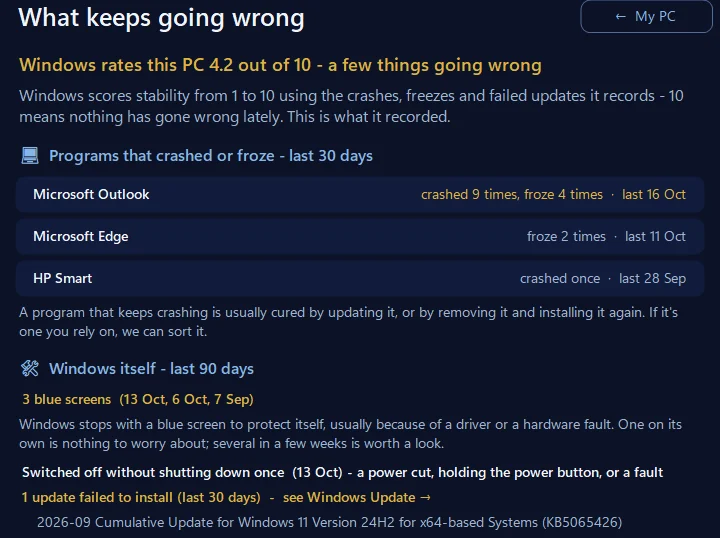
What keeps going wrong: every blue screen, in plain words
It reads the same record as Reliability Monitor and puts it in plain words: blue screens and unexpected shutdowns in the last 90 days, which programs crashed or froze in the last 30, updates that failed, and Windows’ own stability score. Fixed something? Start a fresh list counts from now, so you can see whether the blue screens come back. It never guesses at a cause, and a button opens Reliability Monitor for the stop code.
In the app: My PC, then What keeps going wrong.
Download 365 PC Manager free ↓What else it checks
Made by us, a family IT firm in Bournemouth since 1995, and digitally signed by 365 Techies Ltd.
/06 — WHEN TO CALL US
When to call us
Still not right? Ring 01202 775566 or text 07520 615332, Monday to Friday, 9 to 5. With your permission we connect to your Windows PC and sort it while you watch: usually the same day, remote help from £20, and no fix, no fee. We can read the dump files Windows saves at each blue screen, which name the driver involved. If it’s hardware, we collect the PC and test it on the bench: see computer repairs.
FAMILY-RUN SINCE 1995 · ★ 4.9 ON GOOGLE · 200+ COMPUTERS UNDER OUR CARE · NO FIX, NO FEE · SAME-DAY REMOTE SUPPORT
// GOOD QUESTIONS
Frequently asked
What causes a blue screen?
Usually a driver, faulty memory, a failing drive, damaged Windows files or overheating. The stop code narrows it down; the list on this page says what each common one usually means.
Is one blue screen something to worry about?
Not usually. A single one after an update or a new device often never comes back. Note the code; if it happens again, work through the steps.
What does CRITICAL_PROCESS_DIED mean?
A part of Windows that it can’t run without stopped unexpectedly. Damaged Windows files, a failing drive and drivers are the usual causes: repair Windows’ files with DISM and sfc /scannow, and check the drive’s health.
How do I find the stop code after the PC restarted?
Open View reliability history, click the day with the red cross, the Shut down unexpectedly line, then View technical details. The BCCode is the stop code as a number.
Why is my blue screen black?
Windows 11 changed it in 2025. Up-to-date PCs show the same message and stop code on a black background.
Can a virus cause a blue screen?
It can, but it’s much less common than drivers and hardware. Two security programs running at once are a more likely cause than a virus.
Will I lose my files?
Not from a blue screen itself. But a failing drive can cause them, so back up your files as soon as you can.
Can you fix it remotely?
Usually we can find the cause remotely by reading the crash record and dump files. If it’s a hardware fault, we collect the PC and repair it on the bench.
// Still stuck?
Still getting blue screens?
With your permission we connect to your Windows PC, read its crash record and dump files, and find what’s behind it. Call 01202 775566 or text 07520 615332.
We’ll fix it with you
- Checking the problem is free
- Fixes from £20, agreed before we start
- We phone first, and you watch every step
Stop it happening again
- A full service every six weeks, written up
- Every program kept up to date
- Unlimited remote help when you need it
Plans from £18.25 a month per computer · cancel any time
Mon–Fri 9–5 · family-run since 1995 · rated 4.9 on GoogleLook up your code →