// BLUETOOTH HEADPHONES SOUND MUFFLED
Bluetooth headphones sound muffled on your PC?
Your headphones sounded fine yesterday and now they sound flat, tinny or like an old phone line. They are almost never broken: Windows has switched them into phone-call mode because something wants their microphone. Here’s how to tell, and three ways to get proper sound back. Rated 4.9 on Google.
- ● Usually a two-minute fix
- ● Free sound check app
- ● Windows specialists since 1995
/01 — START HERE
Muffled Bluetooth headphones on a PC? Start here
If your Bluetooth headphones suddenly sound muffled, tinny, flat or like a phone call on your Windows PC, the cause is almost always the same: Windows has switched them out of their music mode and into their phone-call mode. It does that the moment any program opens the headphones’ microphone — a Teams or Zoom call, Discord, WhatsApp on the PC, a game’s voice chat, or a website that asked to use your microphone.
You can see it for yourself. Click the speaker icon by the clock, then the small arrow next to the volume slider (on Windows 10, click the name above the slider). If your headphones appear twice — once as Headphones and once as Headset or Hands-Free — and the Headset one is ticked, that is your muffled sound.
It happens on Windows 10 and Windows 11, with every make: AirPods, Sony, Bose, Jabra, cheap earbuds alike. The fixes below are free and take a couple of minutes.
// FIX IT WITH ME · STEP BY STEP
Get proper sound back, step by step
The steps from this guide, one at a time, in the order that fixes the most cases fastest. Tell it what happened and it shows the next step. Nothing here leaves your device.Last reviewed 8 October 2026
-
01Check which mode Windows is using
Click the speaker icon by the clock and the arrow next to the volume slider. If your headphones are listed twice and the Headset or Hands-Free one is ticked, Windows has put them in phone-call mode.
Do they sound right now? -
02Choose the Headphones output
Pick Headphones (your headphones’ name) instead, or choose it in Settings, System, Sound, under Output.
Do they sound right now? -
03Use a different microphone for calls
In Sound settings, under Input, choose the laptop’s own microphone or a USB microphone, and set the same in Teams, Zoom or Discord.
Do they sound right now? -
04Turn off Hands-free Telephony if it keeps switching
Press Windows key + R, paste shell:::{A8A91A66-3A7D-4424-8D24-04E180695C7A}, right-click the headphones, choose Properties, then Services, and untick Hands-free Telephony. The headset microphone then stops working on that PC.
Do they sound right now? -
05Pair them again and update the Bluetooth driver
Remove the headphones in Settings, Bluetooth & devices, pair them again, and get the latest Bluetooth driver from your PC maker or Windows Update’s optional updates.
Do they sound right now?
Rather have it done for you? Remote help from £20, or in person across Bournemouth, Christchurch, Poole, Ringwood and the New Forest, with no call-out fee.
Sorted{mins}. Nice work.
Play some music, then join a test call to be sure it stays right.
Still muffled after all five steps? That is a remote job.
With your permission we connect to your screen and sort it in one session. Usually the same day, remote help from £20, and no fix, no fee.
Bluetooth headphones sound muffled on your PC? - the fix order (365techies.co.uk/bluetooth-headphones-sound-muffled-on-pc/) 1. Check which mode Windows is using: Click the speaker icon by the clock and the arrow next to the volume slider. If your headphones are listed twice and the Headset or Hands-Free one is ticked, Windows has put them in phone-call mode. 2. Choose the Headphones output: Pick Headphones (your headphones’ name) instead, or choose it in Settings, System, Sound, under Output. 3. Use a different microphone for calls: In Sound settings, under Input, choose the laptop’s own microphone or a USB microphone, and set the same in Teams, Zoom or Discord. 4. Turn off Hands-free Telephony if it keeps switching: Press Windows key + R, paste shell:::{A8A91A66-3A7D-4424-8D24-04E180695C7A}, right-click the headphones, choose Properties, then Services, and untick Hands-free Telephony. The headset microphone then stops working on that PC. 5. Pair them again and update the Bluetooth driver: Remove the headphones in Settings, Bluetooth & devices, pair them again, and get the latest Bluetooth driver from your PC maker or Windows Update’s optional updates. Still stuck? 365 Techies fix it remotely: 01202 775566 - https://365techies.co.uk/remote-support/At a glance
| Most likely cause | Windows has switched them to phone-call (‘Hands-Free’) mode, because an app opened their microphone. |
|---|---|
| Are the headphones broken? | Almost never. The same headphones sound normal again the moment the microphone is let go. |
| Quickest fix | Choose the ‘Headphones’ output, not ‘Headset … Hands-Free’, and use the laptop’s own microphone for calls. |
| Stop it for good | Untick ‘Hands-free Telephony’ in the headphones’ Properties. The headset microphone then stops working on that PC; you can tick it again. |
| Newer kit | Windows 11 24H2 with a PC and headset that both support Bluetooth LE Audio keeps stereo sound during calls. |
| Free check | The Sound check in our free 365 PC Manager app names phone-call mode when it finds it. |
/02 — WHY IT HAPPENS
Why Windows makes them sound like a phone line
Ordinary Bluetooth headphones have two ways of talking to a computer. Stereo mode sends good-quality music one way only, with the microphone switched off. Phone-call mode (Windows calls it Hands-Free) carries your voice both ways, but squeezes the sound down to mono at a much lower quality — roughly what a landline gives you. The two can’t run at once on most headphones, so as soon as a program wants the microphone, Windows drops into phone-call mode and everything you hear goes muffled with it, music and game sound included.
The newer Bluetooth LE Audio standard fixes this: with Windows 11 version 24H2, a PC and headset that both support it keep stereo sound during calls. Most headphones and laptops in use today don’t, so the fixes below are still the way.
/03 — FIX 1
Pick the stereo output, and a different microphone
- Choose the Headphones output. Click the speaker icon by the clock, then the arrow next to the volume slider, and pick Headphones (your headphones’ name), not the one called Headset or Hands-Free. Or open Settings > System > Sound and choose it under Output.
- Give calls a different microphone. In the same Sound settings, under Input, choose the laptop’s own microphone (often called Microphone Array) or a USB microphone, so programs stop grabbing the headset’s.
- Tell your call program too. In Teams, Zoom or Discord, open its settings and set the speaker to your headphones and the microphone to the laptop or USB microphone. Programs remember their own choice and can ignore Windows’.
Play some music. If it sounds full again, you’re done: the headphones were never broken.
/04 — FIX 2
Keeps switching back? Turn off phone-call mode for good
If a program keeps flipping the headphones back into phone-call mode, you can switch that mode off for those headphones on this PC. The trade-off: their built-in microphone stops working on the PC (it still works with your phone), so use the laptop’s microphone for calls.
- Open the classic Devices and Printers window. Press Windows key + R, paste shell:::{A8A91A66-3A7D-4424-8D24-04E180695C7A} and press Enter.
- Open the headphones’ Properties. Right-click your headphones and choose Properties, then the Services tab.
- Untick Hands-free Telephony and press OK. Windows may take a few seconds to reconnect them.
Changed your mind? Tick it again the same way and the headset microphone comes back.
/05 — FIX 3
Still muffled with no microphone in use?
- Remove and pair them again. In Settings > Bluetooth & devices, remove the headphones, put them in pairing mode and add them again. That clears a muddled connection.
- Update the Bluetooth driver. Get it from your PC or laptop maker’s support page for your model, or from Windows Update > Advanced options > Optional updates.
- Turn off sound effects you didn’t ask for. In Sound settings, open the headphones and switch off Audio enhancements, then compare.
- Use a headset with its own USB dongle for calls. Headsets that come with a small USB receiver don’t use Bluetooth’s phone-call mode at all, so they keep good sound and a microphone together.
/06 — THE QUICK WAY
Let our free app check it for you
FREE · WINDOWS 10 & 11 · NO SIGN-UP
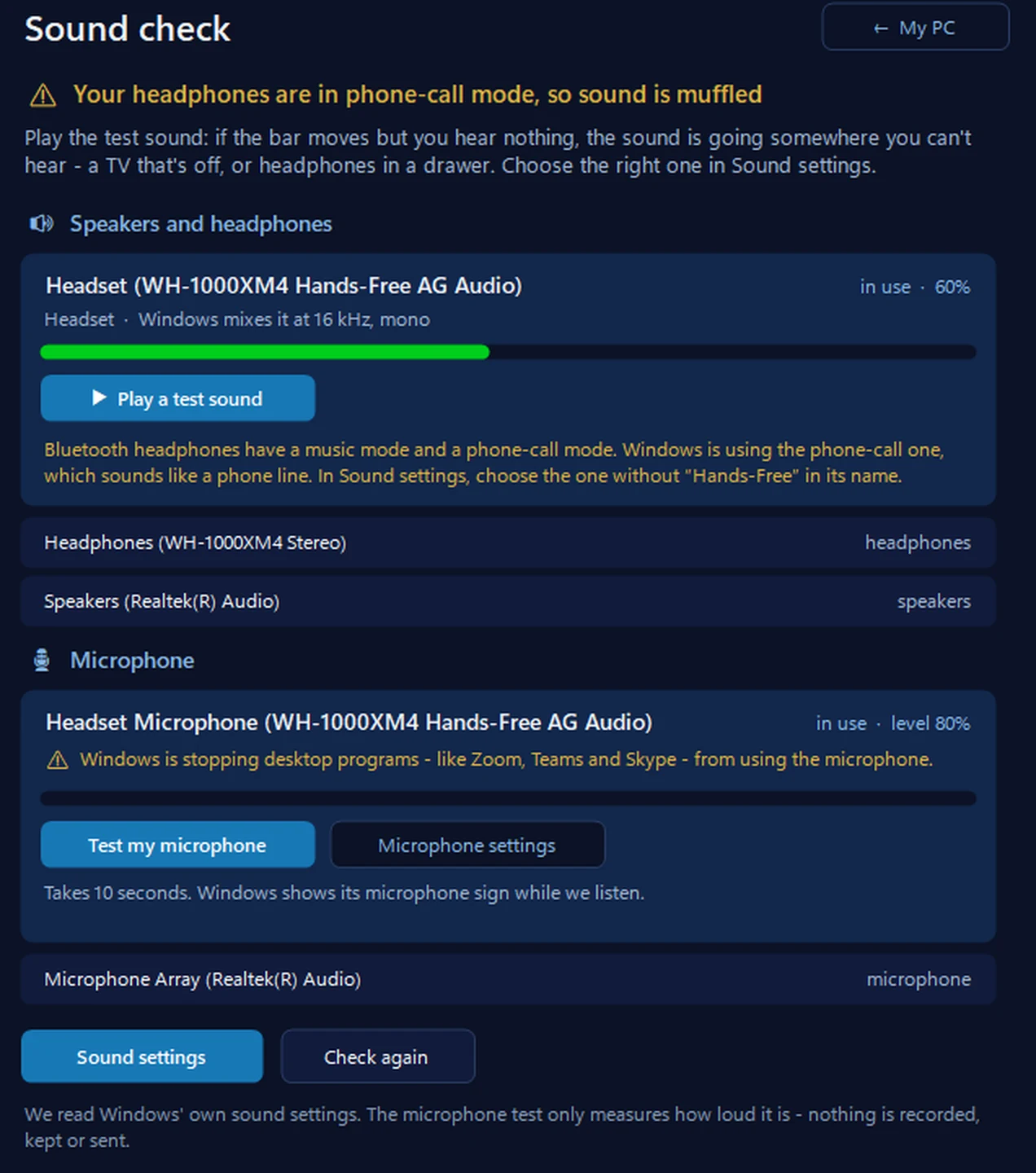
Sound check: what Windows is really doing with your sound
It shows where your sound is going — laptop speakers, headphones, a TV — whether it’s muted, the volume and a live level bar, with a test sound and a microphone test. If Bluetooth headphones are stuck in phone-call mode, it says so by name. It never changes anything itself: it opens Windows’ Sound settings so you choose.
In the app: My PC, then Sound check.
Download 365 PC Manager free ↓What else it checks
Made by us, a family IT firm in Bournemouth since 1995, and digitally signed by 365 Techies Ltd.
/07 — WHEN TO CALL US
When to call us
If the sound is still muffled after all three fixes, or the headphones keep dropping out, it’s worth a proper look. Ring 01202 775566 or text 07520 615332, Monday to Friday, 9 to 5. With your permission we connect to your Windows PC and sort it while you watch: usually the same day, remote help from £20, and no fix, no fee.
It may also be the PC’s own Bluetooth: older laptops and cheap plug-in Bluetooth adapters can struggle, and a modern adapter costs little. We’ll tell you honestly which it is.
FAMILY-RUN SINCE 1995 · ★ 4.9 ON GOOGLE · 200+ COMPUTERS UNDER OUR CARE · NO FIX, NO FEE · SAME-DAY REMOTE SUPPORT
// GOOD QUESTIONS
Frequently asked
Why do my headphones sound fine until I join a Teams or Zoom call?
Because the call opens the headphones’ microphone, and on most Bluetooth headphones Windows can only use the microphone in phone-call mode, which is mono and much lower quality. Set the call program’s microphone to the laptop’s own, and the headphones stay in stereo.
Why do my Bluetooth headphones sound muffled in games?
Usually a voice chat — Discord, or the game’s own — has opened the headset microphone, so Windows switched to phone-call mode for everything, game sound included. Point the chat at another microphone, or untick Hands-free Telephony as in fix 2.
Will unticking Hands-free Telephony break anything?
Only the headphones’ own microphone on this PC: it stops working there. Sound to the headphones gets better, and they still work normally with your phone. Tick it again any time to undo it.
Are my headphones faulty?
Almost certainly not, if they sound fine on your phone or sound normal again once the call ends. That is phone-call mode, not a fault.
Does it happen with AirPods?
Yes. On a Windows PC, AirPods use the same two modes as any Bluetooth headphones, so they go muffled whenever a program uses their microphone.
Can I have good sound and the headset microphone at the same time?
With ordinary Bluetooth headphones, no — that is a limit of how they connect. A headset with its own USB dongle can, and so can a PC and headset that both support Bluetooth LE Audio on Windows 11 24H2.
Does this work on Windows 10?
Yes. The cause and the fixes are the same; only the Settings screens look a little different.
Can you fix it remotely?
Yes. With your permission we connect to your Windows PC, set the right sound devices and test them with you, usually the same day. Remote help is from £20 and no fix, no fee. Ring 01202 775566.
// Still stuck?
Still muffled? We’ll sort it.
We connect to your Windows PC and get proper sound back while you watch, usually the same day. No fix, no fee. Call 01202 775566 or text 07520 615332.
We’ll fix it with you
- Checking the problem is free
- Fixes from £20, agreed before we start
- We phone first, and you watch every step
Stop it happening again
- A full service every six weeks, written up
- Every program kept up to date
- Unlimited remote help when you need it
Plans from £18.25 a month per computer · cancel any time
Mon–Fri 9–5 · family-run since 1995 · rated 4.9 on GoogleSee remote support →