// CHROME SAYS IT’S MANAGED
Chrome says “managed by your organization” on your home PC?
You have never worked for an organisation, yet Chrome’s menu says it is managed by one — and perhaps your search engine keeps switching to one you never chose. On a personal PC that is usually a policy set by an unwanted program, not your employer. Here’s how to see what has been set, and how to get Chrome back to normal. Rated 4.9 on Google.
- ● Find out what was set
- ● Free browser safety check app
- ● Adware and scam specialists
/01 — START HERE
What “managed by your organization” actually means
Google describes a managed browser as one “set up and maintained by a school, company or other group”, where an administrator can set up or restrict features, install extensions and monitor activity (Google Chrome Help). On a work or school computer that is perfectly normal.
On your own PC, it means something has written a policy for Chrome into Windows. Companies use policies so staff can’t change settings; unwanted programs use exactly the same trick, because a policy cannot be undone from inside the browser. That’s why the search engine “keeps changing back”.
(UK versions of Chrome spell it “organisation”. It is the same message, and the same fix.)
// FIX IT WITH ME · STEP BY STEP
Get Chrome back to normal, step by step
The steps from this guide, one at a time, in the order that fixes the most cases fastest. Tell it what happened and it shows the next step. Nothing here leaves your device.Last reviewed 11 October 2026
-
01See what was set
Type chrome://management, then chrome://policy, into the address bar to see which settings have been forced.
Has the managed message gone? -
02Uninstall unknown programs
Open Settings, Apps, Installed apps, sort by date installed, and uninstall programs you don’t recognise.
Has the managed message gone? -
03Remove unknown extensions
At chrome://extensions, remove extensions you don’t recognise.
Has the managed message gone? -
04Run a scan
Run a full scan in Windows Security, then a second opinion from a scanner that looks for adware.
Has the managed message gone? -
05Reset Chrome and check again
In Chrome’s Settings, choose Reset settings, then Restore settings to their original defaults, and check chrome://policy again.
Has the managed message gone?
Rather have it done for you? Remote help from £20, or in person across Bournemouth, Christchurch, Poole, Ringwood and the New Forest, with no call-out fee.
Sorted{mins}. Nice work.
Press Reload policies on chrome://policy after each step.
Still says managed? That is a remote job.
With your permission we connect to your screen and sort it in one session. Usually the same day, remote help from £20, and no fix, no fee.
Chrome says “managed by your organization” on your home PC? - the fix order (365techies.co.uk/chrome-managed-by-your-organization/) 1. See what was set: Type chrome://management, then chrome://policy, into the address bar to see which settings have been forced. 2. Uninstall unknown programs: Open Settings, Apps, Installed apps, sort by date installed, and uninstall programs you don’t recognise. 3. Remove unknown extensions: At chrome://extensions, remove extensions you don’t recognise. 4. Run a scan: Run a full scan in Windows Security, then a second opinion from a scanner that looks for adware. 5. Reset Chrome and check again: In Chrome’s Settings, choose Reset settings, then Restore settings to their original defaults, and check chrome://policy again. Still stuck? 365 Techies fix it remotely: 01202 775566 - https://365techies.co.uk/remote-support/At a glance
| What it means | A policy has been set on Chrome. Google says a managed browser is one set up and maintained by a school, company or other group. |
|---|---|
| See what was set | Type chrome://management, then chrome://policy, into the address bar. |
| On a home PC | Usually an unwanted program — a search toolbar, PDF converter or coupon add-on — using the same settings companies use, so you can’t change them back. |
| Fix | Uninstall unknown programs, remove unknown extensions, run a scan, then reset Chrome’s settings. |
| Work or school computer? | Then it is normal. Leave it to your IT department. |
| Free check | Browser safety in our free 365 PC Manager app shows every add-on and any policy forcing settings on Chrome, Edge and Firefox. |
/02 — SEE WHAT WAS SET
See exactly what has been set
- Type chrome://management into Chrome’s address bar and press Enter. It says whether the browser or your profile is managed.
- Type chrome://policy and press Enter. Each line is one setting that has been forced.
- Read the names. ExtensionInstallForcelist means extensions are forced in. DefaultSearchProvider settings lock your search engine. HomepageLocation or RestoreOnStartupURLs lock the pages Chrome opens with.
- Check the account you’re signed in with, as Google suggests: a personal account ends in @gmail.com; a company or school one uses its own name.
Microsoft Edge has the same system: edge://policy shows its policies, and it may say “Your browser is managed by your organization” for the same reason.
/03 — THE FIX
Get Chrome back to normal, in order
- Uninstall programs you don’t recognise. Settings, then Apps, then Installed apps; sort by date installed. PDF converters, “search” tools, coupon and shopping helpers and free download managers are the usual culprits.
- Remove extensions you don’t recognise at chrome://extensions. One marked “installed by your administrator” can’t be removed until the policy behind it is gone.
- Run a scan: a full scan in Windows Security, then a second opinion from a scanner that looks for adware, such as Malwarebytes.
- Reset Chrome: Settings, then Reset settings, then Restore settings to their original defaults. Google lists this step too.
- Check chrome://policy again and press Reload policies. If it is now empty, you are done.
Still listed, with the program gone? The policies were left behind in Windows’ registry, under SOFTWARE\Policies\Google\Chrome (for Edge, SOFTWARE\Policies\Microsoft\Edge). Removing them is the fix, but editing the registry wrongly can stop Windows working properly, so only do it on your own PC, back up the registry first, or ask us to do it.
/04 — NOT ALWAYS ADWARE
When a policy is there for a good reason
Some genuine software sets browser policies too: parental controls, some security programs, and software left over from an old work laptop or a past employer’s set-up. If a policy names a program you trust and use, leave it. The ones to remove are those you can’t explain, especially anything that changes your search engine or forces in an extension.
/05 — THE QUICK WAY
Let our free app check it for you
FREE · WINDOWS 10 & 11 · NO SIGN-UP
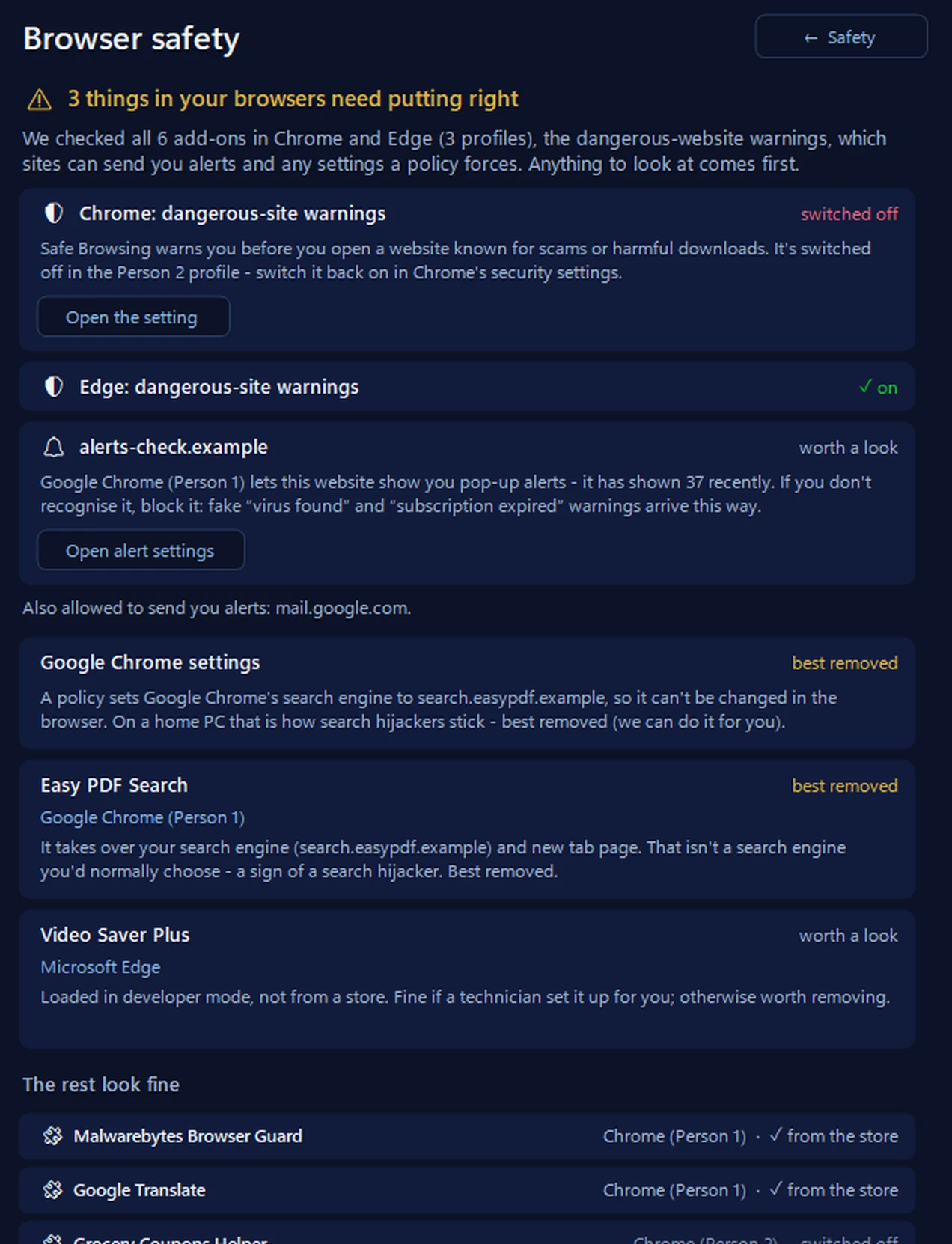
Browser safety: what has been forced on your browsers
It reads every add-on in Chrome, Edge, Brave and Firefox, and the policies Windows holds for them, and says in plain words what is worth a look: an add-on a policy forces in, a policy that locks the search engine or home page, an add-on put there by another program, and anything the browser itself has flagged. It changes nothing on its own — you remove things in the browser, or we can do it for you.
In the app: Safety, then Browser safety.
Download 365 PC Manager free ↓What else it checks
Made by us, a family IT firm in Bournemouth since 1995, and digitally signed by 365 Techies Ltd.
/06 — WHEN TO CALL US
When to call us
If Chrome still says it is managed after these steps, or the search engine keeps switching back, the program behind it is still there or its policies were left in the registry. Ring 01202 775566 or text 07520 615332, Monday to Friday, 9 to 5. With your permission we connect to your Windows PC and sort it while you watch: usually the same day, remote help from £20, and no fix, no fee.
FAMILY-RUN SINCE 1995 · ★ 4.9 ON GOOGLE · 200+ COMPUTERS UNDER OUR CARE · NO FIX, NO FEE · SAME-DAY REMOTE SUPPORT
// GOOD QUESTIONS
Frequently asked
Does managed by your organization mean someone is watching me?
Not necessarily. It means policies have been set. On a home PC they are usually an unwanted program’s settings, such as a forced search engine or extension, rather than monitoring. chrome://policy shows exactly what has been set.
Why can’t I remove an extension?
If it says it was installed by your administrator, a policy is forcing it in. Remove the program that set the policy, or the policy itself, and then the extension can go.
Will resetting Chrome remove it?
Resetting puts Chrome’s own settings back to normal and switches extensions off, but a policy written into Windows survives a reset. Remove the program first, then check chrome://policy.
It’s a work laptop. Should I remove it?
No. On a work or school computer, management is normal and expected. Leave it to your IT department.
Edge says my browser is managed too. Is that the same?
Yes. Edge uses the same policy system; edge://policy shows what has been set, and the same fix applies.
// Still stuck?
Still says managed?
We remove the program and the policies it left behind and get your browser back to normal, while you watch. No fix, no fee. Call 01202 775566 or text 07520 615332.
We’ll fix it with you
- Checking the problem is free
- Fixes from £20, agreed before we start
- We phone first, and you watch every step
Stop it happening again
- A full service every six weeks, written up
- Every program kept up to date
- Unlimited remote help when you need it
Plans from £18.25 a month per computer · cancel any time
Mon–Fri 9–5 · family-run since 1995 · rated 4.9 on GoogleSee remote support →