What’s inside this machine?
One click, zero downloads: your operating system, graphics card, cores, screen, memory, battery and network — read live in your browser, never sent to us, with a plain-English verdict on what needs attention and a spec sheet you can save.
★ Rated 4.9 on GoogleFamily-run since 1995No fix, no fee
Scanning your computer… live
- 01Scanwhat is inside
- 02Benchmarkhow fast it really is
- 03Sharescore card & spec sheet
Warming up the scanner…
Browsers deliberately hide some detail — exact RAM sticks, serial numbers, temperatures and fan speeds are invisible to websites, and that’s good privacy design. Where a reading is rounded or approximate we say so. For an engineer-grade inspection (the full HWiNFO-style readout), that’s exactly what happens on a service or health check.
// THE NEXT STEP · KEEP IT FAST, KEEP IT SAFE
Your scan is a snapshot. Here’s how to keep it fast and safe
A browser only sees the outside of a computer. What slows it down and what lets criminals in sits on the inside: a program that missed its updates, a backup that quietly stopped, a drive on its way out.
// WHY UPDATES MATTER MORE IN THE AI ERA
The UK’s National Cyber Security Centre says that by 2027 AI tools will almost certainly help attackers exploit known weaknesses, increasing the volume of attacks against systems that have not been updated with security fixes
.
NCSC, Impact of AI on cyber threat from now to 2027, May 2025
- A program that missed its updatesNot just Windows: the browser, the PDF reader, the printer software. AI makes the one you missed quicker to find. Closed by: every program updated, every six weeks.
- A message that looks genuineScam emails and texts written with AI no longer give themselves away with clumsy spelling. Closed by: someone to check with before you click. Try the Spot the Scam quiz
- A backup that quietly stoppedWhen ransomware or a dead drive strikes, a working backup is the difference between a bad afternoon and losing everything. Closed by: a backup that is checked, not assumed.
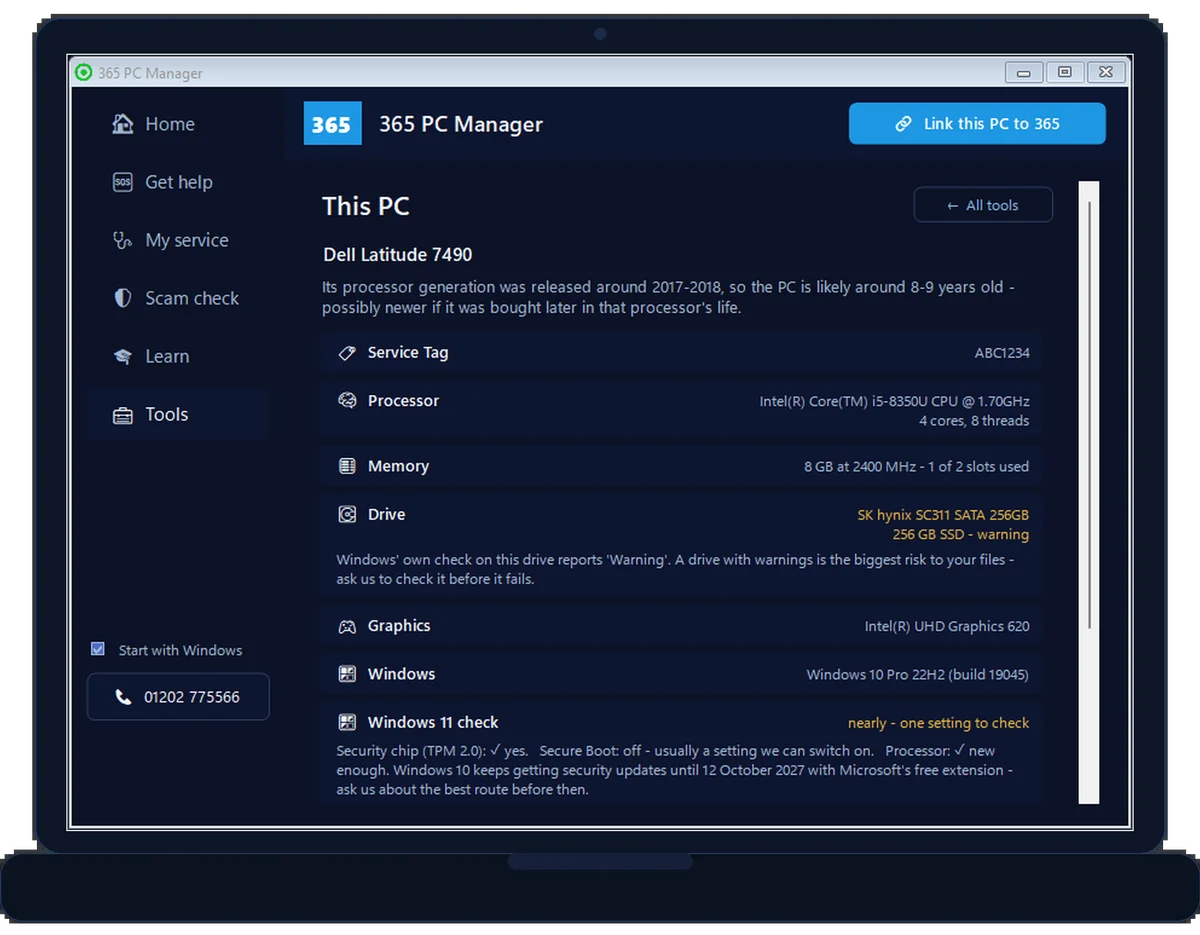
FREE · WINDOWS · A REAL SCREEN, EXAMPLE LAPTOP
See all of this PC with 365 PC Manager
- The full spec from Windows itself: the exact processor, memory and free slots, every drive and graphics card
- A straight answer on Windows 11: the security chip, Secure Boot and the processor
- Drive health and free space, before a failing drive takes your files with it
- Battery wear: how much of its original capacity is left
- Whether antivirus is on, and whether a backup actually exists
- A free full health check, with a report on your Desktop
Digitally signed by 365 Techies Ltd. No fake errors, no scare tactics, uninstall any time. It shows you where you stand; it isn’t an antivirus.
SUPPORT PLAN · WE DO IT FOR YOU
Kept up to date and checked, every six weeks
- Every program on it updated, not just Windows and Microsoft 365
- Antivirus, firewall, drive encryption and backup checked and written down in a dated report you can show a bank or insurer
- Unlimited remote support, so you can check with us before you click on anything that looks odd
- The full 365 service in the app: run it yourself whenever you like, or we run it for you
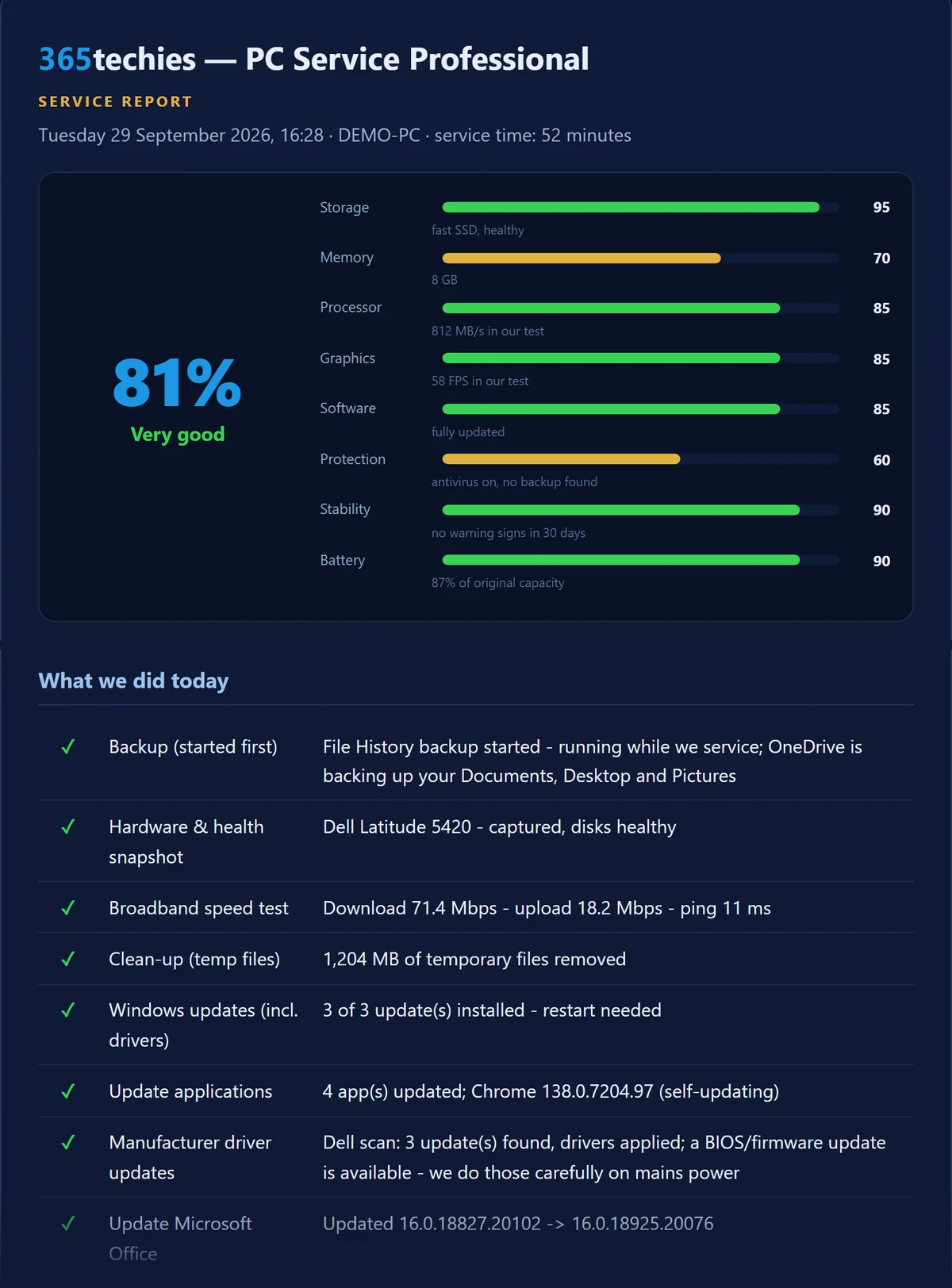
£18.25 a month per computer at home · business from £24.38. Rolling monthly, no lock-in.
Something wrong right now and not on a plan? We check the fault free, then quote before we fix: 01202 775566, Monday to Friday 9 to 5.
Reading by reading: what this page sees, and what the free app sees
| Feature | This page (your browser) | 365 PC Manager (free app) |
|---|---|---|
| Memory | A rounded figure that stops at 32 GB (8 GB in older browsers) | The exact amount fitted, and how much is in use right now |
| Processor | How many threads it has | Live processor and memory load, as graphs |
| Storage | Only the space websites are allowed to use | Every drive and its free space, your biggest files, and each drive’s own SMART health |
| Battery | Charge level and whether it is plugged in | Battery health — how much of its original capacity is left |
| Protection & backup | Nothing — a browser cannot see them | Whether antivirus is on, and whether a backup actually exists |
| Windows | The version family | The edition, whether the monthly updates are arriving, and whether a restart is waiting |
| Programs | Nothing — a browser cannot see them | Two security programs fighting, and tune-up tools or driver updaters a home PC doesn’t need |
| Network | Nothing — a browser cannot see it | The firewall, anything your router has opened to this PC, Remote Desktop and old SMB1 file sharing |
| Broadband | An estimate from the connection type | A real measured speed test, kept so you can compare later |
// FREE FOREVER · DIGITALLY SIGNED BY 365 TECHIES LTD · MADE IN DORSET · UNINSTALL ANY TIME
// FREE PC BENCHMARK
How fast is your computer, really?
Six real tests — processor (single & all cores), encryption, memory, graphics and storage — run live in your browser with a clear score, honest advice and a share card. No downloads, no sign-up.
Takes about 20 seconds and will make your computer work hard (the fan may spin up briefly) — that’s normal, and it does no harm. Close other heavy programs, and plug laptops in, for the fairest score.
Warming up…
365 Benchmark Score
FREE APP · WINDOWS 10 & 11 · NO SIGN-UP
See inside it, free
A browser can only time your computer. Our free Windows app, 365 PC Manager, checks the rest.
Made by us, a family IT firm in Bournemouth since 1995, and digitally signed by 365 Techies Ltd. No fake errors, no scare tactics.
Where you land (indicative bands · ◆ measured by us)
& hard drive Typical office
PC (~2017) Modern
mid-range High-end
desktop
Against everyone tested here
An indicative browser benchmark — real-world speed also depends on startup programs, disk health, updates and malware. Scores are our own 0–100 scale and aren’t comparable with native benchmark suites.
// THE QUESTION BEHIND MOST SPEC CHECKS
Can this PC run Windows 11?
A browser cannot read the two things that decide it, so this page will not pretend to. Here is what Microsoft requires, and where Windows itself tells you.
The minimums
A compatible 64-bit processor — roughly Intel 8th generation or AMD Ryzen 2000 onwards — 4 GB of memory, 64 GB of storage, a DirectX 12 graphics chip and a 720p screen.
The two deciders
TPM 2.0 and Secure Boot. Both live in the firmware, not the browser. On Windows 10: Settings → Update & Security → Windows Security → Device security lists them as Security processor and Secure boot. On Windows 11, Windows Security is under Privacy & security instead.
Still on Windows 10?
Free security updates ended in October 2025. Whatever the check says there is a route: an upgrade if it passes, a refurbished business machine if it does not, or Extended Security Updates while you decide — the three below, or the full Windows 10 page.
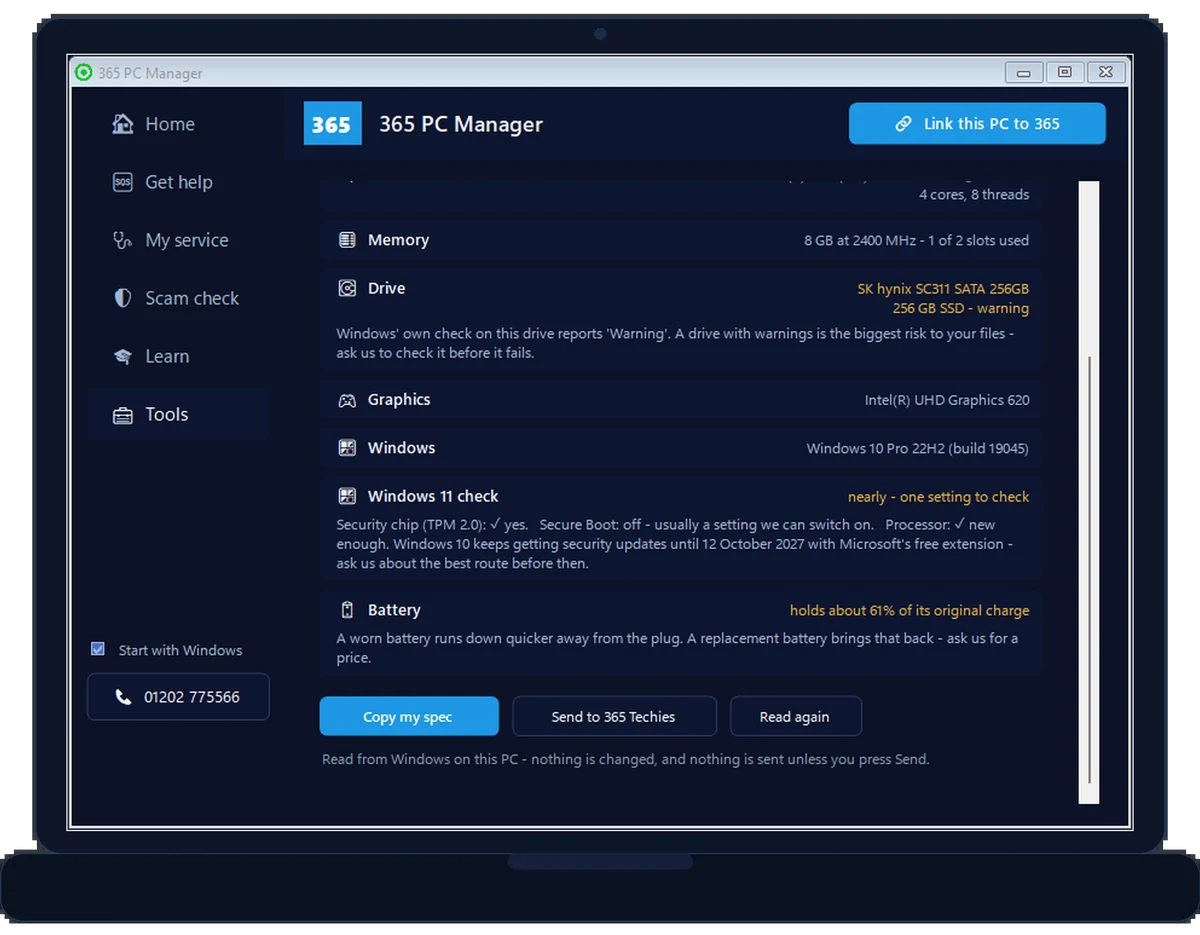
// FIND OUT FOR CERTAIN · FREE · WINDOWS
Get a straight answer in a minute
The free 365 PC Manager reads the security chip, Secure Boot and the processor from Windows itself, and tells you in plain words whether this PC can move to Windows 11 — and what to do if one setting is in the way.
// WHATEVER THE ANSWER, THERE IS A ROUTE
LIKELY YOUR ROUTE
// IF IT CAN
We upgrade it properly
A free compatibility check (TPM 2.0 and all), a full backup first, then the move from Windows 10 to 11 with your files, apps and settings intact. Remote or at your desk, across Dorset.
LIKELY YOUR ROUTE
// IF IT CANNOT
A refurbished business Dell, ready to go
Ex-business Latitude laptops from £510 and OptiPlex desktops from £545: Windows 11 set up, a new 1TB Samsung 990 PRO drive, your data moved across and a 12-month guarantee (5 years on a support plan), all included. We bring it to you to see first.
LIKELY YOUR ROUTE
// NOT READY TO CHANGE
Stay safe on Windows 10 for now
Microsoft’s Extended Security Updates keep Windows 10 patched until 12 October 2027, free when you back up your PC settings with a Microsoft account. We enrol it for you if the button will not appear.
Not sure which? Call 01202 775566 and we work it out with you.
// WHAT TO CHECK NEXT
The spec sheet says what it should do. Now check what it does.
Six free checks, in the order a techie would run them — each takes a minute or two, and none of them sends us a thing.
⚡Benchmark it
Cores and memory are the promise; the benchmark is the delivery. Six live tests give a score you can compare, and catch the fast machine that is being held back.
Run the benchmark on this page ↑🌐Test the broadband
The network reading above is the browser’s rough guess. The speed test measures download, upload and ping for real, so you know whether the slowness is the computer or the line.
Run the broadband speed test →📶Walk the Wi-Fi
Fast broadband at the router can still be a crawl in the back bedroom. Walk around with the signal test open and watch where it drops.
Test the Wi-Fi signal →📱Check the mobile signal
Working from the phone’s hotspot, or thinking about a 4G or 5G broadband box? Measure the mobile data speed right where you sit.
Check the mobile signal →🛡Score the security
Hardware is only half of it. A few quick questions give you a security and IT score out of 100, with the fixes ranked.
Take the IT health check →💾Then see the inside
Exact memory, drive health, battery wear, antivirus and backup — the readings a browser is not allowed to see. Free, small, and it keeps watching so you don’t have to.
Get 365 PC Manager →Every one of these runs in your browser or on your own computer. Nothing is uploaded, and nothing needs an account. See all our free tools →
// HELP MAP THE MOBILE SIGNAL · BOURNEMOUTH, CHRISTCHURCH, POOLE & BEYOND
Where does a phone actually work? Help everyone find out
Knowing where a call will connect matters — for someone working from the back bedroom, for a relative living alone, for the day the broadband goes down. Our signal map is built from ten-second tests on ordinary phones, one square at a time. It started in Bournemouth, Christchurch and Poole, and a reading from anywhere in the UK now counts. Your reading joins a square on the map — never a pin on you.
Live: each square shows the crowd’s typical reading for that spot; dashed squares are still early days. Open the full map and show the gaps →
Ten seconds, one tap, one more square filled
Open the signal check on your phone, say whether you are inside or outside, and tap once. It measures download, upload and ping over mobile data right where you stand, on a live gauge. No app, no sign-up.
- Test where you are. Home, work, the bus stop, the beach — the first reading in a square puts it on the map.
- Walk 500 metres and test again. A square is about 500 m across (140 m on the coast), so a short walk fills the next one. Eight readings make a square verified.
- Find the gaps. On the full map, tap Show the gaps to see the untested squares near you, and take one for the team.
- Working from a phone hotspot? Find the spot in the house where it actually works.
- Thinking about 4G or 5G home broadband? Measure before you buy.
- You see your own network’s result; the map shows the crowd’s typical reading. No league table, no pins.
Point your phone’s camera at the code and tap the link that appears.
365techies.co.uk/mobile-signal-check/
// GOOD QUESTIONS
Frequently asked
Is any of this information sent to you?
No — none of it. Everything on this page is read by your own browser, shown only to you, and vanishes when you close the tab. The only way we ever see your specs is if you download the sheet and choose to send it to us.
How much RAM do I actually have?
This page shows the rounded figure your browser is allowed to share, and browsers stop at 32 GB (older ones at 8 GB), so a well-equipped machine can show less than is fitted. For the exact amount on Windows, press Ctrl+Shift+Esc for Task Manager, choose Performance, then Memory. Or install the free 365 PC Manager, which shows the amount fitted and how much is in use.
What graphics card do I have?
Look at the Graphics card line in your results above. Most browsers share the card’s name, such as an NVIDIA GeForce, AMD Radeon or Intel graphics chip; some hide it for privacy and say so instead. To see it from Windows itself, right-click the Start button, choose Device Manager and open Display adapters, or press Ctrl+Shift+Esc, choose Performance and look for GPU. Many laptops have two: a built-in chip plus a separate graphics card. The browser names the one it is drawing with, which on a laptop is often the built-in one. To see how fast yours is, try our graphics card benchmark.
Can this page tell me whether my PC can run Windows 11?
Not on its own — a browser cannot read the two things that decide it, TPM 2.0 and Secure Boot. Windows can: open Settings → Update & Security (Privacy & security on Windows 11) → Windows Security → Device security, where they appear as Security processor and Secure boot. Or install the free 365 PC Manager: its This PC page reads the security chip, Secure Boot and the processor and gives you a straight answer. Our Windows 11 upgrade service checks it for free and does the upgrade properly if it passes; if it falls short, a refurbished business Dell from £510 with your data moved across is the sensible replacement, and Windows 10 ESU keeps it patched until October 2027 while you decide.
Is it safe to run the benchmark on this page?
Yes. It runs for about twenty seconds inside your browser using ordinary web features, works the processor, memory, graphics and storage hard for a moment, and installs nothing. The fan may spin up briefly, which is normal. Your score stays on your device unless you choose to download the score card or share it.
Why can’t it show my exact RAM, CPU model or temperatures?
Because browsers deliberately hide them — and that’s good privacy design, since the same details could be used to track you. Most browsers share a rounded memory figure, a core count and usually the graphics card name — some hide even those — but never serial numbers, temperatures, fan speeds or your exact CPU model. For the engineer-grade readout we check all of that on a service.
How do I find the full detail myself on Windows?
Press Start and type About your PC for the basics (Windows edition, processor, RAM), or type dxdiag and press Enter for the fuller system report including your graphics card. Stuck reading it? Send us the spec sheet from this page and we’ll translate.
It says I’m on Windows 10 — is that bad?
It needs attention. Free security updates for Windows 10 ended on 14 October 2025, so a machine that is not enrolled in Extended Security Updates gets riskier to use online every month; ESU keeps it patched until 12 October 2027. Many machines can move to Windows 11 free — see your options or call us and we’ll check yours in minutes remotely.
What does ‘graphics running in software’ mean?
It means your real graphics card isn’t being used, so the processor is drawing everything the hard way — video calls stutter, video playback eats the battery and everything feels sluggish. It’s usually a driver or settings problem and is very fixable, often remotely.
How accurate is the refresh-rate reading?
It’s measured live by timing how fast your screen actually draws frames, so it reflects your current setting — laptops sometimes drop to 60 Hz on battery even when the screen can do more. If it reads lower than your screen’s rating, check your power mode and display settings.
Specs raising questions?
Windows 10 warning, mystery slowness, or a machine that doesn’t match what you thought you bought? Not on a plan? We check the fault free, then quote before we fix — usually within minutes, remotely. Or send us your spec sheet for an honest answer.
01202 775566 · help@365techies.co.uk · MON–FRI 9AM–5PM
// HOW IT WORKS
How to check your computer’s specs online
This free checker instantly reveals what your browser can see about your computer — your operating system, graphics card, screen resolution, memory and processor cores — with nothing installed, though a browser can’t read every internal detail like the exact CPU model.
Step by step
- Open the checker — It reads what your browser exposes about your device automatically — no permissions or install needed.
- Read your specs — See your operating system, graphics card, screen resolution and colour depth, memory hint and processor core count.
- Save the spec sheet — Download or copy the summary — handy when buying software, asking for support or selling a device.
- Need the full detail? — For the exact CPU, RAM and drive models a browser can’t see, our PC Hardware Checker guidance and our team can help.
Good to know
How do I check my computer’s specs online?
Open this checker and it instantly shows what your browser can detect — operating system, graphics card, screen resolution, an estimate of memory and your processor’s core count — with nothing installed and nothing sent to us.
Why can’t the checker see my exact CPU or RAM?
Browsers deliberately limit what a website can read about your hardware for privacy, so some details (like the precise processor model or total RAM) aren’t available. What it does show comes straight from your browser, with memory rounded; for the full picture, Windows’ own System Information or our team can help.