// CCLEANER
Do you still need CCleaner?
For years CCleaner was the first thing many people put on a new PC. It’s a legitimate program, but Windows 10 and 11 now do most of its job for free, and its registry cleaner is the part Microsoft says it doesn’t support. Here’s what it does, what Windows already does, and how to decide. Rated 4.9 on Google.
- ● What Windows does free
- ● The registry question
- ● Keep it or remove it
/01 — WHAT IT DOES
What CCleaner does
CCleaner clears temporary files, browser history and caches, and offers a registry cleaner, a startup manager and an uninstaller. Its “Health Check” runs several of these in one go. The paid versions, sold as yearly subscriptions, add automatic cleaning, monitoring and driver updates.
All of that is real. The question in 2026 is whether you need a separate program for it.
// FIX IT WITH ME · STEP BY STEP
Tidy the PC the Windows way, step by step
Work through it one step at a time: press Done when you have finished each step, or I am stuck here and we will take it from there. Nothing here leaves your device.Last reviewed 29 October 2026
-
01Clear junk files
Settings, System, Storage: open Cleanup recommendations or Temporary files, and switch on Storage Sense.
Done that step? -
02Clear browser data
In the browser, press Ctrl + Shift + Delete and choose what to clear.
Done that step? -
03Cut startup programs
Settings, Apps, Startup: switch off what you do not need at start-up.
Done that step? -
04Remove unused programs
Settings, Apps, Installed apps: uninstall what you no longer use.
Done that step? -
05Leave the registry alone
Microsoft does not support registry cleaners, and Windows does not need one.
Done that step?
Rather have it done for you? Remote help from £20, or in person across Bournemouth, Christchurch, Poole, Ringwood and the New Forest, with no call-out fee.
All tidy{mins}. Nice work.
Switch on Storage Sense, so the junk files clear themselves from now on.
Stuck at a step? We can tidy it with you, remotely.
With your permission we connect to your screen and sort it in one session. Usually the same day, remote help from £20, and no fix, no fee.
Do you still need CCleaner? - the fix order (365techies.co.uk/do-i-need-ccleaner/) 1. Clear junk files: Settings, System, Storage: open Cleanup recommendations or Temporary files, and switch on Storage Sense. 2. Clear browser data: In the browser, press Ctrl + Shift + Delete and choose what to clear. 3. Cut startup programs: Settings, Apps, Startup: switch off what you do not need at start-up. 4. Remove unused programs: Settings, Apps, Installed apps: uninstall what you no longer use. 5. Leave the registry alone: Microsoft does not support registry cleaners, and Windows does not need one. Still stuck? 365 Techies fix it remotely: 01202 775566 - https://365techies.co.uk/remote-support/At a glance
| Is it safe? | It’s a legitimate program. Download it only from ccleaner.com and untick any offers. |
|---|---|
| Do you need it? | Usually not: Windows 10 and 11 clear junk files, manage startup and uninstall programs for free. |
| The registry cleaner | Microsoft says it doesn’t support registry cleaners. Leave that part alone. |
| Junk files | Settings, System, Storage: Cleanup recommendations, and switch on Storage Sense. |
| Slow PC? | Cleaning rarely fixes it. The usual causes are startup programs, a full or failing drive, or an old hard drive. |
| Removing it | Settings, Apps, Installed apps, CCleaner, Uninstall. Cancel any paid plan with CCleaner too. |
/02 — IS IT SAFE?
Is CCleaner safe?
CCleaner is a legitimate program from a well-known company. Three things are worth knowing:
- The 2017 incident. Attackers got into the maker’s systems and hid malware inside the official CCleaner 5.33, downloaded by millions between August and September 2017. It was found by Cisco’s security team and fixed in 5.34. It was a one-off, but it shows why to download only from the maker’s own site and keep programs updated.
- Offers during installation. Microsoft Defender has flagged CCleaner installers as a “potentially unwanted app” because they offered other software as they installed. Read each screen and untick anything you didn’t ask for.
- The registry cleaner. Microsoft’s own support policy says it doesn’t support registry cleaning programs, that problems they cause may not be fixable without reinstalling Windows, and that the registry doesn’t need cleaning for a PC to run well (Microsoft).
/03 — WHAT WINDOWS DOES FREE
What Windows 10 and 11 already do for free
| CCleaner job | Where Windows does it |
|---|---|
| Clear temporary and junk files | Settings, System, Storage, Cleanup recommendations or Temporary files. Switch on Storage Sense to do it automatically. |
| Clear browser history and cache | In the browser: Ctrl + Shift + Delete in Edge, Chrome and Firefox. |
| Stop programs starting with Windows | Settings, Apps, Startup, or Task Manager’s Startup apps tab. |
| Uninstall programs | Settings, Apps, Installed apps. |
| Update drivers | Windows Update, including Optional updates, and the PC maker’s own app. |
| Clean the registry | Not needed, and not supported by Microsoft. |
Step by step: freeing up storage space and stopping programs starting with Windows.
/04 — SLOW PC?
If you got it because the PC is slow
Deleting junk files frees space, but it rarely makes a PC faster. What usually does:
- Fewer programs starting with Windows.
- Enough free space on the C: drive (aim for at least 15 per cent).
- Replacing an old spinning hard drive with an SSD, the biggest single speed-up for an older PC: hard drive upgrade.
- Checking the drive isn’t failing: how to check your drive’s health.
More in how to speed up a slow computer.
/05 — KEEP IT OR REMOVE IT
Keep it or remove it?
Keeping it is fine if you like it: use the cleaning, leave the registry cleaner alone, keep it updated, and say no to offers when it updates.
To remove it: Settings, Apps, Installed apps, find CCleaner, then Uninstall, and restart. Paying for it? Cancel the subscription with CCleaner as well, or it may renew.
If you’d like one place that tells you what’s actually wrong instead of cleaning everything, that’s why we made our free app, below.
/06 — THE QUICK WAY
Let our free app say what’s worth keeping
FREE · WINDOWS 10 & 11 · NO SIGN-UP
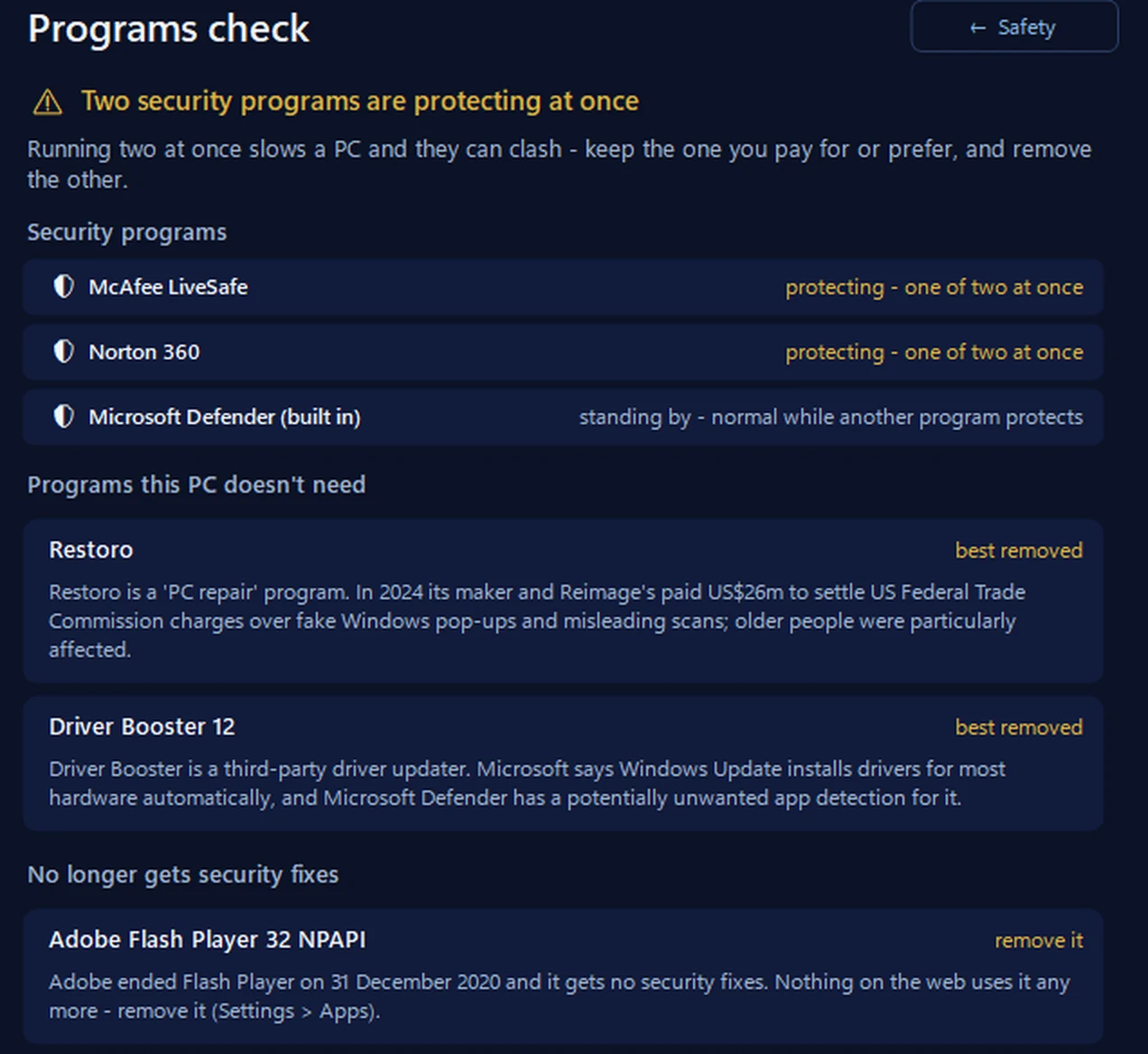
Programs check: what’s worth keeping on your PC
It looks through your installed programs and names the ones the PC doesn’t need — tune-up and registry cleaners (CCleaner included), driver updaters, adware and programs that no longer get security fixes — each with the reason in plain English. It also says which security program is protecting the PC, and warns when two are running at once. It doesn’t clean anything itself: you remove things in Settings, or we can do it with you.
In the app: Safety, then Programs check.
Download 365 PC Manager free ↓What else it checks
Made by us, a family IT firm in Bournemouth since 1995, and digitally signed by 365 Techies Ltd.
/07 — WHEN TO CALL US
When to call us
Still not right? Ring 01202 775566 or text 07520 615332, Monday to Friday, 9 to 5. With your permission we connect to your Windows PC and sort it while you watch: usually the same day, remote help from £20, and no fix, no fee. We look at what’s installed, remove what isn’t needed and set up Windows’ own clean-up, so nothing extra has to run.
FAMILY-RUN SINCE 1995 · ★ 4.9 ON GOOGLE · 200+ COMPUTERS UNDER OUR CARE · NO FIX, NO FEE · SAME-DAY REMOTE SUPPORT
// GOOD QUESTIONS
Frequently asked
Is CCleaner safe to use?
It’s a legitimate program. Download it only from ccleaner.com, untick offers during installation, keep it updated and leave its registry cleaner alone.
Do I need CCleaner on Windows 11?
Usually not. Windows 11 clears junk files with Storage Sense and Cleanup recommendations, manages startup apps and uninstalls programs for free.
Should I use the registry cleaner?
No. Microsoft says it doesn’t support registry cleaning programs and that problems they cause may need Windows reinstalling. The registry doesn’t need cleaning.
Was CCleaner hacked?
In 2017 attackers hid malware in the official CCleaner 5.33. It was found and fixed in 5.34 within weeks. Current versions aren’t affected; it’s a reminder to download only from the maker and keep programs updated.
Will CCleaner make my PC faster?
Rarely by much. Fewer startup programs, enough free space and an SSD in place of an old hard drive make far more difference.
How do I uninstall CCleaner?
Settings, Apps, Installed apps, CCleaner, Uninstall, then restart. Cancel any paid subscription with CCleaner too.
Can you tidy my PC for me?
Yes. With your permission we connect to your Windows PC, remove what isn’t needed and set up Windows’ own clean-up. Remote help from £20, no fix, no fee.
// Still stuck?
Want a second opinion on what’s on your PC?
With your permission we connect to your Windows PC, look at what’s installed and tidy it safely. Call 01202 775566 or text 07520 615332.
We’ll fix it with you
- Checking the problem is free
- Fixes from £20, agreed before we start
- We phone first, and you watch every step
Stop it happening again
- A full service every six weeks, written up
- Every program kept up to date
- Unlimited remote help when you need it
Plans from £18.25 a month per computer · cancel any time
Mon–Fri 9–5 · family-run since 1995 · rated 4.9 on GoogleWhat Windows does free →