// FREE AUDIOBOOKS
Free audiobooks on your computer
You don’t need a subscription to listen to books on a PC or laptop. Thousands of classics are free for good, read aloud by volunteers; most UK libraries lend newer audiobooks free with a library card; and our free app plays the classics with big, simple buttons. Here’s where to find each. Rated 4.9 on Google.
- ● Free, no subscription
- ● Classics and new books
- ● Windows PC or laptop
/01 — THE CLASSICS
Classic books, free for good: LibriVox
LibriVox is a project of volunteers who read books whose copyright has run out and give the recordings away. There are thousands: Jane Austen, Charles Dickens, Arthur Conan Doyle, Mark Twain, Lewis Carroll and many more, from novels to poetry and history.
Go to librivox.org, search for a title or an author, and play a chapter in your browser, or download the files to keep. There’s nothing to pay and no account to make. Readers vary — some books have more than one version, so if a voice doesn’t suit you, look for another.
At a glance
| Classics, free for good | LibriVox: Austen, Dickens, Conan Doyle and thousands more, read by volunteers. No account needed. |
|---|---|
| Newer books, free | Your library: most UK library services lend audiobooks through apps such as BorrowBox or Libby, with your library card. |
| Sight loss | RNIB’s Talking Books service is free for people with sight loss in the UK. |
| What it costs | Nothing. It uses some broadband: roughly 30 to 60 MB an hour. |
| Easiest of all | Our free 365 PC Manager plays the LibriVox classics and remembers where you got to. |
/02 — NEWER BOOKS
New and popular books, free from your library
Most UK library services lend eAudiobooks free with your library card, through apps such as BorrowBox or Libby; your council library’s website says which it uses. You borrow a book for a few weeks and it returns itself, so there are no fines. Popular titles can have a waiting list, just like the shelves.
No library card? Most councils let you join online. The apps are made for phones and tablets; on a Windows PC, the library’s website or the app’s own website usually plays the book in your browser.
If you have sight loss, RNIB’s Talking Books service lends audiobooks free in the UK.
/03 — THE EASY WAY
Or play the classics in our free app
FREE · WINDOWS 10 & 11 · NO SIGN-UP
Audiobooks: classic books read aloud, free
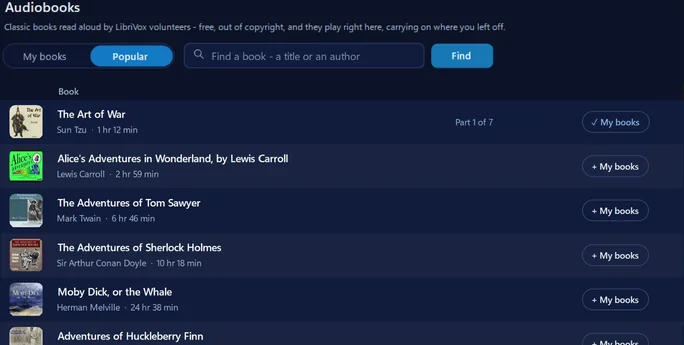
Its Audiobooks place lists the LibriVox books people listen to most, and finds any other by title or author. A book plays like a radio programme: each chapter follows the last, it remembers where you got to, and Clear speech and the sleep timer work on it. The books stream from the Internet Archive: nothing but small covers is saved, and the books you start stay on your PC.
In the app: Music & games, then Music, then Big view, then Audiobooks.
Download 365 PC Manager free ↓What else it checks
Made by us, a family IT firm in Bournemouth since 1995, and digitally signed by 365 Techies Ltd.
/04 — LISTENING TIPS
Making it easy to listen
- Clear voices: recordings by volunteers vary in loudness and tone. Our app’s Clear speech brings voices forward, and good headphones help in a busy room.
- Falling asleep to a book? Use a sleep timer, so it stops by itself and you can find your place in the morning.
- On a TV or a speaker: plug the PC into the TV or a speaker, or use Bluetooth. If Bluetooth headphones sound muffled, see our muffled headphones fix.
- Stops and starts? That’s the internet connection. Move nearer the router, or download the book first if the site lets you.
/05 — WHEN TO CALL US
When to call us
If you’d like the library app or ours set up so a book is one click away, or there’s no sound at all, we’re happy to help. Ring 01202 775566 or text 07520 615332, Monday to Friday, 9 to 5. With your permission we connect to your Windows PC and sort it while you watch: usually the same day, remote help from £20, and no fix, no fee.
FAMILY-RUN SINCE 1995 · ★ 4.9 ON GOOGLE · 200+ COMPUTERS UNDER OUR CARE · NO FIX, NO FEE · SAME-DAY REMOTE SUPPORT
// GOOD QUESTIONS
Frequently asked
Are LibriVox audiobooks really free and legal?
Yes. LibriVox records books whose copyright has run out, and puts its recordings in the public domain, so anyone can listen free. LibriVox goes by copyright in the USA; the classics most people look for, such as Austen, Dickens and Conan Doyle, are out of copyright in the UK too.
Can I get new books free, not just old ones?
Yes, from your library. Most UK library services lend eAudiobooks free through apps such as BorrowBox or Libby with your library card. Popular new titles can have a waiting list.
Do I need an account?
Not for LibriVox, or for our app. The library apps need your library card number and PIN.
How much internet does it use?
Roughly 30 to 60 MB an hour, depending on the recording’s sound quality, which home broadband handles easily. On a phone’s mobile data, download over Wi-Fi first.
Will it remember where I stopped?
Our free app does: it keeps your place in each book you start, on your PC. In a browser, note the chapter number, or download the files and play them in order.
Is there help for people with sight loss?
Yes. RNIB’s Talking Books service lends audiobooks free in the UK to people with sight loss, and Windows’ own accessibility settings can make everything on screen bigger and clearer: see our guide to Windows accessibility features.
Is your app safe to install?
Yes. 365 PC Manager is digitally signed by 365 Techies Ltd, a family IT firm in Bournemouth since 1995, and has no adverts. The books stream from the Internet Archive; nothing but small covers is saved on your PC.
Want it set up for you?
We connect to your Windows PC and set up the library app or ours with you, so a book is one click away. Usually the same day. Call 01202 775566 or text 07520 615332.
01202 775566 · help@365techies.co.uk · MON–FRI 9AM–5PM