// THE MUST-HAVE WINDOWS APP · FREE · SIGNED & LIVE
Your PC’s health, at a glance
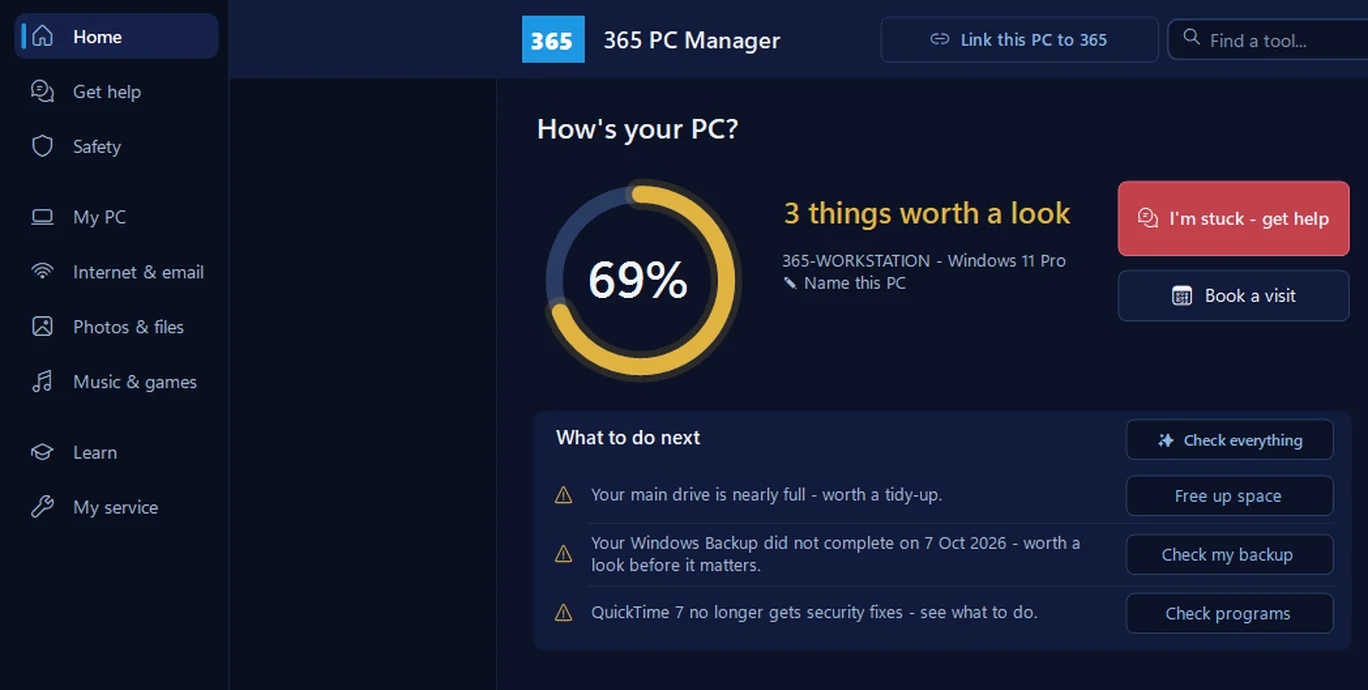
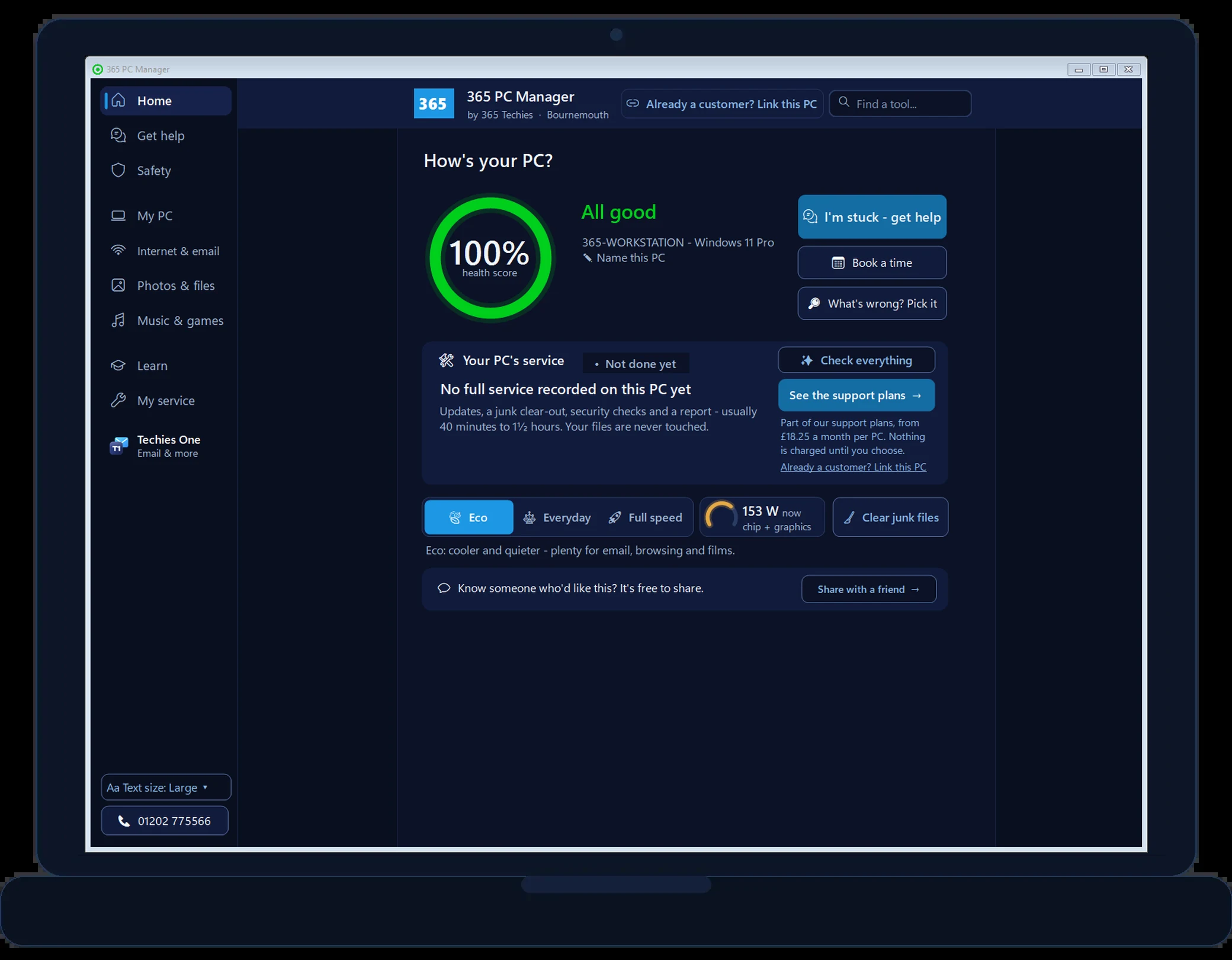
365 PC Manager is a free computer health check for your PC or laptop. It shows your computer’s health in plain English, from your network safety to programs you’re better without — no fake errors, no scare tactics, nothing you have to buy. On a 365 support plan it keeps your PC up to date and secure, and writes up every service.
It works on any Windows 10 or 11 PC (64-bit), in any country: download it, run the checks and fix things yourself with its step-by-step help. There’s nothing to sign up for.
Our support plans, home visits, phone help and remote help are for customers in the UK, so outside the UK the app doesn’t offer them. We never phone anyone abroad: if someone rings you saying they’re from 365 Techies, hang up.
Want the full automatic service too? An optional key, Unlock everything, adds it and two more tools: US$19.99 once, for 12 months on up to 3 PCs, charged in US dollars, in the countries where it is on sale (the app offers it there). It never renews, and you can have a full refund within 30 days. Licence and refunds.
Questions? Email info@365techies.co.uk. We reply Monday to Friday, 9am to 5pm UK time.
1. Open the file. It’s called 365-pc-manager-setup-v44.exe. Your browser shows it at the top or bottom of the window, or it’s in your Downloads folder.
2. Let it install. Click through the short setup. It takes a few seconds and needs no administrator password.
3. It opens and checks your PC. Your health score comes up in plain English. After that it’s in your Start menu, and you can remove it any time from Settings > Apps.
On a phone or tablet? Tap the button and we’ll help you send the link to your Windows computer.
Windows says “protected your PC”? What that means, and how to check it’s really ours
Windows SmartScreen shows that blue box for any program it hasn’t seen many people download yet — even signed ones. It fades as more people install it. To check the file is genuinely ours: click More info and look for the publisher 365 Techies Ltd, then Run anyway. If it says “Unknown publisher”, don’t run it — ring us on 01202 775566.
Or right-click the file → Properties → Digital Signatures: it should show 365 Techies Ltd, issued by Microsoft. If you’d rather we simply set it up for you, we’ll do that free, by hand or remotely.
Rather a person checked it over instead? Book a free IT health check and a techie will look at everything with you.
// FAMILY-RUN SINCE 1995 · 4.9 ON GOOGLE · MON–FRI 9–5 · BOURNEMOUTH, POOLE & DORSET
// NEW IN VERSION 36.5 · FREE, AND IT UPDATES ITSELF
Bought from us, a free month for a friend, and the full service your way
Version 36.5 shows when you bought your PC from us and how long its guarantee has left, lets you give a friend a free month, and in the UK lets you run the full service yourself or have a techie do it every six weeks. The scam check now recognises every link to our own website, too. It builds on 36.4’s service on Home, light show and start-up partition check, 36.3’s audiobooks and webcams, and version 36’s music window and new menu. Everything is explained in plain English and nothing changes unless you tap. Already have the app? It updates itself.
NEW IN 36.5
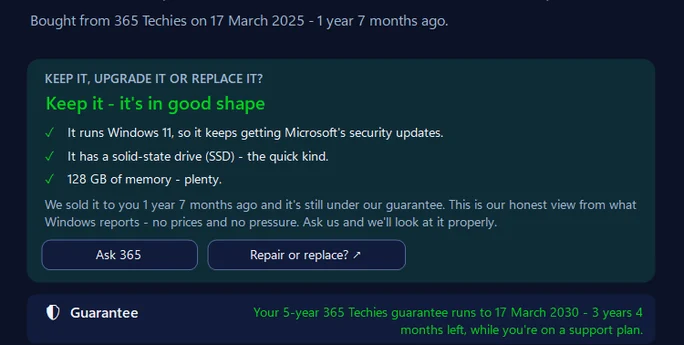
Bought your PC from us? It says so
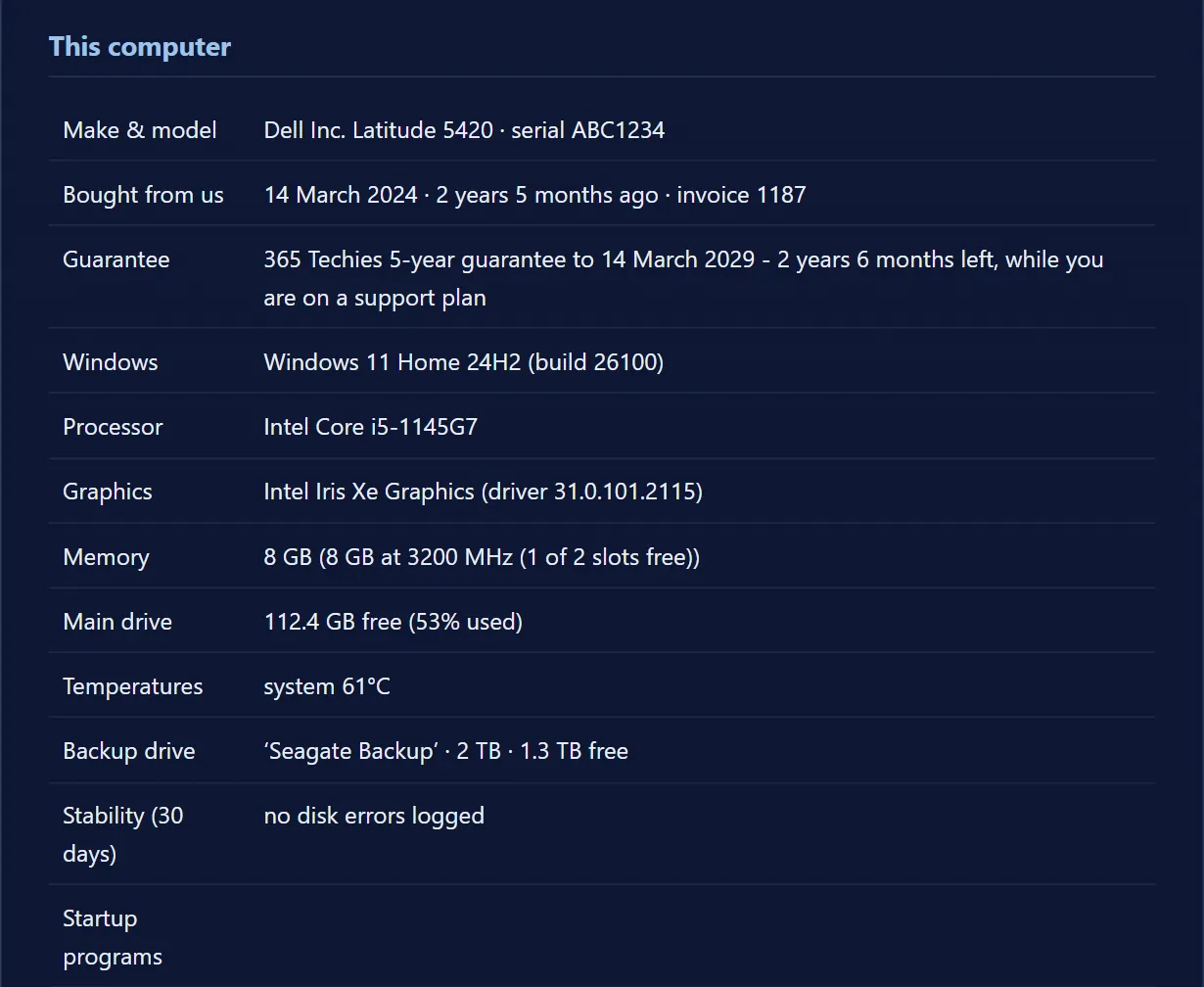
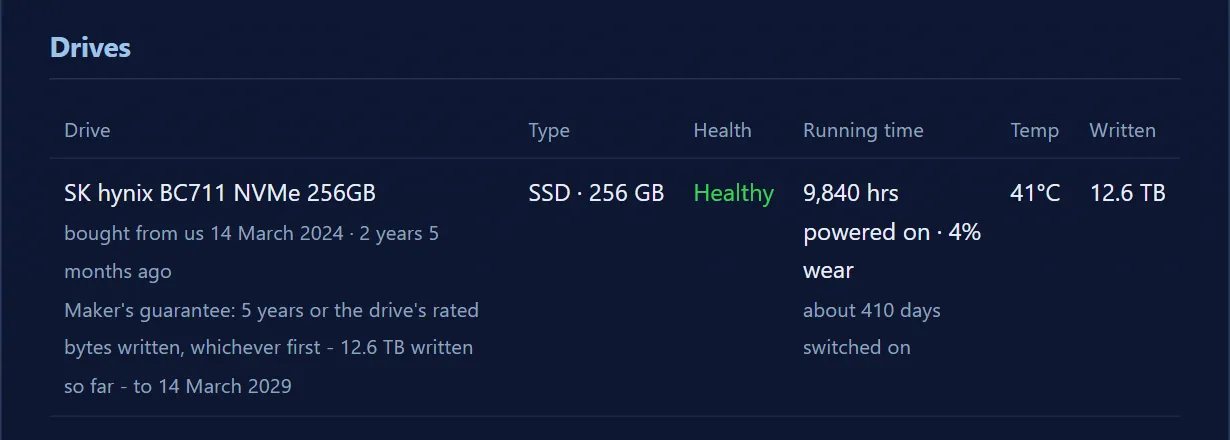
If your computer came from us, This PC shows the day you bought it and how long its guarantee has left — five years while you’re on a support plan, 12 months otherwise — and, for each drive we fitted, when we fitted it and how many hours it had run at its last service. A refurbished PC is dated from the day it became yours, not from when its processor came out. Our refurbished Dells.
NEW IN 36.5
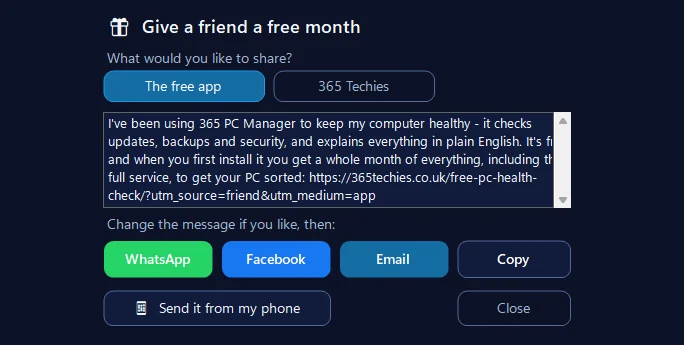
Give a friend a free month
Tap Share with a friend at the foot of Home and send the app by WhatsApp, Facebook or email — or scan a code and send it from your phone. Your friend gets a whole month of everything when they first install it, the full service included. Change the message first if you like.
NEW IN 36.5
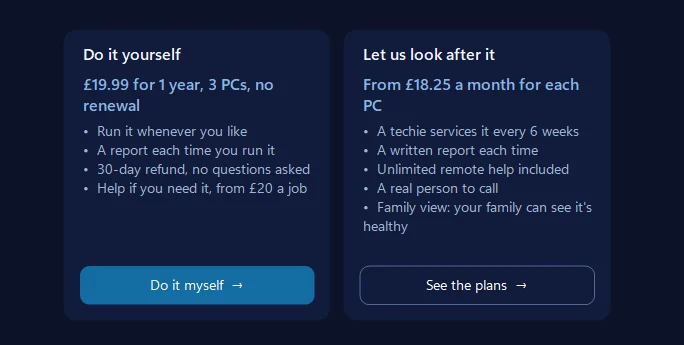
In the UK: do it yourself, or let us
The full service — updates, a junk clear-out, security and repair checks, then a written report — is yours to run whenever you like for £19.99 a year on up to 3 PCs, with no renewal and a 30-day refund; help is from £20 a job if you need it. Or a techie services it every six weeks on a support plan from £18.25 a month, remote help included.
IN 36.4
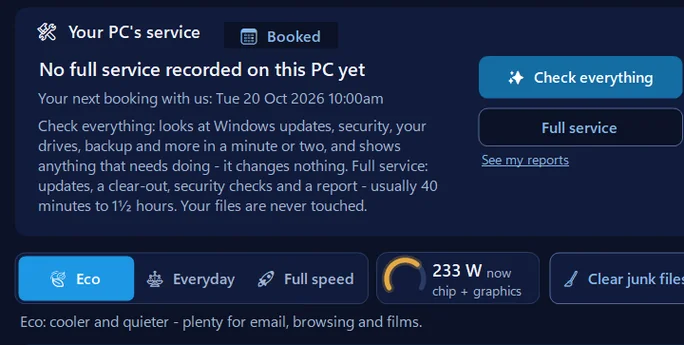
Your service, on Home
When your PC last had its full service, whether one is booked, and one clear button for each next step: Check everything to see what needs doing, or the full service itself. Your files are never touched.
IN 36.4
A light show that moves with the music
Twelve scenes — Sunset Drive, Aurora, Liquid, Moonlit Sea and more — that follow the beat of anything your PC plays, with moods, colours and settings you can change. You can stir Liquid with the mouse. The free music visualiser, explained.
IN 36.4
Before Windows’ big update fails
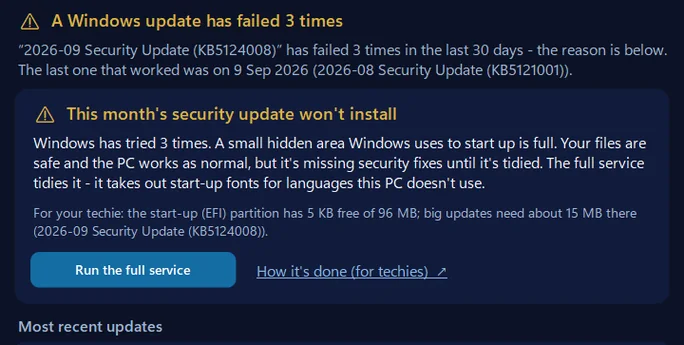
The app checks the small hidden start-up partition Windows needs for its updates and says plainly when it’s too full. The full service now tidies it safely — it takes out start-up fonts for languages the PC doesn’t use — and repairs damaged system files with Windows’ own tool. The error explained.
IN 36.4
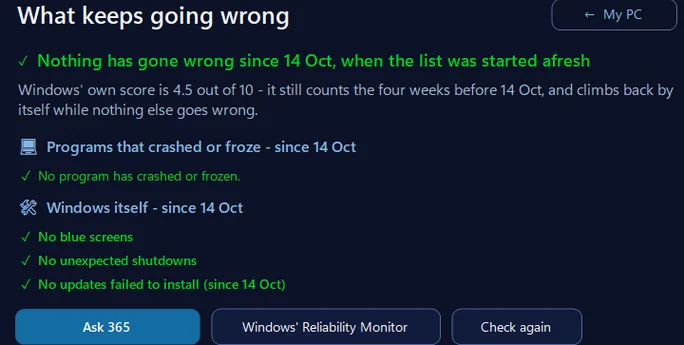
Start a fresh list
Once a problem is fixed, start What keeps going wrong afresh and see whether anything comes back. Windows keeps its own full record — nothing is deleted — and one click brings the old list back.
Audiobooks, free
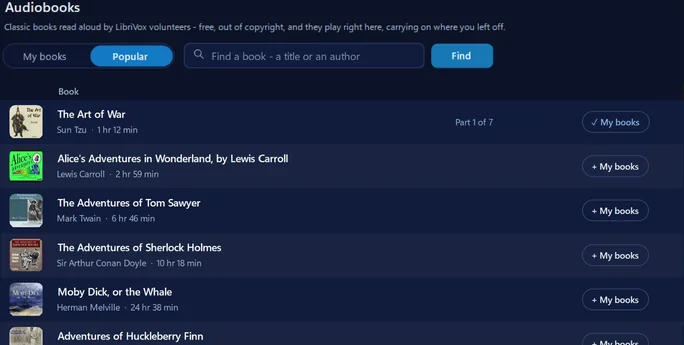
Classic books read aloud by LibriVox volunteers — Austen, Dickens, Conan Doyle, Twain and thousands more, out of copyright and free. Each part plays after the last, it carries on where you left off, and Clear speech and the sleep timer work on them too. Free audiobooks, explained.
World webcams
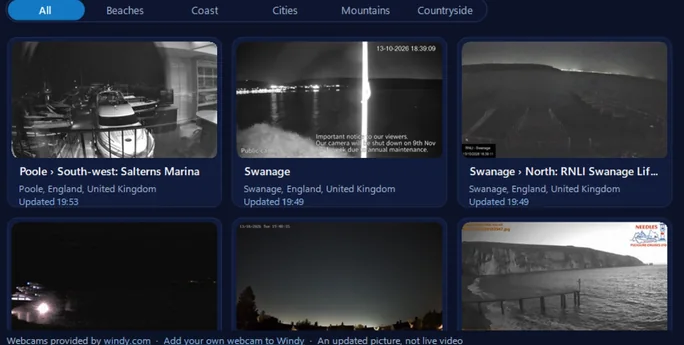
Beaches, harbours, cities and mountains round the world — and, near us, Poole, Swanage and the Needles — each with a fresh picture every few minutes. Keep your favourites, see a night-time camera in daylight, and open live video on Windy. Webcams provided by windy.com. Webcams near us, and how to watch.
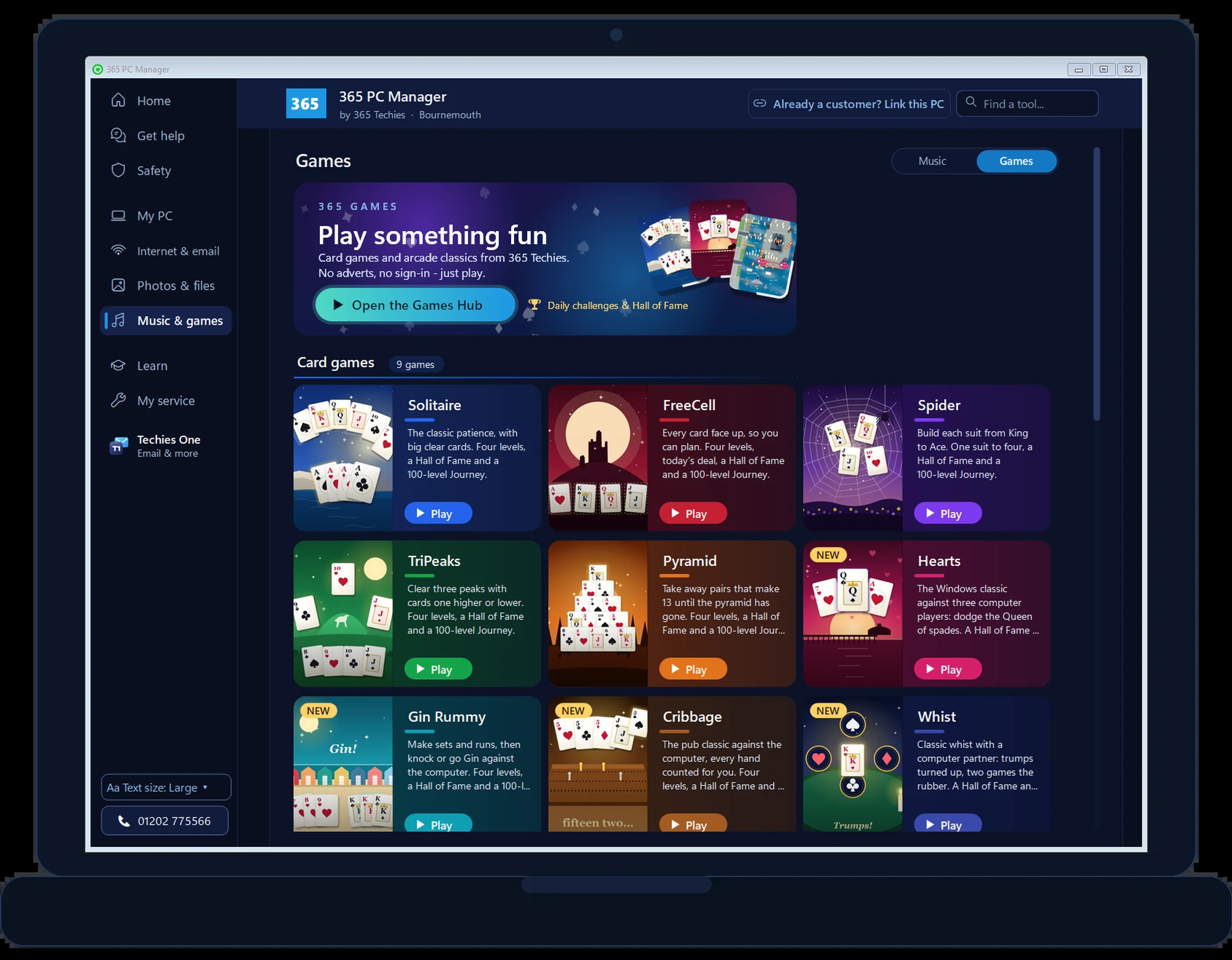
Our own games
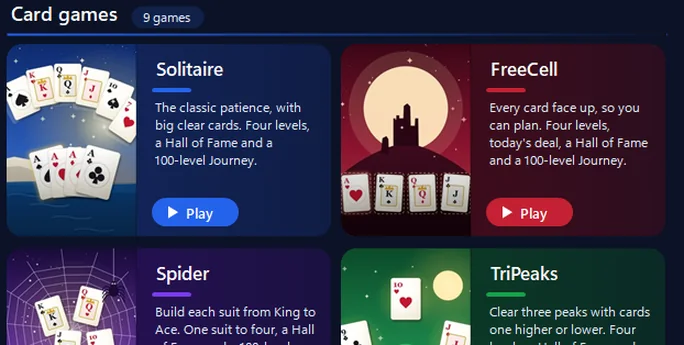
Solitaire, FreeCell, Spider, Hearts, Cribbage and our arcade classics, all made by us: no adverts, no sign-in. Each opens in its own window and your music carries on. See all our games.
A new menu, and Find a tool
Everything now sits in nine plain places down the left: Home, Get help, Safety, My PC, Internet & email, Photos & files, Music & games, Learn and My service. Type in Find a tool to jump straight there, put your own shortcuts on Home, and use Text size to make the whole app bigger.
Music, radio and videos
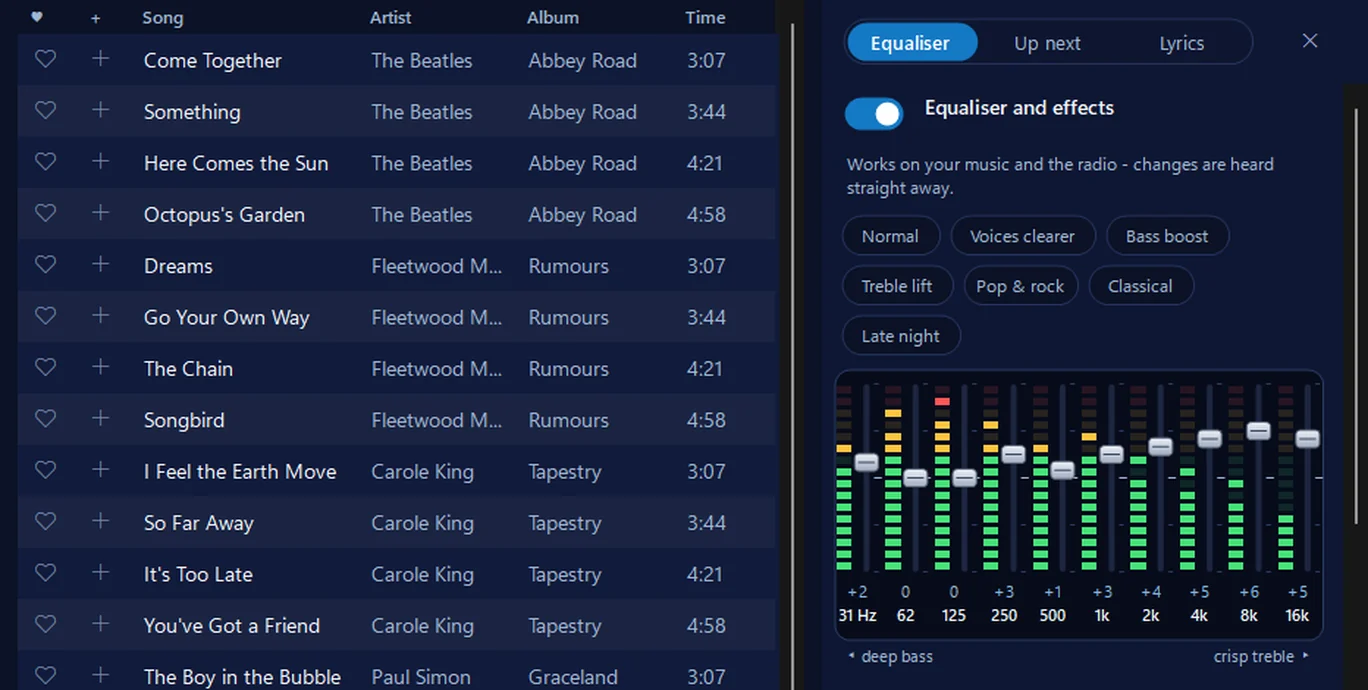
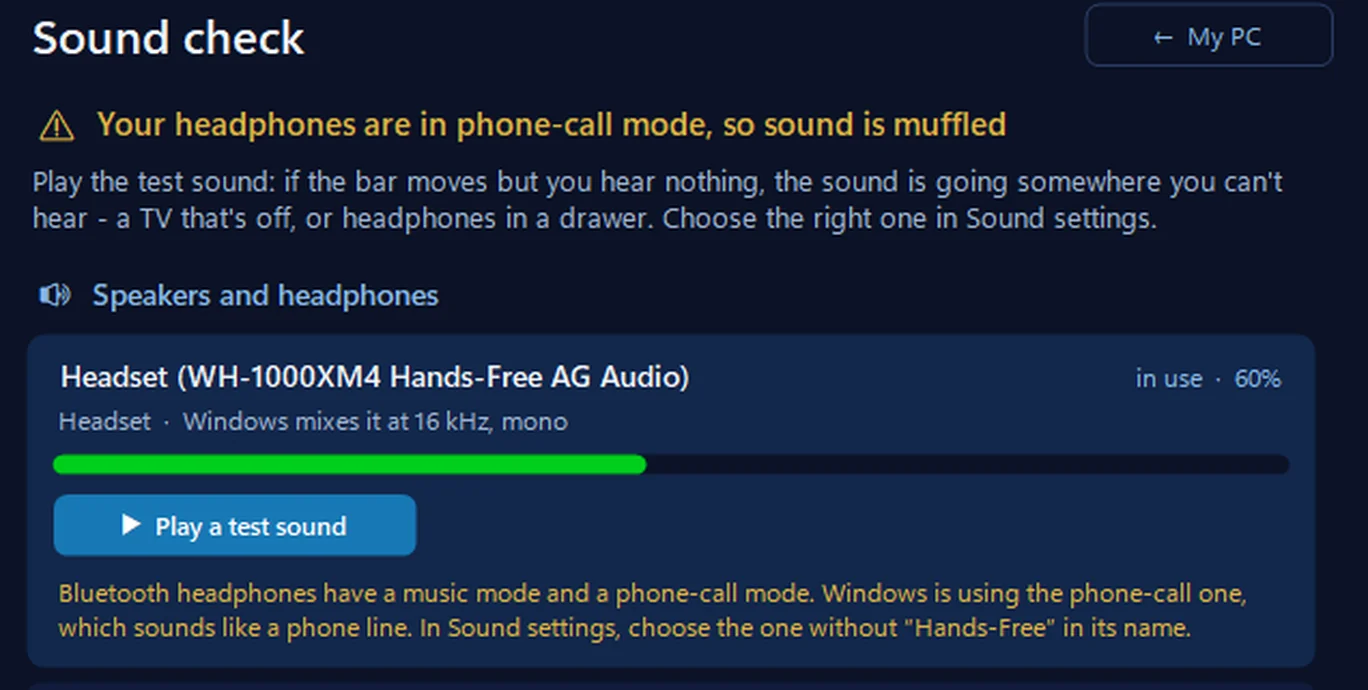
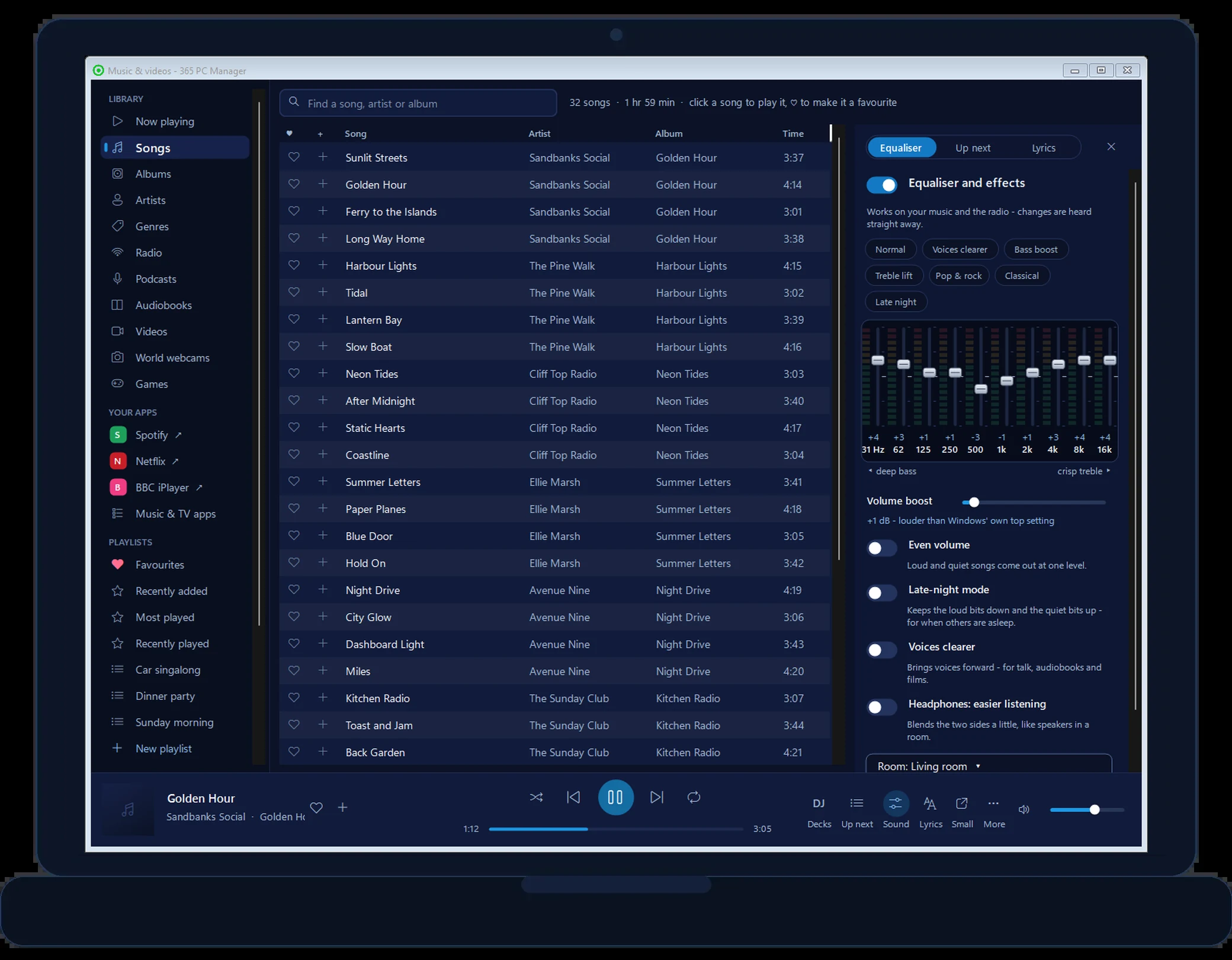
Your songs and albums with their covers, your playlists (iTunes ones too), CDs and videos in one window, with an equaliser, Volume boost, Night mode and Clear speech for your music and the radio, and settings for your speakers or headphones. Playing CDs on Windows 11.
The radio, near you
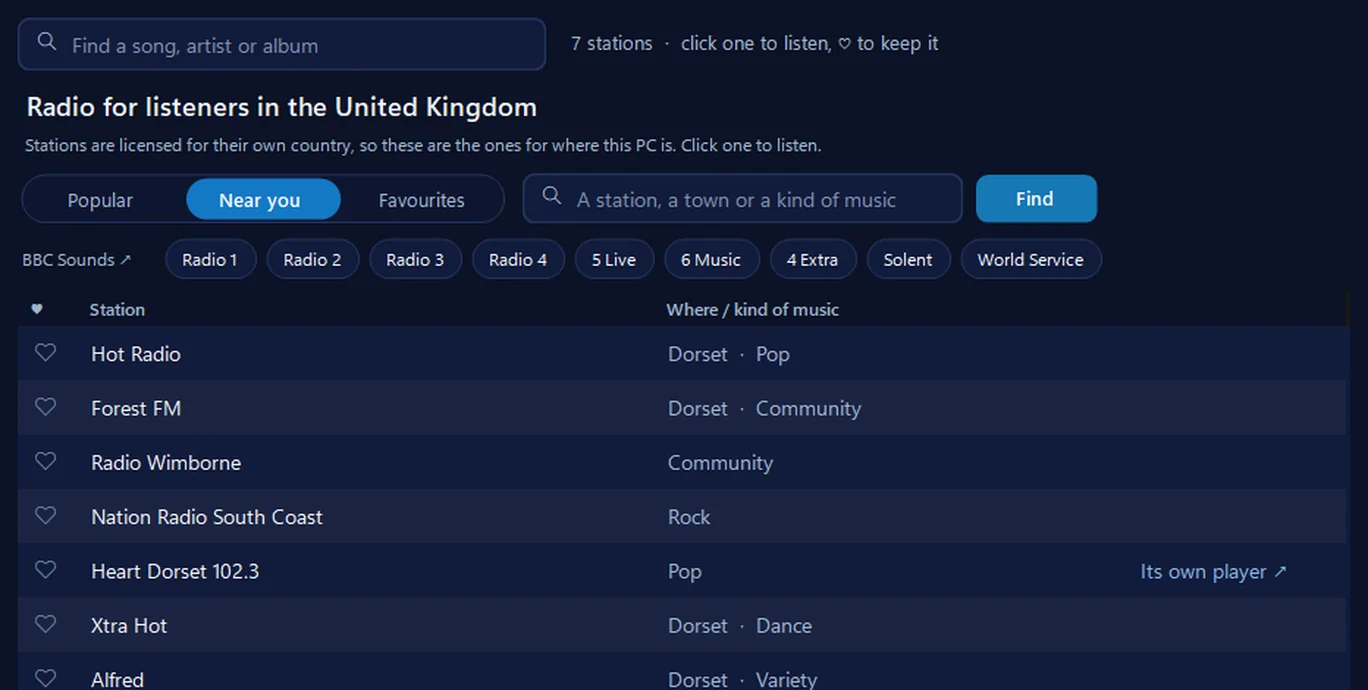
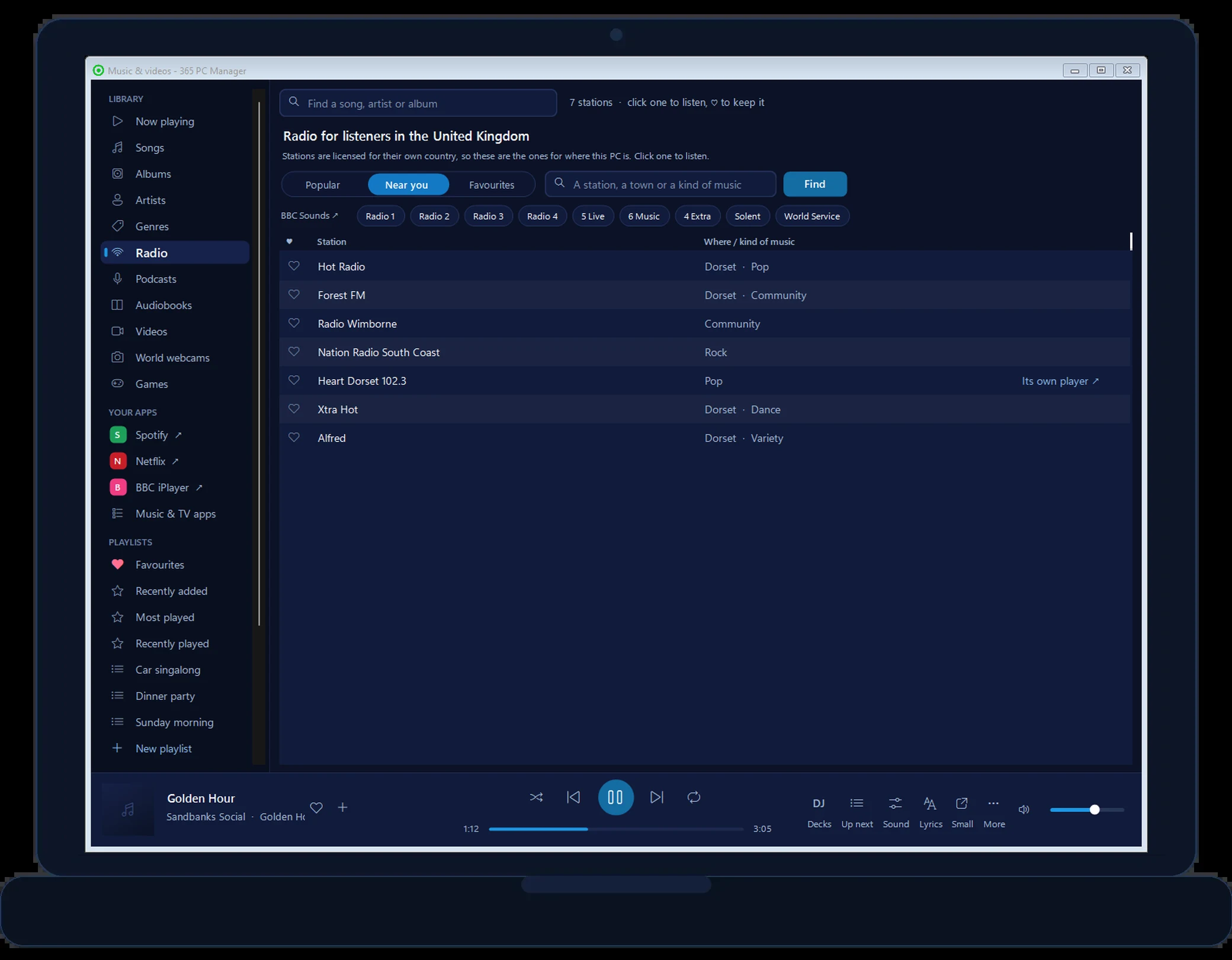
The stations for your country, with a Near you list — for us, Hot Radio, Forest FM and Radio Wimborne — the BBC stations a tap away, and a heart to keep your favourites. Every way to listen on a computer.
Auto DJ, and DJ decks
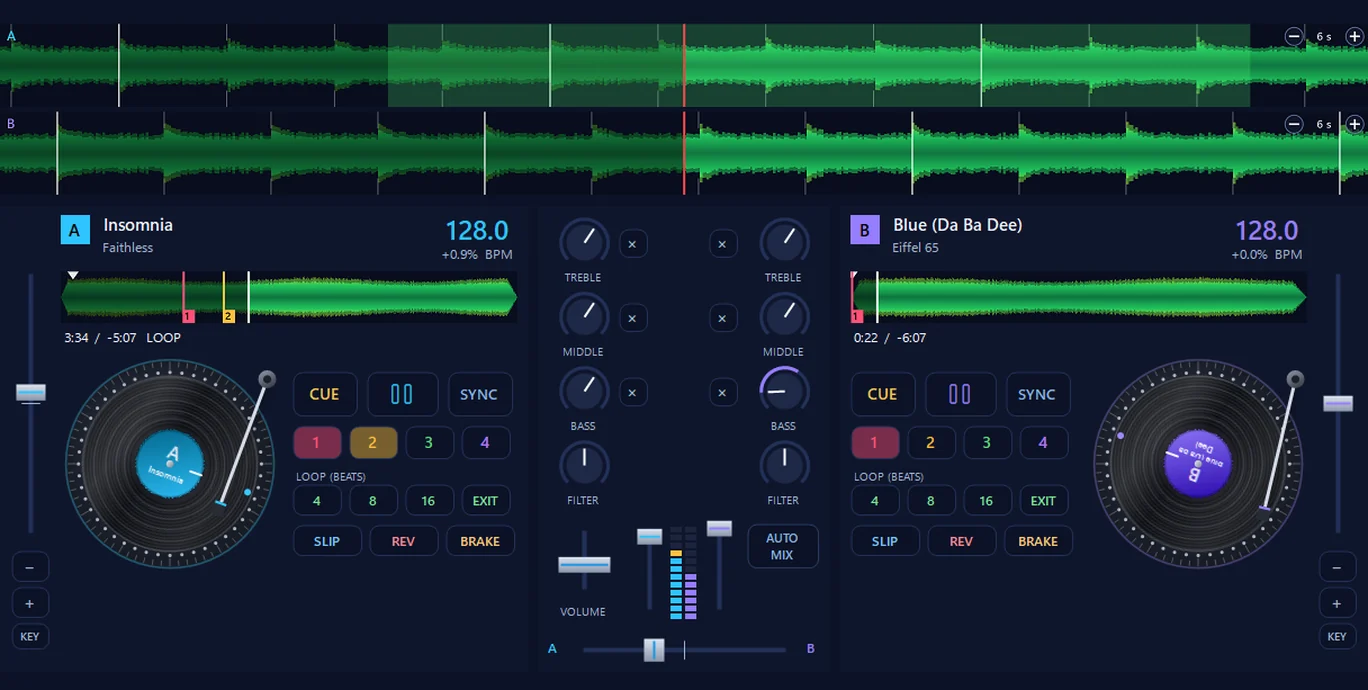
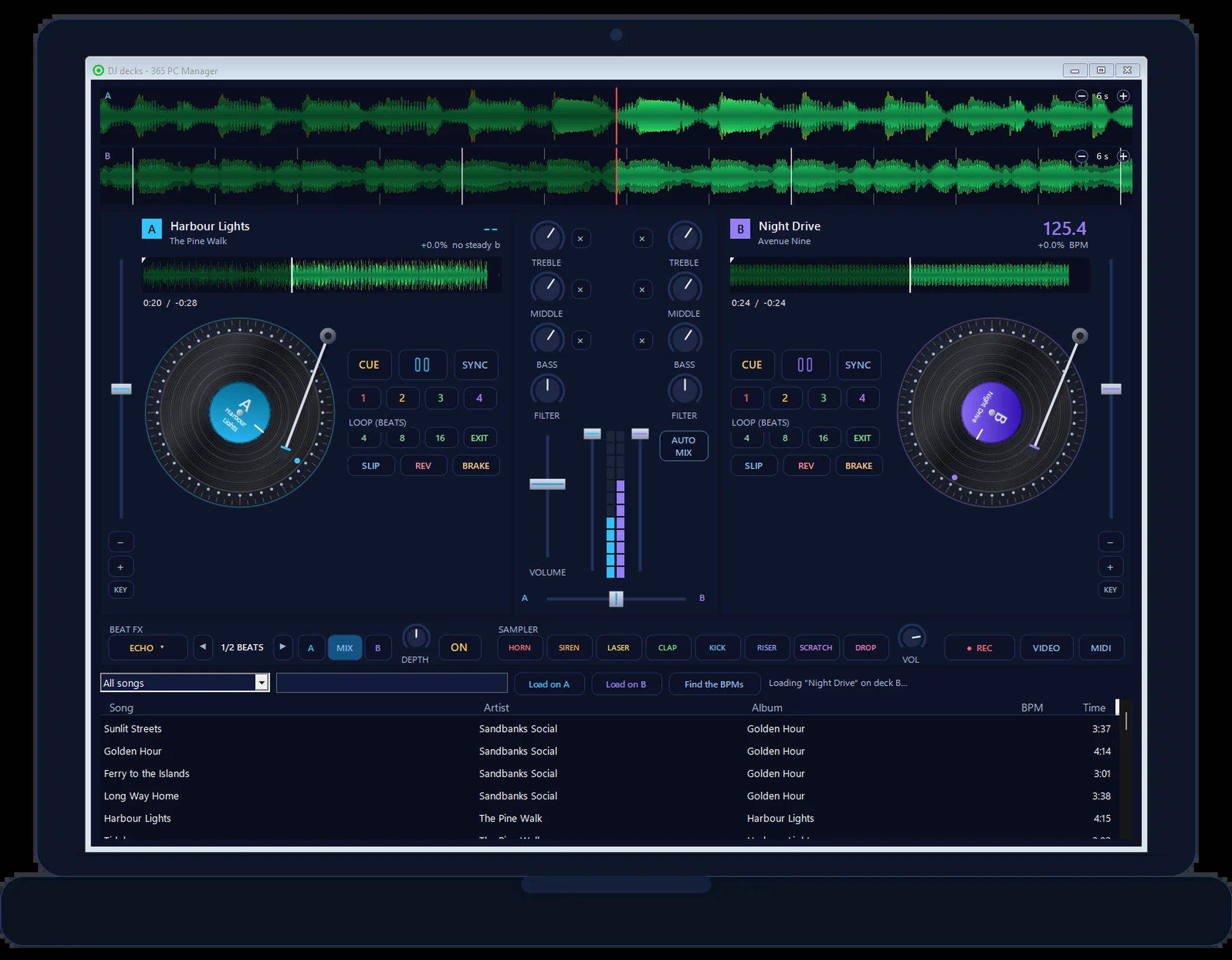
Auto DJ mixes each song into the next on the beat. Or have a go on the decks: two turntables you can scratch, cue points and loops, effects, a sampler and video mixing.
A wake-up alarm, and a house that sounds lived-in
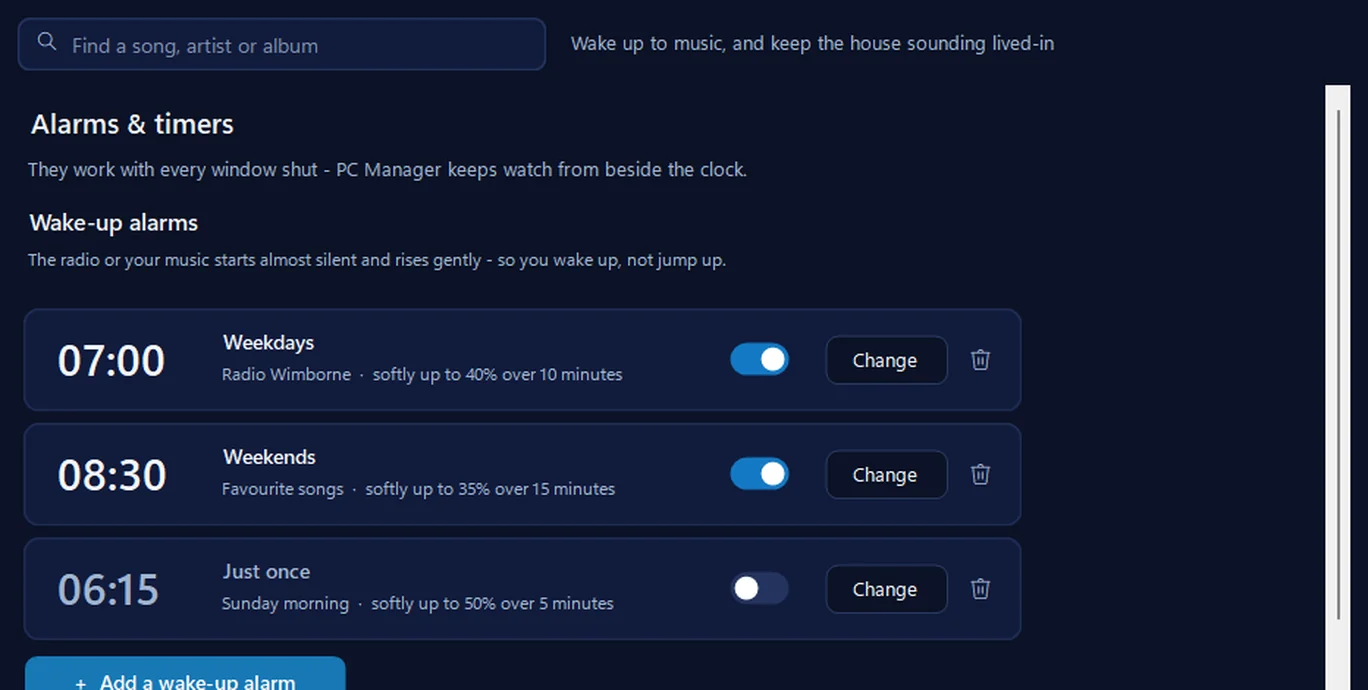
Wake to the radio or your music starting almost silent and rising gently. And a timer plays the radio between set times while you’re out, shifting a little each day, so the house sounds lived-in. Going away? The full checklist.
Lost a file?, copy your photos to a USB stick, photo tools, a password maker, a QR code maker, Is it down or just me?, updates for your programs and your photos as a screensaver — and send us a photo from your phone by scanning a code. New checks look for remote-access programs, drive encryption, Windows 10 extended updates and old programs that no longer get security fixes.
// REAL SCREENS FROM VERSIONS 36 TO 36.5 · THE THIS PC, START-UP PARTITION, FRESH LIST, MUSIC AND SOUND PICTURES SHOW A SAMPLE PC · LIGHT SHOW: REAL SCENES FROM THE APP · WEBCAM PICTURES FROM WINDY.COM · NOTHING MOCKED UP
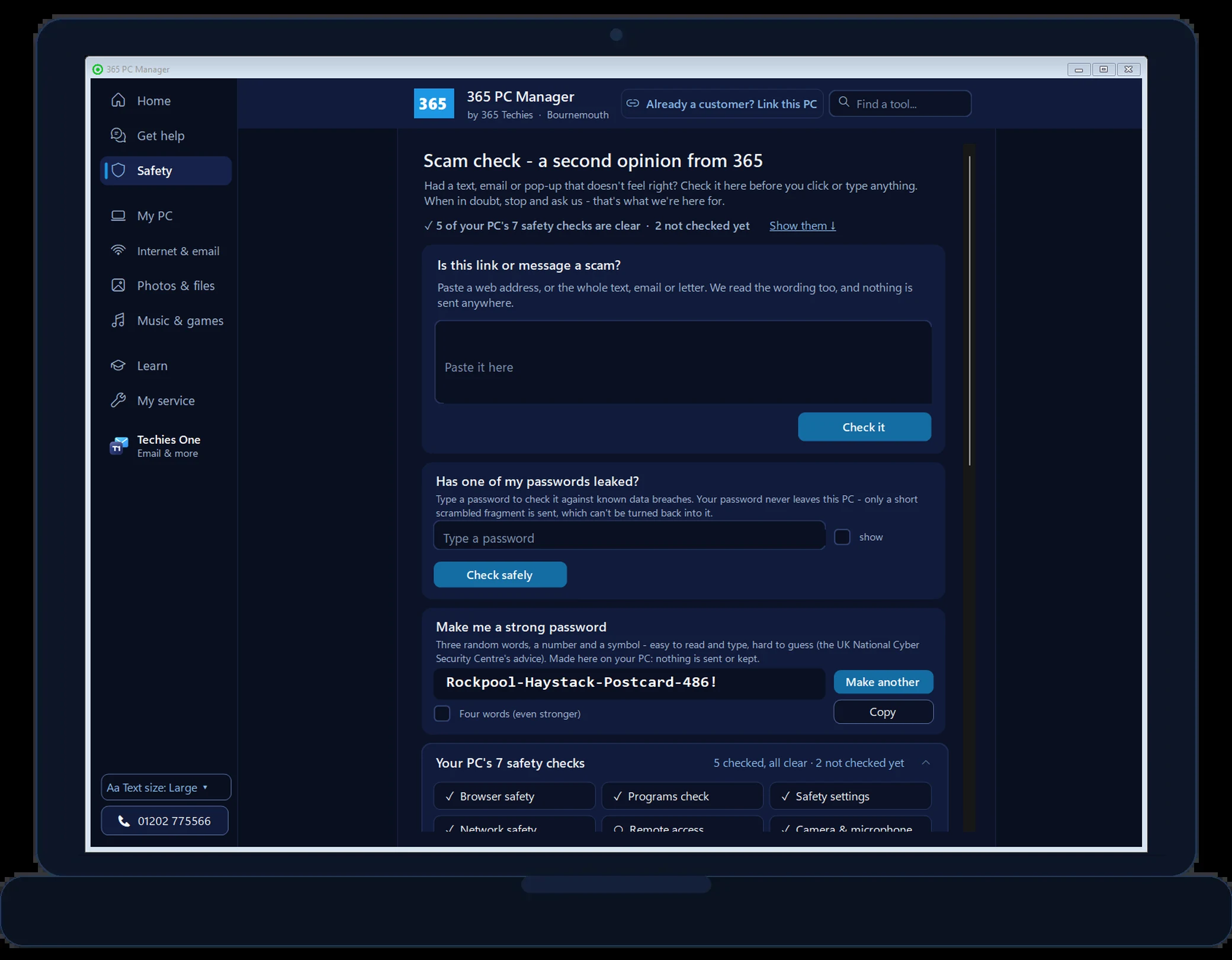
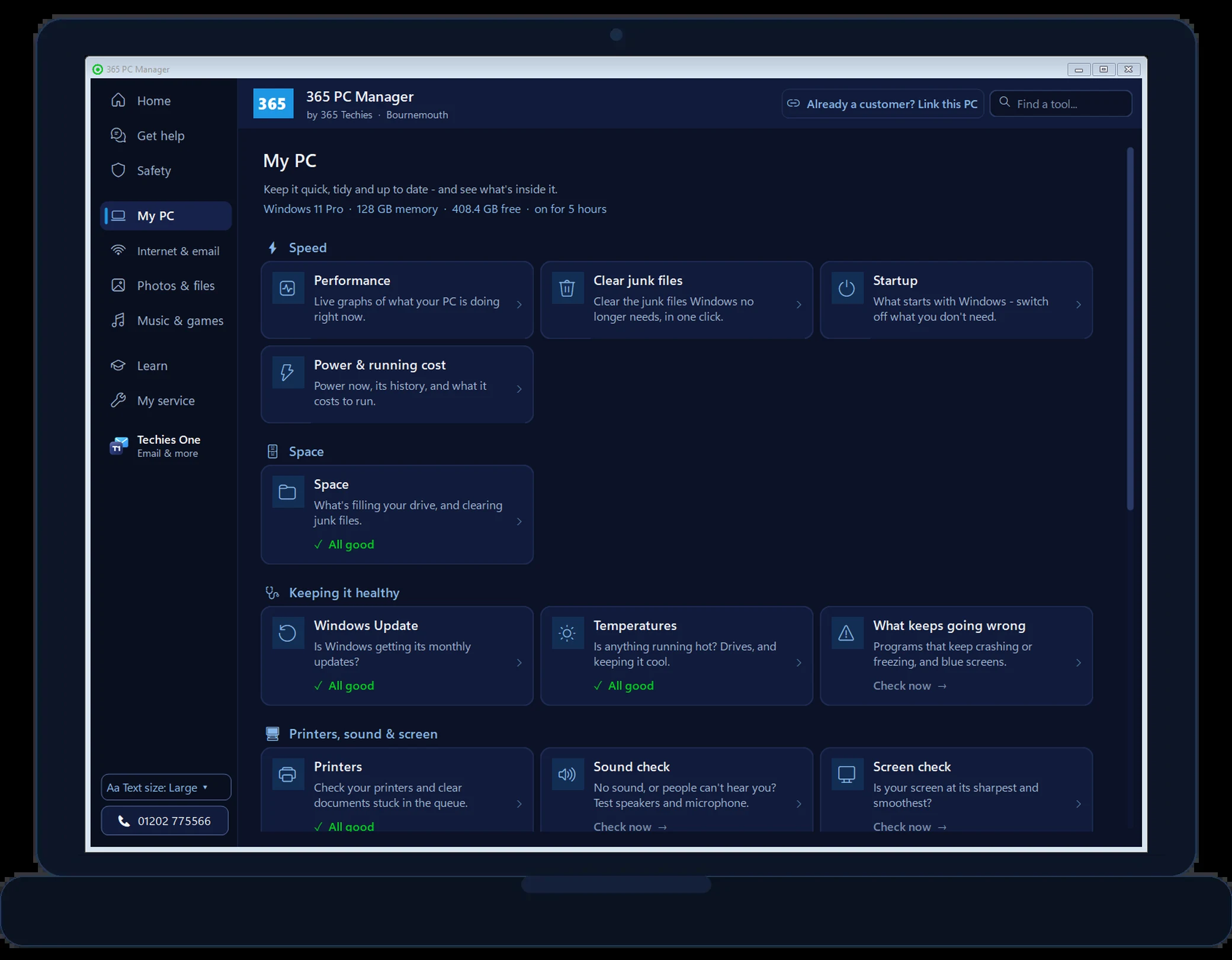
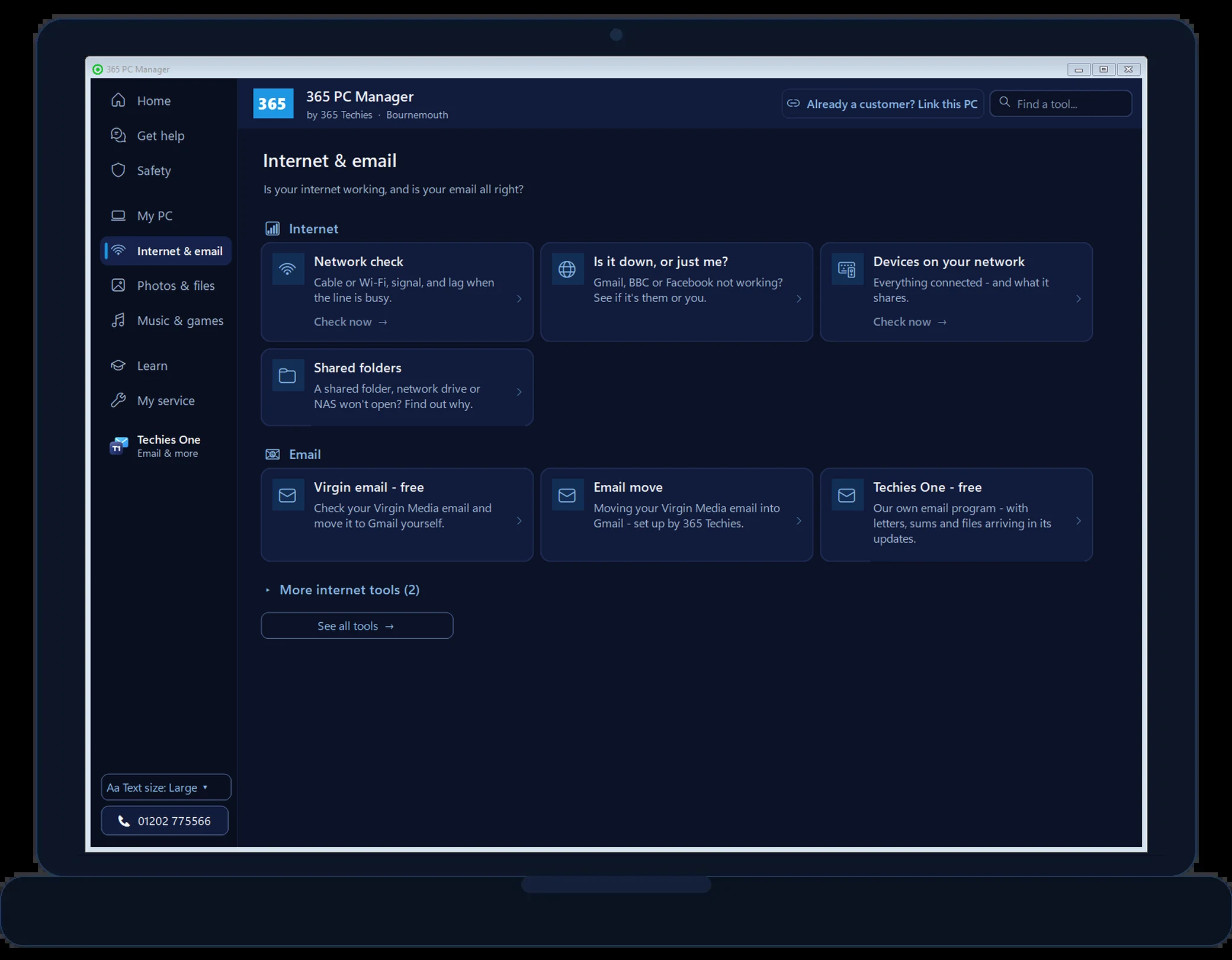
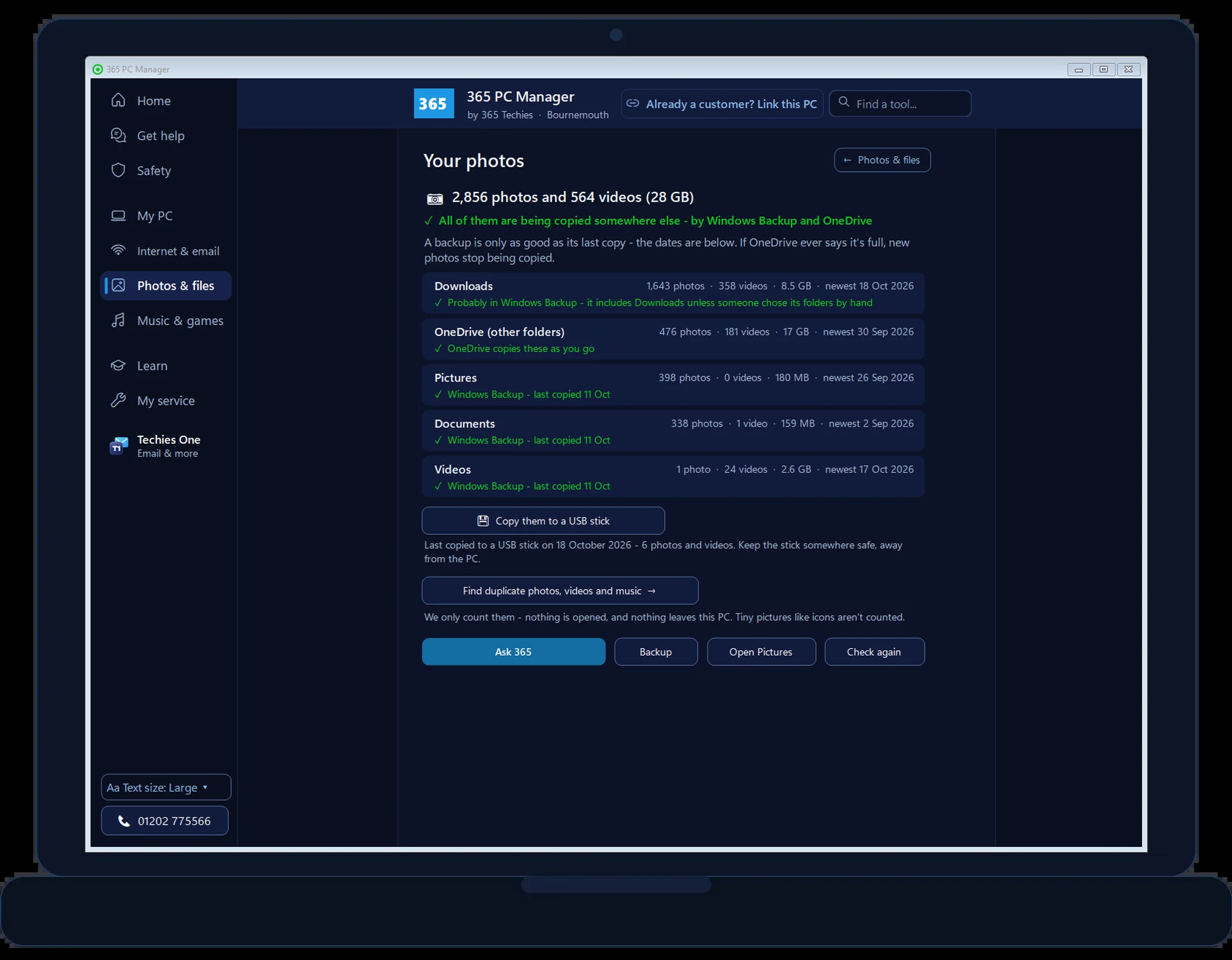
The real app, version 36 — health score → My PC → internet & email → Scam check → photos → music → radio → DJ decks → alarms → Get help → games. Nothing mocked up: the music screens show the app’s sample library.
// DON’T WAIT FOR IT TO FAIL
Keep it maintained, not rescued
The free app shows you where you stand. A 365 support plan keeps it right: every six weeks your computer is serviced, every program is brought up to date and your network is checked, before anything fails or anyone gets in. Criminals now use AI to hunt for one out-of-date program to use as a back door, and Windows Update on its own does not close it.
// WAIT UNTIL IT BREAKS
Programs go months without an update, each one a way in
A router opening or Remote Desktop left on goes unnoticed
The backup quietly stopped, and you find out when the drive dies
You pay for the emergency, and lose the day to it
// MAINTAINED EVERY SIX WEEKS
Windows, drivers and every program brought up to date
Your network checked at every service: firewall, router openings, Remote Desktop
Security programs, your backup and every drive checked
Written up each time, emailed to you and kept in your portal
Home £18.25 a month per computer · business from £24.38 · a real techie in Bournemouth one tap away in the app
// BUSINESS-GRADE SERVICING · FOR HOMES AND BUSINESSES ALIKE
The most thorough PC service we can find in Dorset
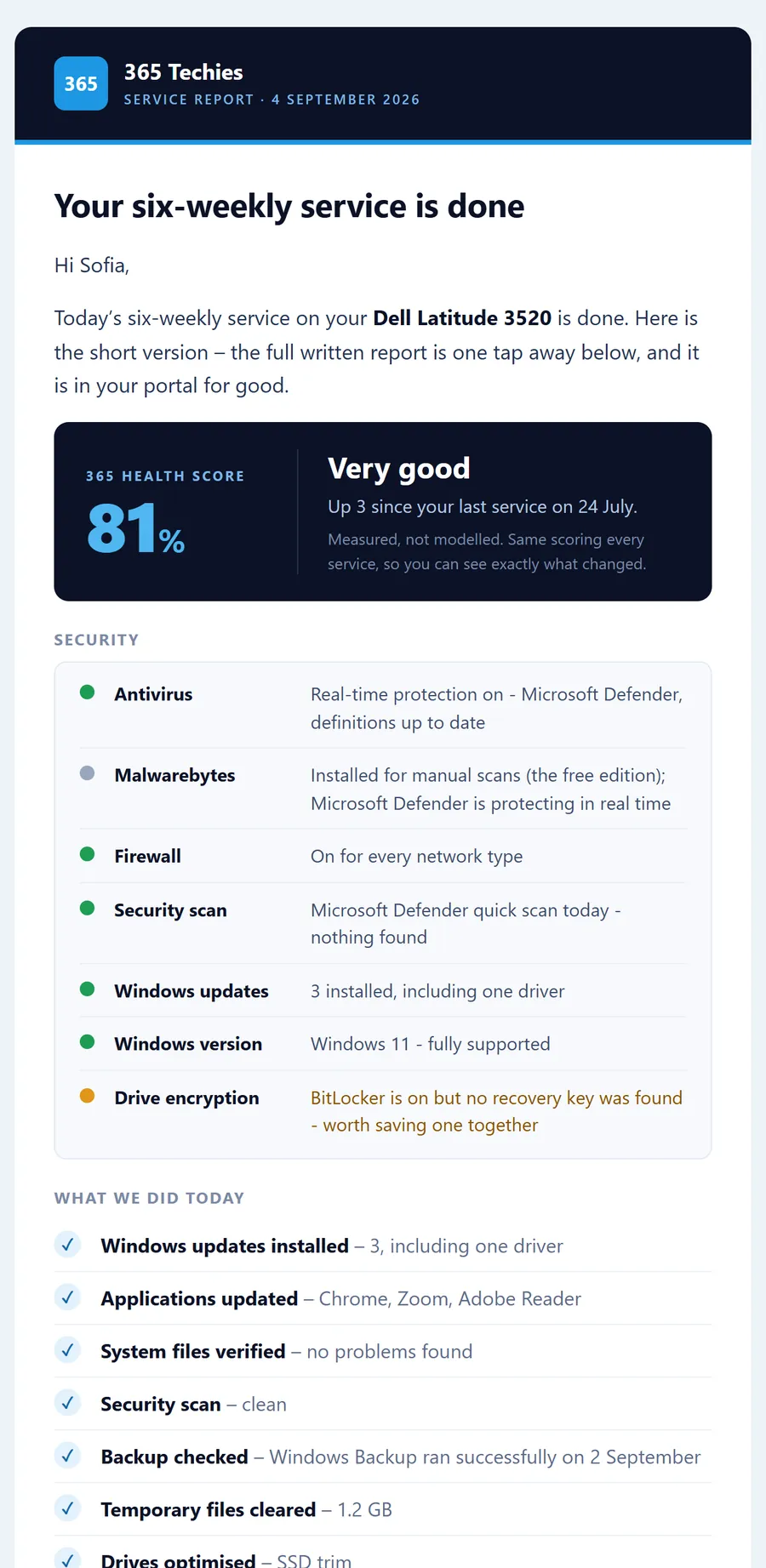
Every six weeks, on a support plan, your computer gets the service a business would expect. Every update is applied, every security setting checked, every drive and backup verified, and the whole thing written up. The Service Report is emailed to you and kept in your portal for good: a dated record that your computer was kept safe, secure and up to date.
One standard, home or business
Businesses have always had this level of care. We can’t find another company in Dorset that gives home customers exactly the same service, the same checks and the same written report. One laptop in a spare room or twenty in an office: the work and the write-up are identical.
Built on more than thirty years of doing it
This is the routine we have refined over three decades of servicing and supplying computers in Bournemouth, as a family firm and a Microsoft Partner. Every item in it is there because we have seen what happens when it is missed.
What every service covers
Windows updates
Installed and verified — including the ones that fail quietly in the background.
Driver updates
Chipset, graphics, network and the maker’s own drivers — the ones Windows Update leaves behind.
Application updates
Every program on the computer, not just Windows and Office — browsers, Zoom, Reader and the rest. An out-of-date program is the back door criminals now hunt for with AI; this is the step that keeps you ahead of them.
Security check
Antivirus, firewall, drive encryption and a scan, plus a programs check for security software that clashes and tools you don’t need — each read on the day and written down as found.
Network safety
Your router asked what it has opened to the internet, and Remote Desktop, old file sharing and remote-control programs checked — every service, so a setting that changes gets noticed.
System file check
Windows verified against itself and repaired where it can be, so faults are caught before they cost you a morning.
Backup checked
Whether last night’s backup actually ran, and how much room is left before the drive quietly stops protecting you.
Broadband speed test
Measured from your machine and compared with your last visit, so a line that has slipped gets noticed by us first.
Drive health & tune-up
Hours run, temperature, data written and wear on every drive — plus temporary files cleared and drives optimised.
Written up, every time
You do not have to take our word for it. The report shows your score and how it moved, the security position on the day, what was done, and the state of every drive and your backup. It is emailed to you, kept in your portal, and left on your Desktop.
The email: your score, security at a glance, and what we did
The full report: your computer, its guarantee and your backup driveEvery drive: hours, wear, temperature, data written
// SAMPLE REPORT · THE REAL TEMPLATE WITH EXAMPLE DATA · EVERY FIGURE IS MEASURED ON THE DAY, NOTHING IS ESTIMATED
A record you can show
For your bank or insurer
If your bank or insurer ever asks whether your computer was protected and up to date, the answer is already in writing, dated and on file. What was checked, what was updated, and when. It is the same kind of report we write for a customer’s bank after a scam. Here it exists before anything goes wrong, showing the reasonable care you took.
For a business
Every machine on one screen in your portal — updates, protection and backups across the lot — and a written report for each one, every service. The kind of record an insurer or auditor asks for, without buying a separate management platform to get it.
Why it matters. Most home computers are not broken into by clever hackers. They are let in — by a scam call, or by an out-of-date app, driver or Windows with a hole that was fixed months ago. Every six weeks we close those doors, and the report shows you it was done.
Home £18.25 a month per computer · business from £24.38. Rolling monthly, no lock-in — and Dell computers we sold carry a five-year guarantee while you are on a plan.
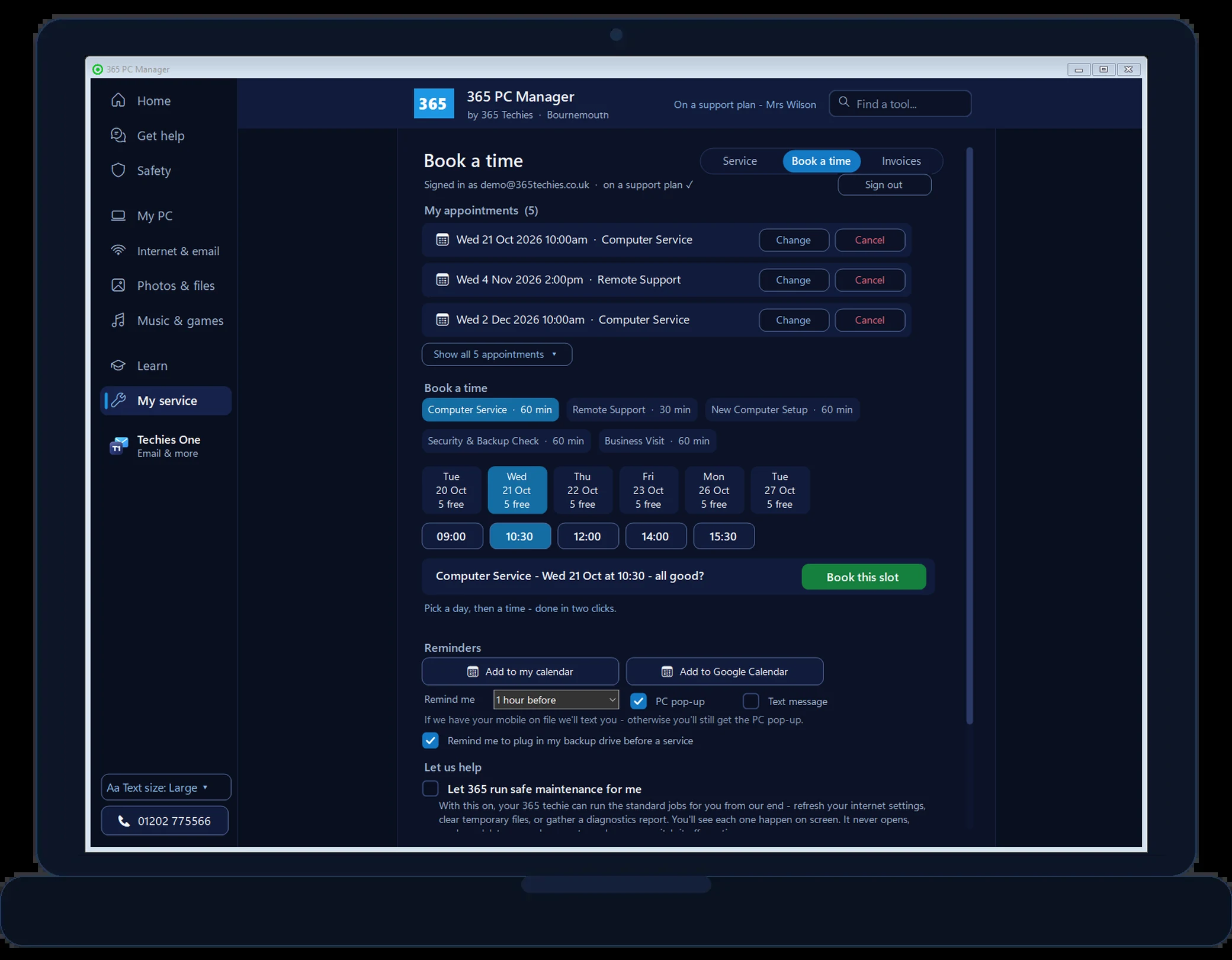
Nothing mocked up — this is version 36 itself, captured on our own office PC. The music, radio and DJ pictures use a sample library, and Booking shows our demo account.
A clear 0–100 score and plain-English notes on anything worth sorting.
Check everything
Every check grouped on one Tools page with a search box. One tap runs seventeen of them and lists what needs a look.
Network check & devices
Wi-Fi signal, band and speed, a lag test for games and video calls, and the devices and shared folders on your home network.
Network safety & programs
Your firewall, anything your router has opened, Remote Desktop and old file sharing — plus two security programs fighting, or adware a home PC doesn’t need.
Scam check & safety settings
Check a link or a leaked password safely, spot the fake “I’m not a robot” trick, see which of Windows’ protections are on, and which programs used your camera and microphone.
Windows Update & printers
Whether Windows is getting its monthly updates and how long it will keep getting them, and which printers have a problem or documents stuck in the queue.
What keeps going wrong
Programs that keep crashing or freezing, and any blue screens, from Windows’ own records — in plain English.
Screen & sound check
Is your screen at its own size and refresh rate, and where is the sound actually going?
Gaming check
Graphics card temperature, fan, driver and slot, the settings that cost frames, and Watch while I play.
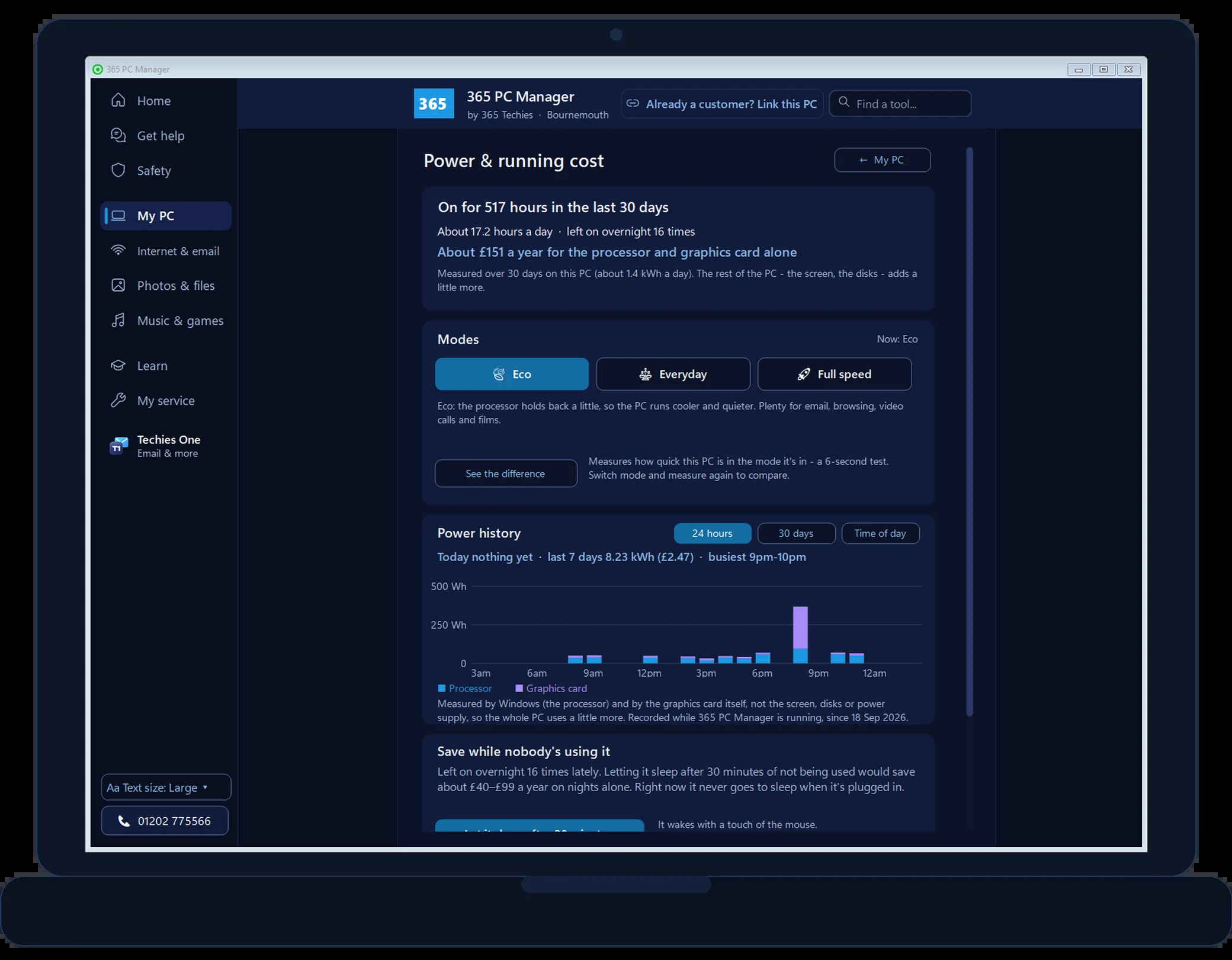
Eco, Everyday or Full speed
Pick how hard your PC works, with a live Power now reading, a power history and the yearly running cost.
Boost, performance & every drive
Clear the temporary files Windows leaves behind, watch live graphs, see what starts with Windows, and move big files to a drive with room.
Backup & OneDrive check
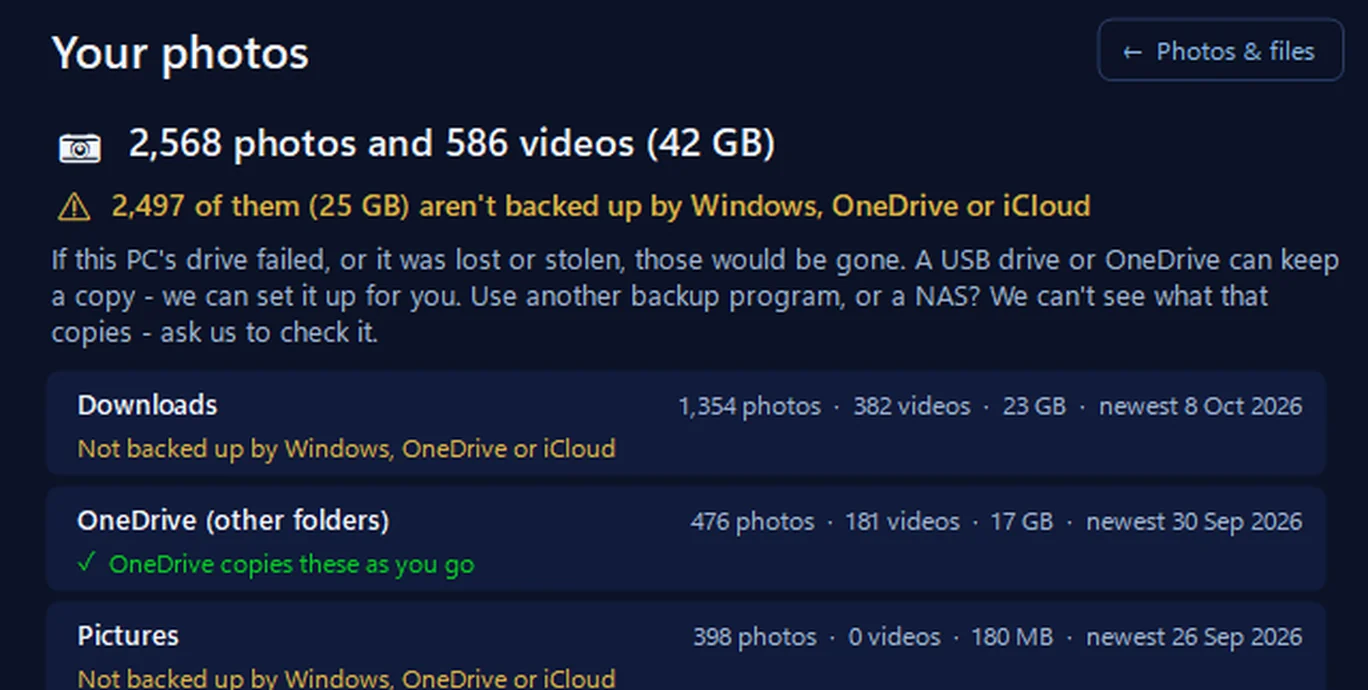
Know whether your files are really backed up, OneDrive folder backup included, test your backup, and what to do if it isn’t.
Games
Nine card games with big, clear cards, and our own arcade games — no adverts, no sign-in.
Service visits, reminders & reports
Book or change your service in-app, get reminders before each visit, and a written report after every one.
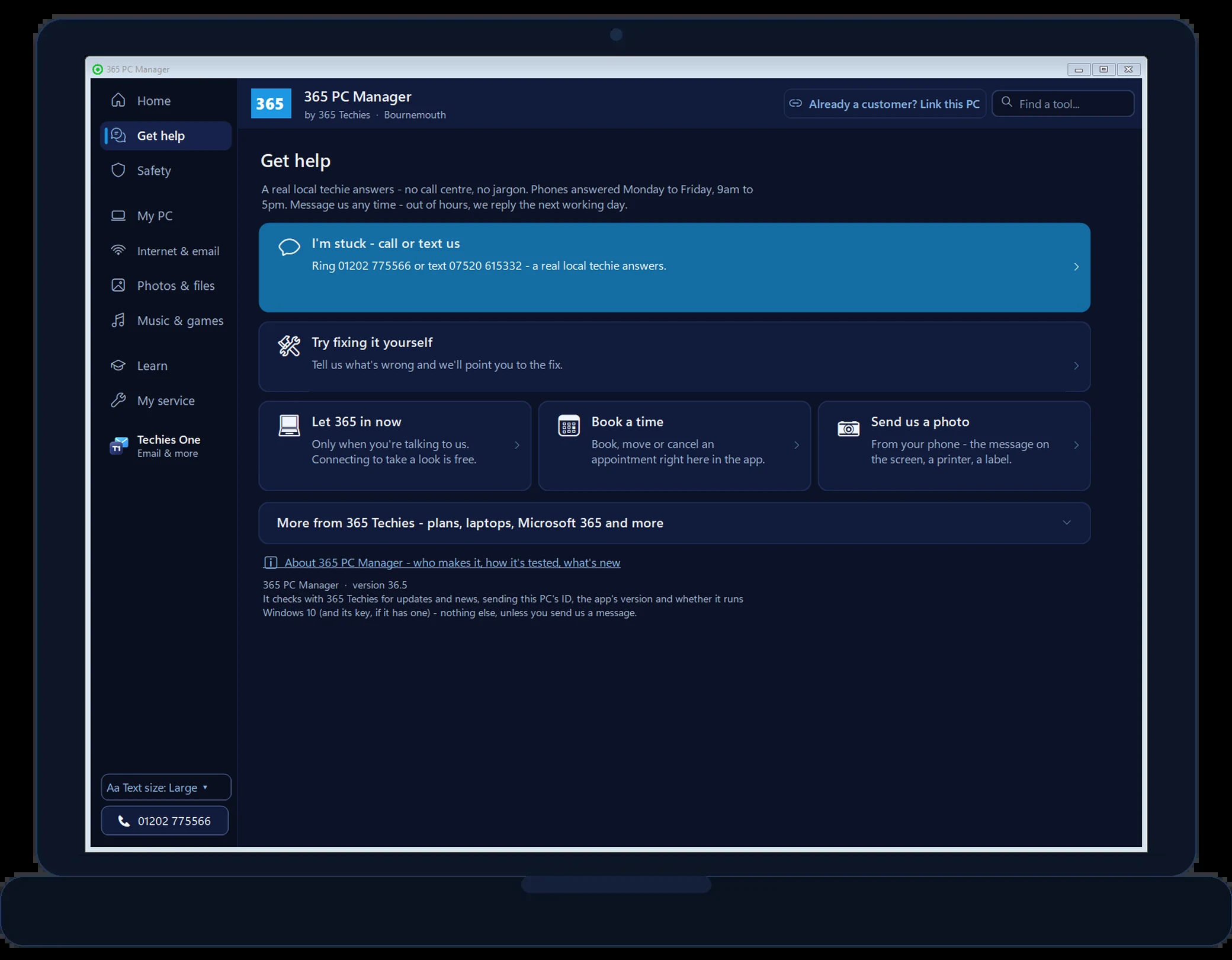
Help in one tap
Stuck? Reach a real local techie without hunting for the number.
Virgin email: check & move
The tool we built in-house to move customers’ Virgin Media, blueyonder, ntlworld and virgin.net email — now in the app, so you can move it to Gmail, free.
// BUILT IN-HOUSE · NOW FREE IN THE APP · VIRGIN MEDIA EMAIL
Our own Virgin Media email mover, built in-house
Virgin is handing virginmedia.com, blueyonder, ntlworld and virgin.net email to a company called Junara, and keeping an address means paying for it. We built our own tool, in-house, to move our customers’ Virgin Media email into Gmail — and it’s now in 365 PC Manager: it checks your Virgin mailbox and moves it into Gmail for you, free, and without a Virgin app password.
Check my Virgin email
Every folder, how many emails, how big, and how many days the move will take. It only reads.
Move it to Gmail myself
Folders and dates kept. Gmail takes about 500 MB a day, so a big mailbox takes a few days — it carries on by itself. You need a Google app password.
Where your address is used
The companies that email you, so you can change your address with each one.
Stuck? We’ll do it for you
£60 per email address, agreed before we start, with a full PC service and written report included.
Worried about Mum or Dad’s computer, but you live the other end of the country? Free Family View lets you see their PC’s health from your own phone or laptop — so you can spot trouble before it becomes a panicked phone call.
It’s health visibility, not spying: you see the score, backup and safety basics — never their screen, their files or their browsing. They stay in control, and can switch it off any time.
And if something does need a hand, you’re dealing with a real Dorset firm you can actually phone — not a call-centre. More about Family View →
// THE BIG ONE · ON A SUPPORT PLAN
Your service visits, sorted from the app
Book, change or cancel your computer service right inside the app — real available slots, no phoning around (unless you want to; we do like a chat).
Then the app quietly takes care of the rest. You get a Windows notification the day before with a countdown to your visit, and another 15 minutes before reminding you to plug your backup drive in. One tap tells us “I’m ready, come on in” when you’re happy for us to connect.
And after every service you get a written report: what we did, how your PC scored, and honest advice and recommendations in plain English. It is emailed to you, saved in your portal and left on your Desktop. Proof, not promises.
// POWER, SOLAR & SMART HOME
See what your PC really costs to run
The app works out how many hours your PC is switched on and roughly what that costs a year at your electricity price, then shows what letting it sleep when nobody’s using it would save. Pick Eco, Everyday or Full speed on the Home screen, watch a live Power now reading, and look back at what it used hour by hour and day by day. On a laptop it reads live watts from the battery and the battery’s health; on a desktop, a plug-in energy meter reading makes the figures exact. No app yet? Work out what your PC costs to run.
Off-grid or on solar? Link your Victron VRM and see your live solar, battery and usage right in the app — the same custom Victron dashboards we design and fit worldwide. Run Home Assistant? Link it and see at a glance that your smart home is online and healthy.
// FREE, AND HONEST ABOUT IT
Genuinely free — here’s the deal
The health check, boost, performance graphs and tools are free forever, no catch and no sign-up. We make it because a PC that’s looked after breaks down less. And when people meet how we work, some choose to put their computers on one of our support plans (from £18.25/month per computer).
On a plan, the app unlocks the extra bits — priority help, tidying old backups, and the six-weekly service that keeps your computer up to date and secure, written up every time. Switching start-up programs off is free for everyone. Rather service it yourself, without a plan? An optional key (£19.99 for 12 months on up to 3 PCs, no renewal) unlocks the full service for you to run whenever you like. But the free app stands on its own, and we’re happy either way.
Made by 365 Techies — family-run in Bournemouth since 1995, Dell specialists, Microsoft Office Specialists, 4.9 on Google. Real local people you can actually phone.
Free health score & advice, forever
One-tap boost & clean-up
Network, screen, sound & gaming checks
Startup & storage tools
Backup & antivirus check
A real techie one tap away
Tiny — sits quietly in your tray
Windows 10 & 11
// UNDER THE BONNET
What the free computer health check actually looks at
Everything is read from your own PC — measured, never made up. If something can’t be read, the report says so rather than guessing.
Check
What you get
Drive health & condition
The drive’s own self-check (SMART) — the earliest warning most drives give before failing
How old your PC is
An honest age estimate from the processor generation, and what that means for its future
Memory
How much you have, the most this machine can take, and whether a top-up is worth it
Backup
Whether a backup is genuinely running — not just installed — including OneDrive folder backup
Antivirus & updates
Whether real-time protection is on and updates have finished
Storage & startup
Every drive at a glance, where your space went, and what slows your start-up
Programs
Two security programs fighting, protection that has stopped updating, and tune-up tools, driver updaters and adware a home PC doesn’t need
Network safety
Whether the firewall is on, anything your router has opened to this PC, Remote Desktop, old SMB1 file sharing and remote-control tools
Windows Update & printers
Whether the monthly updates are arriving, and printers with a problem or documents stuck in the queue
Value for money
What machines like yours typically cost new, and your honest cost-per-week so far
// NOT ANOTHER “PC CLEANER”
Why this isn’t like those scary “free PC scan” tools
You’ve probably seen them: a “free scan” that finds hundreds of alarming “problems”, then demands money to fix them. Some are outright scams aimed at older people; even the famous ones are pushy. We built 365 PC Manager to be the opposite — because our name and 30 years of local reputation are attached to it.
It reads your PC’s real figures and tells you the truth, even when the truth is “your computer is fine”. No invented problem counts, no red flashing warnings, no pop-up upsells, no nagging. And if it ever says something needs attention, you can ring an actual person on 01202 775566 and ask why.
Reads your PC — changes nothing without a tap
No invented “problems” or scare counts
No pop-ups, no nagging, no pressure to pay
Your data stays on your PC (customers with a key share only the health score, so we can help proactively)
Made by a phoneable Bournemouth family firm, est. 1995
If it can’t measure something, it says so
// EASY TO MIX UP
Is this Microsoft’s “PC Health Check” or “PC Manager”?
No — similar names, different things. Microsoft’s PC Health Check mainly answers one question: can this PC run Windows 11? Microsoft’s PC Manager clean-up utility isn’t officially available to download in the UK: it has been region-limited out of the UK Microsoft Store for years (as of mid-2026). 365 PC Manager is different. Made in Dorset for UK users, it is a plain-English health check of the things that actually catch people out: drive health, backup, protection, risky programs, network openings, missed Windows updates, age and value. Your data stays on your PC, and a real local techie is one tap away when you want a human.
Checking if this PC can run Windows 11?
That’s the job of Microsoft’s PC Health Check, and it’s free: type PC Health Check into the Start menu, because many Windows 10 PCs already have it. Or start in your browser with our Can this PC run Windows 11? check, and see where your version stands on Is my Windows still supported?
Looking for Microsoft PC Manager in the UK?
You won’t find it in the UK Microsoft Store. 365 PC Manager is free, works here with no change of region, and does the everyday jobs people want it for: a health score, a tidy-up, start-up programs and Windows Update. Download it free.
// BUILT IN DORSET · GROWING WITH YOU
An app with a workshop behind it
365 PC Manager is designed and built by us, right here — the same team behind our custom Victron dashboards and 365 AI OS. We build custom Windows apps and dashboards that streamline the systems homes and small businesses actually run on. This app grows the same way, shaped by what our customers ask for.
On the drawing board
Octopus Energy smart-meter readings in the app, and a hook-up to our 365 AI OS assistant - both in development, honestly labelled until they're real.
Have an idea?
If there's something your home or business wishes a computer did automatically, tell us - the best features in this app started as customer questions.
Made for our neighbours
Built for Bournemouth, Poole & Dorset customers first - which is why there's always a real phone number in the corner.
// THE BIT NOBODY ELSE SHOWS YOU
It tests your broadband too
Most PC tools stop at the PC. 365 PC Manager also measures your actual broadband speed (download, upload and latency) and remembers it. Slow internet stops being an argument and starts being a number.
A real measurement, not a guess
It downloads and uploads real data and times it, the same way any speed test does. Then it tells you whether you were on Wi‑Fi or plugged in, because that changes what the number means.
It knows Wi‑Fi from your line
A Wi‑Fi reading is the speed at your desk, not the speed your provider sells you. The app says so plainly, so you never complain to your provider about a Wi‑Fi problem.
Compared with your last visit
On a 365 support plan we run it at every service, about every six weeks. Next time it shows what changed — so a line that has quietly degraded gets noticed by us, not by you.
It records who your provider is
BT, Sky, Virgin, Three, Starlink — whoever. When you ask “should I switch?”, we can answer from what your line actually does, not from an advert.
// A FAILED TEST IS NEVER SHOWN AS ZERO · WE NEVER STORE YOUR FULL POSTCODE
// FREE PC BENCHMARK
How fast is your computer, really?
Six real tests — processor (single & all cores), encryption, memory, graphics and storage — run live in your browser with a clear score, honest advice and a share card. No downloads, no sign-up.
Takes about 20 seconds and will make your computer work hard (the fan may spin up briefly) — that’s normal, and it does no harm. Close other heavy programs, and plug laptops in, for the fairest score.
Warming up…
0
365 Benchmark Score
FREE APP · WINDOWS 10 & 11 · NO SIGN-UP
See inside it, free
A browser can only time your computer. Our free Windows app, 365 PC Manager, checks the rest.
Made by us, a family IT firm in Bournemouth since 1995, and digitally signed by 365 Techies Ltd. No fake errors, no scare tactics.
Where you land (indicative bands · ◆ measured by us)
You95
Older laptop & hard driveTypical office PC (~2017)Modern mid-rangeHigh-end desktop
Against everyone tested here
0255075100
◆ Measured by us on this scale: 95 365 workstation (Threadripper PRO 5965WX, RTX 3090, 128 GB, 12 Sep 2026).
Anonymous: your score, the six sub-scores, thread count, browser, operating system and the graphics card name where your browser shares it. Nothing personal is sent or kept, and each computer counts once.
An indicative browser benchmark — real-world speed also depends on startup programs, disk health, updates and malware. Scores are our own 0–100 scale and aren’t comparable with native benchmark suites.
// GOOD QUESTIONS
Frequently asked
Is the 365 PC Manager app really free?
Yes — the health score, network safety and programs checks, Windows Update and printer checks, the backup and OneDrive check, live performance graphs, one-tap boost, seeing what starts with Windows and switching it off, and the storage tools are free forever, no sign-up. If you go on a 365 support plan we unlock the extra bits (priority help, tidying old backups and the six-weekly service), or, without a plan, an optional key (£19.99 for 12 months on up to 3 PCs, no renewal) lets you run the full service yourself. You never have to do either.
What is the written Service Report?
After every six-weekly service on a support plan we write up what we found and what we did. That means your computer’s health score and how it moved since last time, and the security position on the day (Windows updates, firewall, antivirus and drive encryption, each read rather than assumed). It also records every drive’s hours, temperature and wear, whether your backup ran and how much room is left, and how long any guarantee has to run. It is emailed to you, kept in your portal for good, and left on your Desktop.
How often is my computer serviced on a plan?
About every six weeks. Each service applies Windows, driver and application updates, runs a security check, a network safety check and a system file check, and checks your programs, your backup and every drive. It measures your broadband speed from the machine and clears out temporary files, the same routine for a home laptop as for a business fleet.
Can I show the Service Report to my bank or insurer?
Yes. Each report is dated and kept on file. If a bank or insurer asks whether your computer was protected and up to date, you can show what was checked, what was updated and when: a record of the reasonable care you took. It is the same kind of write-up we produce for a customer’s bank after a scam, only here it exists before anything goes wrong. It is evidence of care, not a guarantee of any outcome.
Will it slow my PC down?
No. It’s tiny and sits quietly in your system tray. In the background it does three small things. It checks your health score about once an hour, watches the clock for any service reminder you’ve set, and quietly updates itself when a new version is out (only ever while the window is closed). None of that is anything you’d feel. The live performance graphs run only while you’re watching them.
Is it safe to install?
Yes. It reads your PC’s health (memory, disk, antivirus, backup) and changes nothing unless you tap a button. The one exception is entirely your choice. Support-plan customers can switch on “let 365 run safe maintenance”, which lets us run a short fixed list of harmless tidy-up jobs without ringing you first: clearing temporary files, flushing the network cache, collecting a diagnostics summary. It’s off unless you turn it on, and you can turn it off again any time. We’re 365 Techies, a family-run Dorset IT firm here since 1995, rated 4.9 on Google.
Does 365 PC Manager keep my computer secure?
The free app shows you where you stand — antivirus, backup, drive, memory, risky programs and network settings, all checked on your PC and not sent to us — and never pretends to be more than that; it is not an antivirus. Being on a 365 support plan is what keeps a computer up to date and secure: every six weeks every program on it is updated, not just Windows and Microsoft 365, the security position is read and written down, your network’s safety is checked, and the backup is checked. Criminals now use AI to hunt for a single out-of-date program to use as a back door, so keeping everything current is the point of the service.
Does it send my information anywhere?
Yes, a little — here’s exactly what. Once an hour it checks with us for updates. If your PC isn’t linked to us, that is all it sends: an anonymous ID for the machine, the app’s version and whether it runs Windows 10 (plus its key, if it has a free month or one you bought). Once you link it as a customer, it also sends — hourly, and within 15 minutes of a change — the PC’s health summary and specification — the score and the reasons behind it, whether antivirus and backup are on, the drives, memory and temperatures, battery health, the free courses you’ve ticked off and the PC name you chose — so your techie can spot a problem before it bites. It never sends your files, photos, emails, browsing or passwords. Run the broadband test and your connection is checked against an outside service to name your provider — see our privacy policy.
Can 365 PC Manager move my Virgin Media email to Gmail?
Yes, free, with no sign-up. It checks your virginmedia.com, blueyonder, ntlworld or virgin.net mailbox (every folder, how many emails, how big), moves it into Gmail without a Virgin app password — you need a Gmail account with a Google app password — and lists the companies that email you, so you can change your address with each one. Gmail accepts about 500 MB a day this way, so a big mailbox takes a few days; it carries on by itself. Stuck? We do it for you for £60 per email address, with a full PC service included. How it works.
What does ‘Boost’ actually do?
It clears the temporary files Windows and your programs leave behind, to give you back disk space, and tells you how much it cleared. It never touches your documents, photos or programs.
How do I get it, and is the download safe?
It’s live: tap Download free for Windows, open it, and it installs in a couple of clicks — then it lives in your Start menu like any other program, and you can remove it any time from Settings > Apps. The download is digitally signed by 365 Techies Ltd (a Microsoft-issued certificate), so Windows shows our name as the publisher rather than “unknown”. If you’d rather we set it up for you, ring 01202 775566 and we’ll do it free, by hand.
Why can’t I download Microsoft’s PC Manager in the UK?
Microsoft hasn’t made its “PC Manager” utility officially available in the UK Microsoft Store — it has been region-limited for years (still, as of mid-2026). If what you actually wanted was a friendly Windows health check and tidy-up from someone you can phone, that’s exactly what our free 365 PC Manager is. Made in Dorset, works right here, and your data stays on your PC.
Rather we just sorted it?
Put your computer on a 365 support plan and we’ll keep it healthy for you — the app included.