// PHONE PHOTOS WON’T OPEN
HEIC photos won’t open on your Windows PC?
You copied photos from an iPhone or iPad (or some Android phones) to your PC and they end in .HEIC. Windows shows blank icons, the Photos app asks for an extension, and the website you’re uploading to won’t take them. Here’s why, what Windows needs to open them, and how to turn them into ordinary JPGs — without uploading your photos to a converter website. Rated 4.9 on Google.
- ● Nothing uploaded
- ● Free photo tools app
- ● Windows specialists since 1995
/01 — START HERE
Why your PC won’t open HEIC photos
HEIC is the photo format iPhones and iPads use by default, and some Android phones can use it too. It keeps the same picture in a smaller file than a JPG, which is why phone makers like it.
Windows can show HEIC photos, but only with two add-ons from Microsoft: HEIF Image Extensions, and an HEVC video extension. (The photos are compressed the same way as HEVC video, which is why a “video” add-on is needed for pictures.) Many PCs don’t have them, so the photos show as blank icons, or the Photos app says you need an extension to open them.
The photos aren’t damaged, and nothing is wrong with the phone or the PC. Windows simply can’t read the format yet.
// FIX IT WITH ME · STEP BY STEP
Get HEIC photos opening, step by step
The steps from this guide, one at a time, in the order that fixes the most cases fastest. Tell it what happened and it shows the next step. Nothing here leaves your device.Last reviewed 11 October 2026
-
01Install HEIF Image Extensions
In the Microsoft Store app, search for HEIF Image Extensions by Microsoft and choose Get. It is free.
Do they open now? -
02Install an HEVC extension
If the PC doesn’t already have HEVC Video Extensions from Device Manufacturer, get Microsoft’s HEVC Video Extensions from the Microsoft Store.
Do they open now? -
03Open the photo again
Close and reopen the Photos app or restart the PC. HEIC photos now open and show as thumbnails.
Do they open now? -
04Save JPG copies
Open a photo in Paint and choose File, Save as, JPEG picture, or convert a whole folder with a program that works on your PC.
Do they open now?
Rather have it done for you? Remote help from £20, or in person across Bournemouth, Christchurch, Poole, Ringwood and the New Forest, with no call-out fee.
Sorted{mins}. Nice work.
Close and reopen the Photos app after each add-on.
Still won’t open? That is a remote job.
With your permission we connect to your screen and sort it in one session. Usually the same day, remote help from £20, and no fix, no fee.
HEIC photos won’t open on your Windows PC? - the fix order (365techies.co.uk/heic-photos-wont-open-on-windows/) 1. Install HEIF Image Extensions: In the Microsoft Store app, search for HEIF Image Extensions by Microsoft and choose Get. It is free. 2. Install an HEVC extension: If the PC doesn’t already have HEVC Video Extensions from Device Manufacturer, get Microsoft’s HEVC Video Extensions from the Microsoft Store. 3. Open the photo again: Close and reopen the Photos app or restart the PC. HEIC photos now open and show as thumbnails. 4. Save JPG copies: Open a photo in Paint and choose File, Save as, JPEG picture, or convert a whole folder with a program that works on your PC. Still stuck? 365 Techies fix it remotely: 01202 775566 - https://365techies.co.uk/remote-support/At a glance
| What HEIC is | The photo format iPhones and iPads use by default, and some Android phones can too. Smaller files than JPG for the same picture. |
|---|---|
| Why Windows won’t open it | It needs two Microsoft add-ons: HEIF Image Extensions and an HEVC video extension. Many PCs don’t have them. |
| Are the photos damaged? | No. Windows just can’t read the format yet. |
| The add-ons | HEIF Image Extensions is free. The HEVC one is free on some PCs where the maker included it; otherwise Microsoft charges a small one-off fee. |
| Turn them into JPGs | Open one in Paint and Save as JPEG, or convert a whole folder with our free app. |
| Converter websites | They mean uploading private photos, often with their location hidden inside. Convert on your own PC instead. |
| Free tool | Photo tools in our free 365 PC Manager app turns HEIC into JPG, shrinks photos to email and makes PDFs — nothing uploaded. |
// NEED THIS FIXED RIGHT NOW?
Skip the DIY — call 01202 775566 and we can be looking at your screen within minutes. You watch everything we do, and most problems on this page are fixed in one short remote session. (Mon–Fri, 9am–5pm.)
/02 — OPEN THEM
Get Windows to open them
- Install HEIF Image Extensions. Open the Microsoft Store app, search for HEIF Image Extensions (made by Microsoft) and choose Get. It’s free.
- Install an HEVC extension. Some PCs already have the free HEVC Video Extensions from Device Manufacturer, which the PC’s maker included. If yours doesn’t, Microsoft’s HEVC Video Extensions in the Store costs a small one-off fee — US$0.99 in the US (Windows Latest). Only ever install it from the Microsoft Store, never from a download site.
- Open a photo again. Close and reopen the Photos app, or restart the PC. HEIC photos should now open, and show as thumbnails in File Explorer.
Every Windows program that uses Windows’ own picture support — Photos, Paint, File Explorer, and our app — needs these add-ons to read HEIC.
/03 — TURN THEM INTO JPGS
Turn them into JPGs, on your own PC
Once Windows can open them, you can make ordinary JPG copies that every website, email and older program accepts:
- One or two photos: open the photo in Paint, choose File, then Save as, then JPEG picture.
- A whole folder: our free app’s Photo tools turns as many as you pick into JPGs in one go, and turns phone photos the right way up as it does (next section).
Your originals are kept either way, so nothing is lost.
/04 — THE QUICK WAY
Let our free app do a whole folder
FREE · WINDOWS 10 & 11 · NO SIGN-UP
Photo tools: done on your PC, nothing uploaded
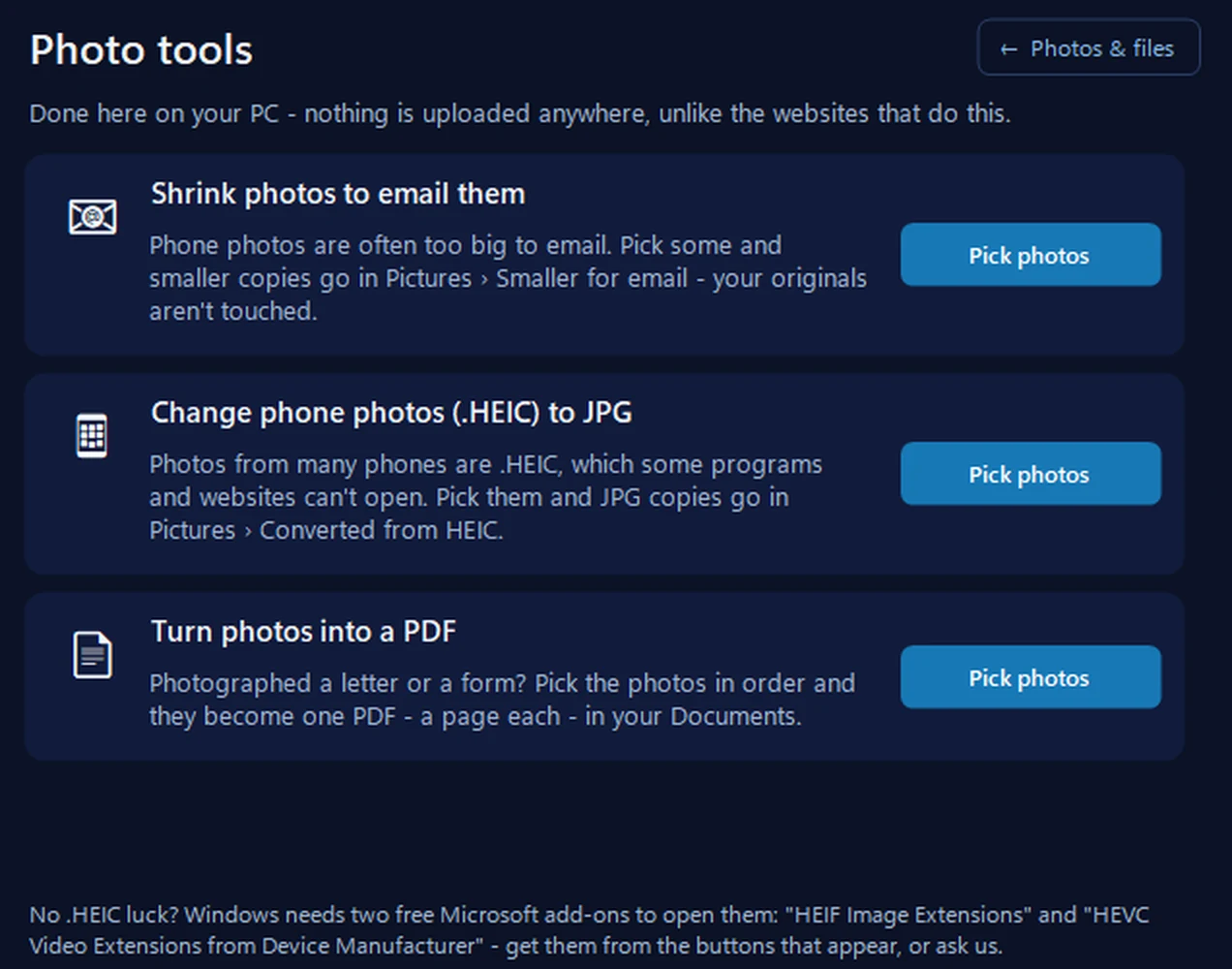
Change phone photos (.HEIC) to JPG — pick as many as you like and JPG copies go into Pictures, in a Converted from HEIC folder, turned the right way up. Shrink photos to email them makes smaller copies for email, and Turn photos into a PDF makes one PDF, a page per photo. Your originals are never touched. It uses Windows’ own picture support, so for HEIC it needs the same two Microsoft add-ons, and it tells you if they’re missing.
In the app: Photos & files, then Photo tools.
Download 365 PC Manager free ↓What else it checks
Made by us, a family IT firm in Bournemouth since 1995, and digitally signed by 365 Techies Ltd.
/05 — YOUR PRIVACY
Why not just use a converter website?
Search for “HEIC to JPG” and you get pages of free converter websites. Most of them work, but every one means uploading your photos to someone else’s computer — family pictures, children, the inside of your home. Phone photos also often carry the place they were taken, hidden inside the file.
If the photos are private, read the site’s privacy policy before uploading anything, or convert them on your own PC instead, where they never leave it.
/06 — AT THE SOURCE
Stop the phone making HEIC photos
If you’d rather the phone took JPGs in the first place, Apple explains the setting on its own help page: on the iPhone, Settings, then Camera, then Formats, then Most Compatible. New photos are then saved as JPG; photos already taken stay HEIC. Apple also says photos copied to a computer with a USB cable may be converted to JPG on the way (Apple).
We look after Windows PCs only, not iPhones or iPads, so for anything on the phone itself, Apple’s own help is the place to go.
/07 — TOO BIG TO EMAIL
Photos too big to email?
Phone photos are often several megabytes each, and email services limit how much one email can carry — Gmail’s limit is 25 MB of attachments. A handful of full-size photos can go over it.
Our app’s Shrink photos to email them makes smaller copies (1,600 pixels on the longest side, still sharp on any screen) in a separate folder, and leaves your originals untouched. And Turn photos into a PDF puts photographed letters or forms into one PDF, a page each, ready to send.
/08 — WHEN TO CALL US
When to call us
If HEIC photos still won’t open after both add-ons are installed, or you have hundreds to sort out on a Windows PC, we can do it with you. Ring 01202 775566 or text 07520 615332, Monday to Friday, 9 to 5. With your permission we connect to your Windows PC and sort it while you watch: usually the same day, remote help from £20, and no fix, no fee.
We work on Windows PCs only — not iPhones, iPads or Macs.
FAMILY-RUN SINCE 1995 · ★ 4.9 ON GOOGLE · 200+ COMPUTERS UNDER OUR CARE · NO FIX, NO FEE · SAME-DAY REMOTE SUPPORT
// GOOD QUESTIONS
Frequently asked
What is a HEIC file?
A photo in the format iPhones and iPads use by default (some Android phones can use it too). It holds the same picture as a JPG in a smaller file, but Windows needs Microsoft add-ons to open it.
Why won’t HEIC photos open on Windows 11?
Windows needs two Microsoft add-ons for them: HEIF Image Extensions and an HEVC video extension. Without them, Photos asks for an extension and File Explorer shows blank icons.
Is the HEVC extension free?
On some PCs, yes: the “from Device Manufacturer” version is free where the PC’s maker included it. Otherwise Microsoft’s HEVC Video Extensions costs a small one-off fee in the Microsoft Store. HEIF Image Extensions is free.
Are online HEIC to JPG converters safe?
Many work, but they all mean uploading your photos to someone else’s server, often with the location they were taken hidden inside. For private photos, convert them on your own PC.
Does converting HEIC to JPG lose quality?
Not that you’d notice for viewing, printing or sharing. The JPG is usually a bigger file, and your original HEIC is kept, so nothing is lost.
Can you help with my iPhone?
No. We work on Windows PCs only, not iPhones, iPads or Macs. For settings on the phone, Apple’s own support is the place to start.
// Still stuck?
Still won’t open?
We get your Windows PC opening and converting phone photos, while you watch. We work on Windows PCs only, not phones. Call 01202 775566 or text 07520 615332.
We’ll fix it with you
- Checking the problem is free
- Fixes from £20, agreed before we start
- We phone first, and you watch every step
Stop it happening again
- A full service every six weeks, written up
- Every program kept up to date
- Unlimited remote help when you need it
Plans from £18.25 a month per computer · cancel any time
Mon–Fri 9–5 · family-run since 1995 · rated 4.9 on GoogleTurn them into JPGs →