// WHAT A PC COSTS TO RUN, UK PRICES
How much does your PC cost to run?
Pick your kind of computer, how long it’s on and your price a unit, and the calculator works out the cost an hour, a day, a month and a year at UK prices. Filled in with today’s price cap of 26.32p a unit. Rated 4.9 on Google.
- ● Free calculator
- ● UK price cap, October 2026
- ● Nothing you type is sent anywhere
/01 — THE CALCULATOR
Work out what your PC costs to run
Choose the kind of computer, or type its watts if you know them, then how many hours a day it’s on. The figures are typical; yours will differ with what you do on it, and the app below measures the real thing.
At your price a unit, from the watts and hours above. Standing charge not included: you pay that whether the PC is on or not. The price filled in is the price cap for 1 October to 31 December 2026 (Ofgem, Direct Debit, average across Great Britain); your bill shows your own. Nothing you type leaves this page.
At a glance
| Price a unit used | 26.32p a kWh, Ofgem’s price cap for 1 October to 31 December 2026 (Direct Debit, GB average). |
|---|---|
| A laptop, 6 hours a day | About £17 a year at 30 watts. |
| An office desktop and screen, 8 hours a day | About £61 a year at 80 watts. |
| A gaming PC, 3 hours of games a day | About £110 a year at 380 watts. |
| Left on day and night | An 80-watt desktop idling around the clock: about £184 a year. |
| Biggest saving | Let it sleep, and switch it off overnight. A sleeping PC uses a watt or two. |
/02 — WORKED EXAMPLES
What typical PCs cost at 26.32p a unit
| Computer | Power and use | An hour | A day | A year |
|---|---|---|---|---|
| A laptop for email and browsing | 30 W, 6 hours a day | 0.8p | 4.7p | £17 |
| An office desktop and its screen | 80 W, 8 hours a day | 2.1p | 16.8p | £61 |
| A gaming PC and screen, 3 hours of games | 380 W, 3 hours a day | 10.0p | 30.0p | £110 |
| A desktop left on day and night, mostly idle | 80 W, 24 hours a day | 2.1p | 50.5p | £184 |
Typical figures, at 26.32p a unit, without the standing charge. Price from Ofgem, 1 October to 31 December 2026.
/03 — WHAT USES IT
Where the power goes
- The graphics card, when you game. In a gaming PC it uses more than everything else put together while a game runs, and very little when you’re just browsing.
- The processor. Busy when you’re working it, idling the rest of the time.
- The screen. Usually 15 to 40 watts for a desktop monitor, more for a big or very bright one.
- Being left on. An idle desktop still draws tens of watts, all day and all night. Asleep, it’s a watt or two.
The size of the power supply doesn’t set the bill: a 750-watt supply only gives the parts what they ask for.
/04 — CUT THE COST
Easy ways to cut it
- Let it sleep. Settings > System > Power: put the screen and the PC to sleep after 10 to 15 minutes.
- Switch it off overnight. Modern PCs don’t mind being switched off, and they start in seconds.
- Use a power-saving mode for everyday work. Email, browsing and films don’t need full speed.
- Cap the frame rate in games. A game running at hundreds of frames a second on a 144Hz screen burns power for nothing.
- Turn the screen’s brightness down a little. It’s easier on the eyes too.
/05 — MEASURE YOURS
Measure what yours really uses
A plug-in energy meter between the wall and the PC’s plug gives the whole figure, screen included. Or let the app below measure as you go:
FREE · WINDOWS 10 & 11 · NO SIGN-UP
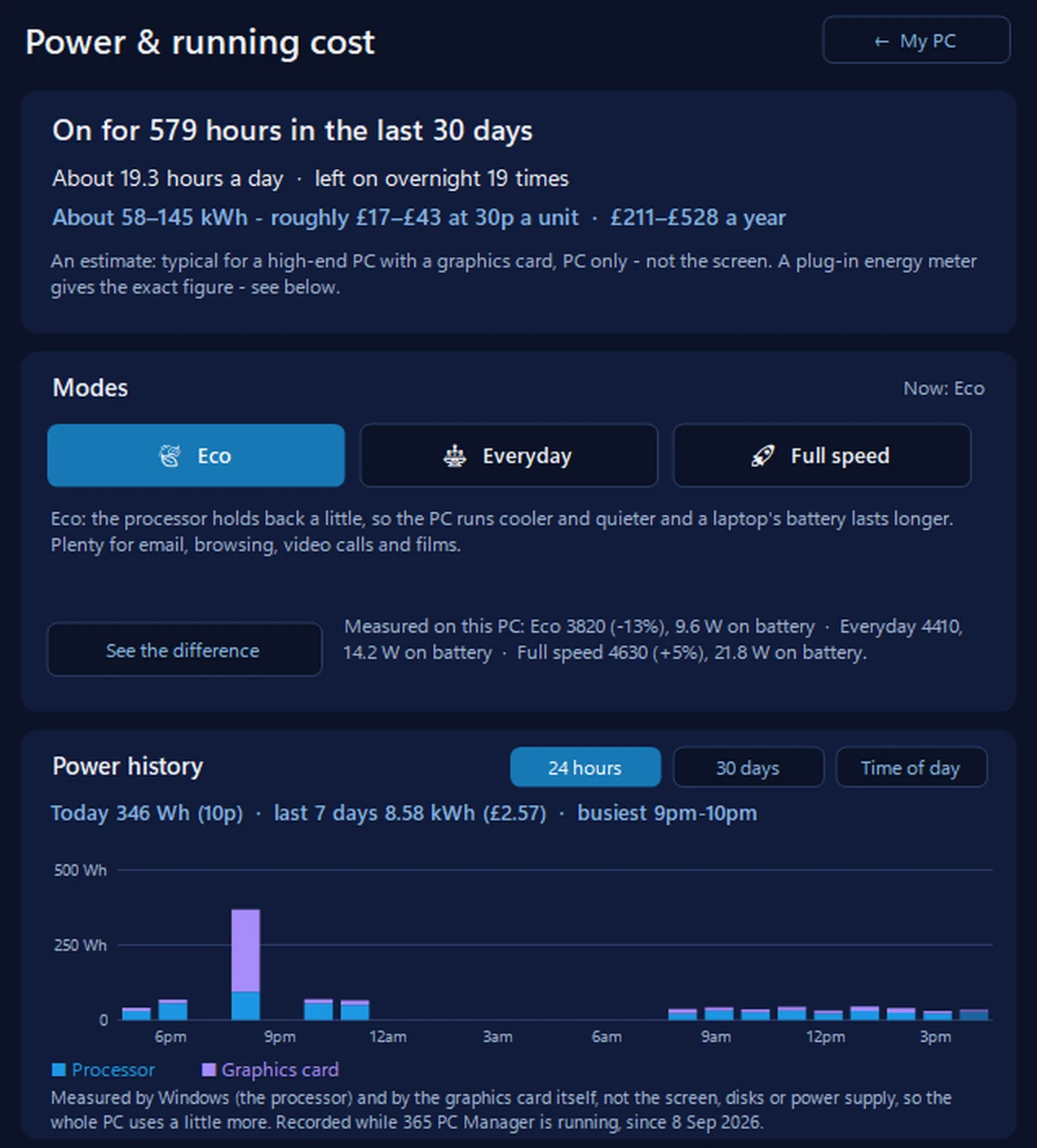
Power & running cost: what yours really uses
It records the power as it goes, hour by hour, and shows what it cost at your own price a unit, with Eco, Everyday and Full speed modes to cut it. On a laptop running on battery it reads the whole laptop; on a desktop, the processor and an NVIDIA graphics card — not the screen or disks, and it says so.
In the app: My PC, then Power & running cost.
Download 365 PC Manager free ↓What else it checks
Made by us, a family IT firm in Bournemouth since 1995, and digitally signed by 365 Techies Ltd.
FAMILY-RUN SINCE 1995 · ★ 4.9 ON GOOGLE · 200+ COMPUTERS UNDER OUR CARE · NO FIX, NO FEE · SAME-DAY REMOTE SUPPORT
// GOOD QUESTIONS
Frequently asked
How much does a gaming PC cost to run an hour?
A gaming PC and screen drawing about 380 watts while gaming costs about 10.0p an hour at 26.32p a unit. A high-end one drawing 550 watts, about 14.5p an hour.
Is it cheaper to leave a PC on or switch it off?
Switch it off, or let it sleep. An 80-watt desktop left on day and night costs about £184 a year; asleep it uses a watt or two. Starting up again uses very little.
Does a PC use electricity when it is switched off?
A very small amount while it’s plugged in, usually well under a watt or two. Switching off at the wall stops even that.
Is the standing charge included?
No. You pay the standing charge whether the PC is on or not, so it isn’t part of what the PC costs to run.
Does a bigger power supply mean a bigger bill?
No. A power supply only provides what the parts ask for, so a 1,000-watt supply in a PC drawing 200 watts uses about 200 watts.
What price a unit should I use?
The unit rate on your electricity bill. If you’re on the standard variable tariff, it’s close to the price cap: 26.32p a unit for 1 October to 31 December 2026, on average, paying by Direct Debit.
Why does 365 PC Manager show a lower figure on my desktop?
On a desktop the app measures the processor and an NVIDIA graphics card, which Windows and the card report, but not the screen, disks or the rest of the PC. A plug-in meter at the wall gives the whole figure. On a laptop running on battery, the app reads the whole laptop.
Want to know exactly what yours uses?
Our free 365 PC Manager app records the power your PC uses, hour by hour, and what it costs at your own price a unit.
01202 775566 · help@365techies.co.uk · MON–FRI 9AM–5PM