// THE RADIO ON YOUR COMPUTER
How to listen to the radio on your computer
Every UK station plays free on a Windows PC or laptop, with no aerial and no licence. BBC stations play on BBC Sounds, Heart, Capital, Classic FM and the other Global stations on Global Player, and most of the rest, local stations included, on Radioplayer or the station’s own website. Here’s the easy way to each, and what to do if there’s no sound. Rated 4.9 on Google.
- ● Free, no aerial needed
- ● Free radio app for Windows
- ● Windows specialists since 1995
/01 — START HERE
The quickest way: in your web browser
You don’t need to install anything to listen to the radio on a computer. Open your web browser — Edge, Chrome or Firefox — and go to the station’s own player:
- BBC stations (Radio 2, Radio 4, 5 Live, your local BBC station such as Radio Solent): go to bbc.co.uk/sounds, choose Stations, pick one and press play. You’ll be asked to sign in with a free BBC account — if you use BBC iPlayer, it’s the same one.
- Heart, Capital, Classic FM, Smooth, LBC, Gold and Radio X: these belong to Global, which plays them on its own Global Player at globalplayer.com.
- Most other UK stations: Radioplayer at radioplayer.co.uk, set up by the BBC and commercial radio together, puts hundreds of stations in one place. Or search for the station’s name: almost every station’s website has a Listen live button.
Found one you like? Press Ctrl + D to bookmark it, so next time it’s one click.
At a glance
| Does it cost anything? | No. Listening is free, and you don’t need a TV licence for radio. It only uses some of your broadband. |
|---|---|
| BBC stations | BBC Sounds, at bbc.co.uk/sounds, with a free BBC account (the same one as BBC iPlayer). |
| Heart, Capital, Classic FM, Smooth, LBC | Global Player, at globalplayer.com. Global keeps its stations to its own player. |
| Most other UK stations | Radioplayer, at radioplayer.co.uk, or the station’s own website. Local and community stations nearly all have a Listen live button. |
| No sound? | Check the volume, where the sound is going (speakers, headphones or a TV), and that the browser tab isn’t muted. |
| Easiest of all | Our free 365 PC Manager app lists the stations near you and plays them in one click. |
/02 — LOCAL RADIO
Local radio around Bournemouth, Poole and Dorset
Local stations are the ones people miss most when they move to listening on a computer. Around here they include BBC Radio Solent (on BBC Sounds), Heart Dorset (on Global Player), Greatest Hits Radio Dorset, Hot Radio, Nation Radio South Coast, Wave 105, and community stations such as Forest FM and Radio Wimborne, which play on their own websites.
Search for the station’s name and “listen live”, and check you’ve landed on the station’s own website before you press play.
/03 — THE EASY WAY
Or let our free app find them for you
FREE · WINDOWS 10 & 11 · NO SIGN-UP
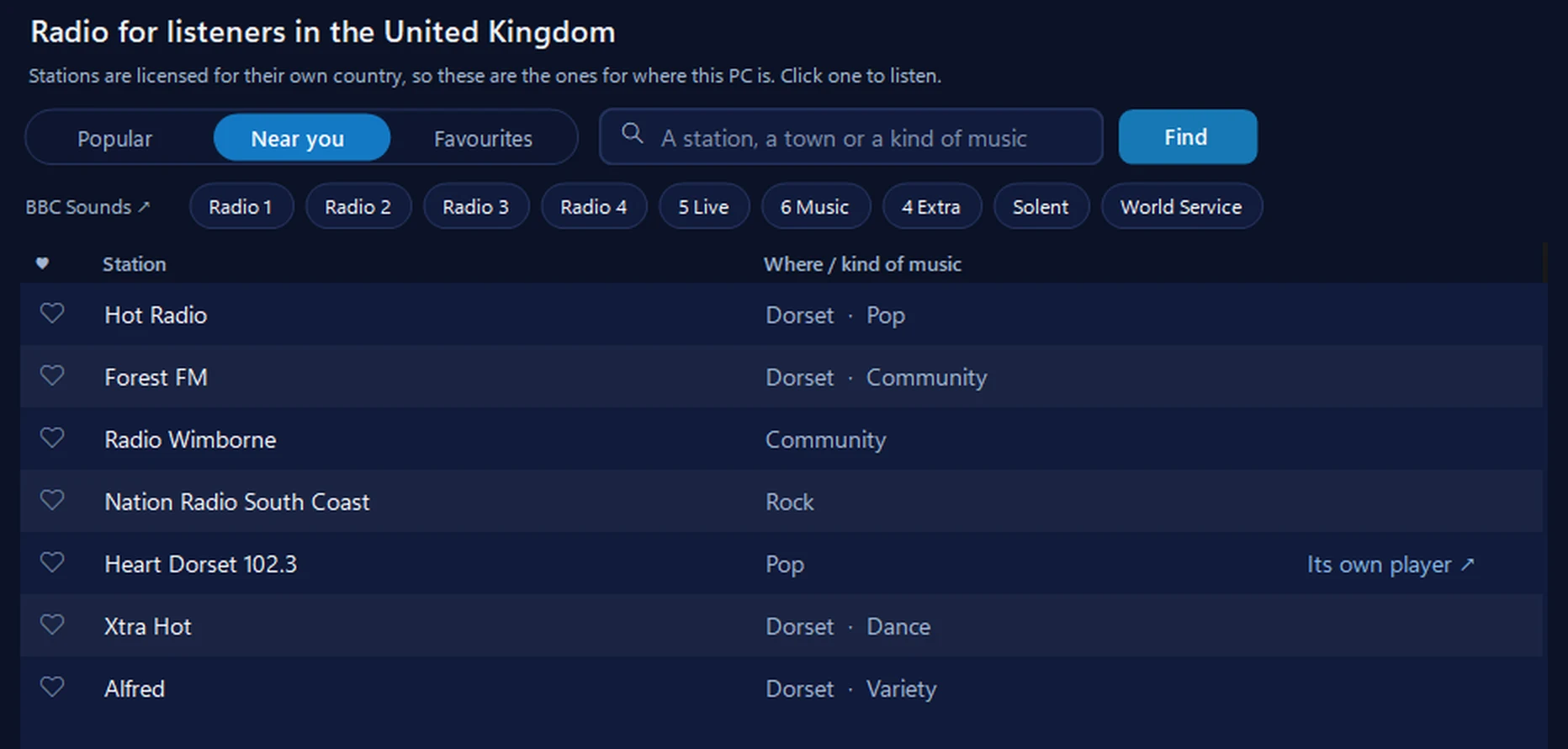
Radio: the stations near you, one click each
It lists the stations for the country your PC is in, with the ones near you first and a heart to keep your favourites, and plays them in one click. BBC and Global stations open in BBC Sounds and Global Player, because those broadcasters keep them to their own apps. The equaliser and Volume boost work on the music and stations it plays itself, and it can wake you with the radio.
In the app: Music & games, then the Radio tab.
Download 365 PC Manager free ↓What else it checks
Made by us, a family IT firm in Bournemouth since 1995, and digitally signed by 365 Techies Ltd.
/04 — NO SOUND?
No sound, or it keeps stopping?
- Check where the sound is going. Click the speaker icon by the clock: make sure it isn’t muted, then use the arrow next to the volume slider to pick your speakers or headphones — not a TV that’s switched off or headphones in a drawer.
- Check the browser tab isn’t muted. A small crossed-out speaker on the tab means it is: right-click the tab and choose Unmute site (or Unmute tab).
- Press play yourself. Browsers don’t let a page start sound on its own, so a radio player can sit there silently until you press its play button.
- Stops and starts? That’s the internet connection struggling. Move nearer the router, close other tabs (videos especially), or plug the computer into the router with a cable. Our Wi-Fi signal test shows how good your signal is.
- “Not available in your area”? Many stations can only be played in the UK, because their music licences only cover UK listeners.
No sound from anything at all, not just the radio? See our muffled headphones fix, or ring us.
/05 — WHEN TO CALL US
When to call us
If the radio won’t play, there’s no sound from the computer at all, or you’d just like your favourite stations set up as one-click buttons, we’re happy to help. Ring 01202 775566 or text 07520 615332, Monday to Friday, 9 to 5. With your permission we connect to your Windows PC and sort it while you watch: usually the same day, remote help from £20, and no fix, no fee.
// FREE · LEARN SOMETHING NEW
13 free, friendly online courses for beginners and older learners — computer basics, email, WhatsApp, staying safe online and more. Short plain-English lessons, a printable certificate at the end, and never a sign-up form.
FAMILY-RUN SINCE 1995 · ★ 4.9 ON GOOGLE · 200+ COMPUTERS UNDER OUR CARE · NO FIX, NO FEE · SAME-DAY REMOTE SUPPORT
// GOOD QUESTIONS
Frequently asked
What is internet radio?
It’s ordinary radio stations, and some that only exist online, played over your broadband instead of through an aerial. Every UK station you can hear on a radio set plays this way too, along with stations from round the world.
Which UK radio stations can I listen to online?
Nearly all of them: every BBC national and local station on BBC Sounds, Global’s stations (Heart, Capital, Classic FM, Smooth, LBC) on Global Player, and most others, from Greatest Hits Radio to small community stations, on Radioplayer or their own websites.
Is listening to the radio on a computer free?
Yes. The stations are free to listen to and you don’t need a TV licence for radio. It uses some of your broadband: roughly 30 to 150 MB an hour, depending on the station’s sound quality, which home broadband handles easily.
Why do I have to sign in to BBC Sounds?
The BBC asks everyone to sign in with a free BBC account to listen on BBC Sounds. If you watch BBC iPlayer, you already have one: use the same email and password.
Why can’t I find Heart or Classic FM on other radio apps?
Global, which owns Heart, Capital, Classic FM, Smooth, LBC, Gold and Radio X, plays them on its own Global Player (globalplayer.com) rather than other apps. The BBC does the same with BBC Sounds.
Can I listen to my local station?
Almost always. Local BBC stations are on BBC Sounds, and nearly every local and community station has a Listen live button on its own website. Around Bournemouth that includes Radio Solent, Heart Dorset, Greatest Hits Radio Dorset, Hot Radio, Forest FM and Radio Wimborne.
Can I wake up to the radio on my computer?
Yes, with our free 365 PC Manager app: its wake-up alarm starts the radio or your music almost silent and lets it rise gently. BBC and Global stations play only in their own apps, so they can’t be used as alarms; other stations can.
Can I listen to UK radio when I’m abroad?
Some stations, not all. Many can only be played in the UK, because their music licences only cover UK listeners.
Is a radio app safe to install?
Stick to the broadcasters’ own players and apps you trust. Our free 365 PC Manager is digitally signed by 365 Techies Ltd, a family IT firm in Bournemouth since 1995, and has no adverts.
Can you set it up for me?
Yes. With your permission we connect to your Windows PC and set up your favourite stations as one-click buttons while you watch, usually the same day. Remote help is from £20 and no fix, no fee. Ring 01202 775566.
Want it set up for you?
We connect to your Windows PC and set up your favourite stations, one click each, while you watch. Usually the same day. Call 01202 775566 or text 07520 615332.
01202 775566 · help@365techies.co.uk · MON–FRI 9AM–5PM