// PDF TOO BIG TO EMAIL?
PDF too big to email? Make it smaller
You press Send and the email bounces back: the attachment is too big. Almost always the PDF is full of photos or scans, and those can be made much smaller without spoiling them. Here’s how to do it on your own Windows PC, free, without uploading the file anywhere. Rated 4.9 on Google.
- ● Free on Windows 11 and 10
- ● Nothing uploaded
- ● Original kept
/01 — WHY IT’S BIG
Why is my PDF so big?
Words take almost no room in a PDF. A ten-page letter is usually well under 1 MB. What makes a PDF big is pictures: photos from a phone, and scans, which are photos of pages. A scanner set to its best quality can make one page 5 MB, and a few phone photos in a PDF can come to 20 MB or more.
That’s why the email bounces. Gmail sends attachments up to 25 MB in total, and many other email services stop at around 20 MB. Some offices take less. So the job is to make the pictures inside the PDF smaller, which hardly shows on screen or on paper.
At a glance
| Why it’s big | Photos and scans. A PDF that’s mostly words is usually small already. |
|---|---|
| Email limits | Gmail sends up to 25 MB; many others stop at around 20 MB. |
| Free, on your PC | Techies PDF: Make a PDF smaller for email, then Good for email. A smaller copy is saved beside it. |
| Made it in Word? | Save as PDF again with Minimum size (publishing online). |
| Scanning it? | Scan at 150 to 200 dpi, in greyscale or black and white for letters. |
| Still too big | Send a OneDrive or Google Drive link instead of the file. |
/02 — FREE, ON YOUR PC
Make a PDF smaller with Techies PDF
- Open Techies PDF and press Make a PDF smaller for email.
- Choose the PDF.
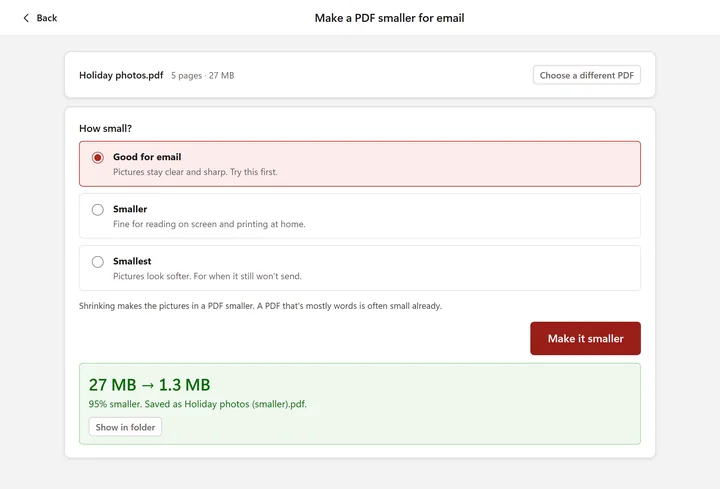
- Start with Good for email: pictures stay clear and sharp. If it’s still too big, try Smaller, then Smallest.
- Press Make it smaller. A smaller copy is saved beside the original, and it tells you how much smaller it is.
Our made-up PDF of five holiday photos went from 27 MB to 1.3 MB. Your original stays exactly as it was. And if a PDF can’t be made any smaller (one that’s mostly words, say), it tells you so, rather than handing you a bigger one.
Watch it done in 31 secondsWatch it done in 21 seconds
FREE · WINDOWS 10 & 11 · NOTHING UPLOADED
Techies PDF: make a PDF smaller for email, on your PC
Choose the PDF, pick Good for email and press Make it smaller. It also signs, joins and fixes PDFs, all on your computer.

On the Microsoft Store, checked by Microsoft. Version 0.2.0, 22 MB, digitally signed by 365 Techies Ltd. Made by us, a family IT firm in Bournemouth since 1995.
/03 — MADE IT IN WORD?
Made the PDF yourself in Word? Save it smaller
If the PDF came from your own Word document, you don’t need to shrink it: make it again, smaller.
- Open the document in Word and choose File, then Save As (or Save a Copy).
- Under the file name, choose PDF as the type.
- Next to Optimise for, choose Minimum size (publishing online).
- Press Save.
The photos in it are saved at a lower quality that still looks fine on screen. Keep the standard setting for anything that will be professionally printed.
/04 — SCANNING IT?
Scanning it? Set the scanner for email
- Resolution 150 to 200 dpi is plenty for a letter or a form. 300 dpi for small print. 600 dpi makes huge files for no benefit on screen.
- Greyscale, or black and white, for anything that’s just words. Colour is three times the size.
- One PDF, not one per page, if your scanner asks: easier to send, and the same size.
In Windows’ own Scan app these settings are under Show more; printer makers’ scanning apps have the same choices under similar names. Already scanned it big? Shrink it as in section 2: scans come down the most.
/05 — STILL TOO BIG?
Still too big? Send a link, or split it
- Send a link instead of the file. Put the PDF in OneDrive (it comes with Windows and Microsoft 365) or Google Drive, choose Share, copy the link and paste it into your email. The other person opens it from there.
- Split it into two emails. In Techies PDF, Take pages out into a new PDF saves pages 1 to 10 as one PDF and 11 to 20 as another.
- Zipping it hardly helps. A PDF is already packed tight, so a zip file of it is about the same size, and some offices block zip files anyway.
/06 — YOUR PRIVACY
Why not just use a “compress PDF” website?
The free “sign”, “merge” and “compress PDF” websites mostly work. But every one of them means uploading your file to someone else’s computer, often abroad, and the PDFs people need to send are often the private ones: bank statements, payslips, medical and solicitors’ letters, a passport form, a scan of a driving licence.
For anything private, read the website’s privacy policy before you upload, or do the job on your own PC instead, where the file never leaves it.
/07 — WHEN TO CALL US
When to call us
If it still won’t send, or your email keeps bouncing files that should be fine, we can find out why and sort it on your Windows PC. Ring 01202 775566 or text 07520 615332, Monday to Friday, 9 to 5. With your permission we connect to your Windows PC and sort it while you watch: usually the same day, remote help from £20, and no fix, no fee.
We work on Windows PCs only, not Macs, iPads or iPhones.
// FREE · LEARN SOMETHING NEW
13 free, friendly online courses for beginners and older learners — computer basics, email, WhatsApp, staying safe online and more. Short plain-English lessons, a printable certificate at the end, and never a sign-up form.
FAMILY-RUN SINCE 1995 · ★ 4.9 ON GOOGLE · 200+ COMPUTERS UNDER OUR CARE · NO FIX, NO FEE · SAME-DAY REMOTE SUPPORT
// GOOD QUESTIONS
Frequently asked
How do I make a PDF smaller for free?
On a Windows PC, open our free Techies PDF program, press Make a PDF smaller for email, choose the PDF and press Make it smaller. It works on your PC, with nothing uploaded, and keeps the original.
Why is my PDF file so big?
Almost always because of photos or scans in it. Words take very little room; pictures take a lot, especially scans made at a high resolution.
What size of attachment can I email?
Gmail sends up to 25 MB in total. Many other email services stop at around 20 MB, and some offices accept less. Bigger than that, send a OneDrive or Google Drive link instead.
Will making a PDF smaller make it blurry?
With Good for email, pictures stay clear and sharp on screen and on paper. Smaller and Smallest go further, and photos can look a little softer, so check the copy before you send it.
Does zipping a PDF make it smaller?
Hardly at all. A PDF is already compressed, so the zip file is about the same size. Shrink the pictures in it instead, or send a link.
Can I make a PDF smaller without uploading it?
Yes. Techies PDF does it on your own PC. The compress-PDF websites all need the file uploaded first.
Still too big to send?
We sort it on your Windows PC while you watch, and set up an easier way to send big files. Call 01202 775566 or text 07520 615332.
01202 775566 · help@365techies.co.uk · MON–FRI 9AM–5PM