// HP SUPPORT ASSISTANT
HP Support Assistant keeps popping up?
HP Support Assistant is HP’s own app on most HP laptops and desktops. It offers driver and BIOS updates, checks the battery and hardware, and shows your warranty. Its pop-ups can get repetitive. You can quieten them, or remove the app altogether. Here’s what each choice means. Rated 4.9 on Google.
- ● Quieten it
- ● Keep it or remove it
- ● Nothing lost that matters
/01 — WHAT IT IS
What HP Support Assistant does
HP Support Assistant comes on most HP PCs. It checks HP’s website for driver, BIOS and software updates for your exact model, runs battery and hardware checks, shows your warranty, and links to HP’s support. Newer HP PCs may also have the myHP app, which does some of the same jobs.
It’s genuine and useful. The trouble is how often it wants your attention.
// FIX IT WITH ME · STEP BY STEP
Quieten it, step by step
The steps from this guide, one at a time, in the order that fixes the most cases fastest. Tell it what happened and it shows the next step. Nothing here leaves your device.Last reviewed 29 October 2026
-
01Open HP Support Assistant
Open HP Support Assistant from the Start menu.
Has it gone quiet? -
02Switch off its notifications
Click the settings (gear) icon, then Notifications, and switch off the alerts you do not want.
Has it gone quiet? -
03Block them in Windows
Settings, System, Notifications: turn HP Support Assistant off.
Has it gone quiet? -
04Or uninstall it
Settings, Apps, Installed apps: uninstall HP Support Assistant, then HP Support Solutions Framework, and restart.
Has it gone quiet?
Rather have it done for you? Remote help from £20, or in person across Bournemouth, Christchurch, Poole, Ringwood and the New Forest, with no call-out fee.
Sorted{mins}. Nice work.
Check for HP BIOS updates now and then, or keep the app for that alone.
Still popping up? That is a quick remote job.
With your permission we connect to your screen and sort it in one session. Usually the same day, remote help from £20, and no fix, no fee.
HP Support Assistant keeps popping up? - the fix order (365techies.co.uk/hp-support-assistant-keeps-popping-up/) 1. Open HP Support Assistant: Open HP Support Assistant from the Start menu. 2. Switch off its notifications: Click the settings (gear) icon, then Notifications, and switch off the alerts you do not want. 3. Block them in Windows: Settings, System, Notifications: turn HP Support Assistant off. 4. Or uninstall it: Settings, Apps, Installed apps: uninstall HP Support Assistant, then HP Support Solutions Framework, and restart. Still stuck? 365 Techies fix it remotely: 01202 775566 - https://365techies.co.uk/remote-support/At a glance
| What it is | HP’s own app: driver and BIOS updates, battery and hardware checks, warranty. |
|---|---|
| Quieten it | In the app: the settings (gear) icon, then Notifications. Or Windows Settings, System, Notifications. |
| Remove it | Settings, Apps, Installed apps: HP Support Assistant, then HP Support Solutions Framework. |
| What you lose | An easy way to get HP’s BIOS updates. Windows Update still brings most drivers. |
| Want it back? | Download it free from HP’s own website at any time. |
| A pop-up with a phone number? | In the web browser, that’s a scam, not HP. Close it and don’t ring. |
/02 — TURN IT DOWN
Turn off HP Support Assistant notifications
- Open HP Support Assistant from the Start menu.
- Click the settings icon (a gear), then Notifications, and switch off the pop-up and tray alerts you don’t want.
- If they still appear, switch them off in Windows too: Settings, System, Notifications, then turn HP Support Assistant off. Do the same for any other HP app that nags.
The menu names differ a little between versions. Windows’ own switch always works, because it blocks the app’s notifications at Windows’ end.
/03 — REMOVE IT
Uninstall HP Support Assistant properly
- Open Settings, Apps, Installed apps.
- Find HP Support Assistant, choose Uninstall, and follow the steps.
- Then uninstall HP Support Solutions Framework, the background part it leaves behind, if it’s listed.
- Restart the PC.
Use Windows’ own uninstall, not a third-party “remover”. You can download HP Support Assistant again free from HP’s website whenever you want it back.
/04 — KEEP IT OR NOT?
Should you keep it?
Keep it if you’d like HP to offer BIOS updates and check the battery for you: it’s the easiest way to keep an HP’s firmware current, and BIOS updates fix real problems.
Remove it if the pop-ups bother you more than they help. Windows Update still brings most HP drivers, and HP’s website has the BIOS for your model when you need it. Before a BIOS update on a PC with BitLocker, suspend BitLocker first: see BitLocker recovery key.
/05 — IS IT REALLY HP?
A pop-up asking you to ring “HP”?
HP Support Assistant runs in its own window from the Start menu. A web browser pop-up saying your HP is infected and giving a phone number to ring is a scam, not HP: close the browser and don’t ring the number. Already rang and let someone in? See gave a scammer remote access.
/06 — THE QUICK WAY
Let our free app say what’s worth keeping
FREE · WINDOWS 10 & 11 · NO SIGN-UP
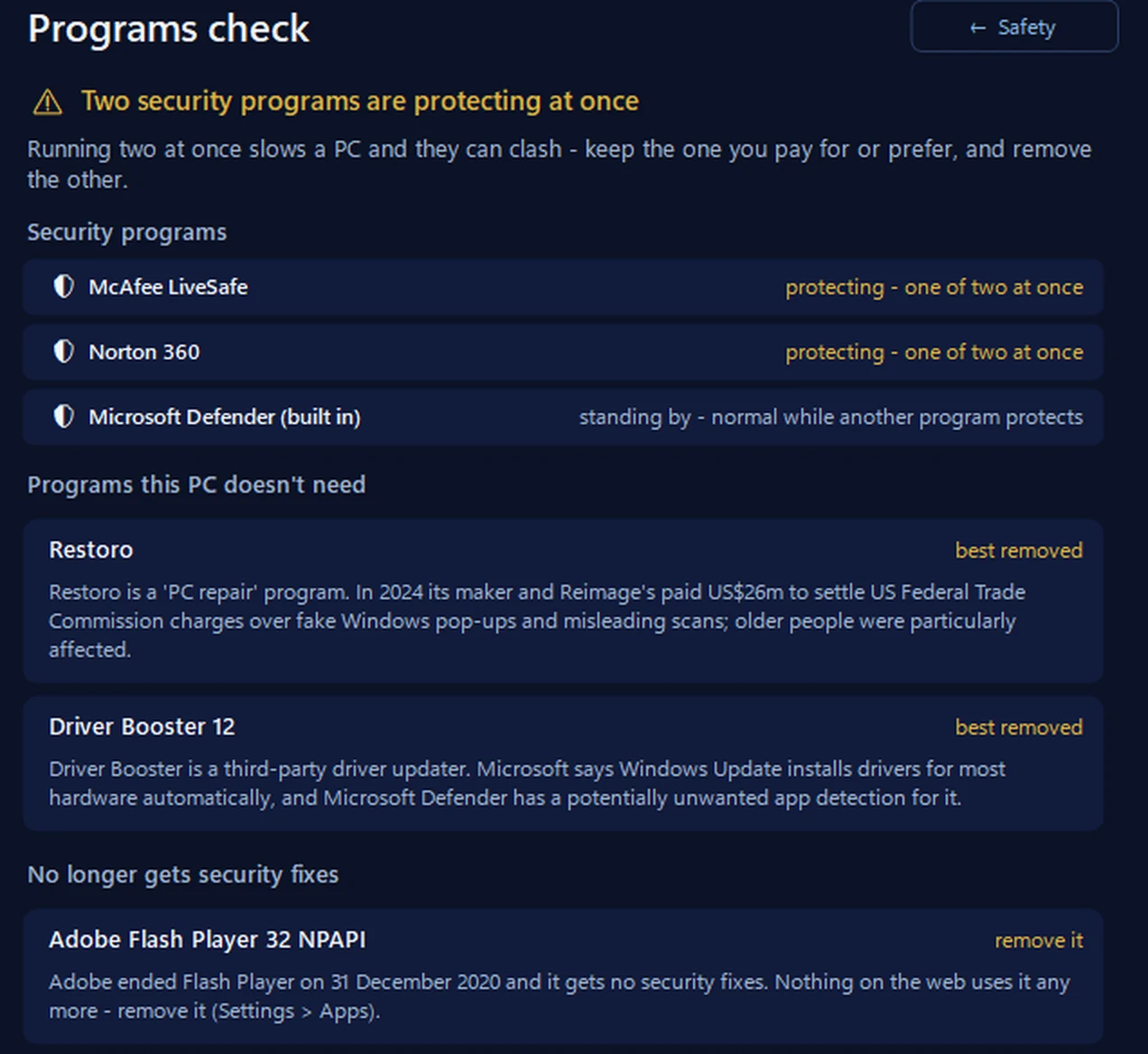
Programs check: what’s worth keeping on your PC
It looks through your installed programs and says which are fine to keep — the PC maker’s own app, HP’s, Lenovo’s or Dell’s, is one of them — and which the PC doesn’t need: tune-up tools, driver updaters, adware and programs that no longer get security fixes, each with the reason. It also says which security program is protecting the PC. It only reads: you remove things in Settings.
In the app: Safety, then Programs check.
Download 365 PC Manager free ↓What else it checks
Made by us, a family IT firm in Bournemouth since 1995, and digitally signed by 365 Techies Ltd.
/07 — WHEN TO CALL US
When to call us
Still not right? Ring 01202 775566 or text 07520 615332, Monday to Friday, 9 to 5. With your permission we connect to your Windows PC and sort it while you watch: usually the same day, remote help from £20, and no fix, no fee. We can quieten or remove the HP apps you don’t want and do the BIOS update safely, BitLocker included.
FAMILY-RUN SINCE 1995 · ★ 4.9 ON GOOGLE · 200+ COMPUTERS UNDER OUR CARE · NO FIX, NO FEE · SAME-DAY REMOTE SUPPORT
// GOOD QUESTIONS
Frequently asked
How do I stop HP Support Assistant pop-ups?
In the app, click the settings (gear) icon, then Notifications, and switch them off. If they continue, Settings, System, Notifications, and turn HP Support Assistant off.
Can I uninstall HP Support Assistant?
Yes. Settings, Apps, Installed apps: uninstall HP Support Assistant, then HP Support Solutions Framework, and restart. You can download it again free from HP.
Do I need HP Support Assistant?
No, Windows works without it. It’s the easiest way to get HP’s BIOS updates and battery checks, so keep it if you value those.
Is HP Support Assistant a virus?
No, it’s HP’s own program, installed with the PC. A browser pop-up telling you to ring HP is a scam, though.
What is HP Support Solutions Framework?
The background part of HP Support Assistant. If you uninstall the app, uninstall this too.
Can you sort it for me?
Yes. With your permission we connect to your Windows PC and sort it while you watch. Remote help from £20, no fix, no fee.
// Still stuck?
Not sure what to keep on your HP?
With your permission we connect to your Windows PC and sort it with you: what to keep, what to remove, and the updates done. Call 01202 775566 or text 07520 615332.
We’ll fix it with you
- Checking the problem is free
- Fixes from £20, agreed before we start
- We phone first, and you watch every step
Stop it happening again
- A full service every six weeks, written up
- Every program kept up to date
- Unlimited remote help when you need it
Plans from £18.25 a month per computer · cancel any time
Mon–Fri 9–5 · family-run since 1995 · rated 4.9 on GoogleTurn the notifications off →