// GOING AWAY? MAKE IT LOOK LIVED-IN
Make your house look lived-in while you’re away
Most burglars are opportunists looking for an empty house, so the aim is simple: make yours look and sound as if someone’s home. Police advice is lamps and a radio on timers, no post piling up, curtains and the garden left looking normal, and every door and window properly locked. Here’s the full checklist, and a free way to put the radio on a timer using your computer. Rated 4.9 on Google.
- ● Police-backed checklist
- ● Free radio timer for your PC
- ● Bournemouth family firm since 1995
/01 — START HERE
The going-away checklist
Secured by Design, the police’s own crime-prevention initiative, puts it simply: most burglars want to get in quickly, take something and get out, so an empty-looking house is what they look for. Make yours look lived-in, and make it hard to get into:
- Lights on timers. A lamp in the front room on a plug-in timer for the evening, and perhaps one upstairs later on. Not a light on all day and night: that looks just as empty.
- A radio on a timer. Voices from inside at the times someone would usually be in — there’s more on this below.
- No post piling up. Ask a neighbour to push post right through the letterbox and take in parcels, or use Royal Mail’s paid Keepsafe service, which holds your post until you’re back. Cancel milk and newspapers.
- Curtains as normal. Closed curtains in the daytime are a giveaway. Leave them as you would during the day, or ask a neighbour to open and close them.
- A tidy garden and the bins. Cut the grass just before you go, and ask a neighbour to put your bins out and back on collection day. A car on the drive helps, if a neighbour can use it.
- Lock up, and hide the keys. Lock every door and window, take the keys out of the locks and put them somewhere safe, away from the letterbox. Set the burglar alarm if you have one.
- Valuables out of sight. Laptops, tablets and jewellery away from windows; important documents locked away or left with family.
- Keep it quiet. Share the holiday photos when you’re home, not while you’re away, and keep your address on the inside of luggage labels.
- Tell one trusted neighbour. Give them your mobile number and, if you’re happy to, a key.
At a glance
| The biggest wins | A lamp on a timer in the evening, a radio playing when someone would normally be in, and no post or parcels piling up. |
|---|---|
| Which radio station? | Police suggest a talk station: voices sound like people at home having a conversation. Keep it at normal speaking volume. |
| Timer plugs | A plug-in timer for a lamp or a radio costs a few pounds. Many digital ones have a random setting, so the times vary. |
| Using your computer | Our free 365 PC Manager plays the radio or your music between set times, shifting them a little each day. The PC can sleep, but must stay switched on. |
| Post and deliveries | Ask a neighbour to clear the post and parcels, or use Royal Mail’s paid Keepsafe service. Cancel milk and papers. |
| Keep it quiet | Don’t post that you’re away until you’re back, and keep your home address off the outside of luggage labels. |
/02 — THE RADIO
Why a radio on a timer helps, and how to set one up
A burglar checking a house often listens at the door or a window. Voices inside are a reason to move on, which is why police advice includes a radio on a timer — ideally a talk station, so it sounds like people chatting rather than a radio left on.
With a plug-in timer and a radio (the classic way):
- Plug the timer into a socket near the front of the house, and the radio into the timer.
- Tune the radio to a talk station and set the volume to ordinary speaking level: loud enough to hear at the front door, not across the street.
- Set the timer for the times someone would normally be in — say late morning and early evening. If it’s a digital timer with a random setting, use it, so the times aren’t the same every day.
- Leave the radio switched on at its own switch, so it plays whenever the timer gives it power. Test it a day or two before you go.
Smart plugs and smart bulbs do the same from a phone app, and many have an “away” mode that varies the times by itself. We can set up smart lights and cameras for you.
/03 — USING YOUR COMPUTER
No timer plug? Let your computer play the radio
FREE · WINDOWS 10 & 11 · NO SIGN-UP
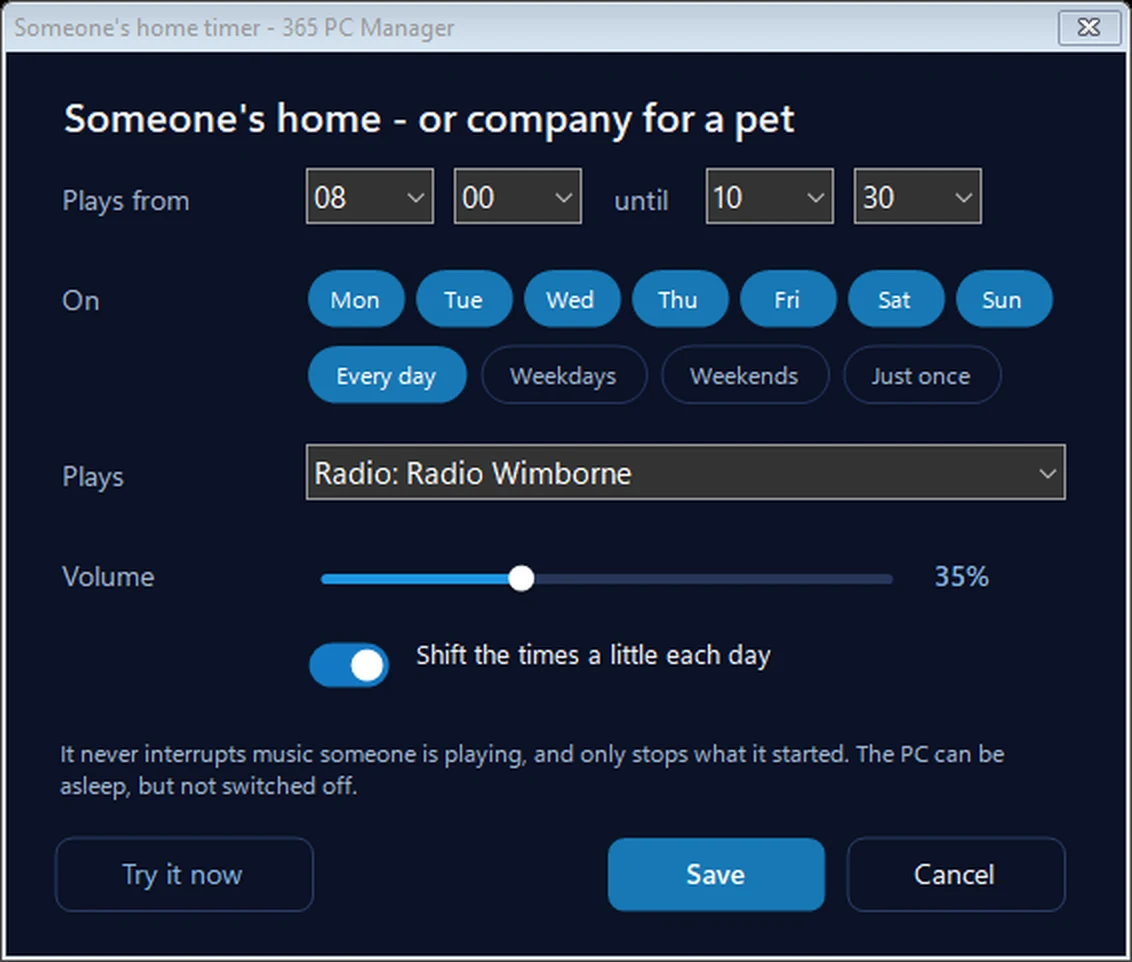
Someone’s home: the radio on a timer, from your PC
Choose the times and days, the radio station or your own songs, and the volume. It plays between those times, and with Shift the times a little each day on, they move by up to 20 minutes each day so it never looks automatic. The PC can be asleep: it wakes itself a minute or so early (a laptop must be plugged in), but it can’t if it’s switched off. It never interrupts music someone is playing. BBC and Global stations can’t be used, as they only play in their own apps.
In the app: Music & games, then Big view, then Alarms & timers.
Download 365 PC Manager free ↓What else it checks
Made by us, a family IT firm in Bournemouth since 1995, and digitally signed by 365 Techies Ltd.
/04 — FOR A PET
Company for a pet left at home
The same timer works on ordinary days for a dog or cat left at home. Many dogs settle better with voices in the house, and council advice on barking dogs suggests leaving a radio on low — a talk station, or calm music rather than anything loud and heavy. Keep the volume gentle, or the neighbours will hear it too.
A radio is company, not care: the RSPCA advises not leaving a dog alone for more than four hours.
/05 — WHAT IT COSTS
What it costs to leave the computer on
Very little. Playing the radio, with the screen off, a laptop uses roughly 8 to 15 watts and a typical desktop 40 to 80 watts; asleep in between, a watt or three. With the radio on for four hours a day, that comes to roughly 1p to 3p a day for a laptop and 5p to 10p a day for a desktop at the current price cap of 26.32p a unit. A radio on a timer plug uses even less.
Want the exact figure for your own computer? Try our PC running cost calculator.
/06 — WHEN TO CALL US
When to call us
If you’d like the radio timer set up and tested before you go, or you’d like smart lights or a camera you can check from your phone, we’re happy to help. Ring 01202 775566 or text 07520 615332, Monday to Friday, 9 to 5. With your permission we connect to your Windows PC and sort it while you watch: usually the same day, remote help from £20, and no fix, no fee.
// RELATED
Related: listening to the radio on your computer, a wake-up alarm on your computer, CCTV and smart home setup, lost or stolen laptop, what a PC costs to run and the free 365 PC Manager app. The checklist follows the advice of Secured by Design, the police’s crime-prevention initiative.
FAMILY-RUN SINCE 1995 · ★ 4.9 ON GOOGLE · 200+ COMPUTERS UNDER OUR CARE · NO FIX, NO FEE · SAME-DAY REMOTE SUPPORT
// GOOD QUESTIONS
Frequently asked
Does leaving a radio on really put burglars off?
It helps as one part of making a house look occupied, which is why police advice includes lamps and radios on timers. Most burglars are opportunists looking for an empty house; voices inside and a lamp coming on in the evening make yours look like the wrong choice. It’s no substitute for good locks and an alarm.
Talk radio or music?
Talk, if you can: police advice is that voices sound like people at home having a conversation. Music is better than silence.
Should I leave a light on all the time?
No. A light left on day and night looks as empty as one never switched on. Put lamps on timers for the evening, the way you’d use them yourself.
Will my computer switch itself on for the radio?
If it’s asleep, yes: the free 365 PC Manager app wakes it a minute or so early using Windows’ own wake timer, as long as the power plan allows wake timers (the app shows this and can switch them on). If the computer is switched off, nothing can run. A laptop must be left plugged in.
What if the internet goes off while I’m away?
Then the radio can’t play, because it comes over the internet. If your broadband is unreliable, set the timer to play your own songs instead: they’re on the computer, so they play either way.
Can I use BBC Radio 4 or LBC?
Not in our app: the BBC and Global (which runs LBC, Heart and Classic FM) only let their stations play in their own apps. Use another station or your own music, or put a real radio tuned to Radio 4 on a timer plug.
Is it safe to leave the computer on while I’m away?
Yes, much like leaving the broadband router on. It sleeps between plays. Leave it on a hard surface with its air vents clear, not on a bed or in a cupboard.
Can you set it up for me?
Yes. With your permission we connect to your Windows PC, set the timer, test it with you and check the PC will wake for it, usually the same day. Remote help is from £20 and no fix, no fee. Ring 01202 775566.
Want it set up before you go?
We connect to your Windows PC and set the radio timer up with you, test it, and check the PC will wake for it. Usually the same day. Call 01202 775566 or text 07520 615332.
01202 775566 · help@365techies.co.uk · MON–FRI 9AM–5PM