// ANTIVIRUS RENEWAL
McAfee or Norton expired: do you need to renew?
A pop-up says your McAfee or Norton protection has expired, or a renewal is about to come off your card. Do you need it? Here’s what Windows does when it runs out, the one thing never to do (run two at once), how to remove one properly, and how to spot the fake renewal emails. Rated 4.9 on Google.
- ● No scare tactics
- ● Free programs check app
- ● Antivirus and scam specialists
/01 — START HERE
What happens if you don’t renew
Many new laptops come with a McAfee or Norton trial already installed. When the trial or a subscription ends, it stops updating and the pop-ups start, and it’s easy to feel the PC is about to be left unprotected.
Windows has its own antivirus built in: Microsoft Defender. It steps aside while another antivirus is in charge, and Microsoft says it can switch itself back on automatically when that product expires, is uninstalled, or stops protecting the PC (Microsoft Learn). So letting McAfee or Norton lapse doesn’t leave you with nothing — as long as you then remove the expired one, so it isn’t still sitting in charge while out of date.
Is Defender enough? For a careful user it’s a decent baseline; paid products add extra web and scam protection, and someone to ask. It’s a genuine choice — our guide on how to choose antivirus goes through it. What it shouldn’t be is a decision a countdown pop-up makes for you.
// FIX IT WITH ME · STEP BY STEP
Sort out the expired antivirus, step by step
The steps from this guide, one at a time, in the order that fixes the most cases fastest. Tell it what happened and it shows the next step. Nothing here leaves your device.Last reviewed 11 October 2026
-
01See what’s protecting your PC
Open Windows Security, Virus & threat protection, and choose Manage providers under Who’s protecting me.
Is that step done? -
02Turn off auto-renewal if you don’t want it
Do it in your McAfee or Norton account online. Uninstalling does not cancel a subscription.
Is that step done? -
03Uninstall the one you don’t want
Open Settings, Apps, Installed apps, choose Uninstall on McAfee or Norton, then restart.
Is that step done? -
04Run the maker’s removal tool
Use the McAfee Consumer Product Removal tool or the Norton Remove and Reinstall tool, downloaded only from the maker’s own website.
Is that step done? -
05Check Defender is protecting
Windows Security should now say Microsoft Defender is protecting the PC.
Is that step done?
Rather have it done for you? Remote help from £20, or in person across Bournemouth, Christchurch, Poole, Ringwood and the New Forest, with no call-out fee.
Sorted{mins}. Nice work.
Restart after uninstalling, then check Windows Security.
Removal won’t finish? That is a remote job.
With your permission we connect to your screen and sort it in one session. Usually the same day, remote help from £20, and no fix, no fee.
McAfee or Norton expired: do you need to renew? - the fix order (365techies.co.uk/mcafee-or-norton-expired-do-i-need-to-renew/) 1. See what’s protecting your PC: Open Windows Security, Virus & threat protection, and choose Manage providers under Who’s protecting me. 2. Turn off auto-renewal if you don’t want it: Do it in your McAfee or Norton account online. Uninstalling does not cancel a subscription. 3. Uninstall the one you don’t want: Open Settings, Apps, Installed apps, choose Uninstall on McAfee or Norton, then restart. 4. Run the maker’s removal tool: Use the McAfee Consumer Product Removal tool or the Norton Remove and Reinstall tool, downloaded only from the maker’s own website. 5. Check Defender is protecting: Windows Security should now say Microsoft Defender is protecting the PC. Still stuck? 365 Techies fix it remotely: 01202 775566 - https://365techies.co.uk/remote-support/At a glance
| If it runs out | Windows’ own antivirus, Microsoft Defender, can switch itself back on when another antivirus expires or is removed. |
|---|---|
| Do you have to pay? | No. Defender is a decent baseline; a paid product adds extra layers. It’s a choice, not something a pop-up should rush. |
| Never run two | Two antivirus programs protecting at once slow the PC and can clash. Keep one. |
| Removing one | Turn off auto-renewal, uninstall it in Settings, then run the maker’s own removal tool. |
| Watch the price | Which? has found second-year prices far above the first-year deal. Check before it renews. |
| Renewal email? | Fake McAfee and Norton invoices are common. Never ring the number in the email. |
| Free check | Programs check in our free 365 PC Manager app shows what’s protecting your PC and anything it doesn’t need. |
/02 — NEVER TWO
Never run two antivirus programs at once
It’s common to find the McAfee that came with the laptop and the Norton bought later both running. Two programs checking everything at once slow the PC and can get in each other’s way — and they don’t add up to double protection. Keep the one you pay for or prefer, and remove the other.
To see what’s protecting your PC: open Windows Security, then Virus & threat protection, and under Who’s protecting me? choose Manage providers (Microsoft Learn).
/03 — REMOVE IT PROPERLY
How to remove McAfee or Norton properly
- Turn off auto-renewal first, in your McAfee or Norton account online, if you’ve paid for it and don’t want it again. Uninstalling the program doesn’t cancel a subscription.
- Uninstall it: Settings, then Apps, then Installed apps. Find McAfee or Norton, choose Uninstall, then restart.
- Clear what’s left with the maker’s own removal tool: the McAfee Consumer Product Removal tool (MCPR) or the Norton Remove and Reinstall tool, which has a remove-only option. Download them only from mcafee.com or norton.com.
- Check Defender is back on: Windows Security, then Virus & threat protection, should say Microsoft Defender is protecting the PC.
/04 — BEFORE IT RENEWS
Check the renewal price first
Antivirus subscriptions usually renew automatically, and the renewal price can be far higher than the first-year deal: Which? found second-year prices several times the introductory price (Which?).
Whatever you decide, look up the renewal date and price in your account before it renews — so it’s your choice, not the card’s.
/05 — FAKE RENEWAL EMAILS
The fake McAfee and Norton renewal emails
One of the commonest scam emails is an “invoice” saying your McAfee, Norton or Geek Squad subscription has renewed for hundreds of pounds or dollars, with a number to ring within 24 hours to cancel. The US Federal Trade Commission explains how it plays out: the “refund” call ends with someone asking to connect to your computer and for your bank details (FTC).
- Never ring the number in the email. Check your bank statement, or log in to your McAfee or Norton account by typing the address yourself.
- No charge on your statement? It’s a scam. Delete it — in the UK, forward it to report@phishing.gov.uk first.
- Already rang them and let them on the PC? See gave a scammer remote access and act today.
/06 — THE QUICK WAY
Let our free app check it for you
FREE · WINDOWS 10 & 11 · NO SIGN-UP
Programs check: what’s really protecting your PC
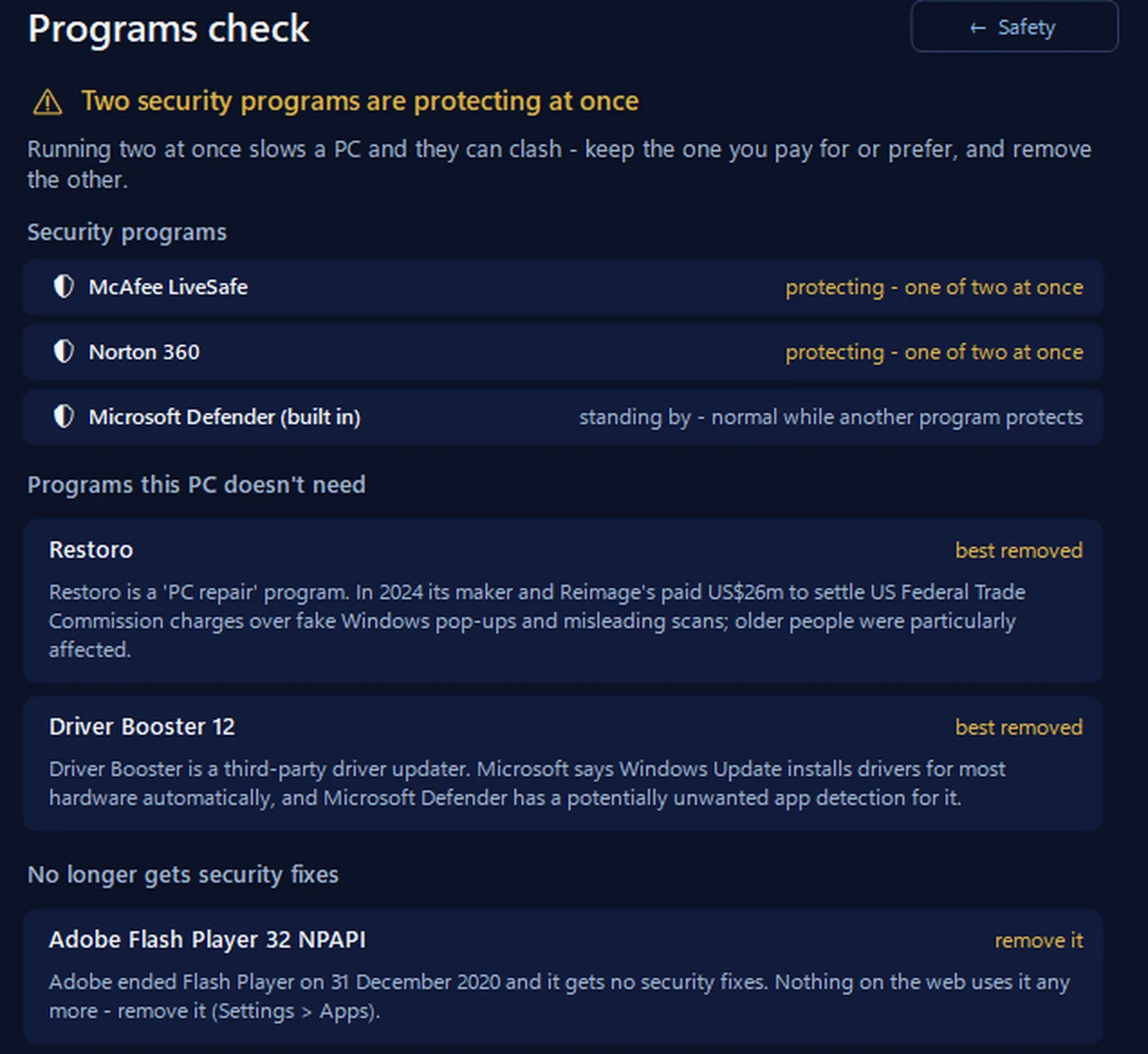
It reads Windows’ own register of security programs and says which one is protecting the PC, warns when two are protecting at once, and when one is switched on but says its protection is out of date — often a subscription that has ended. It also looks through your installed programs for ones the PC doesn’t need — tune-up tools, driver updaters, adware and programs that no longer get security fixes — each with the reason. It only reads: you remove things in Settings, or we can do it with you.
In the app: Safety, then Programs check.
Download 365 PC Manager free ↓What else it checks
Made by us, a family IT firm in Bournemouth since 1995, and digitally signed by 365 Techies Ltd.
/07 — WHEN TO CALL US
When to call us
If you’re not sure which program to keep, a removal won’t finish, or a renewal email has you worried, we’ll check it with you. Ring 01202 775566 or text 07520 615332, Monday to Friday, 9 to 5. With your permission we connect to your Windows PC and sort it while you watch: usually the same day, remote help from £20, and no fix, no fee.
FAMILY-RUN SINCE 1995 · ★ 4.9 ON GOOGLE · 200+ COMPUTERS UNDER OUR CARE · NO FIX, NO FEE · SAME-DAY REMOTE SUPPORT
// GOOD QUESTIONS
Frequently asked
Do I need McAfee if I have Windows Defender?
You don’t have to have it. Defender is built into Windows and is a decent baseline; a paid product adds extra layers. Whichever you choose, run only one.
What happens if I don’t renew Norton or McAfee?
It stops updating and keeps reminding you. Uninstall it properly, and Microsoft Defender can take over by itself.
Is it bad to have two antivirus programs?
Yes. Two protecting at once slow the PC and can clash, without adding real protection. Keep one and remove the other.
Is my McAfee or Norton renewal email real?
Maybe not — fake renewal invoices are one of the commonest scams. Never ring the number in the email; check your bank statement or log in to your account by typing the address yourself.
Does uninstalling cancel my subscription?
No. Turn off auto-renewal in your McAfee or Norton account online as well, or the next payment can still be taken.
Can you remove it for me?
Yes. With your permission we connect to your Windows PC, remove what isn’t needed properly and check the PC is protected, while you watch. Remote help from £20, no fix, no fee.
// Still stuck?
Not sure what to keep?
We check what’s protecting your PC, remove what isn’t needed properly, and make sure it’s protected, while you watch. Call 01202 775566 or text 07520 615332.
We’ll fix it with you
- Checking the problem is free
- Fixes from £20, agreed before we start
- We phone first, and you watch every step
Stop it happening again
- A full service every six weeks, written up
- Every program kept up to date
- Unlimited remote help when you need it
Plans from £18.25 a month per computer · cancel any time
Mon–Fri 9–5 · family-run since 1995 · rated 4.9 on GoogleIs the renewal email real? →