A YELLOW WARNING IN WINDOWS SECURITY?
Memory integrity is off: should you turn it on?
Windows Security shows a yellow warning: “Memory integrity is off. Your device may be vulnerable.” It’s worth switching on if your PC can take it, it isn’t an emergency if it can’t, and the usual reason it won’t switch on is an old driver. Here’s what it does, how to switch it on, and the other Windows safety settings worth a look while you’re there. Rated 4.9 on Google.
- ● Windows 11 and 10
- ● Incompatible drivers
- ● Windows’ other safety switches
WHAT IT IS
What memory integrity does
Memory integrity is part of core isolation. It uses the processor’s virtualisation features to keep a walled-off area where Windows checks drivers and other low-level code before it runs, so a harmful driver can’t slip into the heart of Windows and take it over.
Many new PCs come with it switched on. It’s often off on PCs that were upgraded from older Windows, or where an older driver can’t work with it. Off doesn’t mean unprotected: your antivirus, SmartScreen and Windows’ other defences still work. It’s an extra layer, and worth having when the PC can.
FIX IT WITH ME · STEP BY STEP
Switch it on, step by step
The steps from this guide, one at a time, in the order that fixes the most cases fastest. Tell it what happened and it shows the next step. Nothing here leaves your device.Last reviewed 13 November 2026
-
01Open core isolation
Open Windows Security, then Device security, then Core isolation details.
Is memory integrity on now? -
02Switch it on
Switch Memory integrity on and restart the PC.
Is memory integrity on now? -
03Review incompatible drivers
If it will not switch on, click Review incompatible drivers to see which driver files are blocking it.
Is memory integrity on now? -
04Update or remove them
Get a newer driver from the maker or Windows Update, or uninstall the old program or device you no longer use, then restart and try again.
Is memory integrity on now?
Rather have it done for you? Remote help, usually £60, or in person across Bournemouth, Christchurch, Poole, Ringwood and the New Forest, with no call-out fee.
Sorted{mins}. Nice work.
Check Windows Security again after the next big Windows update.
Still blocked by a driver? That is a remote job.
With your permission we connect to your screen and sort it in one session. Usually the same day, remote help, usually £60, and no fix, no fee.
Memory integrity is off: should you turn it on? - the fix order (365techies.co.uk/memory-integrity-is-off/) 1. Open core isolation: Open Windows Security, then Device security, then Core isolation details. 2. Switch it on: Switch Memory integrity on and restart the PC. 3. Review incompatible drivers: If it will not switch on, click Review incompatible drivers to see which driver files are blocking it. 4. Update or remove them: Get a newer driver from the maker or Windows Update, or uninstall the old program or device you no longer use, then restart and try again. Still stuck? 365 Techies fix it remotely: 01202 775566 - https://365techies.co.uk/remote-support/At a glance
| What it is | Part of core isolation: a protected area that stops harmful code getting into the heart of Windows. |
|---|---|
| Worth it? | Yes, if the PC can take it. Off isn’t an emergency: your antivirus still protects you. |
| Switch it on | Windows Security, Device security, Core isolation details, Memory integrity, then restart. |
| Won’t switch on | Usually an incompatible driver, listed under Review incompatible drivers. |
| Slower? | Hardly noticeable on modern PCs; possibly a little on older processors and in some games. |
| Also check | SmartScreen, the “allow changes?” prompt and file name endings. |
SWITCH IT ON
How to switch memory integrity on
- Click Start, type Windows Security and open it.
- Choose Device security, then Core isolation details.
- Switch Memory integrity on, and say Yes if Windows asks for permission.
- Restart the PC when it asks. It only takes effect after the restart.
If the switch is greyed out, or it says Incompatible drivers, go to the next step. If the page says your PC doesn’t support it, virtualisation may be switched off in the PC’s start-up settings, or the PC is too old for it.
INCOMPATIBLE DRIVERS
When an incompatible driver stops it
Click Review incompatible drivers on the same page. Each line names a driver file, such as oem42.inf, and often its maker. They’re usually left behind by old hardware or software: a printer, a scanner, a game controller, an old VPN or antivirus.
- Update it: look for a newer version on the maker’s site, or in Settings, Windows Update, Advanced options, Optional updates. A newer driver often works with memory integrity.
- Remove what you no longer use: uninstall the old program in Settings, Apps, or the device in Device Manager (tick the box to delete its driver if offered), then restart and try again.
- Still listed? Removing a leftover driver by its file name is possible with Windows’ own tools, but remove the wrong one and a device stops working. That’s one we’d do with you, backed up first.
If the driver is for something you still need and there’s no newer version, leaving memory integrity off is a reasonable choice. Keep everything else up to date.
WHILE YOU’RE THERE
Windows’ other safety switches worth checking
- SmartScreen (Windows Security, App & browser control, Reputation-based protection): warns before you open a download or website known to be harmful. Keep its switches on.
- The “allow this app to make changes?” question (User Account Control): leave it at the default, Notify me only when apps try to make changes. It’s the moment to stop and think before something installs. Click Start and type UAC to see the setting.
- File name endings: Windows hides them, so a fake “invoice.pdf.exe” looks like a PDF. In File Explorer, View, Show, tick File name extensions (Windows 10: the View tab).
- Tamper protection (Windows Security, Virus & threat protection settings): stops harmful programs switching Microsoft Defender off. Keep it on if Defender is your antivirus.
Smart App Control is in the same place; see Smart App Control blocked an app before changing it.
THE QUICK WAY
Let our free app check them all
FREE · WINDOWS 10 & 11 · NO SIGN-UP
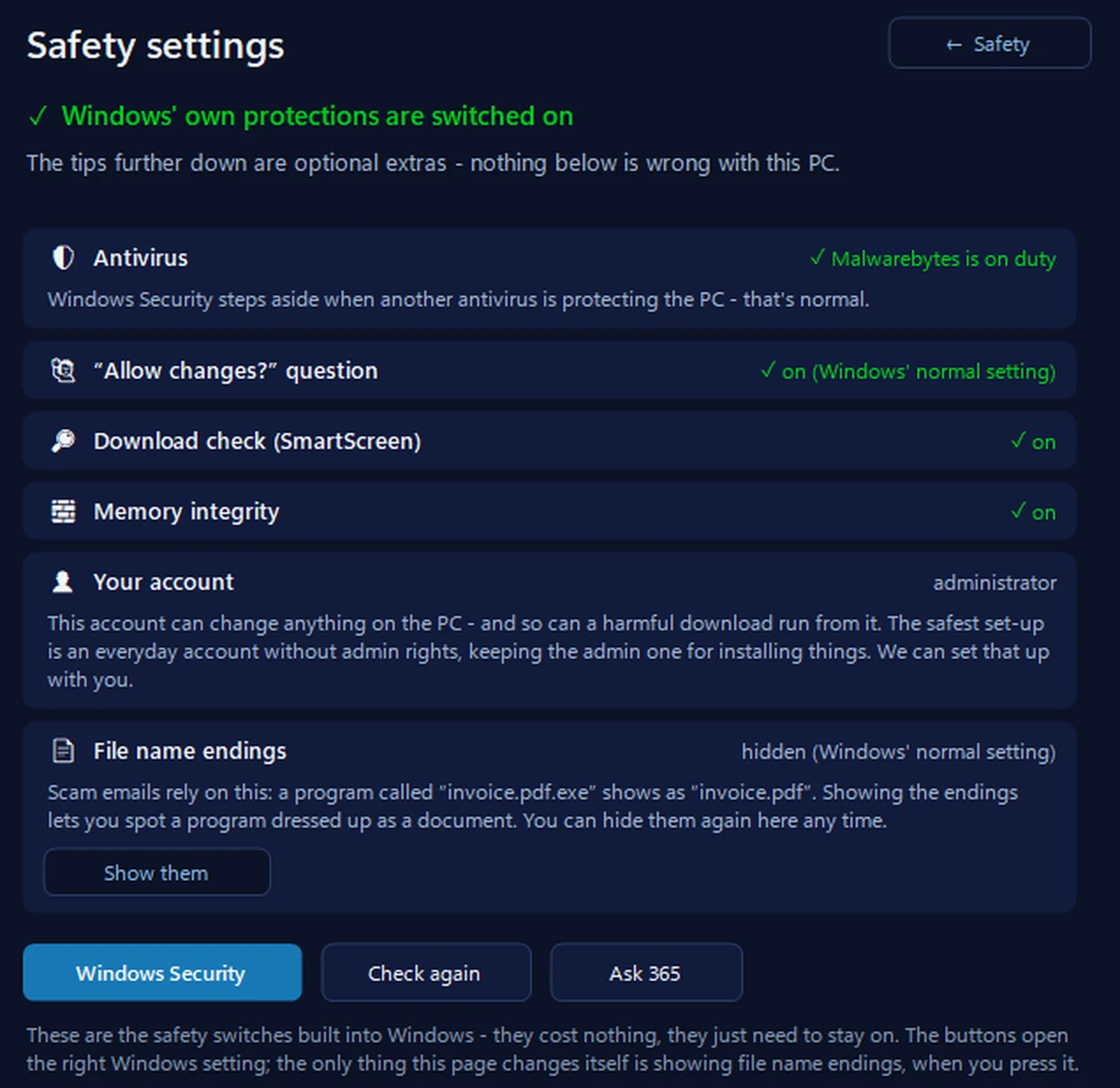
Safety settings: Windows’ own protections, at a glance
It reads Windows’ own protections and says which are on: memory integrity (shown as optional advice, never a black mark, with a button to Device security), SmartScreen and whether a policy switched it off, the “allow this app to make changes?” question, which antivirus is on duty and Defender’s tamper protection. Hidden file name endings get one switch you press yourself, and it can be switched back. Everything else only reads.
In the app: Safety, then Safety settings.
Download 365 PC Manager free ↓ What else it checks
Made by us, a family IT firm in Bournemouth since 1995, and digitally signed by 365 Techies Ltd.
WHEN TO CALL US
When to call us
Still not right? Ring 01202 775566 or text 07520 615332, Monday to Friday, 9 to 5. With your permission we connect to your Windows PC and sort it while you watch: usually the same day, remote help, usually £60, and no fix, no fee. We find the driver that’s blocking memory integrity, update or remove it safely, and check Windows’ other protections while we’re there.
FAMILY-RUN SINCE 1995 · ★ 4.9 ON GOOGLE · 200+ COMPUTERS UNDER OUR CARE · NO FIX, NO FEE · SAME-DAY REMOTE SUPPORT
GOOD QUESTIONS
Frequently asked
Should I turn memory integrity on?
Yes, if your PC can take it: it’s an extra layer of protection against harmful drivers. If an incompatible driver you still need stops it, leaving it off is reasonable; your antivirus and Windows’ other defences still protect you.
Why won’t memory integrity turn on?
Usually an incompatible driver. Click Review incompatible drivers in Core isolation details to see which. Update it from the maker, or remove the old program or device it belongs to, then restart.
Does memory integrity slow down my PC?
On modern PCs the difference is hard to notice. On older processors, and in some games, it can cost a little speed.
What is core isolation?
A Windows security feature that uses the processor’s virtualisation to keep important parts of Windows in a protected area. Memory integrity is its main switch.
Is it safe to delete an incompatible driver?
Only if you know what it belongs to and no longer use it. Removing the driver for something you still need stops that device working. Uninstalling the program or device in Settings or Device Manager is the safer way.
Memory integrity is off: am I hacked?
No. It just means an extra protection isn’t switched on. It’s off on many PCs. If you’re worried about being hacked, see I think I’ve been hacked.
Can you sort it remotely?
Yes. With your permission we connect, find the blocking driver, update or remove it safely, and switch memory integrity on.
Still stuck?
Won’t switch on?
With your permission we connect to your Windows PC, find the driver that’s blocking it and sort it safely, backed up first. Call 01202 775566 or text 07520 615332.
We’ll fix it with you
- Checking the problem is free
- Fixes usually £60, agreed before we start
- We phone first, and you watch every step
Stop it happening again
- A full service every six weeks, written up
- Every program kept up to date
- Unlimited remote help when you need it
Plans from £18.25 a month per computer · cancel any time
Mon–Fri 9–5 · family-run since 1995 · rated 4.9 on GoogleSwitch it on →