// MUSIC VISUALISER FOR WINDOWS
A free music visualiser for your Windows PC
Want lights that move to your music on a Windows PC? Windows’ newer apps dropped their visualisers, and Spotify and YouTube never had one. Here’s what Windows still has, why most visualisers can’t see Spotify, and our free one that follows anything your PC plays, with twelve scenes, full screen and the TV. Rated 4.9 on Google.
- ● Free, no sign-up
- ● Follows any app
- ● Gentle on flashing
/01 — WHAT IT IS
What a music visualiser does
A music visualiser turns sound into moving pictures. It listens to the music, splits it into bass, middle and treble, finds the beat, and moves light, shapes and colour in time with it. The good ones notice the shape of a song too: building before a chorus, landing on the drop, settling in a quiet passage.
They were everywhere in the days of Winamp and Windows Media Player. Most of today’s music apps dropped them, which is why so many people go looking for one.
// FIX IT WITH ME · STEP BY STEP
Get the light show going, step by step
The steps from this guide, one at a time, in the order that fixes the most cases fastest. Tell it what happened and it shows the next step. Nothing here leaves your device.Last reviewed 17 October 2026
-
01Download 365 PC Manager
Download the free app from 365techies.co.uk and install it on Windows 11 or 10.
Is it moving with the music? -
02Open the music window
In the app, choose Music & games, then Music, then Big view.
Is it moving with the music? -
03Choose Now playing
Click Now playing, then a scene, or Mix to let it change with the music.
Is it moving with the music? -
04Play some music anywhere
Play a song in the app, Spotify, YouTube or any other app. The light show follows whatever the PC plays.
Is it moving with the music? -
05Go full screen
Click Full screen. Press Esc to come back.
Is it moving with the music?
Rather have it done for you? Remote help from £20, or in person across Bournemouth, Christchurch, Poole, Ringwood and the New Forest, with no call-out fee.
Sorted{mins}. Nice work.
Play a song you know well: it catches the beat within a few seconds.
Still not moving after all five steps? That is a remote job.
With your permission we connect to your screen and sort it in one session. Usually the same day, remote help from £20, and no fix, no fee.
A free music visualiser for your Windows PC - the fix order (365techies.co.uk/music-visualiser-for-windows/) 1. Download 365 PC Manager: Download the free app from 365techies.co.uk and install it on Windows 11 or 10. 2. Open the music window: In the app, choose Music & games, then Music, then Big view. 3. Choose Now playing: Click Now playing, then a scene, or Mix to let it change with the music. 4. Play some music anywhere: Play a song in the app, Spotify, YouTube or any other app. The light show follows whatever the PC plays. 5. Go full screen: Click Full screen. Press Esc to come back. Still stuck? 365 Techies fix it remotely: 01202 775566 - https://365techies.co.uk/remote-support/At a glance
| What it is | Moving pictures that follow the beat, the bass and the build of whatever is playing. |
|---|---|
| Windows’ own | Windows Media Player Legacy still has a few old ones, but only for songs it plays itself. |
| Spotify and YouTube | Neither has one. A visualiser that listens to the PC’s sound follows both, and everything else. |
| Ours | The free 365 PC Manager app: twelve scenes and a Mix that changes with the music, for anything the PC plays. |
| Full screen and TV | Full screen fills the monitor. Press Windows + P and choose Duplicate to show it on a TV as well. |
| Flashing | Gentle is the default, and None turns flashing off completely. |
| Cost | Free on Windows 11 and 10, with nothing to sign up for. |
/02 — WINDOWS’ OWN
Does Windows have a music visualiser?
- Windows Media Player Legacy still has its old visualisations, Alchemy, Bars and Waves and Battery: play a song, switch to the Now Playing view and right-click it. On Windows 11 you may need to add it first: Settings, System, Optional features, then Windows Media Player Legacy. They only follow songs Windows Media Player itself is playing.
- The newer Media Player that comes with Windows 11 shows the album cover rather than a visualiser.
- VLC, the free video player, has a handful (Audio, then Visualizations), again only for what VLC itself plays.
/03 — SPOTIFY AND YOUTUBE
Spotify, YouTube and the radio: why most visualisers can’t see them
Spotify’s app has no visualiser, and nor do YouTube or the radio station players. Visualiser websites that show Spotify relied on Spotify’s own analysis of each song — its beats and loudness — and Spotify stopped giving that to new apps in November 2024 (Spotify for Developers).
The way round it is a visualiser that listens to the sound itself on its way to your speakers or headphones. Windows lets a program do that without using the microphone, so it can follow anything the PC plays: Spotify, YouTube in the browser, iPlayer, the radio, even a game.
/04 — THE FREE ONE
A free visualiser that follows anything your PC plays
FREE · WINDOWS 10 & 11 · NO SIGN-UP
A light show that moves with anything your PC plays
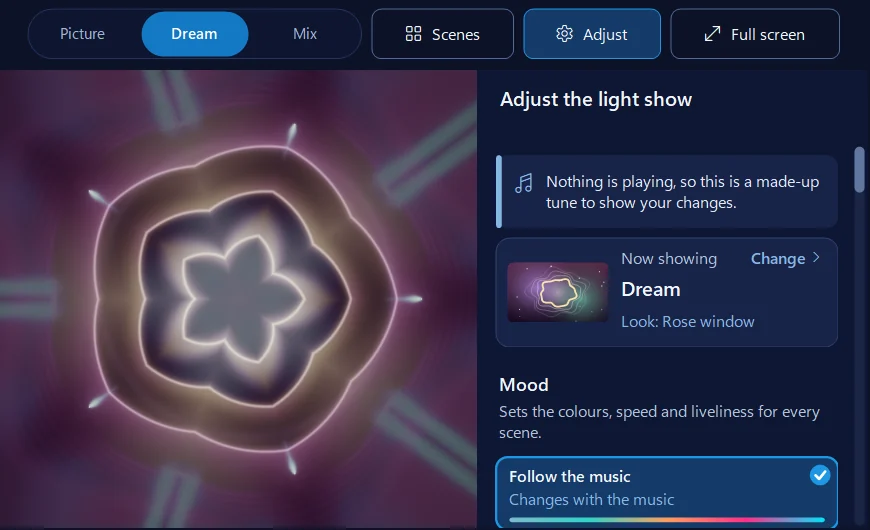
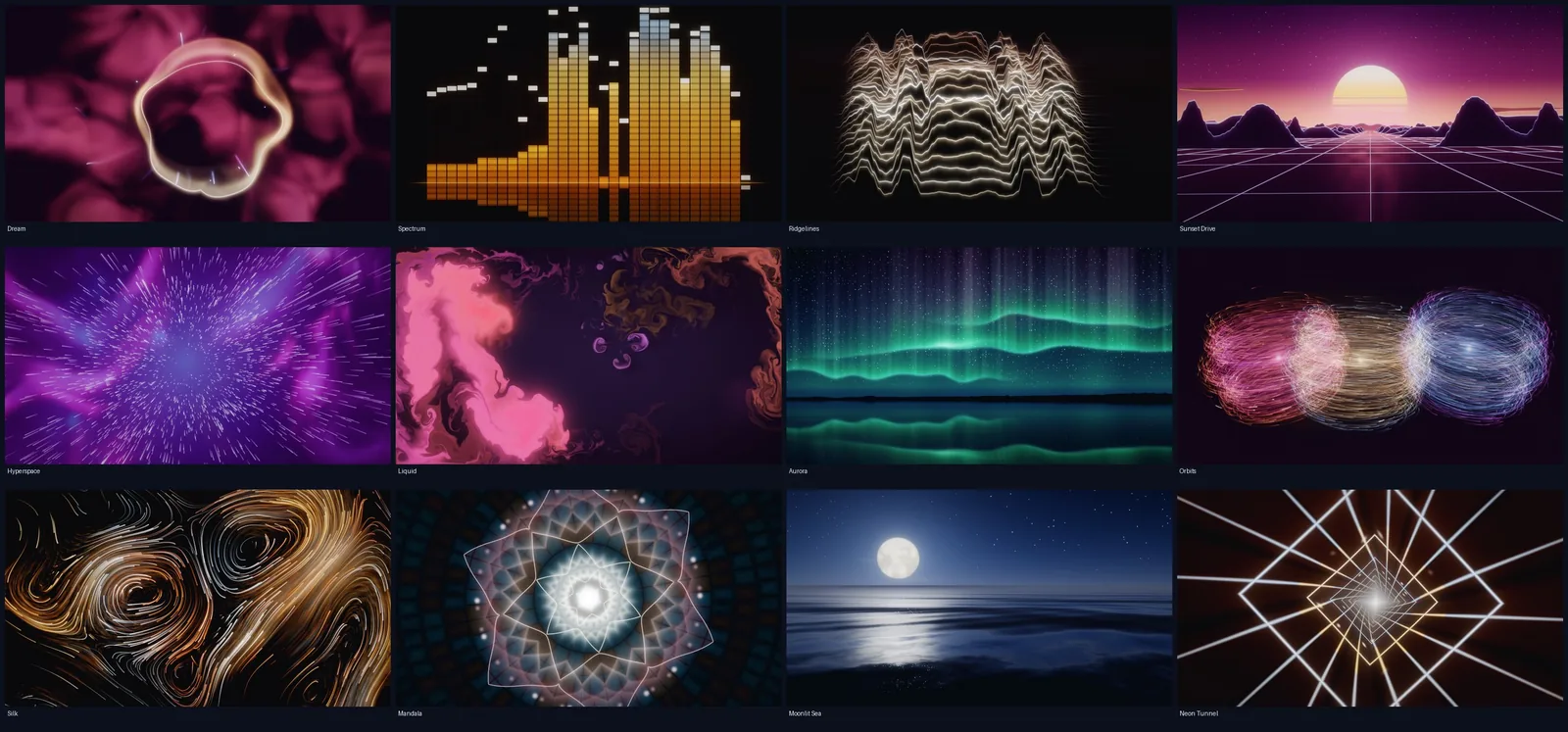
Its music window has a light show drawn by your graphics card: twelve scenes, from northern lights over a lake to a neon drive into the sunset, and Mix, which changes scene on the music’s big moments. It listens to the sound going to your speakers, so it follows Spotify, YouTube, iPlayer and the radio as well as the app’s own music, and finds the beat, the bass and the build. Moods, colours, speed and each scene’s own settings are in Adjust, and Full screen fills the monitor or the TV. It isn’t the microphone: nothing is recorded, kept or sent.
In the app: Music & games, then Music, then Big view, then Now playing.
Download 365 PC Manager free ↓What else it checks
Made by us, a family IT firm in Bournemouth since 1995, and digitally signed by 365 Techies Ltd.
/05 — THE SCENES
Twelve scenes, and a Mix that follows the song
- Dream: light swirling round a shape made of the music.
- Spectrum: a hi-fi graphic equaliser.
- Ridgelines: lines of music rolling away like hills.
- Sunset Drive: a neon drive into the sunset.
- Hyperspace: flying through stars and coloured clouds.
- Liquid: ink in water — stir it with the mouse.
- Aurora: northern lights over a still lake.
- Orbits: thousands of glowing motes round bright cores.
- Silk: threads of light flowing like silk.
- Mandala: a living kaleidoscope, turning to the beat.
- Moonlit Sea: a calm night sea under a big moon.
- Neon Tunnel: flying down an endless neon tunnel.
Mix moves between them on the music’s big moments — a new song, a drop, the start of a phrase, a quiet passage — choosing a scene whose energy suits what’s playing. The scenes are drawn by your graphics card at the screen’s own pace, and there’s nothing else to install.
/06 — MAKE IT YOURS
Moods, colours and settings
- Mood sets the colours, speed and liveliness for every scene: Follow the music (it changes with what’s playing), Calm, Classical, Late night, Rock, 80s or Party.
- Adjust changes the colours, how fast it moves, how strongly it bounces to the beat, the trails it leaves and the detail, plus each scene’s own settings. Changes show straight away and save themselves.
- Surprise me picks a new look, and Put back as it was undoes the lot.
- On talk radio and podcasts it notices the speech, calms down and stops changing scene.
/07 — FULL SCREEN
Full screen, and on the TV
- Full screen fills the monitor. Move the mouse or press a key for the bar along the bottom: the scene, play and pause, Mood, Colours and Adjust. It hides itself again after a few seconds.
- Keys: Space plays and pauses, Left and Right change the scene, Up and Down make it faster or slower, C changes the colours, M the mood, 1 to 9 picks a scene and 0 is Mix. Esc comes back.
- Whatever is playing: the song’s name comes up as each new song starts, and Space pauses it, even in Spotify or a YouTube tab, through Windows’ own media controls.
- On the TV: connect the PC with an HDMI lead, press Windows + P, choose Duplicate, then click Full screen.
/08 — FLASHING LIGHT
Gentle on flashing light, from the start
Flashing light can trigger seizures in people with photosensitive epilepsy, and plenty of visualisers strobe on every beat. This one starts on Gentle: every pulse of light is kept small and soft, designed to stay well below the size the web accessibility guidelines count as a flash (WCAG).
- None turns the pulses off completely, while the scenes still move with the music. If Windows’ Animation effects setting is off, None is what it uses unless you choose otherwise.
- Bigger has to be chosen on purpose in Adjust, and even then flashes are kept to about three a second, with a rest after five seconds of them.
If flashing light affects you or anyone watching, keep Gentle or None, and see the Epilepsy Society’s advice on screens.
/09 — NOT MOVING?
If it doesn’t move with the music
- Check the sound comes out of Windows’ default speakers or headphones (Settings, System, Sound, Output). The light show listens to the default output, so a program sending its sound somewhere else can’t be heard.
- Nothing playing? The scenes drift slowly and wait. In Adjust, a made-up tune plays so you can see your changes.
- A plain light show instead of the scenes? Over Remote Desktop, or on a PC with only Windows’ basic display driver, the graphics card isn’t available, so it shows a simple Aurora. Install the graphics driver from your PC’s maker.
- Jerky on an older PC? It lowers its own detail to keep up. Closing other programs helps, and so does a lower Detail in Adjust. On a laptop, plug it in for a long session.
FAMILY-RUN SINCE 1995 · ★ 4.9 ON GOOGLE · 200+ COMPUTERS UNDER OUR CARE · NO FIX, NO FEE · SAME-DAY REMOTE SUPPORT
// GOOD QUESTIONS
Frequently asked
Is there a free music visualiser for Windows 11?
Yes. Our free 365 PC Manager app has a light show with twelve scenes that move to anything the PC plays. Windows Media Player Legacy also still has a few old visualisations, but only for songs it plays itself.
Is there a music visualizer for Spotify on Windows?
Spotify’s app has none. A visualiser that listens to the PC’s sound, like the light show in our free app, follows Spotify along with everything else, and in full screen it shows the song’s name and Space pauses it.
Does it use my microphone?
No. It listens to the sound going out to your speakers or headphones, which Windows allows without the microphone, so the microphone light stays off. Nothing is recorded, kept or sent anywhere.
Can I show it on my TV?
Yes. Connect the PC to the TV with an HDMI lead, press Windows + P, choose Duplicate, then click Full screen in the app.
What if flashing light affects me?
It starts on Gentle, which keeps every pulse of light soft and small, and None turns flashing off completely. Bigger flashes have to be chosen on purpose. If flashing light affects you or anyone watching, keep Gentle or None.
Will it slow my PC down?
It uses the graphics card and only runs while it’s on screen. On a slower PC it lowers its own detail to stay smooth. On a laptop, plug it in for a long session.
Does it cost anything?
No. The light show is part of the free app, on Windows 11 and 10, with nothing to sign up for.
// Still stuck?
Want it on the big screen?
We can set it up with you over a remote connection and help get the PC showing on your TV. Call 01202 775566 or text 07520 615332.
We’ll fix it with you
- Checking the problem is free
- Fixes from £20, agreed before we start
- We phone first, and you watch every step
Stop it happening again
- A full service every six weeks, written up
- Every program kept up to date
- Unlimited remote help when you need it
Plans from £18.25 a month per computer · cancel any time
Mon–Fri 9–5 · family-run since 1995 · rated 4.9 on GoogleSee the twelve scenes →