// NEW DEVICE SETUP
New computer setup
We set up your new computer or laptop properly — transferring files, email and settings, installing software, and getting security and backups in place from day one.
Prefer to write? Message us
Rated 4.9 on GoogleFiles transferred · 30 days support includedHow we help
- 1995a family business since
- 6 weeksbetween full services on every plan
- £0call-out fee for remote help
- 4.9★average rating on Google
/01 — FOR YOU
Out of the box and ready to go
A new computer should be a fresh start, not a weekend of frustration. We take the new machine, transfer everything from the old one, remove the bloatware and set it up exactly how you like it — most setups are done remotely, at a time that suits you, and the transfer itself usually takes around an hour and a half.
Files, email, printers, Wi-Fi, software, security and backups — all sorted, so you can just sit down and use it. We set it up properly so it’s genuinely easy to use, and every new computer setup includes 30 days of remote support — plus honest advice and a friendly look at any other IT niggles while we’re there.
- New PC & laptop setup
- Data & file transfer
- Email & Microsoft 365
- Software installation
- Printer & Wi-Fi setup
- Security & backups
- 30 days support included
- Old computer wipe
/02 — HOME & BUSINESS
Set up right, home or work
New computer at home
We turn a boxed-up new PC into a ready-to-go machine — files, photos, email and printers all moved across and working, with the bloatware gone.
- Files, photos & email moved
- Printers & Wi-Fi reconnected
- Bloatware removed
- Security & backups in place
New computers for business
New starter or whole-team rollout — standardised, secured and onboarded, with data moved and accounts set up, ready for day one.
- Standardised business setup
- Microsoft 365 & accounts ready
- Data migrated securely
- Onboarded & supported
/03 — HOW IT WORKS
From box to ready-to-use
-
01
We back up & transfer
Full backup of the old machine first, then files, photos, email and settings move across — usually about an hour and a half.
-
02
We set up
We install your software, reconnect printers, Wi-Fi and Microsoft 365, and remove the bloat — set up properly so it’s easy to use.
-
03
We stay with you
30 days of remote support included — plus protection, backups, and a secure wipe of your old device if you like.
What customers say
Rated 4.9 on Google
★★★★★
“I think that 365 is a first class service. They are always so competent and obliging.”
★★★★★
“Invaluable from 365 for years. David and Steve are 100% supportive. Always there to help in a timely manner, A giant thanks to the team at 365!”
// FREE WITH EVERY PLAN · UPDATES ITSELF
365 PC Manager, on your PC
Our own free Windows app — digitally signed in our name — shows your PC’s health in plain English: drive condition, memory, protection, backup, Windows updates, risky programs and network settings, and an honest verdict. Anyone can use it, and we think every Windows PC should have it. On a plan it does more: it keeps your computer up to date and secure.
At every service we run a real broadband speed test from your machine and keep it with your record. Next visit, we can see whether your line has quietly got worse. No other local IT firm we can find will even show you your broadband speed — let alone track it visit to visit.
On a plan, every six-weekly service updates every program on the computer, not just Windows and Office — an out-of-date program is the back door criminals now hunt for with AI — checks your network’s safety, and ends with a written Service Report: what we did, how the machine scored, and anything worth planning. It is emailed to you, saved in your portal and left on your Desktop. And we keep an eye on the machines we look after between visits, so problems get caught before they bite. We can’t find another IT support company in Dorset that gives its customers an app of its own.
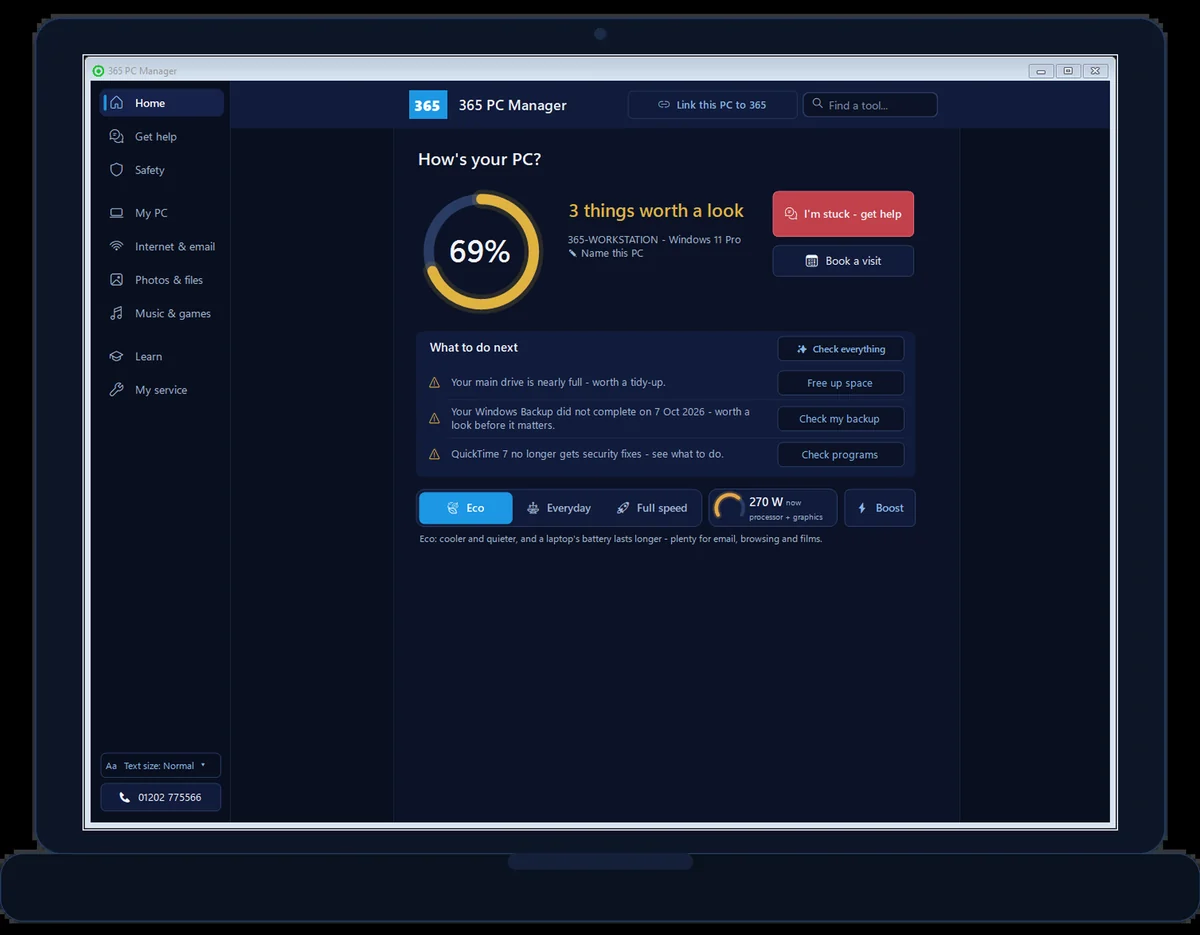
- Free forever, no sign-up, uninstall any time
- Every program kept up to date, not just Windows
- Your network’s safety checked at every service
- Broadband speed measured at every visit
- Every written Service Report in one place
- Your next visit — move or cancel it yourself
- Optional: let us run safe maintenance remotely
- No fake errors, no scare tactics, ever
// GOOD QUESTIONS
Frequently asked
Can you transfer everything from my old computer?
Yes — files, photos, email, bookmarks and most settings move across so it feels like home.
How does a remote new-computer setup work — what do I need ready?
Simple: both computers online, and ideally a backup drive or USB stick plugged into the old one so we can create a full backup before anything moves. If either machine is a laptop, keep it plugged into the mains so it can’t switch off mid-transfer. We connect securely, you watch everything on screen, and we do the rest.
How long does a new computer setup take?
The transfer itself usually takes around an hour and a half, depending on how much data you have and what needs setting up — email accounts, applications, printers, Microsoft 365 and so on. We’ll give you an honest idea before we start.
What if I don’t know my passwords?
Don’t worry — most people don’t! We’ll help you find or safely recover them as part of the setup, all done securely.
My old computer is ancient — is that a problem?
Not at all. It doesn’t matter how old your old computer is, as long as it can get online. If it’s broken and won’t start, we’ll arrange a collection at a time that suits you, do the transfer here, then return your computers with home setup included.
Is any support included afterwards?
Yes — every new computer setup includes 30 days of remote support, so if anything puzzles you in the first month, just call. We’ll also happily check whether there’s anything else IT-wise we can help with while we’re set up.
Can you help me choose a new computer?
Absolutely — tell us what you do and your budget, and we'll recommend the right machine.
Can you wipe my old computer?
Yes, we securely erase your old device so your data can't be recovered before you sell or recycle it. See our secure IT disposal & data destruction service.
Can you set up a laptop ready to use for an elderly parent?
Yes — it’s one of our favourite jobs. Large text, email, video calls, printer and security all configured, so it’s genuinely ready to switch on. See laptop set up ready to use for an elderly parent.
Let’s sort your IT
Join the Dorset homes and businesses who never worry about technology. Pick a plan or say hello.
01202 775566 · help@365techies.co.uk · MON–FRI 9AM–5PM