Has your password been leaked?
Check any password against billions exposed in real data breaches — instantly and privately. Your password is hashed in your browser and never sent, so it’s completely safe to check.
★ Rated 4.9 on GoogleFamily-run since 1995No fix, no fee
🔒 Privacy-safe: your password is hashed in your browser and never sent — the same k-anonymity method security professionals trust.
Checking against breached passwords…
What to do next
Checked against Have I Been Pwned’s corpus of over a billion breached passwords using k-anonymity. Your password never leaves this page.
Also: Cybersecurity Help
// ALSO IN OUR FREE WINDOWS APP
Prefer it on your PC?
FREE · WINDOWS 10 & 11 · NO SIGN-UP
Check for leaked passwords from your PC
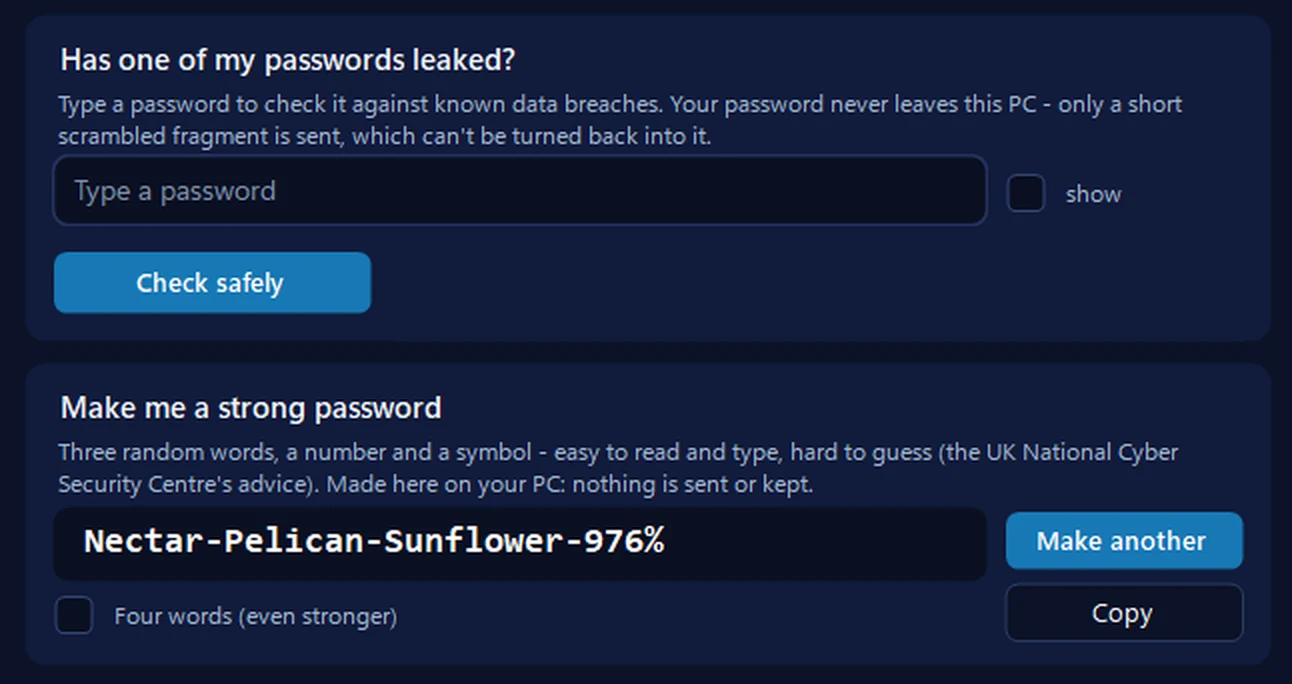
Our free app runs the same private check: it scrambles your password on your PC and sends only the first five characters of the scramble to the Have I Been Pwned database, so the password itself never leaves the computer. If one has leaked, it makes you a strong new one with one click.
Everything happens on your PC: nothing typed or made there is sent anywhere or kept, and a password you copy is kept out of Windows’ clipboard history.
In the app: Safety, then Scam check.
Download 365 PC Manager free ↓What else it checks
Made by us, a family IT firm in Bournemouth since 1995, and digitally signed by 365 Techies Ltd.
// GOOD QUESTIONS
Frequently asked
Is it safe to type my password in here?
Yes — completely. Your password is turned into a one-way fingerprint in your browser, and only the first few characters of that fingerprint are ever sent. Your actual password never leaves this page and is never stored — the same k-anonymity method security professionals use.
What does ‘found in a breach’ mean?
That exact password has appeared in a real data breach somewhere online, so it’s on the lists criminals use to try to break into accounts. Even if it wasn’t your account that leaked it, the password is now unsafe to use anywhere.
My password was found — what should I do?
Stop using it, change it on any account where you use it (or anything similar), use a different password for every login, and switch on two-factor authentication. A password manager makes this easy — we can set you up.
My password wasn’t found — am I safe?
It’s a good sign, but not a guarantee it’s strong. A long, unique passphrase you don’t reuse anywhere is what really keeps you safe. Try our password strength checker too.
Where does the data come from?
From Have I Been Pwned, a respected security service with a database of over a billion passwords exposed in data breaches. We check against it without ever sending your actual password.
Let’s lock down your accounts
From password managers and two-factor authentication to a full security check-up, we help Dorset homes and businesses stay safe online — in plain English, no jargon.
01202 775566 · help@365techies.co.uk · MON–FRI 9AM–5PM
// HOW IT WORKS
How to safely check if your password has been leaked
Yes — it is safe to check whether your password has been leaked here, because your password is turned into a one-way fingerprint in your browser and only the first five characters of that fingerprint are ever sent, so your actual password never leaves your device.
Step by step
- Type the password to check — Enter the password you want to test in the box; use the 'show' toggle if you need to see what you typed.
- Run the check — Press 'Check password' — your browser creates a SHA-1 fingerprint and sends only a short, anonymised fragment of it.
- Read the result — See whether the password was found in known breaches and, if so, exactly how many times it has appeared.
- Act on a match — If it was found, stop using it, change it everywhere you used it (or anything similar), and switch on two-factor authentication.
- Prevent a repeat — Use a unique password for every login — a password manager makes that effortless and 365 Techies can set one up for you.
Good to know
Is it safe to type my real password into a leak checker?
With this tool, yes — it uses k-anonymity, meaning your password is hashed on your device and only a five-character slice of that hash is sent, so no website (including us) ever sees your password or can store it.
How can a checker find my leaked password without knowing it?
It sends just the first five characters of the password's hash to the Have I Been Pwned range API, which returns all matching hash endings; your browser then compares them locally, so the full password is never revealed.
Is it safe to check a password I still use?
Yes, and it is worth doing — the check reveals nothing about you, and if the password turns out to be in a breach you will want to change it straight away before criminals try it on your accounts.