// FREE REFRESH RATE TEST
Free refresh rate test
See how many times a second your screen is really refreshing, in hertz (Hz), and compare smooth and half-speed motion side by side. Bought a 144 Hz monitor or a gaming laptop? Check it isn’t stuck at 60. Nothing to install. Rated 4.9 on Google.
- ● Measures in seconds
- ● Any screen, any browser
- ● How to fix a 60 Hz screen
/01 — THE TEST
Test your screen’s refresh rate
The test starts by itself and takes a few seconds. Keep this window on the screen you want to test, and don’t scroll while it measures. Two screens? Drag the window to the other one and press Measure again.
Measuring… keep this window on screen.
It measures the screen this window is on. Nothing is sent anywhere.
At a glance
| What it measures | How many times a second the screen this window is on redraws: its refresh rate, in hertz. |
|---|---|
| Most screens | 60 Hz. Gaming monitors and laptops are often 120, 144, 165 Hz or more. |
| Says 60 on a 144 Hz monitor? | Windows, the cable or the port is holding it back. The fix is usually one setting. |
| The setting | Settings, System, Display, Advanced display, Choose a refresh rate. |
| Laptop on battery | Some laptops drop to 60 Hz on battery or in battery saver to save power. That’s normal. |
| Unsteady result | Close other tabs and busy programs, then measure again. |
/02 — WHAT IT MEANS
What the number means
- 60 Hz is normal for most office monitors, TVs and everyday laptops.
- 120 to 165 Hz is common on gaming monitors and gaming laptops: scrolling and games look noticeably smoother.
- 240 Hz and above is for fast competitive games.
- The two moving blocks show the difference: the top one moves on every refresh, the bottom one on every other, which is what half your screen’s speed looks like.
/03 — STUCK AT 60 HZ?
Get it running at its full speed
- Choose the higher rate in Windows: Settings, System, Display, Advanced display, then Choose a refresh rate. Pick the highest number offered. Windows puts the old setting back by itself if the screen goes blank.
- Use the right cable and socket: DisplayPort, or the HDMI cable that came with the monitor. An old HDMI cable, an adapter, or the motherboard’s socket instead of the graphics card’s can cap it at 60 Hz.
- Laptops: plug the charger in and switch off battery saver; some laptops run at 60 Hz on battery to save power.
- Update the graphics driver from NVIDIA, AMD or Intel, or the laptop maker.
Every step, in detail: monitor stuck at 60Hz.
/04 — THE QUICK WAY
Let our free app check your screens
FREE · WINDOWS 10 & 11 · NO SIGN-UP
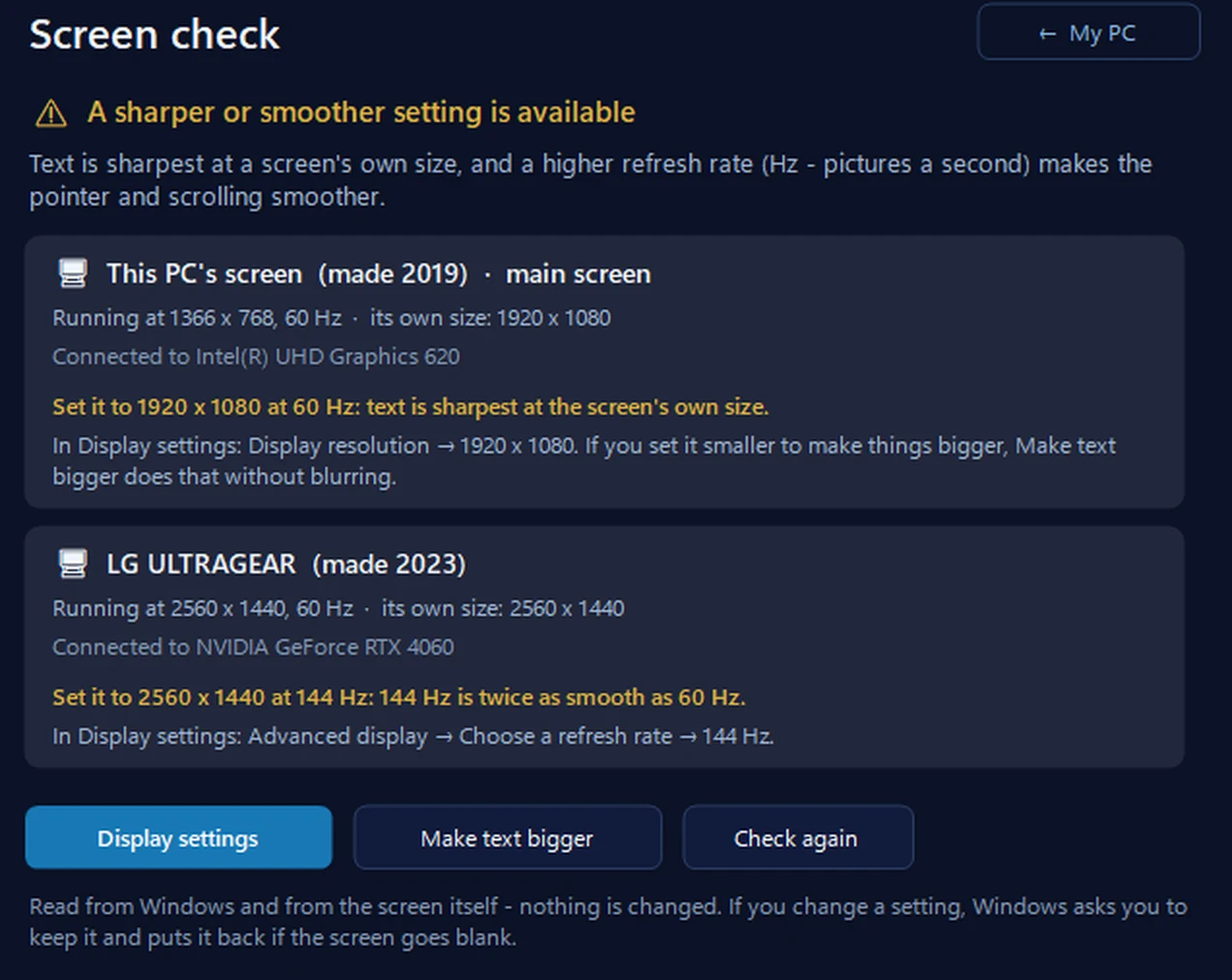
Screen check: is your screen at its sharpest and smoothest?
For every screen it shows the name and year it was made, the size and refresh rate it’s running at, its own best size, and a better setting when Windows offers one. It never changes the setting itself — it opens Display settings, and Windows puts the old setting back if the screen goes blank.
In the app: My PC, then Screen check.
Download 365 PC Manager free ↓What else it checks
Made by us, a family IT firm in Bournemouth since 1995, and digitally signed by 365 Techies Ltd.
/05 — WHEN TO CALL US
When to call us
Still not right? Ring 01202 775566 or text 07520 615332, Monday to Friday, 9 to 5. With your permission we connect to your Windows PC and sort software problems while you watch: usually the same day, remote help from £20, and no fix, no fee. Gaming PC? Our gaming PC tune-up sets the screen, drivers and power settings up properly.
FAMILY-RUN SINCE 1995 · ★ 4.9 ON GOOGLE · 200+ COMPUTERS UNDER OUR CARE · NO FIX, NO FEE · SAME-DAY REMOTE SUPPORT
// GOOD QUESTIONS
Frequently asked
How do I check my monitor’s refresh rate?
Run the test on this page, or look in Settings, System, Display, Advanced display, where Windows shows the refresh rate it’s using.
Why is my 144 Hz monitor running at 60 Hz?
Usually the refresh rate hasn’t been chosen in Windows, or the cable or socket can’t carry more than 60 Hz. See monitor stuck at 60Hz.
Is the test accurate?
It measures how often your browser draws the page, which follows the screen’s refresh rate. If other programs are busy the result can wobble; close them and measure again.
Why does my laptop show 60 Hz on battery?
Many laptops lower the refresh rate on battery or in battery saver to save power. Plug the charger in and measure again.
Does a higher refresh rate matter for everyday use?
It makes scrolling and moving windows look smoother, and matters most for games. For email and browsing, 60 Hz is fine.
Screen still stuck at 60 Hz?
With your permission we connect to your Windows PC and get the screen running at its full speed while you watch. Call 01202 775566 or text 07520 615332.
01202 775566 · help@365techies.co.uk · MON–FRI 9AM–5PM