// FREE FOR WINDOWS 10 & 11 · SIGNED BY 365 TECHIES LTD
Techies One: free email, photos, letters and sums for Windows
Techies One is a free program for Windows 10 and 11 PCs from 365 Techies, the family-run IT firm in Bournemouth. Mail replaces Windows Mail and Outlook Express, with scam warnings in plain English, and brings your old emails in. Albums puts your photos in date order, with slideshows, films and memories, and brings across your Picasa stars and captions. Letters, Sums and Files look after your letters, budgets and folders. No adverts.
Our firm is rated 4.9 on Google365 Techies · family-run since 1995What the film says
Your email. Your letters. Your sums. Your files. All in one simple program. This is Techies One, from 365 Techies. Mail puts all your email addresses in one place. It moves scam emails out of the way before you open them. And the writing can be as big as you like. Letters writes the letter with you: a complaint, cancelling a contract, a CV. Press Next to fill in the gaps. Or just talk, and it types for you. Then save it as a PDF, or email it. Sums is a spreadsheet that adds itself up. A household budget, bills, club accounts. And it opens Excel files too. Files shows everything on your PC and your clouds together. Your photos, nice and big. And a video that’s too big to email? Share a link, and send it by WhatsApp. When your PC is full, Space finds the duplicates and the biggest files, and makes room. Safely. Anything removed goes to the Recycle Bin. Techies One. Free to download, with real people in Dorset if you ever need a hand.
- £0for the program, with no adverts
- Signedby 365 Techies Ltd, checked by Windows
- A personto ring: 01202 775566, Mon to Fri 9 to 5; any paid work is priced first
- 4.9★the firm behind it, on Google
// DOWNLOAD · FREE · WINDOWS 10 & 11
Get Techies One
The program is free for everyone, at home or at work, with as many email addresses as you like. Mail, Albums, Letters, Sums and Files come in the one download. No account to make with us, no trial, no adverts.
- 1. Download it. Press the Download button. The file is called TechiesOneMail-Setup-0.22.0.exe (the name it has always had) and is signed by 365 Techies Ltd.
- 2. Open the file. It installs for you in a few seconds and needs no administrator password. It only adds itself (a Start menu entry and, if you like, a desktop icon) and doesn’t change anything else on the PC.
- 3. Type your email address. For Mail, type your address: Techies One recognises BT, Sky, Plusnet, Gmail, Yahoo, AOL and Outlook.com addresses and fills in all the technical settings itself. Albums, Letters, Sums and Files are on the bar down the left.
- 4. Type your password, or sign in with Microsoft. Before saving, it checks it can both receive and send. Your email appears straight away, because it is still with your provider.
What will Windows say when I open it?
Usually nothing: it’s digitally signed by 365 Techies Ltd. But a brand-new program can get a warning or two while Windows gets to know it. When downloading, Edge may say the file “isn’t commonly downloaded”: press the three dots next to it, choose Keep, then Show more and Keep anyway. When you open it, you may see a blue “Windows protected your PC” box: choose More info, check that the Publisher line says 365 Techies Ltd, then choose Run anyway. If the publisher says anything else, don’t run it, and ring us.
Will I lose my old emails?
Usually not. If your old program used the normal setting (IMAP), your emails are kept with your email provider, so they appear in Techies One, folders and all, as soon as you add your address. Outlook Express and Windows Live Mail were often set to the older “POP” setting instead, which kept email only on the old PC. Then Bring in old emails can copy them from the old program’s files (Windows Live Mail, Windows Mail, Thunderbird or an Outlook .pst file; Outlook Express files are still experimental) into a mailbox on this PC, without changing the originals. Keep the old program or PC until they’re in, and ask us if you’re not sure.
// WHAT’S IN IT
Everything people ring us about, in one simple program
Techies One started as a simple email program. Now the same window shows your photos, writes your letters, adds up your sums and looks after your files, with the same big buttons, plain words, help on every screen and a real person to ring.
- MailEmail from every address, with scam warnings
- AlbumsAll your photos by date, slideshows, films and memories
- LettersLetters, CVs and notices, saved as Word files
- SumsBudgets and accounts that add themselves up
- FilesYour PC, USB sticks and clouds together
- SpaceFind duplicates and big files, make room
- Share a linkSend a video that’s too big to email
- DictateTalk instead of typing
Mail: the simple replacement for Windows Mail and Outlook Express
Email programs have looked much the same for twenty years. Techies One Mail was built around the problems our customers actually ring us about: scams, settings that won’t take, an inbox they can’t keep on top of, and too many buttons. This film shows it fixing them.
What the email film says
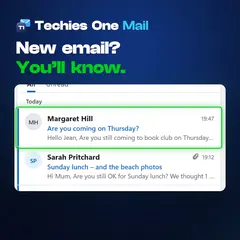
Email giving you trouble? Here’s a simpler way. Techies One Mail is a free email program for Windows computers, from 365 Techies. If Windows Live Mail or Windows Mail has stopped working, your email is most likely still with your email company, and Techies One can show it. If your BT or Sky email won’t go into the new Outlook, type your address into Techies One. It already knows the settings. Find it all too fiddly? One tick turns on Simple view: fewer, bigger buttons. Every email is checked for the signs of a scam while Techies One is open. Fakes go in their own folder, with the reasons in plain English. Inbox full of old emails? Clean up shows who sends the most, and clears thousands in a few clicks. Deleted emails go to your Deleted folder first. More than one address? All inboxes puts every email in one list, and your reply goes from the right one. Your password stays on your computer, so we never see it. And it’s free, with no adverts. If you get stuck, press Get help, and a real person from 365 Techies rings you back. Download Techies One Mail free from 365techies.co.uk, or ring us if you’d rather we set it up.
Several email addresses to keep an eye on
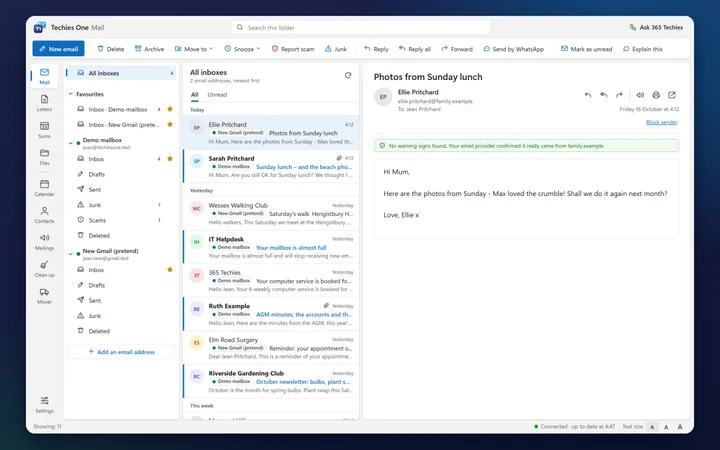
All your inboxes in one list
Got a BT address, a Gmail and a work one? Add them all, and All inboxes shows the email from every one of them in one list, newest first, each marked with the address it came to. Reply, and it goes from the address the email was sent to, so you never answer from the wrong one. The Unread tab works across them all, and searching while All inboxes is open looks through every inbox.
Scam emails are the biggest worry
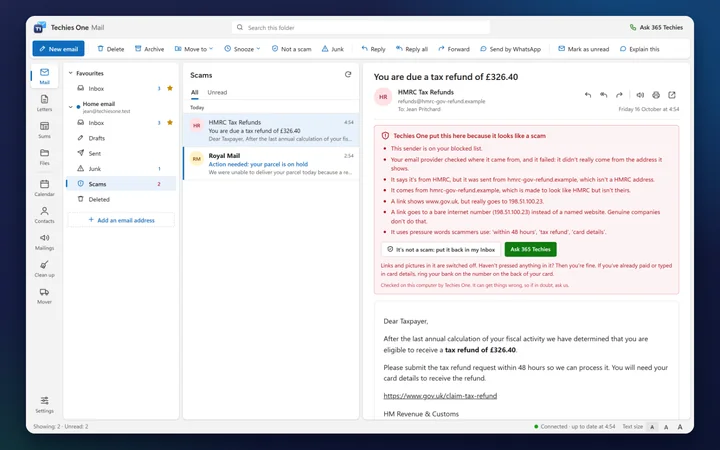
Warnings about scams, in plain English
Every email you open is checked on your PC for the tell-tale signs of a scam: a fake Royal Mail, HMRC or bank sender, a link that goes somewhere other than it says, a dangerous attachment, or pressure words like “within 24 hours”. It tells you exactly why. While Techies One is running, even with its window minimised or closed, obvious scams go to a Scams folder and the sender is blocked; anyone you’ve emailed before is never moved to Scams, though you’re told to be careful if something looks wrong. Like any checker it can get things wrong, so if in doubt, ask us.
“Is this really from them?”
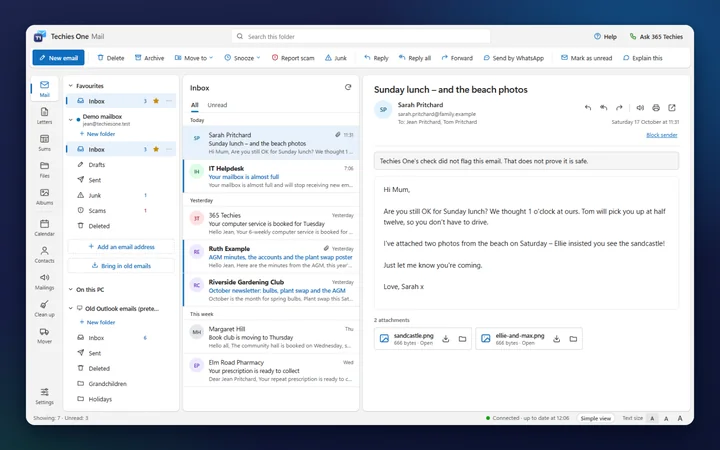
It never tells you an email is safe
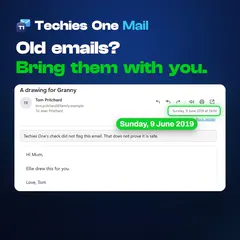
When the check finds no warning signs, a plain grey line says only that: Techies One’s check did not flag the email, and that doesn’t prove it is safe. If all an email has in its favour is that you’ve written to that person before (their account could have been taken over), an amber Be careful box says so, with Move to Scams. If an email asks for money, bank details or a code, check by phone first. Pictures from the internet stay hidden until you choose to show them, so senders can’t tell when you’ve opened their email.
Settings, ports and passwords put people off
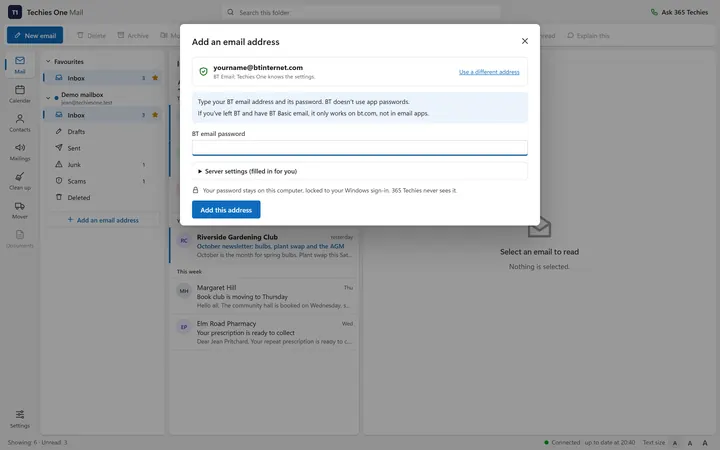
Type your address; it does the rest
Techies One knows the settings for the big UK providers, so there are no server names or port numbers to look up. It tells you which password it needs (BT’s normal one, or a Gmail app password) and checks everything works before it saves. Moving from an old program? Look for my old email settings adds the addresses it used; you type each password once, because Techies One never reads saved passwords.
“Where’s the button to make a folder?”
Your own email folders, as in Outlook
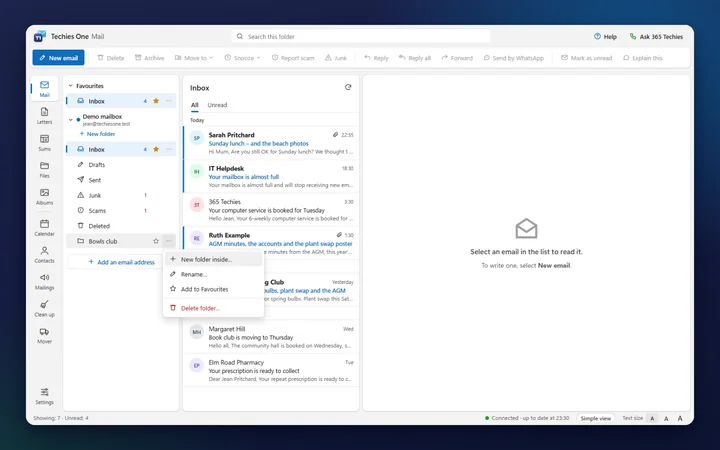
Select New folder under your email address to make a folder for the club, the house or the family. The … button beside a folder makes one inside it, renames it or deletes it (its emails go to Deleted first), and Move to puts an email into any of them, in Simple view too. The folders are made at your email provider, so a phone reading the same address sees them as well.
 Watch it in 21 secondsThe real program, with a spoken guide and captions
Years of newsletters and junk
Clean up your inbox in minutes
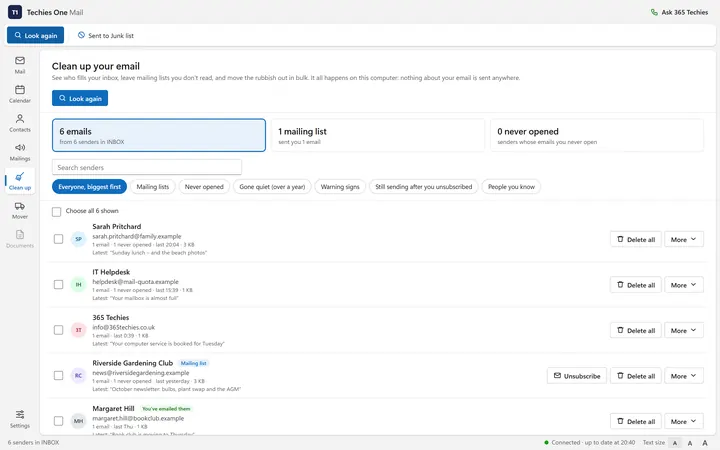
Clean up lists everyone who fills your inbox, biggest first: mailing lists, emails you never open, senders gone quiet for over a year. Unsubscribe from genuine newsletters in one press (it refuses on anything suspicious, because that would tell a scammer your address works), delete or archive all of a sender’s emails at once, or send a whole company to Junk from now on. Deleted email goes to Deleted, so nothing is lost by mistake.
Years of emails stuck in an old program
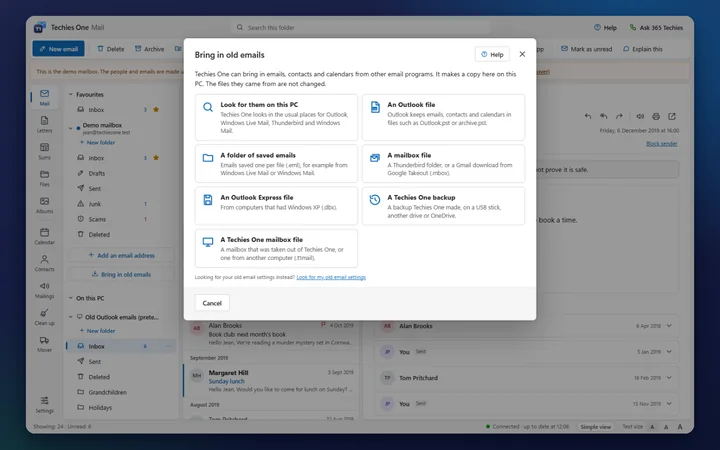
Bring in old emails from Outlook, Windows Live Mail and Thunderbird
Bring in old emails copies emails, contacts and calendars from an Outlook .pst or .ost file, Windows Live Mail, Windows Mail, Thunderbird, a Google Takeout download or a folder of saved emails, and from Outlook Express files too (that one is still experimental). Look for them on this PC searches the usual places for you. They go into a mailbox under On this PC, by your inboxes, kept on your computer rather than using your email company’s space, and the files they came from are never changed.
 Watch it in 21 secondsThe real program, with a spoken guide and captions
“What if the PC dies?”
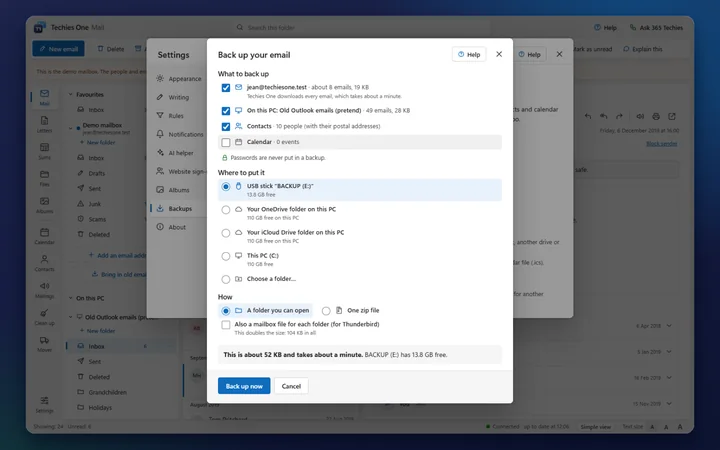
Back up your email to a USB stick or OneDrive
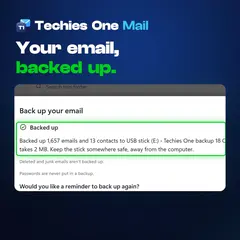
Backups, in Settings, copies the email from your addresses, your mailboxes on this PC, your contacts (with their postal addresses) and your calendar to a USB stick, another drive or OneDrive, as ordinary email files that other programs can open too. Later backups add only what’s new, and Bring back puts a backup back without doubling anything up. Passwords are never put in a backup.
 Watch it in 21 secondsThe real program, with a spoken guide and captions
An address book you never had time to make
An address book that fills itself in
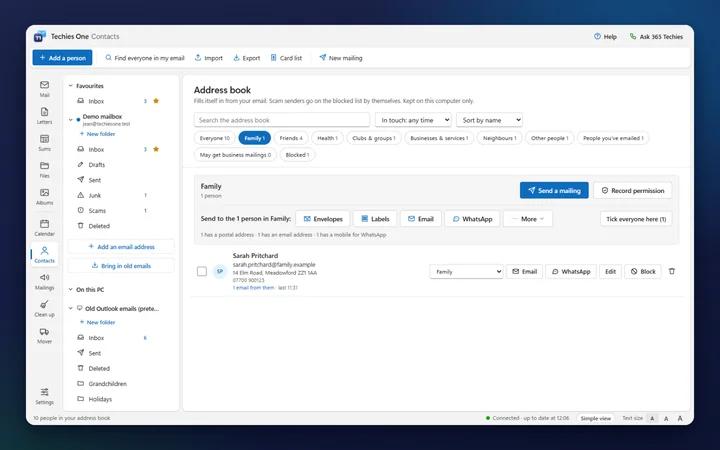
The people who email you, and everyone you email, go into your address book by themselves (newsletters and scam senders are left out), sorted into groups: Family, Health, Clubs & groups, Businesses & services and more. Add postal addresses and mobile numbers, email a whole group in one go, block someone in one press, or bring in contacts from Outlook, Gmail or any contacts file (.csv or .vcf), addresses and all.
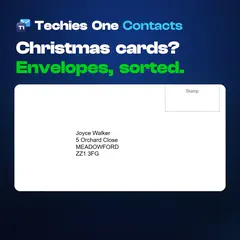
Christmas cards and a pile of envelopes to write
Envelopes, labels and your Christmas card list
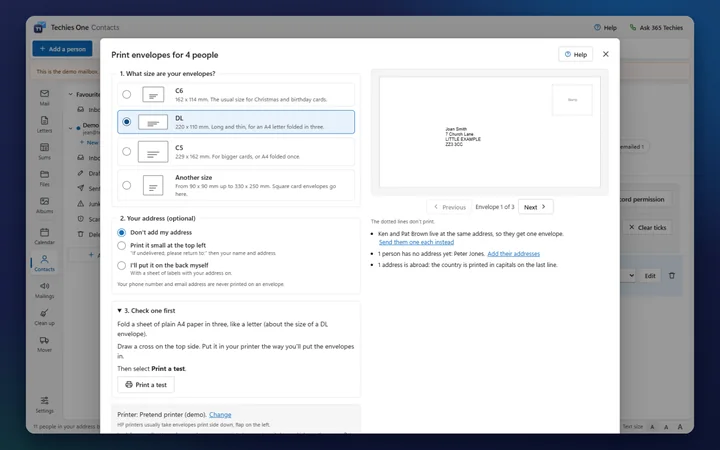
Tick the people, then press Envelopes (C6, DL, C5 or any size) or Labels (the usual A4 sheets of sticky labels, starting at whichever label is next). It shows each one first, and a test on folded paper tells you which way the envelope goes in. People at the same address get one envelope. Email sends each person their own “Dear Sarah” email, and WhatsApp opens a message for each in turn: you press Send. The Christmas card list keeps who you sent a card to, and who sent one to you, year by year. No mail merge to learn.
 Watch it in 24 secondsThe real program, with a spoken guide and captions
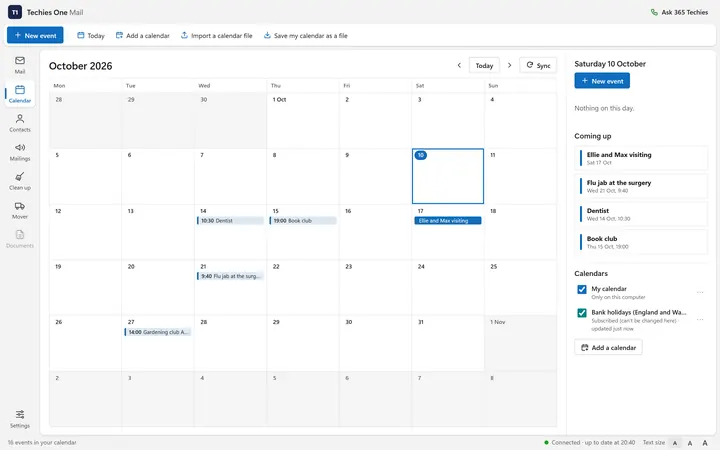
Appointments in one place
A calendar that can keep your phone in step
A clear month calendar with reminders that pop up by the clock while Techies One is running, even with its window minimised or closed. Sign in with an Outlook.com or Hotmail address and your Outlook calendar syncs both ways, so a dentist appointment you add on the PC also appears on a phone that shows your Outlook calendar. With other addresses the calendar is kept on your PC. Add the UK bank holidays in one click, or a school-terms or bin-day calendar from a link.
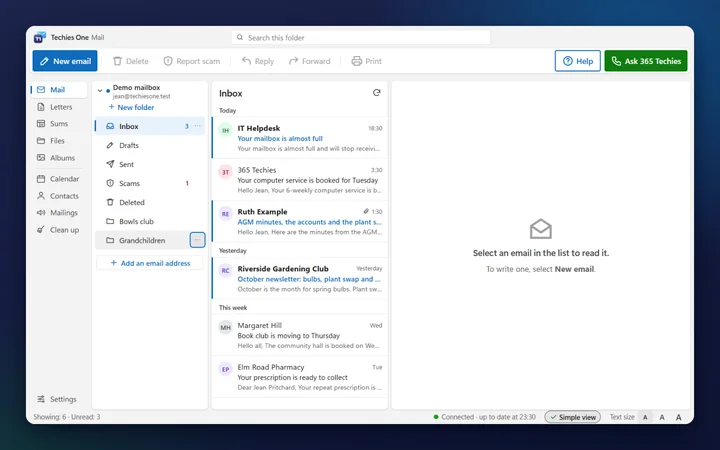
Too many buttons
Big buttons and big text when you want them
Simple view keeps just the everyday buttons (reading, writing, replying, deleting and reporting scams), bigger, with Help and a green Ask 365 Techies button that asks one of us to ring you back (it sets out the price before you send anything). Text size goes up to extra large, there’s a dark mode, and it can read an email out loud using Windows’ own voice.
And the everyday things you’d expect
// ALBUMS · NEW
Albums: all your photos, in the order they were taken
For everyone who misses Picasa: your photos and videos from this PC, USB sticks, camera cards and your cloud folders, together in date order, with slideshows, films and memories. Albums never changes, moves or uploads your photo files, and nothing about your photos is sent to 365 Techies.
Photos on the PC, a USB stick, the camera and OneDrive
All your photos by date, wherever they’re kept
Albums finds the photos and videos in your Pictures, Videos and Desktop folders, on USB sticks and in the cloud folders on your PC, and shows them newest first by the date they were taken, with the years and months down the side. Plug in a camera’s memory card and it offers to copy just the new photos into Pictures, by year and month, without changing anything on the card. Signed in to OneDrive in Techies One, it can also show the photos kept only online, once you say yes, without downloading them.
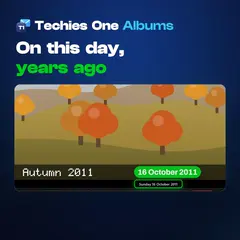 Watch it in 26 secondsThe real program, with a spoken guide and captions
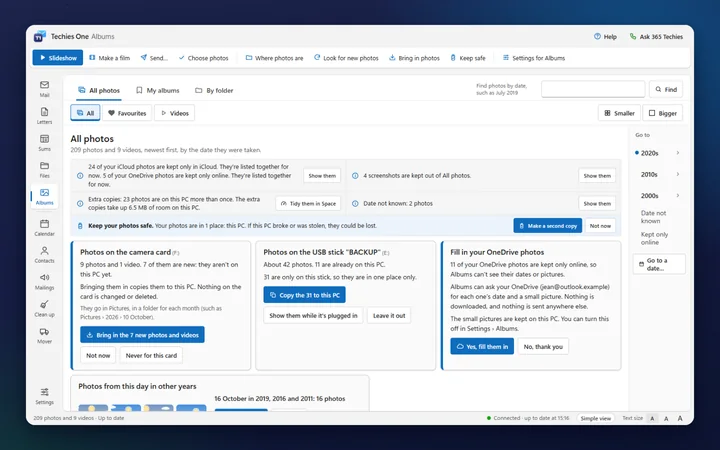
Thousands of photos you never look at
Looking back: memories, if you’d like them
Only if you say yes, Looking back gathers On this day, A year ago this week, your trips and busy days, Christmas through the years, the birthdays you set and, once you’ve said who’s in some photos, “Ellie through the years”. Not this one hides a memory you’d rather not see, and you can pause it for a month, leave someone out or switch it off. It never uses screenshots or photos you’ve hidden, and nothing ever pops up.
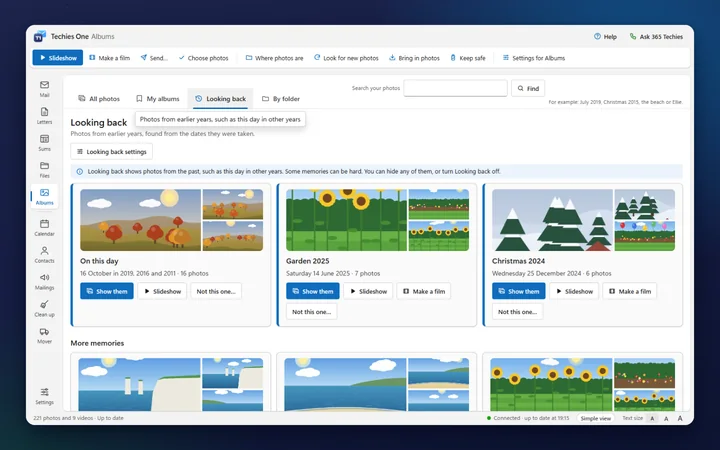
Showing the family on the big screen
Slideshows, and photos sent at the right size
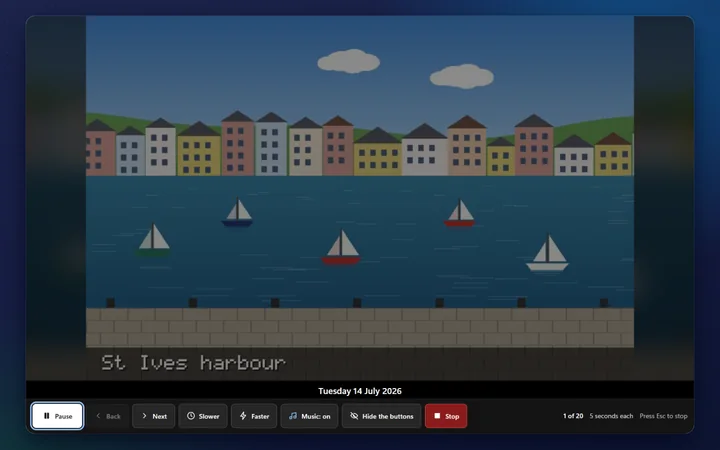
Choose some photos, an album or a memory and press Slideshow: full screen, with gentle or happy music if you like, slower or faster, and your words under each photo read aloud if you want. Send emails copies made smaller, with where they were taken removed, or opens WhatsApp with them a few at a time for you to press Send, or saves copies on a USB stick.
A film for a birthday, or for a funeral
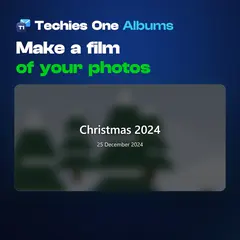
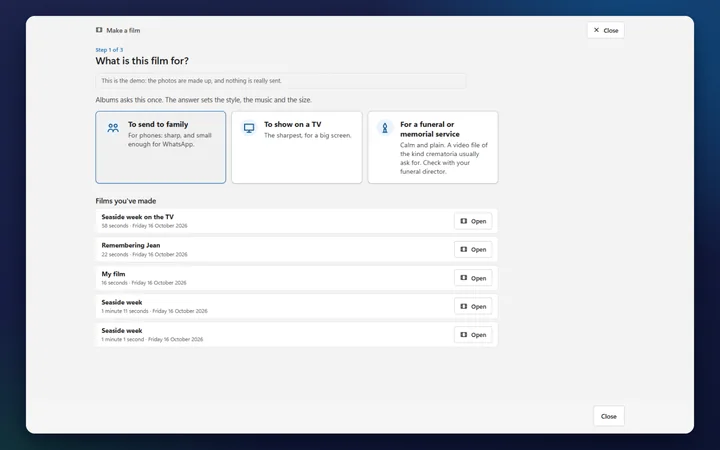
Make a short film of your photos
Pick the photos and Albums makes a short film with music, on your PC, with nothing extra to install. Choose what it’s for: to send to family (small enough for WhatsApp), to show on a TV, or for a funeral or memorial service, calm and plain, the kind of video file crematoria usually ask for (check with the funeral director). Then watch it, send it, share a link from your own OneDrive or put it on a USB stick.
 Watch it in 24 secondsThe real program, with a spoken guide and captions
Picasa stopped, and your stars and captions are in it
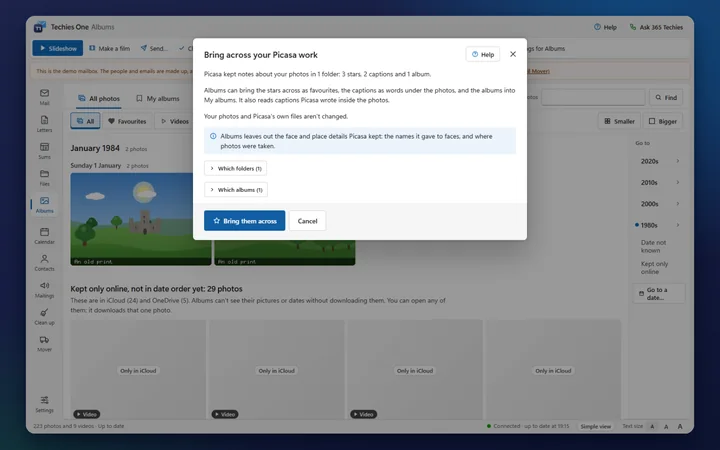
Bring across your Picasa work
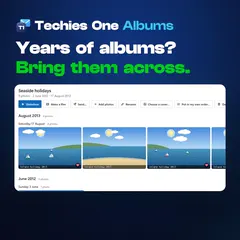
Picasa kept notes about your photos in its own files. Albums reads them: your stars become favourites, your captions become words under the photos, and your Picasa 3.9 albums become My albums. Captions written inside the photos themselves come too. It leaves out the faces and places Picasa kept, and your photos and Picasa’s files aren’t changed. Then carry on where Picasa left off: type who’s in a photo (Techies One doesn’t recognise faces), add words, and find photos by typing “Ellie Christmas 2019”.
 Watch it in 23 secondsThe real program, with a spoken guide and captions
Every photo on one PC that could break
Keep safe: a second copy on a USB drive
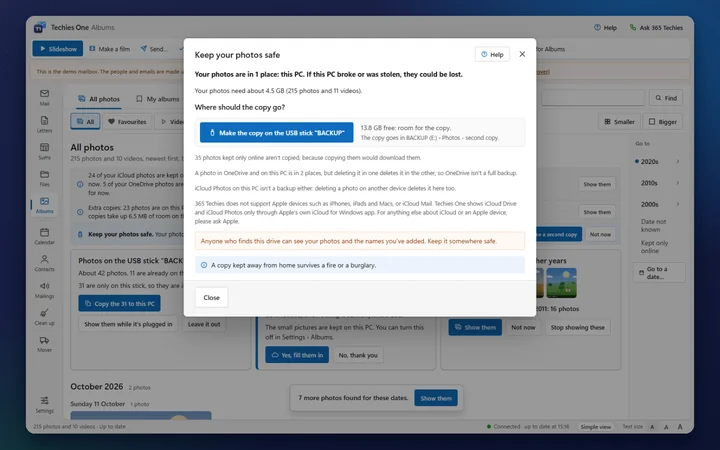
If your photos are only on this PC, a fire, a burglary or a broken PC could lose them. Keep safe copies every photo and video onto a USB stick or drive, then adds only the new and changed ones each time, and never replaces anything already on the drive. The drive gets a plain Open my photos page, so the family can look through them on another computer. Anyone who finds the drive can see your photos too, so it says to keep it somewhere safe.
And more in Albums
// LETTERS · SUMS · FILES · SPACE
Letters, sums and your files, in the same window
The same big buttons and plain words as Mail, for the other things people ask us about every week. Letters and Sums save ordinary Word and Excel files, so nothing is locked in.
A letter to write, and no Word on the PC
Letters: the letter is written with you
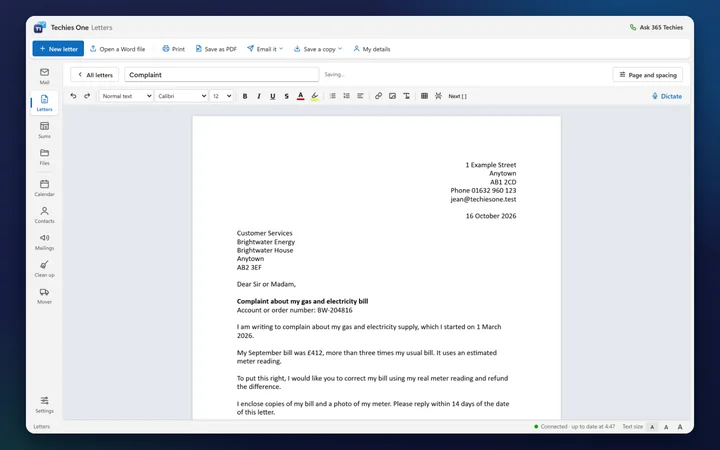
Start from a ready-made letter: a complaint, cancelling a contract or subscription, asking for a copy of your records, a letter to the council, a thank-you, a notice or a CV. Your name and address go at the top by themselves, with today’s date the British way, and Next [ ] takes you to each gap to fill in. It’s a proper A4 page, saved as you type as a Word file in your Documents folder, so it opens in Word too. Print it, save it as a PDF, or email it in one click.
Household bills on the back of an envelope
Sums: a spreadsheet that adds itself up
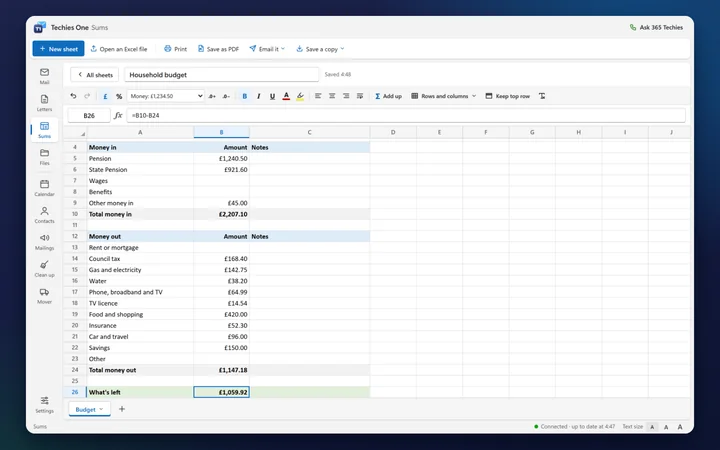
Start from a household budget, bills and direct debits, expenses, a mileage log, club accounts or profit and loss over the UK tax year, or open an Excel file. Type what comes in and what goes out, and the totals follow. It understands about 90 of Excel’s formulas, saves real Excel files in your Documents folder so they open in Excel too, and emails a sheet as a PDF or an Excel file.
Photos everywhere, and no idea where
Files: your PC, USB sticks and clouds in one window
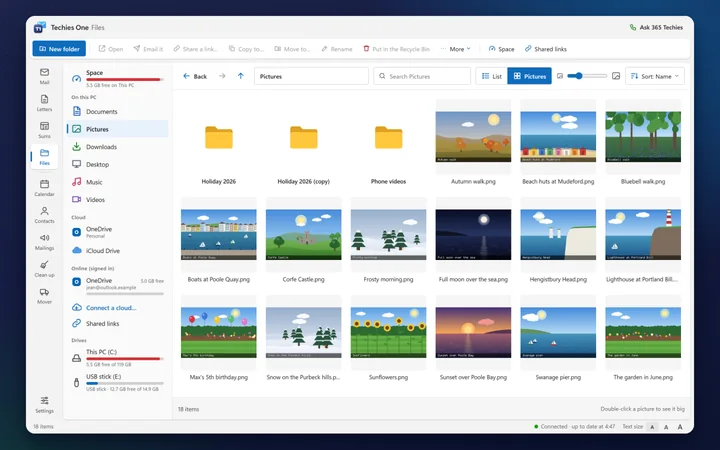
Documents, Pictures, Downloads and your USB sticks, with the OneDrive, Dropbox, Google Drive and iCloud folders their own apps keep on your PC, in one simple window. See your photos big, move and copy with a progress bar and Undo, and nothing is deleted for good without asking: it goes to the Recycle Bin. You can sign in to OneDrive right inside Techies One (and Dropbox is coming). With Apple’s iCloud for Windows app on the PC, Move out of iCloud brings photos and videos down to the PC or a USB stick and frees your iCloud space; it says plainly first that this takes them off your iPhone and iPad too.
“Your PC is running out of space”
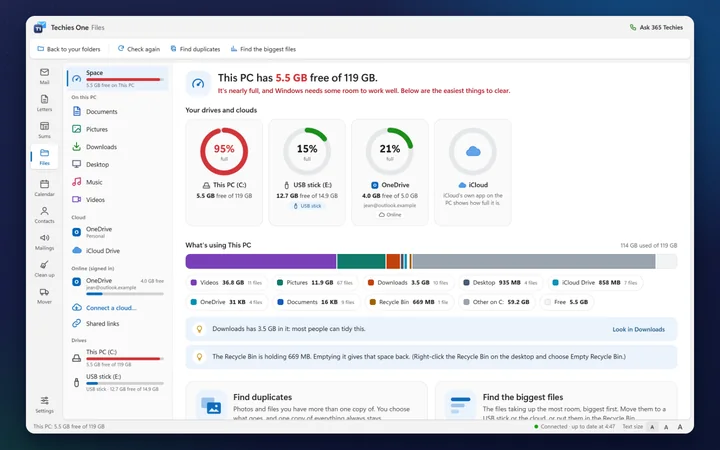
Space: see how full everything is
Space rings show how full your PC, your USB sticks and your signed-in OneDrive are: green, amber at 85%, red at 95%, each with how much is free. What’s using This PC shows where the room has gone (pictures, videos, downloads, the Recycle Bin), with a plain hint where it helps, and a click opens that folder.
The same photos saved three times
Find the duplicates and the biggest files, and make room safely
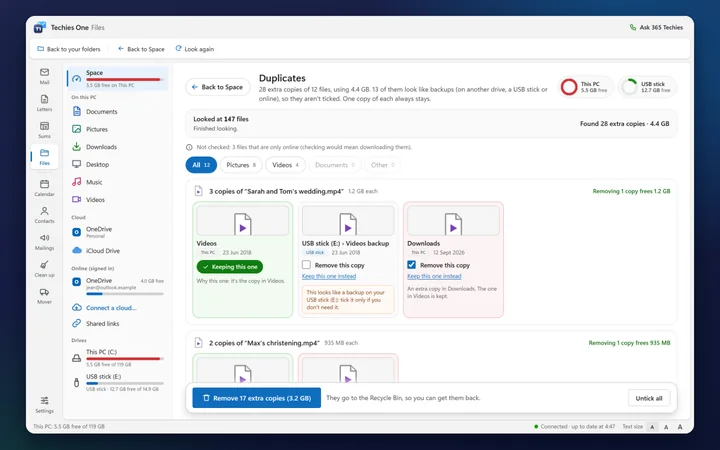
Find duplicates checks photos and videos by what’s inside them, not just their names, and never downloads an online-only file to do it. It ticks the extra copies and keeps the one in the tidiest place; a copy on a USB stick or in a cloud is left unticked, because it may be your backup. Remove the ticked copies puts them in the Recycle Bin, so you can get them back, and it never removes the last copy of anything. Find the biggest files lists what takes the most room, ready to move to a USB stick.
A video too big to email or WhatsApp
Share a link: send it by WhatsApp or email
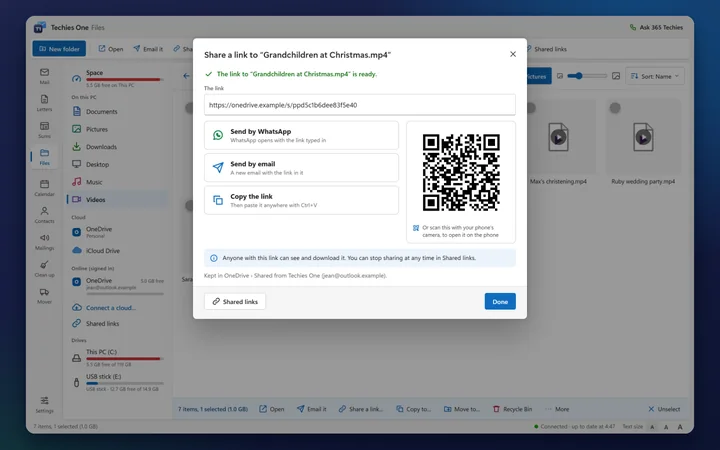
Right-click a video or file and choose Share a link. Techies One puts it in your own OneDrive (you sign in once, on Microsoft’s own page) and gives you a link to send by email or WhatsApp, or a code to scan with your phone’s camera. Send by WhatsApp opens WhatsApp with the link typed in: you choose who it goes to and press Send. Stop sharing whenever you like. The file stays in your OneDrive: 365 Techies never holds your files.
Typing is slow, or hard on the hands
Dictate: talk instead of typing
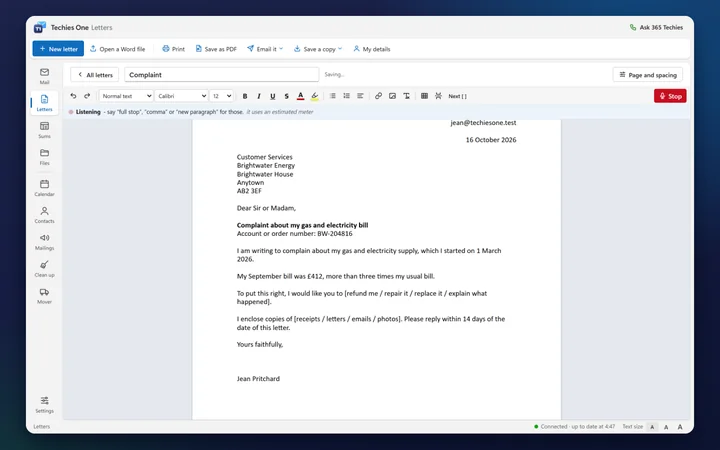
Press Dictate in an email, a letter or a mailing and speak: your words appear where the cursor is. Say “full stop”, “comma”, “question mark” or “new paragraph” for those. Microsoft turns your speech into words over the internet, as Windows’ own voice typing does, so Dictate needs an internet connection.
// HELP ON EVERY SCREEN
Stuck? The answer is on the screen
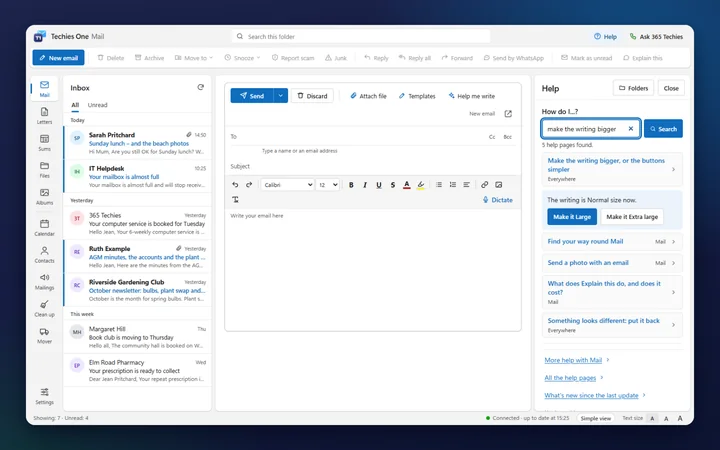
“How do I make the writing bigger?”
Help on every screen, in plain English
Press Help, or F1, and Techies One shows the help for what you’re doing. Or type a question in your own words into How do I...?: it finds the answer here on your PC, and for a few settings gives you a button that does it for you. Help pages can be printed in large print or read aloud, and resting the mouse on a button shows a short tip. Rather talk to a person? Ask 365 Techies asks one of us to ring you back: checking a problem is free, and any work is priced before we start.
// WHY YOUR OLD EMAIL PROGRAM STOPPED
What happened to Windows Mail, Outlook Express and Windows Live Mail?
Each was Microsoft’s free email program for its time, and each has ended. For most people the email itself is still with their email provider, waiting for a program that can open it. The exception is an old program set to the “POP” setting, which kept email only on that PC; Techies One can bring those emails in from the old program’s files.
| Program | Came with | What happened |
|---|---|---|
| Outlook Express | Windows XP | Ended with Windows XP on 8 April 2014. Windows Vista replaced it with Windows Mail, and no later Windows has included it. |
| Windows Mail (Vista) | Windows Vista | Ended with Vista on 11 April 2017. |
| Windows Live Mail 2012 | A free download for Windows 7 | Support ended on 10 January 2017. In 2016 it lost its direct link to Hotmail and Outlook.com (people could still connect it another way), and on 16 September 2024 Outlook.com stopped accepting plain passwords from any program that can’t use Microsoft’s modern sign-in, which ended that too. |
| Mail and Calendar | Windows 10 and 11 | Support ended on 31 December 2024. Microsoft says it can no longer send or receive email, and points people to the new Outlook. |
Dates from Microsoft’s support and lifecycle pages and, for the 2016 Hotmail change, press reports at the time; checked 10 October 2026.
A warning about “Outlook Express for Windows 11” downloads. Microsoft no longer offers Outlook Express or Windows Live Mail anywhere, so a website offering them is not Microsoft, and old copies get no security fixes. Many people also call Outlook.com or the new Outlook “Outlook Express”: if that’s the one you mean, it is still going, and our Outlook help covers it.
Where does your email actually live?
Why your email is usually still there when the old program stops, and when it isn’t.
An animated diagram with a spoken guide and captions.
What the film says
Where does your email actually live? Usually, not on your computer. It’s kept by your email company, like BT, Sky or Gmail. Your computer and your phone each show you a copy of the same email. So if your old email program stops working, your email is still there. A new program shows it again. But some older programs, like Outlook Express, were often set up to move email onto one computer. Then it’s only on that PC. Your phone can’t see it, and if the PC fails, it can be lost. Not sure which you have? Ring us before you change anything.
// WORKS WITH YOUR EMAIL ADDRESS
Will it work with my email address?
Almost certainly. You type your address and Techies One fills in the settings. What you need to sign in depends on who your email is with:
| Email from | Addresses ending | How you sign in | Good to know |
|---|---|---|---|
| BT | btinternet.com, btopenworld.com | Your normal BT email password | BT Basic email (kept after leaving BT broadband) only works on bt.com, in no email program. More about BT email. |
| Sky | sky.com | Your Sky iD password | Changed it lately? Use “Unlock your emails” on sky.com first. More about Sky email. |
| Plusnet | name@username.plus.com | Your Plusnet mailbox password | Older force9 and free-online addresses may need the settings typed in. Plusnet email that has moved to Greenby uses the same settings: logging in to Greenby. More about Plusnet. |
| Virgin Media | virginmedia.com, ntlworld.com, blueyonder.co.uk, virgin.net | A Virgin Media app password, made in the My Virgin Media app | Making a new one stops the old one working on your other devices, and Virgin often won’t give one for a second mailbox (ask us if that happens). Virgin email is moving to Junara: what that means. |
| Gmail | gmail.com, googlemail.com | A Google app password | Needs Google’s 2-Step Verification switched on first. The app shows you where to make one. |
| Yahoo and AOL | yahoo.co.uk, yahoo.com, aol.com and others | A Yahoo or AOL app password | Made under Account security on the Yahoo or AOL website. |
| Outlook.com and Hotmail | outlook.com, hotmail.co.uk, live.co.uk, msn.com and others | Sign in on Microsoft’s own page | Techies One never sees your Microsoft password. Microsoft’s page may call the app “unverified” while we finish Microsoft’s checks. Your Outlook calendar syncs both ways. |
| Work addresses on Microsoft 365 | your company’s own address | Sign in on Microsoft’s own page | Your company’s IT administrator will usually need to approve the app, and to switch on “SMTP AUTH” sending for your mailbox (it’s off on many small-business setups). If that’s us, just ring. |
| Other providers (including TalkTalk) | any other address | Usually your normal password | Techies One looks up the settings itself, or you can type them in. We haven’t yet tested every provider, TalkTalk included, so if it won’t connect, ring us. |
It reads email that is kept on your provider’s server (IMAP), so your phone and PC show the same email. It doesn’t collect email by the older POP setting (though it can bring in what an old POP program kept), and Apple iCloud email isn’t supported.
// HOW ITS MAIL COMPARES
How it compares with Outlook, Thunderbird and the others
For email, side by side. Prices as each maker shows them in the UK. They change, so check before you buy.
| Program | What it costs | Limits and catches | A person to talk to | Runs on |
|---|---|---|---|---|
| Techies One (365 Techies) | Free | No limit on addresses, all your inboxes in one list, and no adverts; your own folders, old emails brought in, and Albums, Letters, Sums and Files come with it. Catches: Windows only; no POP; scam checks, the blocked list and new-email pop-ups work only while Techies One is running | Yes: ring 01202 775566 (Mon to Fri 9 to 5) or press Ask 365 Techies in the app. Checking a problem is free; any work is priced before we start | Windows 10 and 11 (64-bit) |
| New Outlook (Microsoft) | Free with adverts in the inbox; no adverts with Microsoft 365, from £19.99 a year (Basic) | The free version shows adverts | Call-back for paying Microsoft 365 subscribers | Windows 10 and 11 |
| Classic Outlook (Microsoft 365 Personal) | £84.99 a year, which also includes Word, Excel and 1 TB of storage | Needs a subscription, or Office Home & Business 2024 (£249.99 one-off); Office Home 2024 doesn’t include it | Call-back for paying subscribers | Windows (Mac has its own Outlook) |
| Thunderbird (Mozilla) | Free, funded by donations | No limits; blocking a sender needs a filter | Community forums | Windows, Mac, Linux and Android |
| eM Client | Free for home use; Personal £42.95 a year or £64.95 once | Free version: 2 email addresses, home use, 1 computer | VIP support on paid plans | Windows and Mac |
| Mailbird | Free; Premium £3.44 a month (billed yearly) or £74.75 once | Free version: 1 address; the calendar, contacts, combined inbox and blocking are Premium | VIP email support on Premium | Windows and Mac |
| OE Classic | Free; Pro US$19 a year | Some features are in Pro | No UK phone support | Windows |
Prices and limits checked on each maker’s own website on 10 October 2026. Mailbird’s prices were shown as discounts and may change. OE Classic is priced in US dollars.
When something else suits you better
- You need a Mac, Android phone or Linux version: Thunderbird (Mac, Linux and Android), or eM Client or Mailbird (Mac).
- You rely on Outlook’s add-ins, shared mailboxes or Exchange features at work: classic Outlook. (Techies One brings in a .pst file’s emails, contacts and calendar, but it isn’t Outlook.)
- Your mailbox only works with the old POP setting, or you want all your email readable with no internet connection: Thunderbird or Outlook.
- You want to edit photos or have faces recognised: Albums only turns photos and never looks for faces. Windows’ own Photos app can crop and adjust them.
When Techies One is the better fit
- You want something simple that warns you about scams and blocks a sender in one press, free.
- Your email is BT, Sky, Plusnet, Gmail, Yahoo, AOL or Outlook.com, and you just want it working on your PC.
- Your old emails are in Windows Live Mail, Outlook Express or an Outlook .pst file, and you want them on screen again.
- You miss Picasa: Albums brings across its stars, captions and albums.
- You’d like your email, letters, sums and photos in one window with the same big buttons.
- You’d like a real person in Dorset to ring when you’re stuck (checking the problem is free; we agree a price before any work).
// THE COST QUESTION
Do I need to pay for Microsoft 365 just for email?
No. You never needed Microsoft 365 to read BT, Sky, Gmail or Outlook.com email on a PC. Here is what each option gets you (Microsoft’s UK prices on 10 October 2026):
- The new Outlook, free: works with most addresses, but shows adverts in your inbox.
- Microsoft 365 Basic, £1.99 a month or £19.99 a year: takes the adverts away and gives a 100 GB Outlook.com mailbox. No desktop Word or Excel.
- Microsoft 365 Personal, £84.99 a year: adds classic Outlook, Word, Excel and PowerPoint on your computer and 1 TB of OneDrive storage. Family is £104.99 a year for up to six people.
- Techies One, free: no adverts, for email, a calendar, an address book and your photos, with simple letters and sums saved as Word and Excel files.
So if you only pay for Microsoft 365 to get email on your PC without adverts, Techies One does that for nothing. One check first if your address is Outlook.com or Hotmail: the free mailbox holds 15 GB, and Microsoft 365 raises it to 100 GB. If yours is bigger than 15 GB, stopping Microsoft 365 would stop your email, so ask us before you change anything.
Keep Microsoft 365 if you use Word or Excel for more than everyday letters and budgets, or OneDrive to back up your photos: it is good value for those. If you’re on our home support plan (£18.25 a month per computer), we can add Microsoft 365 for £4.85 a month per user and set it up for you. See which Microsoft 365 plan or ask us.
// SAFE TO USE
Is it safe to put my email password into it?
Your email, files and passwords
- Your email goes straight between your PC and your email provider. It never passes through 365 Techies.
- Passwords are locked with Windows’ own protection, so they only open for you, on that PC.
- For Outlook.com, Hotmail and OneDrive you sign in on Microsoft’s own page; Techies One never sees that password.
- Only secure, encrypted connections to your provider are allowed.
- Files never deletes anything for good without asking: it goes to the Recycle Bin (a USB stick has none, so it asks first). Programs and scripts are never started from Files.
- A shared link points to the copy in your own OneDrive. 365 Techies never holds your files.
- Albums never changes, moves or uploads your photo files, never looks for faces, and sends nothing about your photos to us.
- Old emails you bring in are copied: the files they came from are never changed. Backups never contain your passwords.
What it tells us, and updates
- To hear about updates it checks in with us when it starts and every few hours. It sends only a random install number, its version, your Windows version and which kinds of provider you use (for example BT or Gmail). Never your addresses, emails, contacts, files or passwords. Details are in our privacy policy.
- The website sees your internet address when it checks in; we keep only the country, and delete an install we haven’t heard from for a year.
- Nothing else goes to us unless you press Ask 365 Techies and send the form, which sends the name, phone number and message you type.
- When you add an address it doesn’t already know, it looks up the settings using only the part after the @ (for example example.co.uk).
- When you press Dictate, Microsoft turns your speech into words over the internet. If you switch on the optional AI writing helper, the email you ask about goes to Anthropic.
- The installer and every update are digitally signed by 365 Techies Ltd. Before an update installs, Techies One checks it is genuinely ours, and throws it away if not.
- It tells you when there’s an update and installs it when you press Update now.
// HONEST LIMITS
What it can’t do (yet)
- Windows PCs only. There’s no Mac, iPhone, iPad or Android version. Your phone keeps using its own email app, and both stay in step because your email is kept at your provider.
- It checks new email only while Techies One is running. It looks in every inbox about every 2 minutes, even with its window minimised or closed, to move scams, run your rules and pop up new-email and calendar notes. Close it completely, or switch the PC off, and that stops: your provider’s own spam filter keeps working, and Techies One catches up when you next open it. It can start when Windows starts, if you tick that when you install it.
- Send later needs your PC on. Emails set to send later wait on your PC and go at that time if it’s on and Techies One is running (it keeps running when you close its window); otherwise they go when you next open it.
- Search looks through one folder at a time (or, from All inboxes, every inbox at once), including old email, and shows the newest 40 matches. It can’t yet search Sent, Archive and your other folders all together.
- No Flag button yet. A rule can flag emails as they arrive, but you can’t flag one by hand.
- Outlook’s .pst files are brought in, not opened in place. Bring in old emails copies their emails, contacts and calendar into a mailbox on this PC. It doesn’t run Outlook add-ins or repair Outlook: it replaces it for everyday email. Outlook Express files are still experimental: if one won’t come in, ask us.
- No POP. It reads email kept on your provider’s server (IMAP), so new email needs an internet connection. Emails in a mailbox on this PC can be read without one.
- Gmail, Yahoo, AOL and Virgin Media need an app password, and work addresses on Microsoft 365 usually need an administrator to approve the app and switch on sending (SMTP AUTH) for the mailbox.
- Google Calendar shows read-only for now (from its private link). Outlook.com calendars sync both ways.
- Letters is for everyday letters, not everything Word does. Headers and footers, page numbers, text boxes, comments and tracked changes aren’t there: a Word file that has them opens as a copy, says which parts it left out, and your original is never touched.
- Sums has no charts, and an Excel file with charts, pictures, macros or pivot tables opens as a copy with those parts named and left out. It knows about 90 of Excel’s formulas, the everyday ones.
- Dictate needs the internet. Where it isn’t available, Windows’ own voice typing (the Windows key and H) still works.
- WhatsApp opens ready to send: you press Send. Techies One never sends anything in WhatsApp for you.
- Signing in to a cloud inside Techies One is OneDrive only for now (Dropbox is coming); Google Drive’s and Dropbox’s own apps’ folders on the PC already show in Files. Share a link uses your own OneDrive’s space.
- iCloud needs Apple’s iCloud for Windows app on the PC (Apple offers no other way in). Moving photos out of iCloud takes them off your iPhone and iPad too, and iCloud keeps them in Recently Deleted for 30 days.
- Space makes room once the Recycle Bin is emptied. Removed copies go to the Recycle Bin, so they still take up room until you empty it; Space says so.
- Albums shows photos that are on this PC (and, once you sign in and say yes, the ones in your OneDrive). Photos kept only in Google Photos, Amazon Photos or Facebook can’t be shown; Albums explains how to bring them onto the PC.
- Albums doesn’t edit photos or recognise faces. It can turn a photo; you type who’s in it. Picasa’s face names and places aren’t brought across, on purpose.
- Photos from iPhones and some other phones (HEIC) need Microsoft’s add-on from the Microsoft Store before Windows can show them (79p in October 2026). Albums tells you if it’s missing.
// IT KEEPS GETTING BETTER
Built by us, improved on request
Techies One is made and looked after by 365 Techies in Dorset, and it grows with what people ask for: Albums, Letters, Sums, Files and Space, email folders, envelopes and bringing in old emails all began as requests. Want it to do something it doesn’t? Press Ask 365 Techies in the app, ring 01202 775566 or send us a message, and tell us. Updates arrive in the program itself: it tells you when there’s a new version.
What’s new
Version 0.22.0. New in 0.22: Techies One Mail is now Techies One. Beside Mail: Albums (all your photos and videos by the date they were taken, slideshows, films, Looking back, names and words, and your Picasa stars, albums and captions brought across), Letters, Sums and Files. Mail gets your own folders, new email announced by the clock even with the window closed, and old emails brought in from Outlook, Windows Live Mail and Thunderbird. Contacts keep postal addresses and print envelopes and labels. Back up your email to a USB stick. Help on every screen, with a "How do I...?" search. Signed by 365 Techies Ltd.
Next on our list (no dates yet): searching every email folder at once, and signing in to Dropbox inside Techies One.
// WHO MAKES IT
Who makes Techies One?
365 Techies Ltd, a family-run IT support firm looking after homes and small businesses in Bournemouth, Christchurch and Poole since 1995. We spend our days helping people with their email, letters, photos and full-up PCs, which is why we built a program that avoids the problems we’re asked about most. We also make 365 PC Manager, a free health check for Windows PCs. Ring 01202 775566, Monday to Friday, 9am to 5pm, or read more about us.
// GOOD QUESTIONS
Frequently asked
Is Techies One really free?
Yes. The program costs nothing, Mail, Albums, Letters, Sums and Files included: no charge, no trial, no adverts and no account to make with us, and you can add as many email addresses as you like. Two optional things can cost money. The AI writing helper is charged by Anthropic for each use, if you switch it on with your own key. And if you’d like us to set it up or sort out a problem, that’s a paid job (remote jobs from £20), and we agree the price with you before we start.
Is Techies One the same as Techies One Mail?
Yes. Techies One Mail grew Letters, Sums, Files and Albums, so the whole program is now called Techies One, and Mail is one part of it. An update keeps your email, your saved passwords and your settings.
Do I need Word or Excel?
No. Letters saves ordinary Word files and Sums saves ordinary Excel files, so they also open in Word and Excel on any computer, and Word and Excel files people send you open in Techies One. Letters and Sums are for everyday letters, CVs, budgets and accounts: if you need headers and footers, charts or macros, keep Word and Excel for those.
Is there a replacement for Picasa?
Yes: Albums, in Techies One, free for Windows 10 and 11. Google stopped making Picasa in 2016. Albums shows all your photos in the order they were taken, with slideshows, albums, captions and memories, and it brings across what you did in Picasa: stars become favourites, captions come with the photos and Picasa 3.9 albums become My albums. It doesn’t edit photos or recognise faces: you type who’s in a photo, and the names stay on your PC.
Can I open my old Outlook .pst file or Windows Live Mail emails?
Yes, by bringing them in. In Mail, select Bring in old emails: Techies One copies the emails, contacts and calendar from an Outlook .pst or .ost file, Windows Live Mail, Windows Mail or Thunderbird (and, still experimentally, Outlook Express) into a mailbox under On this PC. The files they came from aren’t changed. If it can’t read one, ask us.
Can I make my own email folders?
Yes. Select New folder under your email address, and use Move to to put emails into it. The folders are made at your email provider, so your phone sees them too.
Can it print envelopes and address labels?
Yes. Add postal addresses in Contacts, tick the people, and press Envelopes or Labels: it prints C6, DL, C5 or other envelopes, or the usual A4 sheets of address labels, and keeps a Christmas card list year by year.
Does Dictate need the internet?
Yes. Microsoft turns your speech into words over the internet, as Windows’ own voice typing does, and only while you have Dictate switched on. Windows may ask once whether Techies One can use the microphone. If Dictate isn’t available, the Windows key and H starts Windows’ own voice typing.
Can it get my photos out of iCloud?
Yes, if Apple’s iCloud for Windows app is on the PC: your iCloud Drive and iCloud Photos then show in Files. Move out of iCloud moves photos and videos to the PC or a USB stick and says how much iCloud space that frees. It takes them off iCloud on your iPhone and iPad too, and iCloud keeps them in Recently Deleted for 30 days. Copying instead of moving leaves iCloud as it was.
Does it work with Dropbox?
If the Dropbox app is on your PC, its folder shows in Files like any other, so you can see, copy and move your Dropbox files. Signing in to Dropbox inside Techies One, without the Dropbox app, is coming; OneDrive works that way now.
What replaced Windows Mail in Windows 11?
Microsoft ended support for its Mail and Calendar app on 31 December 2024 and now offers the new Outlook, which is free but shows adverts unless you pay for Microsoft 365. Techies One is a free alternative without adverts.
Can I still use Outlook Express on Windows 11?
No. Outlook Express came with Windows XP and ended in 2014, and Microsoft doesn’t offer it any more. Websites offering it for Windows 11 are not Microsoft and the copies get no security fixes. Techies One is a modern, free replacement.
Can I still use Windows Live Mail with Windows 11?
Not safely. Support ended in January 2017, so it gets no security fixes; it no longer works with Hotmail or Outlook.com; and it can’t use the modern sign-in Outlook.com and Hotmail now need. Microsoft no longer offers it, so download sites offering it are not Microsoft.
Is there a free alternative to Outlook?
Yes: Techies One, Thunderbird and the free versions of eM Client and Mailbird all work on Windows. Techies One explains each scam warning in plain English, blocks a sender in one press for free, and comes from a UK firm you can ring. The comparison table above shows the limits of each.
Can I use email on my PC without paying for Microsoft 365?
Yes. You don’t need Microsoft 365 to use BT, Sky, Gmail or Outlook.com email on a PC. Techies One is free and has no adverts. Keep Microsoft 365 if you use Word, Excel or OneDrive backup.
Does it work with BT, Sky, Virgin Media and Plusnet email?
Yes, with two exceptions: BT Basic email, which BT only allows on bt.com, and Virgin Media mailboxes that Virgin won’t give an app password for (often a second mailbox). BT and Sky use your normal password, Plusnet your mailbox password, and Virgin Media an app password from the My Virgin Media app.
What is the easiest email program for older people?
Look for big, clear buttons, large text and warnings about scams. Techies One has a Simple view with bigger buttons, three text sizes, read-aloud, Help on every screen and an Ask 365 Techies button that asks a real person at 365 Techies to ring you back (any paid help is priced before we start).
How do I block someone sending me emails?
Open one of their emails and press Block sender. From then on, while Techies One is running (even with its window minimised or closed), anything new they send is moved to your Scams folder, and your phone sees it there too. It doesn’t stop their emails reaching your provider, so a new one can show on your phone until Techies One next checks. You can unblock them from the address book at any time.
Can I see all my email addresses in one inbox?
Yes. Once you’ve added a second address, All inboxes appears at the top of the folder list: the email from every address in one list, newest first, each marked with the address it came to. When you reply, it’s sent from the address the email went to. It’s free, with no limit on how many addresses you add.
How do I free up space on my PC safely?
In Techies One, open Files and then Space. It shows how full each drive is and what’s using the room, and finds duplicate photos and videos and the biggest files. Removed copies go to the Recycle Bin, so you can get them back, and it never removes the last copy of anything. The room comes back when you empty the Recycle Bin.
Will I lose my old emails if I switch?
Usually not. If your old program used the normal setting (IMAP), your emails are kept with your email provider, so they appear in Techies One, folders and all, as soon as you add your address. Outlook Express and Windows Live Mail were often set to the older POP setting instead, which kept email only on the old PC. Then Bring in old emails can copy them from the old program’s files into a mailbox on this PC (Outlook Express files are still experimental). Keep the old program or PC until they’re in, and ask us if you’re not sure.
Is it safe to put my email password into it?
Yes. Passwords are locked with Windows’ own protection on your PC and never sent to us, and your email goes straight between your PC and your provider. The program is digitally signed by 365 Techies Ltd.
Does it work on a Mac, iPad or phone?
No, it is for Windows 10 and 11 (64-bit) PCs only. Your phone or tablet keeps using its own email app, and everything stays in step because your email is kept at your provider.
Rather we set it up for you?
We can install Techies One, add your email addresses and show you round, over the phone or on a visit. It’s a paid job, from £20 remotely, and we agree the price before we start.
01202 775566 · help@365techies.co.uk · MON–FRI 9AM–5PM
Microsoft, Microsoft 365, Microsoft Edge, Outlook, Outlook Express, Hotmail, OneDrive, Word, Excel, PowerPoint, Windows and Windows Live are trademarks of the Microsoft group of companies. iCloud, iPhone, iPad and Mac are trademarks of Apple Inc. Google Drive, Google Photos, Picasa and Gmail are trademarks of Google LLC. Amazon Photos is a trademark of Amazon.com, Inc. or its affiliates. Facebook is a trademark of Meta Platforms, Inc. Dropbox is a trademark of Dropbox, Inc. WhatsApp is a trademark of WhatsApp LLC. Thunderbird is a trademark of the Mozilla Foundation. Other names belong to their owners. Techies One is made by 365 Techies Ltd and is not made, endorsed or supported by Microsoft or any other company named here.