PC HEALTH CHECK SAID NO?
This PC can’t run Windows 11? What to do
Microsoft’s PC Health Check app, or Windows Update, says this PC doesn’t meet the requirements. It often doesn’t say which one, and plenty of perfectly good PCs fail only because a setting is switched off. Here’s how to find the real reason, switch on what can be switched on, and what to do if the PC really is too old. Rated 4.9 on Google.
- ● Any make of PC
- ● Find the real reason
- ● Settings first
WHAT IT CHECKS
What Windows 11 needs, and which parts trip people up
Microsoft’s check looks at five things. Most PCs from the last few years pass the last two easily:
- A supported processor. Microsoft publishes the list: roughly Intel Core 8th generation (2017 to 2018) or newer, or AMD Ryzen 2000 or newer. This is the only one that’s purely about age.
- TPM 2.0. A security chip, or the same thing built into the processor (Intel calls it PTT, AMD calls it fTPM). Often present but switched off.
- Secure Boot, on a UEFI PC. The PC must start in modern UEFI mode, not the old Legacy (BIOS) mode, with Secure Boot available. Again, often a setting.
- 4 GB of memory and 64 GB of storage.
So “this PC can’t run Windows 11” can mean anything from a five-minute setting to a PC that really is too old. Finding out which comes first.
FIX IT WITH ME · STEP BY STEP
Find the reason and fix it, step by step
The steps from this guide, one at a time, in the order that fixes the most cases fastest. Tell it what happened and it shows the next step. Nothing here leaves your device.Last reviewed 13 November 2026
-
01See which check failed
In PC Health Check, click See all results under the Windows 11 box.
Does PC Health Check pass now? -
02Check the TPM
Run tpm.msc: Specification Version should say 2.0. Compatible TPM cannot be found usually means it is switched off.
Does PC Health Check pass now? -
03Check Secure Boot and UEFI
Open System Information: BIOS Mode should say UEFI and Secure Boot State On.
Does PC Health Check pass now? -
04Switch them on
Back up, then in the PC’s start-up settings switch on TPM (Intel PTT or AMD fTPM) and Secure Boot. Save, restart and check again.
Does PC Health Check pass now? -
05If the processor is too old
Enrol Windows 10 in Extended Security Updates (updates until 12 October 2027) and plan a replacement.
Does PC Health Check pass now?
Rather have it done for you? Remote help, usually £60, or in person across Bournemouth, Christchurch, Poole, Ringwood and the New Forest, with no call-out fee.
Sorted{mins}. Nice work.
Run PC Health Check once more after a restart to be sure.
Still failing, or the processor is too old? Ring us for the honest options.
With your permission we connect to your screen and sort it in one session. Usually the same day, remote help, usually £60, and no fix, no fee.
This PC can’t run Windows 11? What to do - the fix order (365techies.co.uk/this-pc-cant-run-windows-11/) 1. See which check failed: In PC Health Check, click See all results under the Windows 11 box. 2. Check the TPM: Run tpm.msc: Specification Version should say 2.0. Compatible TPM cannot be found usually means it is switched off. 3. Check Secure Boot and UEFI: Open System Information: BIOS Mode should say UEFI and Secure Boot State On. 4. Switch them on: Back up, then in the PC’s start-up settings switch on TPM (Intel PTT or AMD fTPM) and Secure Boot. Save, restart and check again. 5. If the processor is too old: Enrol Windows 10 in Extended Security Updates (updates until 12 October 2027) and plan a replacement. Still stuck? 365 Techies fix it remotely: 01202 775566 - https://365techies.co.uk/remote-support/At a glance
| What it checks | A supported processor, a TPM 2.0 security chip, Secure Boot (UEFI), 4 GB of memory and 64 GB of storage. |
|---|---|
| Often a setting | The TPM and Secure Boot are frequently just switched off in the PC’s start-up settings. |
| Find the reason | In PC Health Check choose See all results, or look in tpm.msc and System Information. |
| Processor too old | That one can’t be switched on. Windows 10 with Extended Security Updates gets updates until 12 October 2027. |
| Workarounds | There are ways to force Windows 11 on, but Microsoft says those PCs aren’t entitled to updates. |
| Back up first | Before changing start-up settings or upgrading, copy your files somewhere safe. |
FIND THE REASON
Find which check failed
- In PC Health Check, click See all results under the Windows 11 box. Each requirement gets a tick or a cross.
- The TPM: click Start, type tpm.msc and press Enter. Under TPM Manufacturer Information, Specification Version should say 2.0. “Compatible TPM cannot be found” usually means it’s switched off, not missing.
- Secure Boot and UEFI: click Start, type System Information and open it. Look at BIOS Mode (UEFI or Legacy) and Secure Boot State (On, Off or Unsupported).
- The processor: the Processor line in the same window gives the model, such as Intel Core i5-7500 or i5-8250U. In most Intel names the first digit after the dash is the generation: 7 is too old, 8 or more is usually fine.
Our Can this PC run Windows 11? check in your browser gives a quick first answer too.
SWITCH THEM ON
When it’s the TPM or Secure Boot: switch them on
Both live in the PC’s own start-up settings (the firmware, often still called the BIOS), not in Windows. Back up your files first, and if the drive is encrypted with BitLocker, have its recovery key to hand: changing these settings can make it ask.
- Open the start-up settings: in Windows 11, Settings, System, Recovery, then Restart now next to Advanced startup (Windows 10: Settings, Update & Security, Recovery). Then Troubleshoot, Advanced options, UEFI Firmware Settings, Restart. Or tap the maker’s key as the PC starts: usually F2 or Delete, F10 on HP, F1 or Enter on Lenovo.
- The TPM: usually under Security or Advanced. Switch on TPM, Intel PTT or AMD fTPM.
- Secure Boot: usually under Boot or Security. Switch it on. If the PC is in Legacy mode, Secure Boot can’t be switched on yet: see below.
- Save and exit (often F10), let Windows start, then run PC Health Check again.
Legacy mode is the awkward one. Switching to UEFI also needs the drive converted to the newer layout (GPT), which Windows’ own MBR2GPT tool can do without wiping it. Done in the wrong order the PC won’t start, so that’s one we’d do with you, backed up first. On a Dell, see this Dell can’t run Windows 11 for the exact menus.
TOO OLD?
When the processor is too old
No setting changes the processor. You still have sensible choices:
- Stay on Windows 10 for now, safely. Enrolled in Extended Security Updates, Windows 10 keeps getting security updates until 12 October 2027, free for home users who sync their settings to a Microsoft account. See enrolling in Extended Security Updates.
- Plan the replacement before then rather than in a rush. Is it worth upgrading parts or not? Our repair or replace advisor helps, and a refurbished business laptop that runs Windows 11 costs far less than new.
- Forcing it on. There are registry workarounds that install Windows 11 on unsupported PCs, but Microsoft warns those machines aren’t entitled to updates and the install can be unstable. We don’t recommend it for a PC you rely on.
Worried about your files either way? Will I lose my files upgrading? answers it.
THE QUICK WAY
Let our free app say which one failed
FREE · WINDOWS 10 & 11 · NO SIGN-UP
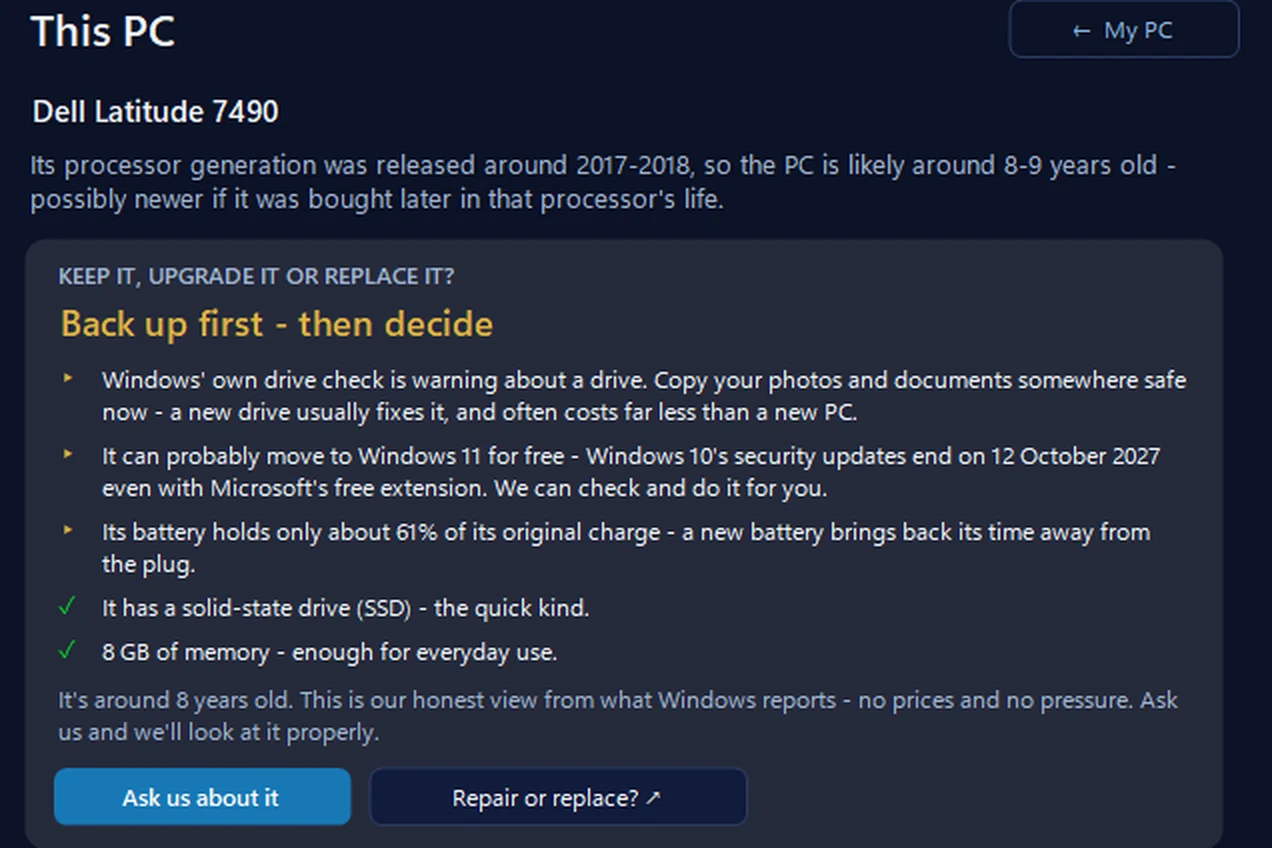
This PC: which Windows 11 check fails, in plain words
On a Windows 10 PC its This PC page gives its own Windows 11 verdict — looks ready, nearly (one setting to check) or not ready as it stands — and names each part: the TPM 2.0 security chip (found, older, or not found and maybe switched off), Secure Boot (on, off, or not available) and whether the processor is new enough. It also says until when this PC gets security updates, including whether it’s enrolled in Extended Security Updates, and gives a plain keep, upgrade or replace verdict. It only reads.
In the app: My PC, then This PC.
Download 365 PC Manager free ↓ What else it checks
Made by us, a family IT firm in Bournemouth since 1995, and digitally signed by 365 Techies Ltd.
WHEN TO CALL US
When to call us
Still not right? Ring 01202 775566 or text 07520 615332, Monday to Friday, 9 to 5. With your permission we connect to your Windows PC and sort it while you watch: usually the same day, remote help, usually £60, and no fix, no fee. We’ll check every requirement, switch on what can be switched on, and back up before any upgrade. Prefer it all done for you? See our Windows 11 upgrade service.
FAMILY-RUN SINCE 1995 · ★ 4.9 ON GOOGLE · 200+ COMPUTERS UNDER OUR CARE · NO FIX, NO FEE · SAME-DAY REMOTE SUPPORT
GOOD QUESTIONS
Frequently asked
Why does PC Health Check say this PC can’t run Windows 11?
It failed at least one of Microsoft’s requirements: a supported processor, TPM 2.0, Secure Boot on a UEFI PC, 4 GB of memory or 64 GB of storage. Click See all results to see which. The TPM and Secure Boot are often just switched off.
How do I know if my PC has TPM 2.0?
Click Start, type tpm.msc and press Enter. Specification Version should say 2.0. If it says Compatible TPM cannot be found, it’s usually switched off in the PC’s start-up settings, often as Intel PTT or AMD fTPM.
Is it safe to switch on TPM and Secure Boot?
Yes, both are normal settings. Back up first, and have your BitLocker recovery key if the drive is encrypted. The one change to leave to someone confident is switching from Legacy to UEFI mode, because the drive has to be converted first.
What if my processor is too old?
It can’t be fixed with a setting. Windows 10 enrolled in Extended Security Updates keeps getting security updates until 12 October 2027, free for home users who sync their settings to a Microsoft account; plan a replacement before then.
Can I install Windows 11 anyway?
There are registry workarounds, but Microsoft warns that PCs below the requirements aren’t entitled to updates and can be unstable. For a PC you rely on, we don’t recommend it.
Is PC Health Check the same as 365 PC Manager?
No. Microsoft’s PC Health Check mainly answers whether the PC can run Windows 11. Our free 365 PC Manager checks the whole PC, and its This PC page says which Windows 11 requirement fails.
Will upgrading to Windows 11 delete my files?
An upgrade through Windows Update keeps your files, programs and settings. We still back up first, just in case.
Still stuck?
Not sure what yours is telling you?
With your permission we connect to your Windows PC, check every Windows 11 requirement and tell you honestly whether it’s a setting, an upgrade or time for a new one. Call 01202 775566 or text 07520 615332.
We’ll fix it with you
- Checking the problem is free
- Fixes usually £60, agreed before we start
- We phone first, and you watch every step
Stop it happening again
- A full service every six weeks, written up
- Every program kept up to date
- Unlimited remote help when you need it
Plans from £18.25 a month per computer · cancel any time
Mon–Fri 9–5 · family-run since 1995 · rated 4.9 on GoogleFind which check failed →