Virgin Media email is moving to Junara: keep it, or move it?
Keeping your address is free for 12 months if you still have Virgin (plus 99p), then paid per mailbox.
★ 4.9 on GoogleFamily-run since 1995Real people on 01202 775566
DONE FOR YOU · AGREED BEFORE WE START
Let us do it: £60 per email address
For Windows PCs only.
Text 07520 615332Call 01202 775566
We move every folder into Gmail for you, remotely. No app passwords, no settings, nothing to learn, and the price includes a full service of your PC with a written report.
- Every message and folder into Gmail, with the original dates
- Works even if Virgin won’t give you an app password
- A full service of your PC, with a written health report
- Forwarding set up, and checked on your phone if you like
- Done remotely: we phone first, and you watch us start
For Windows PCs · agreed before we start · no fix, no fee · we can usually start the same day, Mon–Fri 9–5
FREE · NO SIGN-UP · FOR WINDOWS PCs
Or do it yourself, free, with 365 PC Manager
Our free app moves your Virgin email into Gmail for you, no Virgin app password needed.
Download free for WindowsDownload free ↓
For Windows PCs. You’ll need a Gmail account and a Google app password. Not for Macs. If Virgin won’t let you sign in, copy your email from the Chrome you already use with our free 365 Email Mover add-on, or press ‘Stuck? We’ll do it for you’ and we’ll move it for you.
- Check my Virgin email: every folder, how many emails, how big, and how many days the move will take. It only reads.
- Move it to Gmail myself: folders and dates kept. Gmail takes about 500 MB a day, so a big mailbox takes a few days — it carries on by itself.
- Where your address is used: the companies that email you, so you can change your address with each one.
- Stuck? We’ll do it for you: one tap asks us to ring you back.
Rather keep your Virgin address? What Junara costs · your deadline · keep it or move it? · is this Junara email real? · move it to Gmail by hand
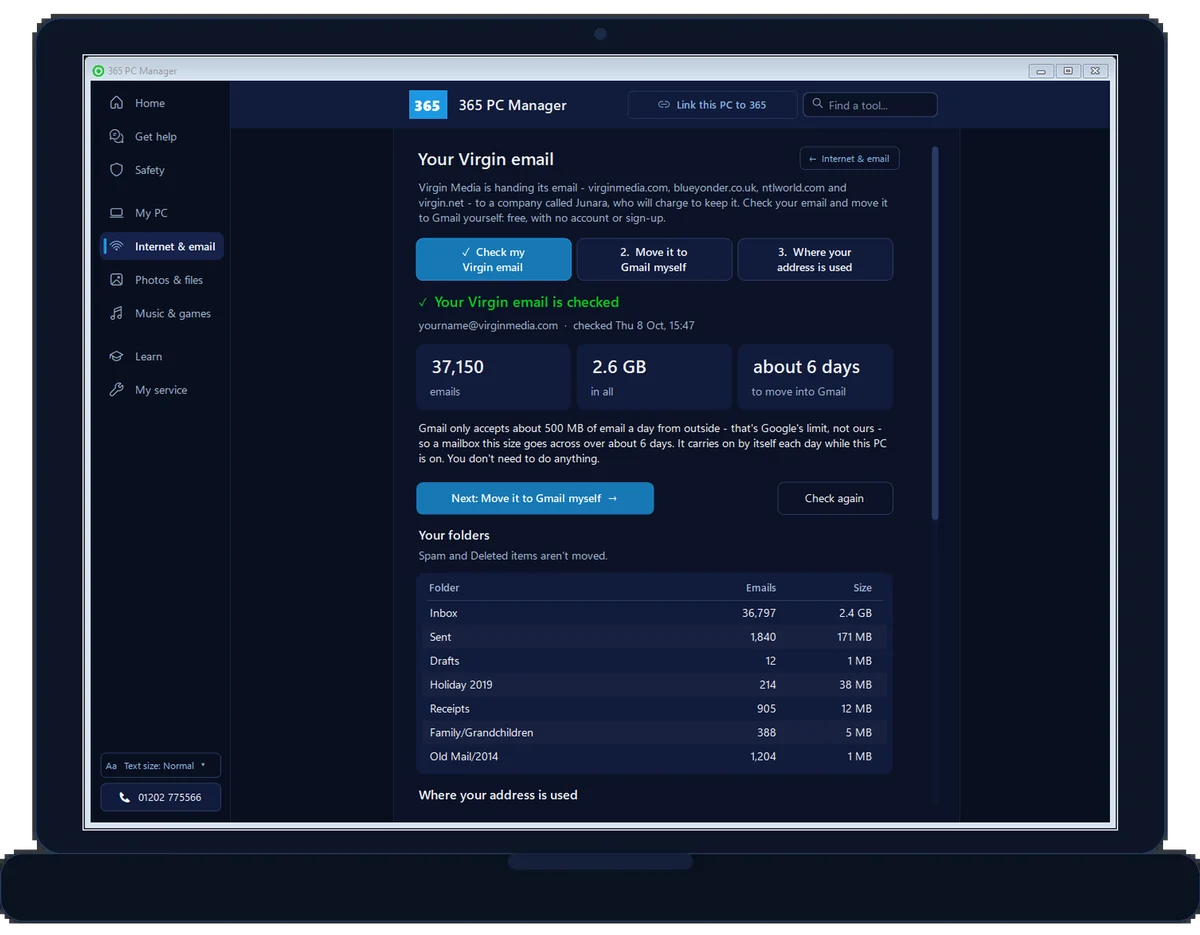
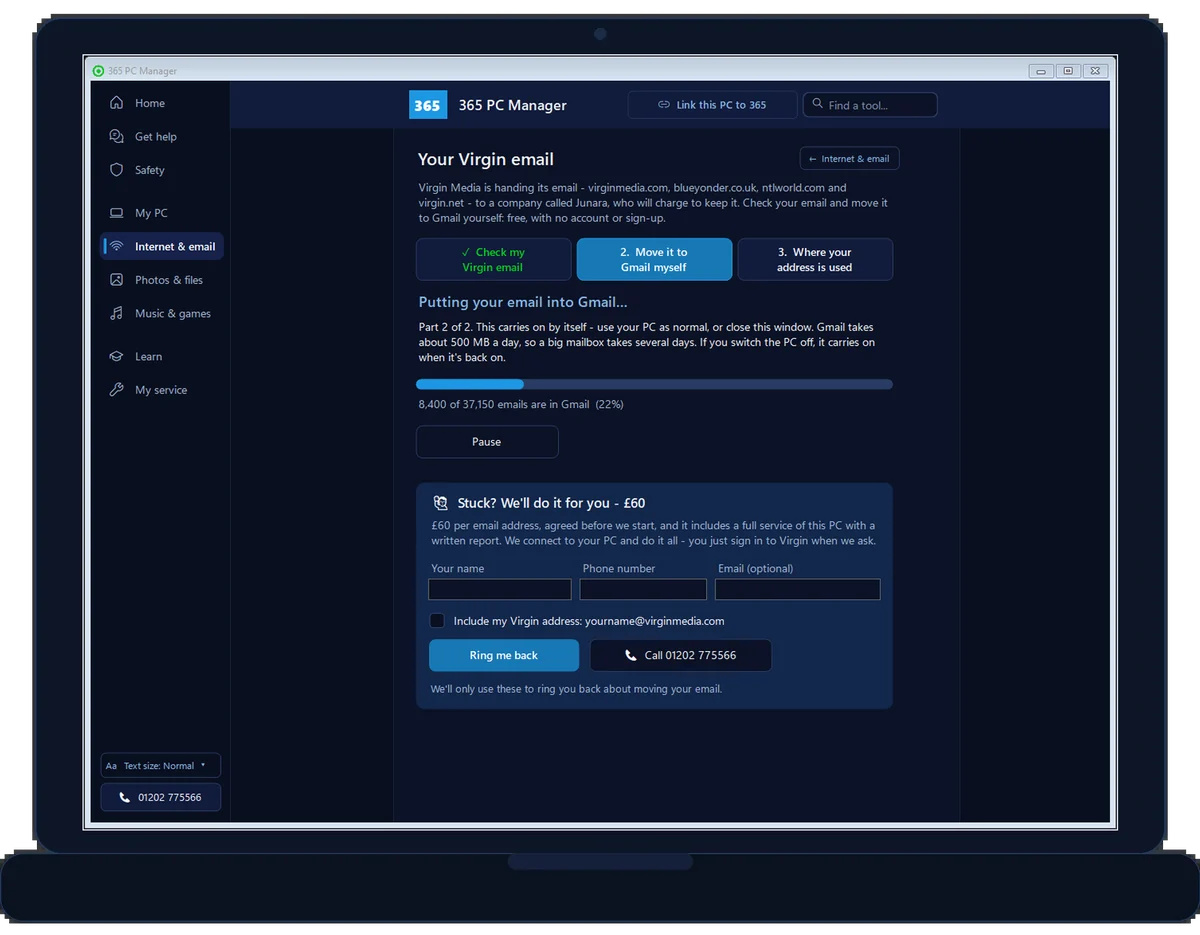
Real screens from 365 PC Manager, with a made-up sample mailbox. See every screen →
Virgin Media email and Junara: the facts
| What is happening | Virgin Media is closing its own email service and handing it to Junara (Virgin Media O2) |
|---|---|
| Who Junara are | An email company, part of the Atmail group (Junara) |
| Which addresses | virginmedia.com, blueyonder.co.uk, ntlworld.com and virgin.net (Virgin Media) |
| Free period | 12 months if you still have Virgin broadband, TV or a landline, plus a 99p transfer fee; 18 months if you have told Virgin you need extra support (Virgin Media O2) |
| After that | A paid plan, monthly or yearly, for each mailbox. The price is shown only in the sign-up; aliases come free (Junara) |
| Already left Virgin | Paid from the start (Virgin Media O2) |
| A price to compare | Isle of Man, 2025: £6.50 a month or £65 a year per mailbox (discounted) (ISPreview) |
| Your deadline | At least 45 days from Virgin’s first email: the date is in that email (Virgin Media) |
| If you miss it | The mailbox is suspended, you get 120 more days to sign up, then it is deleted for good (Virgin Media) |
| Webmail afterwards | Sign in at junara.com or webmail.junara.com; your account at account.junara.com (Junara) |
| Or move it instead | Gmail is free: our free app moves it, or we do it for £60 |
Checked against Virgin Media’s, Virgin Media O2’s and Junara’s own pages. Updated 29 September 2026.
/01 — WHAT’S HAPPENING
What is happening to Virgin Media email?
On 9 September 2026 Virgin Media O2 announced that it is closing its own email service and handing it to Junara, an email company owned by Atmail, which Virgin says has nearly 30 years’ experience of running email. Every Virgin Media email address is included: virginmedia.com, blueyonder.co.uk, ntlworld.com and virgin.net.
Virgin is writing to customers in batches, starting in September, so two neighbours can get their emails weeks apart and have different deadlines. Your deadline is the one in the email Virgin sent you, not a date you read online or hear from a friend.
Virgin gives three choices:
- Keep the address by signing up with Junara before your deadline. Your mailbox moves across and carries on.
- Move to another provider, including free ones such as Gmail or Outlook.com, taking your old emails with you.
- Let it close. The mailbox is suspended, then deleted, and the emails in it are gone for good.
Doing nothing ends in the third choice, which is why it is worth deciding now.
Sources: Virgin Media O2, announcement of 9 September 2026; Virgin Media, email service change; Junara, Virgin Media customers. Read 26 September 2026.
// WINDOWS PCS ONLY
We do not support email on Apple Macs, iPads or iPhones. Apple does not allow our remote-support tool to take control of an iPad or iPhone (an Apple restriction), and our remote support covers Windows PCs only. On an Apple device, Apple’s own Mail help is the place to start.
// WHAT TO DO · STEP BY STEP
What to do, one step at a time
The five steps from this page, one at a time. Tick each one off and it shows the next. Nothing here leaves your device.Last reviewed 11 October 2026
-
01Find Virgin’s email and your date
Look in your inbox for the email from Virgin Media about your email changing, and note the sign-up date in it. That date, not one you read online, is your deadline.
Done that step? -
02Count your mailboxes
List every virginmedia.com, blueyonder, ntlworld or virgin.net address in the house. Each separate mailbox is its own Junara sign-up and bill.
Done that step? -
03Decide: keep it or move it
Keep it with Junara if the address is on everything and you are happy to pay after any free period. Move to free Gmail if you have left Virgin, have several mailboxes, or want an address that does not depend on your broadband.
Done that step? -
04To keep it, sign up yourself
Type junara.com into your browser yourself, never through an emailed link, and sign up before your date.
Done that step? -
05To move it, copy the mail while the account is open
Copy every message and folder into Gmail while the Virgin mailbox is fully open, set up forwarding, then tell people your new address. Our free 365 PC Manager app does the copying for you on a Windows PC, or have us do it for £60 per email address.
Done that step?
Rather we did it for you? We move it for £60 per email address, done remotely, for people across Bournemouth, Poole, Christchurch, Ringwood and the New Forest.
All done{mins}. Nice work.
Keep the email from Virgin somewhere safe: it has your date in it.
Stuck on a step? We can do it with you.
Ring us and we will talk it through, or, with your permission, connect to your screen and do the move with you. We do the whole move for £60 per email address, agreed before we start.
Virgin Media email is moving to Junara: keep it, or move it? - the fix order (365techies.co.uk/virgin-media-email-moving-to-junara/) 1. Find Virgin’s email and your date: Look in your inbox for the email from Virgin Media about your email changing, and note the sign-up date in it. That date, not one you read online, is your deadline. 2. Count your mailboxes: List every virginmedia.com, blueyonder, ntlworld or virgin.net address in the house. Each separate mailbox is its own Junara sign-up and bill. 3. Decide: keep it or move it: Keep it with Junara if the address is on everything and you are happy to pay after any free period. Move to free Gmail if you have left Virgin, have several mailboxes, or want an address that does not depend on your broadband. 4. To keep it, sign up yourself: Type junara.com into your browser yourself, never through an emailed link, and sign up before your date. 5. To move it, copy the mail while the account is open: Copy every message and folder into Gmail while the Virgin mailbox is fully open, set up forwarding, then tell people your new address. Our free 365 PC Manager app does the copying for you on a Windows PC, or have us do it for £60 per email address. Still stuck? 365 Techies fix it remotely: 01202 775566 - https://365techies.co.uk/remote-support/Where does your email actually live?
Why your Virgin Media email lives with the email company, not your PC, and the one older setting to check first.
An animated diagram with a spoken guide and captions.
What the film says
Where does your email actually live? Usually, not on your computer. It’s kept by your email company, like BT, Sky or Gmail. Your computer and your phone each show you a copy of the same email. So if your old email program stops working, your email is still there. A new program shows it again. But some older programs, like Outlook Express, were often set up to move email onto one computer. Then it’s only on that PC. Your phone can’t see it, and if the PC fails, it can be lost. Not sure which you have? Ring us before you change anything.
/02 — BLUEYONDER, NTLWORLD, VIRGIN.NET
Blueyonder, ntlworld and virgin.net: the same change
Yes, these are included. blueyonder was Telewest’s broadband brand and ntlworld was NTL’s; the two companies merged and became Virgin Media in 2007, and virgin.net addresses came along with them. All four now run on the same Virgin Media Mail system, which is why Virgin’s announcement names every one of them.
So a blueyonder or ntlworld address has exactly the same choice, and the same kind of deadline, as a virginmedia.com one. It also uses the same settings in Outlook and on a phone, including the Virgin app password.
Many of these addresses are decades old and sit on everything from the bank to the GP surgery, which makes the choice below matter more, not less.
One trap to check: if the login you use for My Virgin Media (your Virgin Media O2 ID) is the Virgin email address itself and you let that address close, change the login to another email address first, in My Virgin Media under Account settings, then Identity & security settings. Otherwise you risk losing access to your Virgin account.
/03 — WHAT IT COSTS
What does it cost to keep it with Junara?
The short answer: free for the first 12 months if you still have Virgin broadband, TV or a landline (plus a 99p transfer fee), then a paid plan for each mailbox. Junara hasn’t published what that plan costs Virgin customers: you see the price only once you start signing up.
From Virgin Media O2’s own announcement:
- Still with Virgin for broadband, TV or a landline: the first 12 months free, plus a 99p transfer fee paid to Junara.
- Told Virgin you need extra support: the first 18 months free, plus the 99p fee.
- Already left Virgin: straight onto a paid Junara plan.
After any free period it is a paid plan, monthly or yearly. Neither Virgin nor Junara publishes the Virgin price on its website; Junara shows you the plans once you start signing up with your email address. Check the price in the sign-up itself before you commit.
The only Junara price made public so far is from the Isle of Man. When Manx Telecom moved its manx.net email to Junara in late 2025, keeping an address cost £6.50 a month or £65 a year per mailbox — a discounted price, normally £7.50 a month or £79 a year. Virgin’s price may be different: check it in the sign-up before you pay.
What that could mean for a household, if Virgin’s price turned out the same: two mailboxes at £65 a year is £130 a year, every year, once any free period ends.
Manx prices from ISPreview, 22 October 2025 and Manx Radio, 21 October 2025.
Each separate mailbox is its own sign-up and its own bill. Junara says extra addresses that are only aliases of one mailbox, arriving in the same inbox, come across with it at no extra cost. A household with three separate Virgin mailboxes is looking at three subscriptions once the free year ends.
Or pay nothing. Gmail is free, and so is moving to it with our 365 PC Manager app for Windows. Or we do the move once for £60 per address, with a full PC service included: see both choices.
/04 — THE DEADLINE
Your deadline, and what happens if you miss it
Virgin gives everyone at least 45 days from its first email to decide. Miss that date and:
- the mailbox is suspended: Outlook and your phone start showing send and receive errors, though you can still see the mail already there;
- you then have 120 more days to sign up with Junara and reactivate it;
- after that it is deleted permanently, and Virgin says a deleted mailbox cannot be recovered.
If you want the mail rather than the address, copy it out while the account is fully open. It is quicker and far less fiddly than working against a suspended mailbox. If yours is already suspended and you need to get into it, Virgin’s help pages say to ring Virgin on 0345 454 1111 and ask for it to be unsuspended for a while.
/05 — KEEP IT OR MOVE IT
Keep it with Junara, or move to Gmail?
There is no single right answer, so here is how we talk it through with customers.
Keep it with Junara if the address is on everything that matters — bank, pension, GP, family — and telling everyone a new address feels worse than a yearly bill. Virgin and Junara both say Outlook, Apple Mail and phone mail apps should carry on with the same settings after the transfer, so nothing needs setting up again.
Move to free Gmail (or Outlook.com) if you have already left Virgin, so you would pay from day one; you have several mailboxes in the house, each a separate bill; or you never want a broadband company’s decision to put your email at risk again. An address from Google or Microsoft stays yours whoever supplies your internet.
A calm middle way if you are still a Virgin customer: sign up with Junara for the free year, then use that year to move to Gmail at your own pace, with the old address still working while the bank, the GP and the family are told. Before the free year ends, check what Junara will charge and decide whether to carry on.
Moving is free with our 365 PC Manager app for Windows: it checks your mailbox and moves it into Gmail for you, even if Virgin won’t give you an app password, which is common for a second mailbox since the O2 ID change (more about that). A small mailbox goes across the same day; a big one takes a few days, because Gmail accepts only about 500 MB a day. Prefer to do it by hand? Follow our step-by-step guide to moving Virgin email to Gmail. Or we do it for you for £60 per email address, with a full PC service and written report included, agreed before we start.
/06 — SCAMS
Fake ‘Junara’ emails, and how to tell
A change that touches every Virgin email address, with a deadline attached, is exactly what scammers wait for. Expect fake ‘your email is closing, pay now’ messages.
- Virgin says its emails about the change contain no clickable sign-up link and never ask for personal or payment details.
- Junara says to manage payments only through your Junara account, and never to pay by phone or through an unexpected email link.
- If you decide to sign up, type junara.com into your browser yourself rather than clicking anything in an email.
- A message that rushes you (‘act within 24 hours’), asks for card details or asks for your password is not genuine.
Not sure about a message? Don’t click. Ring us on 01202 775566 first.
FAMILY-RUN SINCE 1995 · ★ 4.9 ON GOOGLE · 200+ COMPUTERS UNDER OUR CARE · NO FIX, NO FEE · SAME-DAY REMOTE SUPPORT
// GOOD QUESTIONS
Frequently asked
What is Junara?
Junara is the email company Virgin Media is handing its email service to. It is owned by Atmail, which Virgin says has nearly 30 years’ experience of running email. If you sign up, your Virgin address and mailbox move to Junara and carry on working.
Is blueyonder email closing?
Blueyonder.co.uk addresses are part of Virgin Media email, and Virgin’s announcement includes them in the move to Junara. You can keep the address by signing up with Junara before the date in your email from Virgin, or move your mail to another provider such as Gmail. If you do neither, the mailbox is suspended and later deleted.
Is ntlworld email closing? And virgin.net?
The same. Ntlworld.com and virgin.net addresses run on Virgin Media’s email service and are included in the move to Junara, with the same choice: sign up with Junara to keep the address, or move your mail elsewhere before your deadline.
How much does Junara email cost?
Virgin says current Virgin broadband, TV or landline customers get the first 12 months free plus a 99p transfer fee, and customers who have told Virgin they need extra support get 18 months free. Former customers go straight onto a paid plan. The ongoing price is shown once you start the sign-up at junara.com; neither company publishes it. Each separate mailbox is its own sign-up. Junara hasn’t published a Virgin price. The only Junara price made public so far is from the Isle of Man, where manx.net addresses moved to Junara in late 2025 at £6.50 a month or £65 a year per mailbox (discounted from £7.50 and £79). Virgin’s may differ. Or move to Gmail, which is free: our free app moves it for you.
Who are Junara?
Junara is an email company that is part of the Atmail group, which says it has run email services for nearly 30 years. It is the provider Virgin Media chose to take over its email service. It also took over the manx.net email addresses from Manx Telecom in the Isle of Man in 2025.
Is Junara legit? Are there Junara reviews?
Junara is the real provider Virgin Media chose: Virgin’s own email service change page sends you to it. It is a new name to most people, so the useful checks are about the emails, not the company: type junara.com into your browser yourself, pay only inside your Junara account, and never pay by phone or through a link in an email.
How do I log in to Junara? Is there a Junara app?
After your mailbox has moved, Junara says you can use webmail through the Sign in button at junara.com or at webmail.junara.com, and manage your account at account.junara.com. Virgin says Outlook, Apple Mail and phone mail apps carry on with the same settings, so you may never need the webmail. Junara’s Virgin Media page doesn’t mention an app of its own. Type these addresses in yourself rather than following a link in an email.
What is Junara’s contact number?
Junara’s own Virgin Media page, junara.com/virginmedia, gives +44 20 3977 0077, and a help centre at support.junara.com. Check the number on junara.com yourself, and never ring a number given in an email or text message about your email closing: that is a favourite trick of scammers.
Is the Junara email I got genuine?
Be careful. Virgin says its emails about the change have no clickable sign-up link and never ask for personal or payment details, and Junara says never to pay by phone or through an unexpected email link. If you want to sign up, type junara.com into your browser yourself. If a message rushes you or asks for card details or a password, it is not genuine; ring us before you click.
Will Outlook keep working if I move to Junara?
Virgin and Junara both say email programs such as Outlook, Apple Mail and phone mail apps should keep working with the same settings after the transfer. If Outlook is already refusing your Virgin address, the usual cause is the Virgin app password, and our guide to Virgin email in the new Outlook covers it.
What happens if I do nothing?
When your date passes, the mailbox is suspended: you can still see old mail, but sending and receiving stop. You then have 120 more days to sign up with Junara and reactivate it. After that it is deleted, and Virgin says a deleted mailbox cannot be recovered.
Can I move my Virgin email to Gmail for free?
Yes. Gmail is free, and our free 365 PC Manager app for Windows checks your Virgin mailbox and moves it into Gmail for you, without a Virgin app password. You need a Gmail account with a Google app password. How it works. Or we do it for you for £60 per address, including a full PC service.
Can you move my Virgin email to Gmail for me?
Yes. We copy every message and folder into Gmail, set up forwarding while the old address still works, and check it on your computer and phone, remotely while you watch. We can do it even if Virgin won’t give you an app password, with our own 365 Mail Mover. It costs £60 per email address, agreed before we start, and it includes a full service of your computer with a written report on its health. Call 01202 775566.
// Still stuck?
Not sure whether to keep it or move it?
Ring us and we’ll talk it through with you. If you decide to move, we do the whole thing for £60 per email address, agreed before we start, remotely while you watch. Family-run in Bournemouth since 1995.
We’ll move it for you
- £60 per email address, agreed first
- Every message and folder into Gmail
- A full PC service and written report included
Stop it happening again
- A full service every six weeks, written up
- Every program kept up to date
- Unlimited remote help when you need it
Plans from £18.25 a month per computer · cancel any time
Mon–Fri 9–5 · family-run since 1995 · rated 4.9 on GoogleMove it to Gmail yourself →