// WI-FI & NETWORK
Wi-Fi & network support
Fast, reliable Wi-Fi in every room — fix dead zones, slow speeds and dropouts, set up routers and mesh systems, and connect all your devices securely.
Prefer to write? Message us
Rated 4.9 on GoogleWhole-home coverage · Speed fixesHow we help
- 1995a family business since
- 6 weeksbetween full services on every plan
- £0call-out fee for remote help
- 4.9★average rating on Google
/01 — FOR YOU
Wi-Fi that reaches every room
Buffering in the back bedroom, drop-outs on video calls, a router that needs constant restarting — patchy Wi-Fi is one of the most common complaints we hear.
We design and set up reliable home and office networks — routers, mesh systems and extenders — so every device gets a strong, secure connection.
Useful starting points: our honest guide to online WiFi heatmaps, and for workplaces a business WiFi health check across Dorset.
- Wi-Fi setup
- Dead zone fixes
- Router setup
- Mesh & extenders
- Speed troubleshooting
- Guest networks
- Smart-home connectivity
- Network security
/02 — HOME & BUSINESS
Reliable Wi-Fi, everywhere
Wi-Fi at home
Strong, reliable Wi-Fi in every room — dead zones banished with mesh, the kids’ devices and smart home connected, all on a secure network.
- Whole-home mesh Wi-Fi
- Dead zones fixed
- Smart home connected
- Secure & guest networks
Office networks
Fast, secure office networks that keep your team online — reliable Wi-Fi, wired connections and guest access, designed and supported. Business access points started playing up? See our access-point end-of-support guide — including when ageing kit does not need replacing.
- Reliable office Wi-Fi
- Wired & wireless networks
- Secure staff & guest access
- Designed & supported
/03 — HOW IT WORKS
Full coverage in three steps
-
01
We survey
We find your dead zones, bottlenecks and weak spots.
-
02
We set up
We install and configure routers, mesh and extenders for full coverage.
-
03
We secure
We lock down your network and keep it running fast.
// FIX IT YOURSELF FIRST
What is the Wi-Fi doing? Pick the closest, and work through it step by step on that page
What customers say
Rated 4.9 on Google
★★★★★
“365 have looked after my computers for many years. They have always gone out of their way to be professional and helpful and I trust them completely.”
★★★★★
“David and Steve guided me through the process, which all went smoothly. Everything was explained in detail before they went ahead. Very pleased with the outcome. Would definitely use them again.”
// FREE WITH EVERY PLAN · UPDATES ITSELF
365 PC Manager, on your PC
Our own free Windows app — digitally signed in our name — shows your PC’s health in plain English: drive condition, memory, protection, backup, Windows updates, risky programs and network settings, and an honest verdict. Anyone can use it, and we think every Windows PC should have it. On a plan it does more: it keeps your computer up to date and secure.
At every service we run a real broadband speed test from your machine and keep it with your record. Next visit, we can see whether your line has quietly got worse. No other local IT firm we can find will even show you your broadband speed — let alone track it visit to visit.
On a plan, every six-weekly service updates every program on the computer, not just Windows and Office — an out-of-date program is the back door criminals now hunt for with AI — checks your network’s safety, and ends with a written Service Report: what we did, how the machine scored, and anything worth planning. It is emailed to you, saved in your portal and left on your Desktop. And we keep an eye on the machines we look after between visits, so problems get caught before they bite. We can’t find another IT support company in Dorset that gives its customers an app of its own.
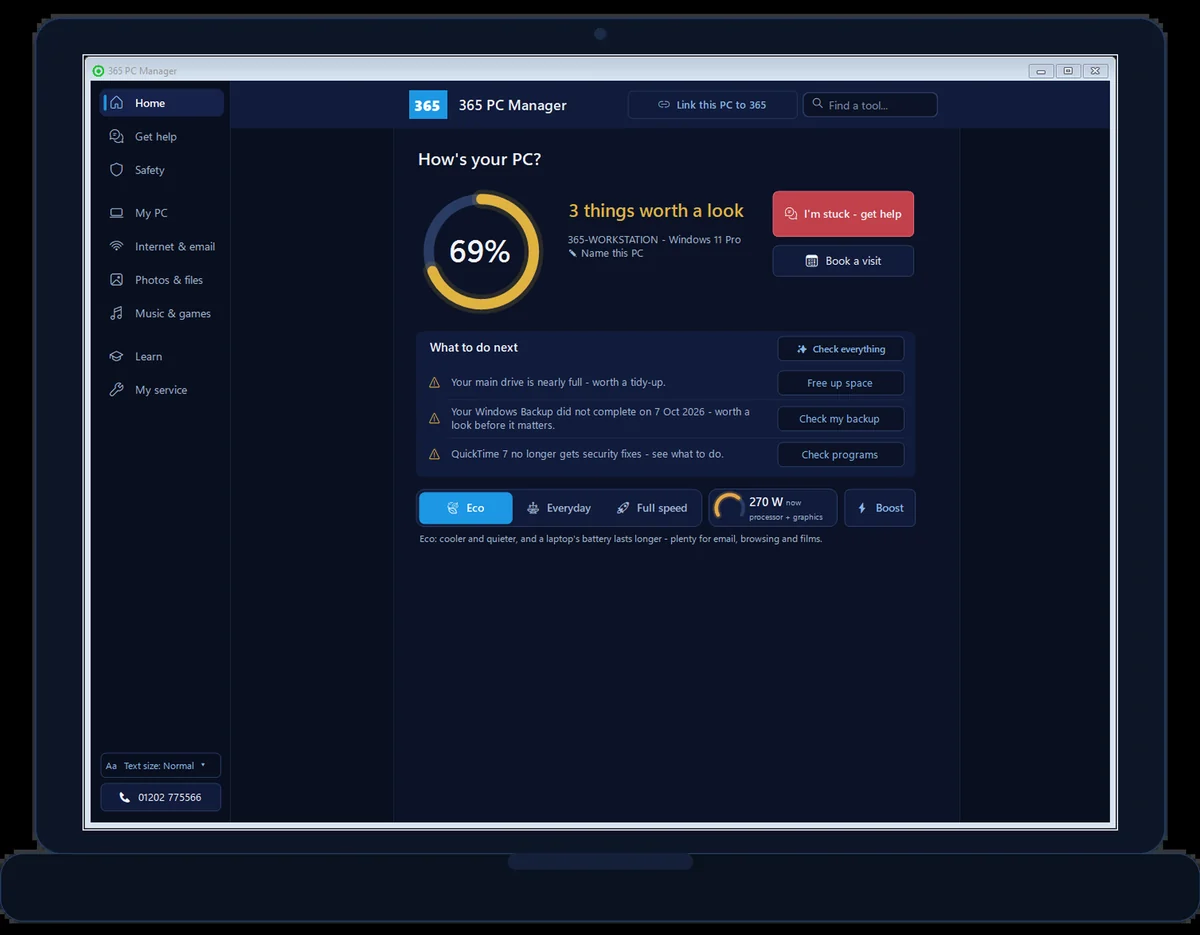
- Free forever, no sign-up, uninstall any time
- Every program kept up to date, not just Windows
- Your network’s safety checked at every service
- Broadband speed measured at every visit
- Every written Service Report in one place
- Your next visit — move or cancel it yourself
- Optional: let us run safe maintenance remotely
- No fake errors, no scare tactics, ever
// GOOD QUESTIONS
Frequently asked
Can you fix Wi-Fi dead zones?
Yes — we use mesh systems and extenders to bring strong, reliable Wi-Fi to every corner of your home or office.
My internet is slow — is it my Wi-Fi?
Often, yes. We diagnose whether it's your Wi-Fi, router or broadband and fix what we can.
Can you set up a guest network?
Yes, we set up secure guest Wi-Fi so visitors don't need your main password.
Why is my Wi-Fi so slow at home?
Distance from the router, thick walls, interference, an ageing router or too many devices all play a part — and sometimes it’s the broadband, not the Wi-Fi. We’ll find the cause and fix it, often with mesh for whole-home coverage. Check your line with our broadband checker.
Can you get Wi-Fi into a granny annexe or outbuilding?
Yes — from mesh and outdoor access points to a proper point-to-point wireless link for detached buildings. Start with our guide to Wi-Fi in a granny annexe — we design and install across Dorset.
// FREE TOOLS
Try our free tools
No sign-up, no catch — free tools built by our techies. See all our free tools →
Free tool
365 WiFi Optimizer
Walk around your home and watch the signal get stronger or weaker live — find your best spot, then get honest advice.
Try it →Free tool
Live Broadband Speed Test
Measure your real download, upload and ping right now on a live animated gauge.
Try it →Free tool
Wi-Fi QR Code Generator
Make a QR code guests scan to join your Wi-Fi — no typing the password.
Try it →Free tool
Broadband Switch Checker
Could you get faster broadband for less? See what your line can really do.
Try it →Let’s sort your IT
Join the Dorset homes and businesses who never worry about technology. Pick a plan or say hello.
01202 775566 · help@365techies.co.uk · MON–FRI 9AM–5PM