// WINDOWS UPDATE STUCK?
Windows Update stuck?
It has sat at the same percentage for ages, keeps failing, or the PC is stuck on “Working on updates”. Updates are usually slow rather than broken. Here’s how long to give it, what’s safe to try, and the repair Windows 11 has built in. Rated 4.9 on Google.
- ● How long to wait
- ● Safe fixes first
- ● Keeps your files
/01 — HOW LONG TO WAIT
How long to give it
The monthly updates usually take minutes. The big yearly ones can take an hour or more, and the percentage can sit still for a long time while Windows works in the background.
- On the blue “Working on updates” screen: don’t switch off. Plug a laptop in, and give it at least an hour or two.
- In Settings, stuck at a percentage: you can keep using the PC. Give it an hour, then try the fixes below.
// FIX IT WITH ME · STEP BY STEP
Get the updates through, step by step
The steps from this guide, one at a time, in the order that fixes the most cases fastest. Tell it what happened and it shows the next step. Nothing here leaves your device.Last reviewed 17 October 2026
-
01Give it time
Big updates can take an hour or more. Leave a laptop plugged in.
Has it got going? -
02Restart and check again
Restart the PC (Restart, not Shut down), then Check for updates.
Has it got going? -
03Free space and pause
Free up space in Settings, System, Storage, then pause updates for a week and resume them.
Has it got going? -
04Run the troubleshooter
Settings, System, Troubleshoot, Other troubleshooters, Windows Update.
Has it got going? -
05Repair system files
In Terminal (Admin), run DISM /Online /Cleanup-Image /RestoreHealth, then sfc /scannow, and let each finish.
Has it got going? -
06Repair Windows
Back up first, then Settings, System, Recovery, Fix problems using Windows Update, Reinstall now.
Has it got going?
Rather have it done for you? Remote help from £20, or in person across Bournemouth, Christchurch, Poole, Ringwood and the New Forest, with no call-out fee.
Sorted{mins}. Nice work.
Check for updates once more afterwards: there may be another waiting.
Still stuck after all six steps? That is a remote job.
With your permission we connect to your screen and sort it in one session. Usually the same day, remote help from £20, and no fix, no fee.
Windows Update stuck? - the fix order (365techies.co.uk/windows-update-stuck/) 1. Give it time: Big updates can take an hour or more. Leave a laptop plugged in. 2. Restart and check again: Restart the PC (Restart, not Shut down), then Check for updates. 3. Free space and pause: Free up space in Settings, System, Storage, then pause updates for a week and resume them. 4. Run the troubleshooter: Settings, System, Troubleshoot, Other troubleshooters, Windows Update. 5. Repair system files: In Terminal (Admin), run DISM /Online /Cleanup-Image /RestoreHealth, then sfc /scannow, and let each finish. 6. Repair Windows: Back up first, then Settings, System, Recovery, Fix problems using Windows Update, Reinstall now. Still stuck? 365 Techies fix it remotely: 01202 775566 - https://365techies.co.uk/remote-support/At a glance
| “Working on updates, don’t turn off” | Leave it plugged in, and give it at least an hour or two before doing anything. |
|---|---|
| Stuck downloading | Restart, check the internet and free space, pause and resume, and run the troubleshooter. |
| Fails again and again | Note the error code in Update history, then try Fix problems using Windows Update. |
| Repair Windows’ own files | In Terminal (Admin): DISM /Online /Cleanup-Image /RestoreHealth, then sfc /scannow. |
| Fix problems using Windows Update | Settings, System, Recovery: reinstalls Windows 11 and keeps your files, apps and settings. |
| Back up first | Before any repair, copy your important files somewhere safe. |
| Don’t force it | Switching off mid-update is the last resort, not the first. |
// NEED THIS FIXED RIGHT NOW?
Skip the DIY — call 01202 775566 and we can be looking at your screen within minutes. You watch everything we do, and most problems on this page are fixed in one short remote session. (Mon–Fri, 9am–5pm.)
/02 — STUCK IN SETTINGS
Stuck downloading or installing
- Restart the computer (Restart, not Shut down), then Check for updates again.
- Check the internet is working, and that you’re not on a phone hotspot with a data limit.
- Free up space: big updates need several gigabytes. Settings, System, Storage, Cleanup recommendations.
- Pause and resume: in Settings, Windows Update, choose Pause for 1 week, then Resume updates. It often restarts a stuck download cleanly.
- Run the Windows Update troubleshooter: Settings, System, Troubleshoot, Other troubleshooters, Windows Update.
- Unplug extras such as USB drives and docks, which can block an update.
/03 — FAILS AGAIN AND AGAIN
An update fails again and again
- Find the error code: Settings, Windows Update, Update history shows each failed update with a code such as 0x800f0922. Microsoft’s help pages explain most codes.
- Back up your important files to a USB drive or OneDrive first.
- Repair Windows’ own files: right-click Start, choose Terminal (Admin) and say Yes. Run DISM /Online /Cleanup-Image /RestoreHealth, which fetches good copies of damaged Windows files from Windows Update (stay online), then sfc /scannow, which checks every Windows file and puts back any that are damaged. Each can take a while, often 10 to 30 minutes; let them finish. Microsoft suggests this order (Microsoft). If SFC still says it “found corrupt files but was unable to fix some of them”, go on to the next step.
- Use Windows 11’s own repair: Settings, System, Recovery, Fix problems using Windows Update, then Reinstall now. It reinstalls the version of Windows you already have, repairs Windows’ own files, and keeps your files, apps and settings (Microsoft). Keep the PC plugged in and online until it finishes. It may not appear on PCs managed by a work or school.
The big yearly update keeps undoing itself? If it restarts, says “Undoing changes made to your computer” and goes back to the desktop, or Microsoft’s installer says “We couldn’t update the system reserved partition”, the usual cause is a full start-up partition, not a broken PC. We fixed exactly that on a customer’s Dell in October 2026 (5 KB free, 15 MB needed): how to check it and free the space safely.
365 PC Manager’s full service runs the system file check itself: SFC first, DISM when SFC finds damage it can’t fix, then SFC again, and it says in plain words when Windows needs the repair above (the app). Windows’ own record of every failed update, day by day, is in Reliability Monitor.
Why updates sometimes cause trouble in the first place: why Windows updates break things.
/04 — STUCK ON THE BLUE SCREEN
Stuck on “Working on updates” for hours
Only if nothing has changed for several hours: hold the power button for about 10 seconds until the PC switches off, wait a moment, then switch it on again. Windows usually carries on, or says it couldn’t complete the updates and undoes them, which is safe.
If it then won’t start properly, see laptop stuck on the logo and won’t boot, or ring us before trying anything else.
/05 — THE QUICK WAY
Let our free app check the updates
FREE · WINDOWS 10 & 11 · NO SIGN-UP
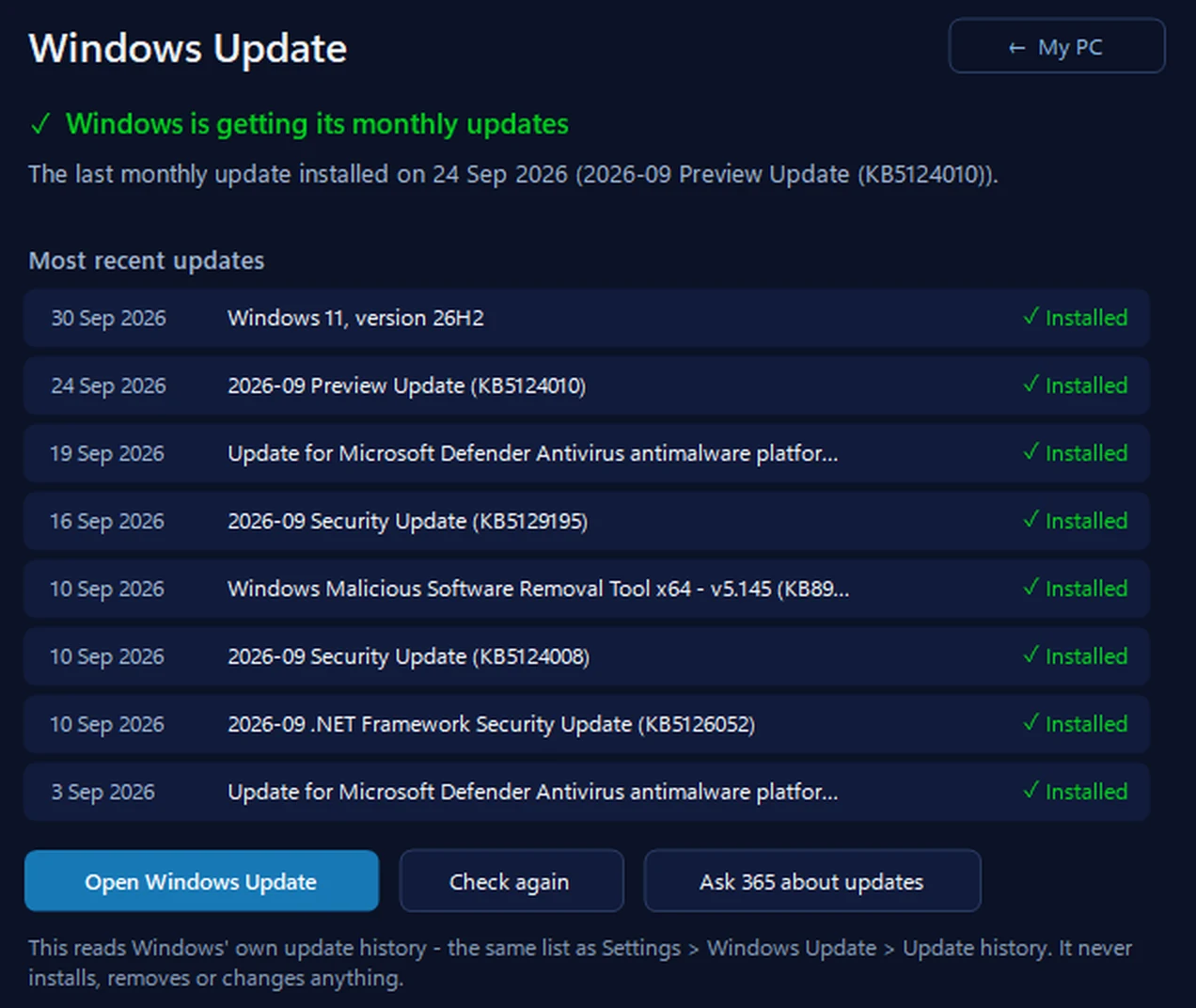
Windows Update: is it really getting updates?
It reads Windows’ own update history — the same list as Settings, Windows Update, Update history — and says in plain words when the monthly update last installed, whether one update is failing over and over, and whether an update is waiting for a restart. It never installs, removes or changes anything.
In the app: My PC, then Windows Update.
Download 365 PC Manager free ↓What else it checks
Made by us, a family IT firm in Bournemouth since 1995, and digitally signed by 365 Techies Ltd.
/06 — WHEN TO CALL US
When to call us
Still not right? Ring 01202 775566 or text 07520 615332, Monday to Friday, 9 to 5. With your permission we connect to your Windows PC and sort it while you watch: usually the same day, remote help from £20, and no fix, no fee.
FAMILY-RUN SINCE 1995 · ★ 4.9 ON GOOGLE · 200+ COMPUTERS UNDER OUR CARE · NO FIX, NO FEE · SAME-DAY REMOTE SUPPORT
// GOOD QUESTIONS
Frequently asked
How long should a Windows update take?
Monthly updates usually take minutes. The big yearly updates can take an hour or more, and the percentage can stay still for a long time.
Is it safe to switch off during an update?
Avoid it. On the “Working on updates” screen, wait at least an hour or two. Only if nothing changes for several hours, hold the power button to switch off; Windows usually carries on or undoes the update.
Why does Windows Update keep failing?
Common causes are too little free space, a damaged update download or Windows file, or a device or driver the update doesn’t like. Update history shows the error code. If it’s the big yearly update that keeps undoing itself, check the hidden start-up partition: we couldn’t update the system reserved partition.
What does Fix problems using Windows Update do?
It reinstalls the version of Windows 11 you already have, repairing Windows’ own files, and keeps your files, apps and settings. Back up first anyway.
What does sfc /scannow do?
System File Checker checks every Windows file against a good copy and puts back any that are damaged or missing. Run it in Terminal (Admin), after DISM /Online /Cleanup-Image /RestoreHealth. It doesn’t touch your own files or programs.
SFC found corrupt files but was unable to fix some of them. What now?
Run DISM /Online /Cleanup-Image /RestoreHealth with the PC online, which fetches good copies from Windows Update, then sfc /scannow again. If it still can’t fix them, Fix problems using Windows Update (Settings, System, Recovery) reinstalls Windows and keeps your files, apps and settings.
Will I lose my files?
Not from the steps on this page. Back up before any repair, just in case.
Can you fix it remotely?
Usually, yes: with your permission we connect to your Windows PC and get the updates through while you watch.
// Still stuck?
Updates still stuck?
With your permission we connect to your Windows PC, get the updates through and check nothing was lost. Call 01202 775566 or text 07520 615332.
We’ll fix it with you
- Checking the problem is free
- Fixes from £20, agreed before we start
- We phone first, and you watch every step
Stop it happening again
- A full service every six weeks, written up
- Every program kept up to date
- Unlimited remote help when you need it
Plans from £18.25 a month per computer · cancel any time
Mon–Fri 9–5 · family-run since 1995 · rated 4.9 on GoogleHow long to wait →