// SCAM EMAIL, EXPLAINED
The “you’ve been hacked” email that wants Bitcoin: it’s a bluff
It says a hacking group got into a real company’s database, then into your devices, recorded you through your camera, and will send the videos to everyone you know unless you pay within 48 hours in Bitcoin or Litecoin. The 2026 version names ShinyHunters and CarGurus and asks for $2,000. It is a template, sent to millions of addresses from a leaked list. Nobody recorded you.
Rated 4.9 on GoogleFamily-run since 1995 · no fix, no fee// LINE BY LINE
What the email claims, and what is actually true
The current wave reads, in part: “We are the ShinyHunters hacking group … We gained access to the CarGurus.com database where you have an account and easily accessed your email … we installed an exploit on your devices … We managed to record you … Send us $2000 in Litecoin … You have 48 hours.” Earlier versions named other companies and asked for Bitcoin; the shape never changes.
What’s true: your email address was in a data breach. The CarGurus breach was real — reported in February 2026, millions of records — and that is how they got your address. Some versions also show an old password of yours, because the same leaked lists contain passwords from older breaches.
What’s false: everything else. Being in a company’s customer list does not give anyone access to your devices. There is no exploit, no recording, no video, no “wallet generated for you”, and no 48-hour clock. The same message went to everyone on the list, whether or not they own a webcam.
// NEED THIS FIXED RIGHT NOW?
Skip the DIY — call 01202 775566 and we can be looking at your screen within minutes. You watch everything we do, and most problems on this page are fixed in one short remote session. (Mon–Fri, 9am–5pm.)
// WHY IT FEELS REAL
How the email is built to frighten you
- A real breach, named. You may even have had a breach notice from the company. That is the hook: one true fact lends the rest its weight.
- An old password of yours. Alarming to see — but it proves only that a password leaked years ago, not that anyone is inside your computer now. If you still use it anywhere, that is the one real problem in the email.
- Sent “from” your own address. The sender line of an email can be forged as easily as the return address on an envelope. It does not mean your account was used.
- Shame and a deadline. Adult websites, family, colleagues, 48 hours, “do not contact the police”. Every line is there to stop you thinking or asking anyone.
- Cryptocurrency. Untraceable and irreversible — which is why it’s never a bank transfer.
If you find yourself checking the webcam light, that is the email working as designed. It is doing that to a great many people this month.
// WHAT TO DO
What to do, and what not to do
- Don’t pay, don’t reply, don’t click anything in it. Paying marks you as someone who pays; more emails follow.
- Forward it to report@phishing.gov.uk, then delete it. The National Cyber Security Centre uses those reports to take down the campaign’s infrastructure.
- If it shows a password you still use anywhere, change it now — on every account where you used it — and switch on two-factor authentication for email and banking. Our free tool explains whether it’s safe to check a leaked password.
- Run a scan for peace of mind. Windows Security’s full scan, or Malwarebytes, will find nothing — and that nothing is worth having.
- Tell someone. The email relies on silence. A family member, a friend, or us: 01202 775566.
You do not need to close your email account, buy a new computer, or cover the camera — though a sticker over a webcam never hurt anyone.
// CHECK FOR YOURSELF
See what your webcam has actually done
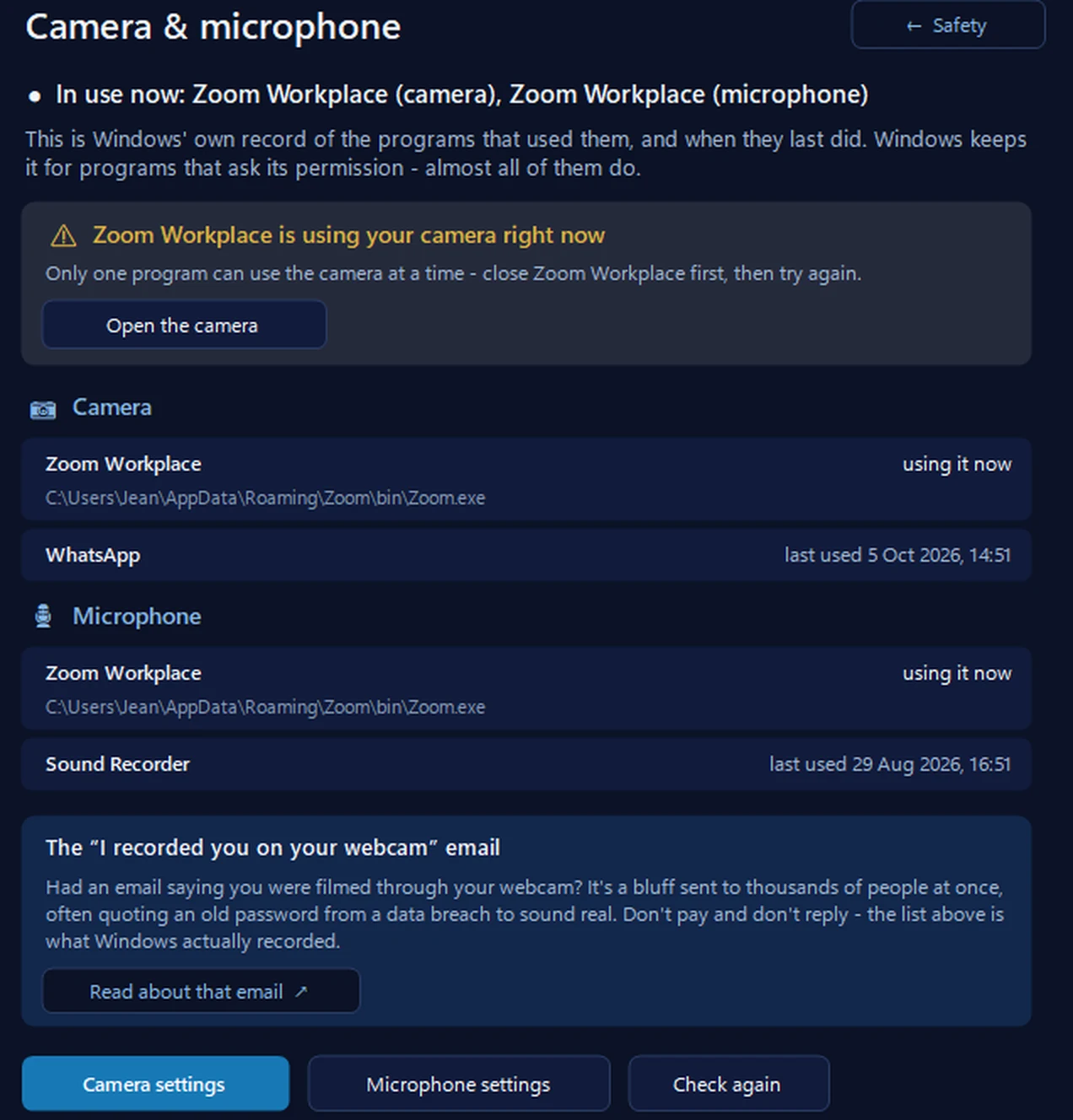
You don’t have to take anyone’s word for it. Windows keeps its own record of the programs that use your camera and microphone: on Windows 11, Settings, then Privacy & security, then Camera (or Microphone) lists the desktop apps it has detected using them (Microsoft). Our free app shows the same record with dates, in one place.
FREE · WINDOWS 10 & 11 · NO SIGN-UP
Camera & microphone: what Windows actually recorded
It lists the programs Windows says used your camera and microphone, and when each one last did — and what’s using them right now. Windows keeps this record for programs that ask its permission, which almost all do, so the app says “Windows has no record”, never “never used”. It changes nothing: its buttons open Windows’ camera and microphone settings.
In the app: Safety, then Camera & microphone.
Download 365 PC Manager free ↓What else it checks
Made by us, a family IT firm in Bournemouth since 1995, and digitally signed by 365 Techies Ltd.
// WHEN TO WORRY
The situations that are not a bluff
Three cases change the advice, and it’s worth being honest about them.
- You paid. Ring your bank on 159 straight away if a card or transfer was involved, report to Report Fraud (which replaced Action Fraud) on 0300 123 2040, and keep the email. Cryptocurrency payments are rarely recoverable, but reporting still matters.
- You clicked a link or opened an attachment in it, or you had already let someone connect to your computer recently. Treat the machine as possibly compromised: change passwords from a different device, don’t use online banking on it, and have it checked. That is our scam recovery service — a remote check, a clean-up, and a written report for your bank if it asks.
- Someone really does have intimate images of you — usually from a person you spoke to online, not from a mass email. That is a different crime, and there is real help: adults can contact the Revenge Porn Helpline; anyone under 18 can use Childline’s Report Remove tool; and the police on 101 take it seriously. Don’t pay; paying never ends it.
// NEXT TIME
Spotting the next one in five seconds
The test that beats every version of this email: does it want money in cryptocurrency, gift cards or a “safe account”, and does it want it fast and quietly? Then it’s a scam, whatever it knows about you. Real companies, real police and real banks don’t work that way.
Our free online safety course covers scam emails, texts and calls in six short lessons, and the Spot the Scam quiz lets you practise on real examples. If a check-in with a patient human would help, that is what we’re for.
FAMILY-RUN SINCE 1995 · ★ 4.9 ON GOOGLE · 200+ COMPUTERS UNDER OUR CARE · NO FIX, NO FEE · SAME-DAY REMOTE SUPPORT
// GOOD QUESTIONS
Frequently asked
The email shows my real password. Doesn’t that prove they got in?
It proves the password leaked in a past data breach and ended up on a list — nothing more. If you still use that password anywhere, change it today and switch on two-factor authentication; if you don’t, it’s a museum piece. Either way, nobody is inside your computer because of it.
It was sent from my own email address. Has my account been hacked?
Almost certainly not. The “from” line is forged — it’s a trick to make the email feel like proof. Check your account’s recent sign-ins if you want reassurance, and turn on two-factor authentication so a stolen password alone can never get someone in.
Can they really see me through the webcam?
Not from an email. Taking over a camera needs software running on your computer, and being on a company’s customer list doesn’t put any there. A full scan with Windows Security or Malwarebytes will confirm it. A sticker over the lens is fine if it helps you sleep.
Should I report it to the police?
Forward the email to report@phishing.gov.uk, which is the quickest useful thing. If you paid or lost money, report to Report Fraud (formerly Action Fraud) on 0300 123 2040 (Police Scotland 101). The email tells you not to contact the police precisely because it works less well when you do.
I paid. What now?
Don’t pay again, however the next email threatens. Ring your bank on 159 if a card or bank transfer was involved, report to Report Fraud (formerly Action Fraud), and keep everything. If you also clicked or installed anything, have the computer checked — that’s our scam recovery service, remote, with a report for the bank.
// Still stuck?
Rattled by one of these? Call us.
A patient local person will look at the email with you, check whether anything real is behind it, and — if you clicked or paid — make the computer safe and write it up for your bank. 01202 775566, Mon–Fri 9am–5pm.
We’ll fix it with you
- Checking the problem is free
- Fixes from £20, agreed before we start
- We phone first, and you watch every step
Stop it happening again
- A full service every six weeks, written up
- Every program kept up to date
- Unlimited remote help when you need it
Plans from £18.25 a month per computer · cancel any time
Mon–Fri 9–5 · family-run since 1995 · rated 4.9 on GoogleScam recovery service →